1. Úvod
This manual provides essential information for setting up, operating, maintaining, and troubleshooting your Dell Precision 3581 Mobile Workstation. Please read this guide thoroughly to ensure proper use and to maximize the performance and longevity of your device.

Figure 1: Dell Precision 3581 Mobile Workstation displaying a graphical user interface.
2. Co je v krabici
Ověřte, zda jsou v balení přítomny všechny položky:
- Mobilní pracovní stanice Precision 3581
- Standardní baterie
- AC adaptér
3. Nastavení
3.1 Připojení AC adaptéru
Connect the AC adapter to the power connector on your workstation and then to a power outlet. The AC adapter provides power to the workstation and charges the battery.

Figure 2: Right side of the workstation with the power connector.
3.2 Počáteční zapnutí
Open the display lid and press the power button located on the keyboard deck. Follow the on-screen instructions to complete the initial setup of the Windows 11 operating system.
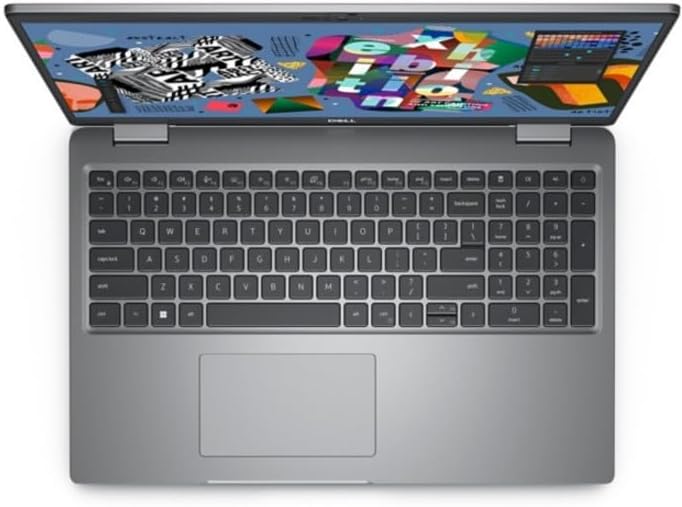
Obrázek 3: Nahoře view of the workstation, showing the keyboard and display.
3.3 Připojení periferních zařízení
Utilize the available ports to connect external devices such as a mouse, keyboard, external monitor, or USB drives.
- USB porty: Pro připojení USB zařízení.
- Port HDMI: Pro připojení externího displeje.
- Ethernetový port: Pro kabelové síťové připojení.
- Audio jack: Pro sluchátka nebo externí reproduktory.

Figure 4: Left side of the workstation with various connectivity ports.
4. Obsluha pracovní stanice
4.1 Řízení spotřeby
- Zapnutí: Stiskněte tlačítko napájení.
- Režim spánku: Zavřete víko nebo v nabídce Start vyberte možnost „Spánek“.
- Vypnout: V nabídce Start vyberte možnost „Vypnout“.
- Restartovat: V nabídce Start vyberte možnost „Restartovat“.
4.2 Používání klávesnice a touchpadu
The workstation features a full-size keyboard and a precision touchpad. Refer to the operating system's help documentation for advanced gestures and keyboard shortcuts.
4.3 WebPoužití kamery
Integrovaný webcam is located at the top center of the display. It can be used for video conferencing and other applications requiring camera input.

Obrázek 5: Detailní view of the integrated webcam and its components.
5. Údržba
5.1 Pokyny pro čištění
- Obrazovka: Lehce používejte měkký hadřík, který nepouští vlákna dampvodou nebo čističem obrazovek. Nestříkejte tekutinu přímo na obrazovku.
- Klávesnice a šasi: Použijte měkký, suchý hadřík. Na odolnou špínu použijte lehceamp Lze použít hadřík a ujistit se, že se do otvorů nedostane žádná kapalina.
- Průduchy: Periodically clean air vents with compressed air to prevent dust buildup and ensure proper cooling.

Obrázek 6: Nahoře view of the workstation, illustrating the surface for cleaning.
5.2 Péče o baterii
To prolong battery life, avoid extreme temperatures and fully discharging the battery frequently. Store the workstation with a partial charge if not used for extended periods.
5.3 Aktualizace softwaru
Regularly update your operating system, drivers, and applications to ensure optimal performance and security. Dell provides driver updates on its official support webmísto.
6. Řešení problémů
6.1 Bez napájení
- Ujistěte se, že je síťový adaptér bezpečně připojen k pracovní stanici i k funkční zásuvce.
- Check the power indicator light on the workstation. If it's off, try a different power outlet.
- Pokud používáte napájení z baterie, ujistěte se, že je baterie nabitá.
6.2 Problémy se zobrazením
- Pokud je obrazovka prázdná, zkuste stisknout Fn + F8 (nebo příslušné funkční tlačítko pro přepínání zobrazení) pro přepínání mezi režimy zobrazení.
- Ujistěte se, že jsou externí monitory správně připojeny a zapnuté.
- Aktualizujte ovladače grafické karty z podpory Dell webmísto.
6.3 Problémy s připojením k síti
- For Wi-Fi, ensure Wi-Fi is enabled and you are connected to the correct network.
- V případě kabelového připojení zkontrolujte stav ethernetového kabelu a routeru.
- Restart your router/modem and the workstation.
7. Specifikace
The following table outlines the key technical specifications of the Dell Precision 3581 Mobile Workstation:
| Funkce | Specifikace |
|---|---|
| Název modelu | Precizní 3000 (3581) |
| Velikost obrazovky | 15.6 palce |
| Maximální rozlišení obrazovky | 1920 x 1080 pixelů (Full HD) |
| Procesor | Intel Core i7-13700H (13th Gen, Tetradeca-core) |
| Paměť (RAM) | 16 GB DDR4 SDRAM |
| Skladování | 512 GB SSD |
| Grafika | Integrovaná grafika Intel Iris Xe Graphics |
| Operační systém | Windows 11 |
| Bezdrátový typ | 802.11ax |
| Hmotnost položky | 3.7 libry |
| Rozměry produktu (DxŠxV) | 9.2 x 14.1 x 0.97 palce |
| Barva | Šedá |
| Speciální funkce | Antireflexní vrstva |
8. Záruka a podpora
For detailed warranty information, please refer to the warranty documentation included with your product or visit the official Dell support website. Dell provides comprehensive support resources, including drivers, manuals, and troubleshooting guides.
To contact Dell support, visit www.dell.com/support a zadejte svou službu tag for product-specific assistance.


