Zavedení
Thank you for choosing the GOBOULT Z60 Wireless Earbuds. This manual provides detailed instructions to help you set up, operate, and maintain your earbuds for an optimal audio experience. Please read this manual thoroughly before use and retain it for future reference.

Image: GOBOULT Z60 Earbuds, illustrating the brand transition from BOULT to GOBOULT, highlighting the new logo and packaging while assuring consistent product performance.
Co je v krabici
Ujistěte se, že v balení jsou přítomny všechny položky:
- GOBOULT Z60 Wireless Earbuds (Left and Right)
- Nabíjecí pouzdro
- Nabíjecí kabel USB typu C.
- Ušní nástavce (různé velikosti)
- Uživatelská příručka
- Záruční list

Image: The GOBOULT Z60 Wireless Earbuds and their charging case, showcasing the product's design and included accessories.
Konec produktuview
The GOBOULT Z60 earbuds are designed for comfort and high-quality audio. Each earbud features a 13mm bass driver and multiple microphones for clear calls. The charging case provides extended battery life.
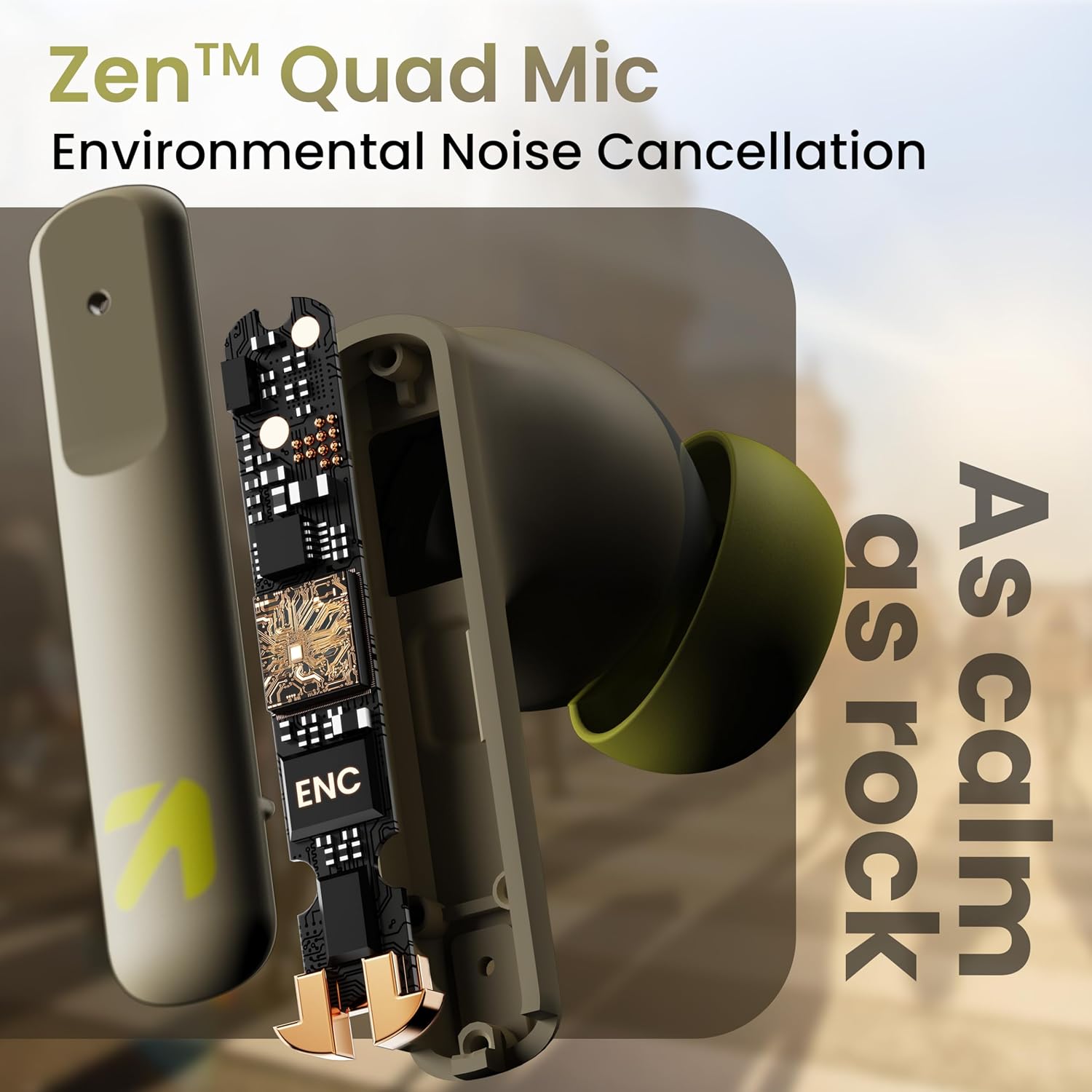
Obrázek: Interní view of a GOBOULT Z60 earbud, highlighting the Zen Quad Mic Environmental Noise Cancellation (ENC) technology for clear audio.

Image: A close-up of a GOBOULT Z60 earbud, emphasizing the 13mm BoomX Drivers responsible for rich bass and superior sound quality.
Nabíjení
To charge your GOBOULT Z60 earbuds and charging case:
- Vložte sluchátka do nabíjecího pouzdra. Ujistěte se, že jsou správně usazena.
- Připojte nabíjecí kabel USB typu C k nabíjecímu portu na pouzdře a ke zdroji napájení.
- LED indikátor na pouzdře bude ukazovat stav nabíjení.
A full charge provides up to 60 hours of total playtime with the charging case. A quick 10-minute charge can provide up to 150 minutes of playtime.

Image: The GOBOULT Z60 charging case connected via a Type-C cable, illustrating the fast charging capability with indicators for 10 minutes charge yielding 150 minutes playtime.

Image: GOBOULT Z60 earbuds in their charging case, highlighting the impressive 60 hours of total playtime and 8 hours of playtime on a single earbud charge.
Setup: Pairing with Your Device
The GOBOULT Z60 earbuds utilize Bluetooth 5.3 for stable and efficient wireless connectivity.
- Počáteční párování:
- Otevřete nabíjecí pouzdro. Sluchátka se automaticky přepnou do režimu párování.
- Na svém zařízení (chytrý telefon, tablet, notebook) povolte Bluetooth.
- Hledat "GOBOULT Z60" in the list of available Bluetooth devices and select it to connect.
- Once connected, you will hear an audio prompt, and the LED indicator on the case will change.
- Opětovné spárování: Sluchátka se po vyjmutí z pouzdra automaticky připojí k poslednímu spárovanému zařízení, pokud je na zařízení povoleno rozhraní Bluetooth.

Image: GOBOULT Z60 earbuds and their open charging case next to a smartphone, illustrating the Bluetooth 5.3 "Blink & Pair" feature for quick and stable connection.
Ovládání sluchátek
Dotykové ovládání
The GOBOULT Z60 earbuds feature intuitive touch controls. The specific functions are:
- Přehrávání hudby:
- Jedno klepnutí: Přehrát/Pozastavit
- Dvojité klepnutí (pravé sluchátko): Další skladba
- Dvojité klepnutí (levé sluchátko): Předchozí skladba
- Trojité klepnutí (pravé sluchátko): Zvýšení hlasitosti
- Trojité klepnutí (levé sluchátko): Snížení hlasitosti
- Správa hovorů:
- Jedno klepnutí: Přijmout/Ukončit hovor
- Long press: Reject call
- Hlasový asistent: Long press (either earbud) to activate Google Assistant or Siri.
- Herní režim: Tap 4 times on either earbud to activate/deactivate Combat Gaming Mode (50ms low latency).

Image: A visual guide to the GOBOULT Z60's touch controls, detailing actions for music playback (play/pause, next/back, volume), call management, activating voice assistance, and toggling game/music mode.
Herní režim
Activate the 50ms low latency Combat Gaming Mode for a synchronized audio-visual experience during gaming. Tap 4 times on either earbud to switch between gaming and normal modes.

Image: GOBOULT Z60 earbuds in use with a smartphone displaying a racing game, emphasizing the "Combat Gaming Mode" with 50ms ultra-low latency, activated by tapping the earbud 4 times.
Hlasový asistent
Access your device's voice assistant (Google Assistant or Siri) by long-pressing either earbud. This allows for hands-free control of your device.

Image: GOBOULT Z60 earbuds and their charging case, illustrating how to activate voice assistance (Ok Google, Hey Siri) with a long press on an earbud.
Údržba
To ensure the longevity and optimal performance of your GOBOULT Z60 earbuds:
- Čištění: Pravidelně čistěte sluchátka a nabíjecí pouzdro měkkým, suchým hadříkem. Nepoužívejte agresivní chemikálie ani abrazivní materiály.
- Špunty do uší: Remove and clean the eartips periodically. Ensure they are dry before reattaching.
- Voděodolnost: The earbuds are IPX5 water-resistant, meaning they can withstand sweat and light rain. Do not submerge them in water or expose them to heavy downpours. Ensure the charging port is dry before charging.
- Skladování: Pokud sluchátka nepoužíváte, uložte je do nabíjecího pouzdra, aby byla chráněna a zůstávala nabitá.

Image: A GOBOULT Z60 earbud with water droplets on its surface, illustrating its IPX5 water resistance, suitable for protection against sweat, rain, and splashes.
Odstraňování problémů
If you encounter issues with your GOBOULT Z60 earbuds, refer to the following common solutions:
| Problém | Možné řešení |
|---|---|
| Sluchátka se nespárují |
|
| Žádný zvuk z jednoho sluchátka |
|
| Sluchátka se nenabíjejí |
|
| Nízká hlasitost nebo špatná kvalita zvuku |
|
Specifikace
| Funkce | Detail |
|---|---|
| Název modelu | AirBass (Z60) |
| Technologie připojení | Bezdrátové (Bluetooth) |
| Verze Bluetooth | 5.3 |
| Dosah Bluetooth | 10 metrů |
| Velikost zvukového ovladače | 13 milimetrů |
| Typ zvukového ovladače | Dynamický ovladač |
| Výdrž baterie (celková) | Až 60 hodin (s nabíjecím pouzdrem) |
| Doba nabíjení | Přibližně 90 minut |
| Rychlé nabíjení | 10 minut nabíjení = 150 minut přehrávání |
| Nabíjecí port | Typ-C |
| Mikrofony | 4 ENC Mics for Clear Calling |
| Zvuková latence | 50 milisekund (herní režim) |
| Voděodolnost | IPX5 (Sweatproof, Rainproof, Splashproof) |
| Kontrolní metoda | Dotyk, Hlas |
| Hmotnost položky | 41.5 gramů |
| Země původu | Indie |
Záruka a podpora
Your GOBOULT Z60 Wireless Earbuds come with a 1letá záruka výrobce od data nákupu.
For any support, warranty claims, or technical assistance, please refer to the contact information provided on your warranty card or visit the official GOBOULT support webmísto.


