1. Úvod
This manual provides essential information for the safe and efficient use of your CUBOT P80 smartphone. Please read it carefully before using the device and keep it for future reference.
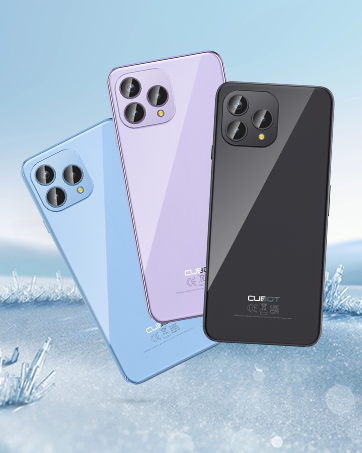
The CUBOT P80 is available in multiple color options.
2. Co je v krabici
Ověřte, zda jsou v balení produktu přítomny všechny položky:
- Smartphone CUBOT P80
- Ochranný kryt na telefon
- Phone protection film (pre-applied or separate)
- Nabíječka (9V2A)
- USB kabel (typ C)
- Type-C headphone
- SIM pin ejector tool
- Rychlý průvodce
- Compliance regulation document

Included accessories with the CUBOT P80 smartphone.
3. Rozvržení zařízení a fyzické vlastnosti
The CUBOT P80 features a sleek design with a 6.58-inch FHD+ display and a triple camera system on the rear.
Rozměry a hmotnost
- Tloušťka: 9.75 mm
- Hmotnost: 217 g

The CUBOT P80's slim profile a lehký design.
Skener otisků prstů
The device includes a side-mounted fingerprint scanner for secure and quick unlocking.

Fingerprint sensor location for convenient unlocking.
4. Nastavení
Inserting SIM Cards and TF Card
The CUBOT P80 supports dual SIM functionality or one SIM card with a TF (microSD) card for expanded storage.
- Vyhledejte držák SIM karty na boku telefonu.
- Vložte nástroj pro vysunutí SIM karty do malého otvoru vedle zásobníku a pevně zatlačte, dokud zásobník nevyskočí.
- Place your Nano SIM card(s) and/or TF card into the designated slots on the tray. Ensure the gold contacts are facing down.
- Opatrně zatlačte zásobník zpět do telefonu, dokud nebude v jedné rovině s tělem zařízení.

SIM and TF card installation options.
Počáteční zapnutí
Press and hold the power button located on the side of the device until the CUBOT logo appears. Follow the on-screen instructions to complete the initial setup, including language selection, Wi-Fi connection, and Google account login.
5. Návod k obsluze
Operační systém Android 13
The CUBOT P80 runs on Android 13, offering a user-friendly interface, enhanced privacy controls, and access to the Google Play Store for applications.

Nadview of the Android 13 operating system.
Funkce displeje
The device features a 6.58-inch FHD+ Capacitive Touch Screen with a resolution of 2408x1080 pixels, 400 nits peak brightness, and a 20:9 aspect ratio.

Key features of the CUBOT P80 display.
6. Funkce fotoaparátu
The CUBOT P80 is equipped with an AI Quad Camera System on the rear and a high-resolution front camera.
Specifikace fotoaparátu
- Hlavní fotoaparát: 48 MP
- Přední kamera: 24 MP
- Makro kamera: 2 MP

The CUBOT P80's AI Quad Camera System.
Hlavní fotoaparát
The 48MP main camera captures images with high detail and clarity.

High-resolution capture with the 48MP main camera.
Přední kamera
The 24MP front camera is designed for clear selfies and video calls, featuring beauty modes.

Selfie capabilities of the 24MP front camera.
Makro fotoaparát
The 2MP macro lens allows for detailed close-up photography of small objects.

Detailed close-up shots with the 2MP macro camera.
Multiple Camera Modes
The camera application includes various modes such as Night View, Portrait, and Panorama to enhance your photography experience.

Explore various photography modes.
7. Konektivita
Síť a Wi-Fi
The CUBOT P80 supports Dual 4G Dual VoLTE for cellular connectivity and 2.4/5GHz Dual Wi-Fi for stable and faster internet access.
- GSM: 850/900/1800/1900 MHz
- WCDMA: B1/2/4/5/6/8/19
- FDD: B1/2/3/4/5/7/8/12/13/17/18/19/20/26/28A/28B/66
- TDD: 38/39/40/41
Cellular and Wi-Fi network support.
NFC and GPS
The device includes Multifunctional NFC for cash-free mobile payments and supports GPS, GLONASS, and Galileo for accurate global satellite positioning.
NFC for payments and advanced GPS for navigation.
8. Baterie a nabíjení
The CUBOT P80 is equipped with a 5200mAh battery, providing extended usage times. It supports 18W fast charging and OTG (On-The-Go) functionality.
- Pohotovostní: Až 26 dní
- Volání: Až 29 hodin
- Přehrávání hudby: Až 26 hodin
- Přehrávání videa: Až 7 hodin

Battery life and charging features.
9. Úložiště a výkon
The CUBOT P80 is powered by an MT8788 Octa-core processor and features amppaměť a úložiště.
- Procesor: MediaTek MT8788 Octa-core (12nm process, 2.0 GHz clock speed)
- BERAN: 8GB + 8GB Expansion RAM (total 16GB)
- Interní paměť (ROM): 256 GB
- Rozšiřitelné úložiště: Až 1 TB přes TF kartu

Processor and memory details.

RAM expansion technology for enhanced performance.

Internal and expandable storage options.
10. Důležitá upozornění
Kompatibilita s operátory
The CUBOT P80 smartphone does not support AT&T, Cricket, or Verizon networks in the United States. Please confirm your carrier's compatibility before purchasing nebo používání tohoto zařízení.

Important information regarding network compatibility.
11. Specifikace
| Funkce | Specifikace |
|---|---|
| Číslo modelu | P80-schwarz-US |
| Operační systém | Android 13.0 |
| Procesor | MediaTek MT8788 Octa-core |
| BERAN | 16 GB (8 GB + 8 GB rozšíření) |
| Interní úložiště | 256 GB |
| Rozšiřitelné úložiště | Až 1 TB (TF karta) |
| Velikost obrazovky | 6.58 palce |
| Rezoluce | 1920 × 1080 (FHD+) |
| Hlavní fotoaparát | 48 MP |
| Přední kamera | 24 MP |
| Makro fotoaparát | 2 MP |
| Kapacita baterie | 5200 XNUMX mAh |
| Nabíjení | Rychlé nabíjení 18W |
| Konektivita | 4G LTE, Dual SIM, Wi-Fi (2.4/5GHz), NFC, Bluetooth |
| Navigace | GPS, GLONASS, Galileo |
| Audio Jack | 3.5 mm |
| Rozměry | 9.29 x 7.17 x 1.81 palce (balení) |
| Hmotnost položky | 7.7 unce |
12. Řešení problémů
Běžné problémy a řešení
- Zařízení se nezapíná: Ujistěte se, že je baterie nabitá. Připojte telefon k nabíječce a před opětovným zapnutím počkejte několik minut.
- Slabý signál sítě: Check SIM card insertion. Ensure you are within your carrier's coverage area. Note that the CUBOT P80 is not compatible with AT&T, Cricket, or Verizon.
- Pády aplikací: Clear the cache of the problematic app (Settings > Apps > [App Name] > Storage > Clear Cache). If the issue persists, try reinstalling the app or performing a factory reset (backup data first).
- Rychlé vybíjení baterie: Snižte jas obrazovky, zavřete nepoužívané aplikace běžící na pozadí, vypněte nepotřebná oznámení a omezte služby určování polohy.
- Nefunkční skener otisků prstů: Ujistěte se, že máte prst čistý a suchý. Znovu zaregistrujte své otisky prstů v nastavení zabezpečení.
13. Záruka a podpora
For warranty information and technical support, please refer to the official CUBOT webnebo se obraťte na prodejce. Uschovejte si doklad o koupi pro případ reklamace.
Online zdroje:
- Navštivte CUBOT Store on Amazon pro informace o produktech a aktualizace.
14. Produktové videoview
Oficiální video s produktemasing the CUBOT P80's features and design.


