Zavedení
This manual provides detailed instructions for the setup, operation, and maintenance of your Hisense AX5100G 5.1 Channel Soundbar System. This system is designed to enhance your audio experience with 5.1 channel surround sound, Dolby Atmos, and DTS Virtual:X.
Co je v krabici
Pečlivě vybalte všechny komponenty a ujistěte se, že jsou k dispozici následující položky:
- 5.1kanálový soundbar
- Bezdrátový subwoofer
- 2 Zadní reproduktory
- Dálkové ovládání
- Napájecí kabely (pro soundbar, subwoofer a zadní reproduktory)
- HDMI kabel
- Optický kabel
- Wall Mounting Kit (screws, brackets)
- Uživatelská příručka (tento dokument)

The Hisense AX5100G 5.1 Channel Soundbar System includes the main soundbar unit, a wireless subwoofer, and two dedicated rear speakers for a complete surround sound experience.
Nastavení
1. Umístění
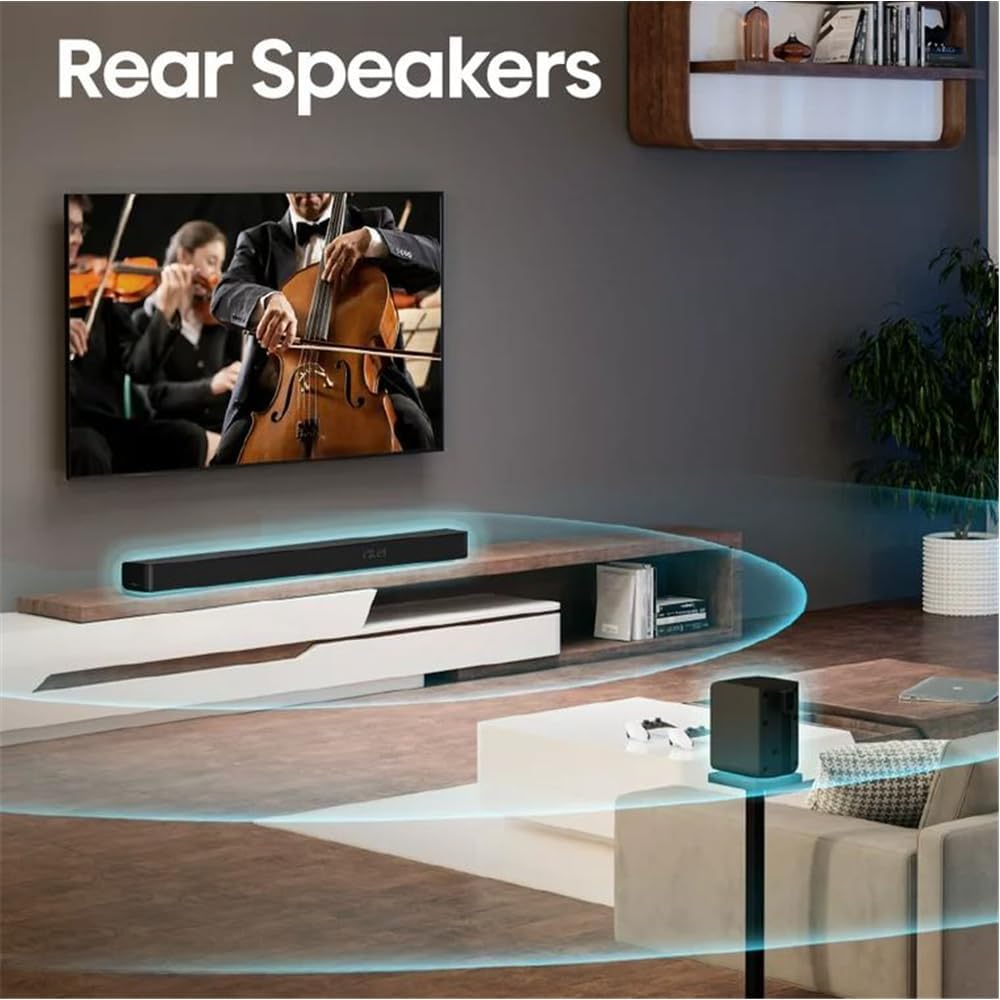
Position the soundbar centrally below your TV. The wireless subwoofer can be placed anywhere in the room, ideally near the soundbar for optimal bass distribution. The rear speakers should be placed behind your listening position, to the left and right, for an immersive surround sound experience.

Optimal placement of the soundbar, wireless subwoofer, and rear speakers in a living room setting to achieve the best 5.1 surround sound.
2. Connecting the Soundbar and Subwoofer
The wireless subwoofer automatically pairs with the soundbar when both are powered on. Ensure both units are plugged into a power outlet.
3. Connecting the Rear Speakers
The rear speakers connect to the wireless subwoofer. Plug the rear speakers into the designated ports on the subwoofer.

Dedicated rear speakers are positioned to provide true surround sound, immersing the listener in audio.
4. Připojení k televizoru
Choose one of the following connection methods based on your TV's available ports:
HDMI eARC (doporučeno)
For the best audio quality and control, connect the soundbar to your TV's HDMI eARC port using the provided HDMI cable. This allows for two-way communication, enabling TV remote control of the soundbar.
Optický
If your TV does not have an HDMI eARC port, use the included optical cable to connect the soundbar to your TV's optical audio output.
Bluetooth
For wireless audio streaming from your TV (if supported) or other Bluetooth-enabled devices, pair the soundbar via Bluetooth.
The back panel of the soundbar features multiple connectivity options, including HDMI eARC, Optical, AUX, USB, and Coaxial inputs.
Návod k obsluze
Zapnutí/vypnutí
Stisknutím tlačítka napájení na soundbaru nebo na dálkovém ovladači systém zapnete nebo vypnete.
Ovládání hlasitosti
Adjust the volume using the Volume Up (+) and Volume Down (-) buttons on the soundbar or the remote control.
Výběr vstupu
Press the Source button on the soundbar or the remote control to cycle through available input sources (HDMI eARC, Optical, Bluetooth, AUX, USB).
Zvukové režimy
The soundbar offers various preset sound modes (e.g., Movie, Music, News) to optimize audio for different content types. Select your preferred mode using the remote control.
Nastavení basů a výšek
Use the remote control to adjust the bass and treble levels to your preference.
Specifikace
| Funkce | Detail |
|---|---|
| Název modelu | AX5100G |
| Konfigurace kanálů prostorového zvuku | 5.1 |
| Maximální výstupní výkon reproduktoru | 340 wattů |
| Konektivita subwooferu | Bezdrátový |
| Průměr subwooferu | 5.25 palce |
| Speciální funkce | Bass Boost, Dolby Enabled (Dolby Atmos, DTS Virtual:X) |
| Technologie připojení | HDMI (eARC), Optical, AUX, USB, Bluetooth |
| Kontrolní metoda | Vzdálený |
| Barva | Černý |
| Hmotnost položky | 43 libry |
| Výrobce | HISENSE |
| Připraveno pro Roku TV | Ano |
Údržba
Čištění
Gently wipe the surfaces of the soundbar, subwoofer, and rear speakers with a soft, dry cloth. Do not use liquid cleaners or abrasive materials, as they may damage the finish.
Větrání
Zajistěte dostatečné větrání kolem všech součástí, abyste zabránili přehřátí. Neblokujte žádné větrací otvory.
Odstraňování problémů
Žádný zvuk
- Ujistěte se, že všechny napájecí kabely jsou bezpečně připojeny a jednotky jsou zapnuté.
- Ověřte, zda je na soundbaru vybrán správný vstupní zdroj.
- Check the TV's audio output settings to ensure it's sending audio to the soundbar (e.g., HDMI ARC/eARC, Optical).
- Confirm the volume is not muted or set too low on both the soundbar and the TV.
Subwoofer nefunguje
- Ensure the wireless subwoofer is plugged in and powered on.
- Check if the subwoofer is paired with the soundbar. Refer to the pairing instructions in the full user manual if re-pairing is needed.
Dálkové ovládání nefunguje
- Zkontrolujte a vyměňte baterie v dálkovém ovladači.
- Ujistěte se, že mezi dálkovým ovladačem a senzorem soundbaru nejsou žádné překážky.
Záruka a podpora
Informace o záruce
This Hisense soundbar system comes with a limited warranty. Please refer to the warranty card included in the packaging for specific terms and conditions.
Zákaznická podpora
For technical assistance or warranty inquiries, please contact Hisense customer support. Contact details can be found in the full user manual or on the official Hisense webmísto.