1. Úvod
Welcome to the user manual for your Optoma HD30LV 1080p Full HD Home Projector. This document provides essential information for the safe and efficient operation of your device. Please read these instructions carefully before using the projector and retain them for future reference.
2. Konec produktuview
The Optoma HD30LV is designed to deliver a high-quality visual experience for home theater and gaming. It features 1080p Full HD resolution, 4K HDR input compatibility, and a compact design for versatile placement.
Klíčové vlastnosti:
- 4,500 lumenů: Provides bright images suitable for various lighting conditions.
- 4K UHD and HDR Compatible: Supports high-resolution and high dynamic range content for enhanced detail and color.
- Přenosný a lehký: Designed for easy transport and flexible installation.
- Vylepšený herní režim: Offers lightning-fast response times for a smooth gaming experience.
- Dual HDMI Connectors: Allows connection to multiple devices simultaneously.
Co je v krabici:
- Optoma HD30LV Projector
- Napájecí kabel
- Dálkové ovládání
- Uživatelská příručka (tento dokument)
Vizuální podoba produktu:

Přední view of the Optoma HD30LV projector, showcasinobjektiv a větrání.

Nahoru view of the Optoma HD30LV projector, showing the control panel and focus/zoom adjustments.
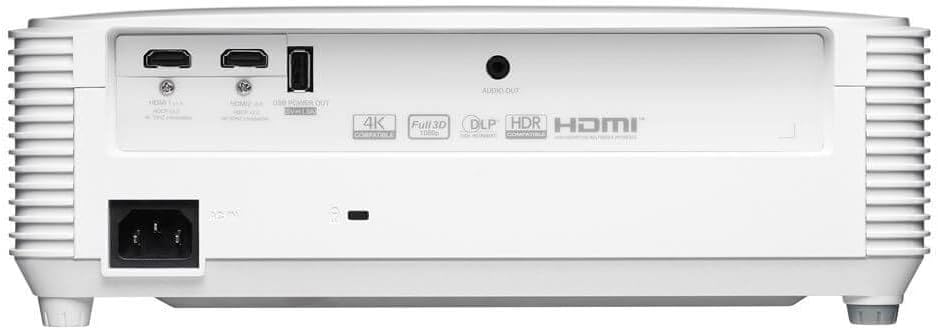
Zadní view of the Optoma HD30LV projector, detailing the input and output ports.
Produkt Video:
Oficiální produktview video demonstrating the features and design of the Optoma HD30LV projector.
3. Nastavení
3.1 Vybalení a umístění
- Opatrně vyjměte projektor a veškeré příslušenství z obalu.
- Place the projector on a stable, flat surface or mount it securely according to the manufacturer's guidelines. Ensure adequate ventilation around the unit.
- Consider the throw distance for your desired screen size. The HD30LV can project a 120-inch image from approximately 13 feet 10 inches (4.22 meters) away.

Diagram illustrating recommended throw distances for 100-inch and 120-inch screen sizes for the HD30LV projector.
3.2 Připojení zařízení
The HD30LV features multiple connectivity options. Refer to the diagram below for port locations.

Detailní view of the Optoma HD30LV projector's dimensions and labeled connectivity ports, including HDMI and USB.
- Moc: Connect the power cable to the projector and a suitable power outlet.
- HDMI: Use an HDMI cable to connect your video source (e.g., Blu-ray player, gaming console, streaming device) to one of the two HDMI 2.0 ports.
- Výstup USB: A USB port (5V/1.5A) is available for powering compatible devices.
- Audio výstup: Connect external audio systems via the 3.5mm stereo audio jack if desired.
- Zámek Kensington: For security, a Kensington lock slot is provided.
4. Návod k obsluze
4.1 Zapnutí/vypnutí
- Stisknutím tlačítka napájení na projektoru nebo na dálkovém ovladači zapněte jednotku.
- To power off, press the power button again. Confirm shutdown if prompted.
4.2 Úprava obrazu
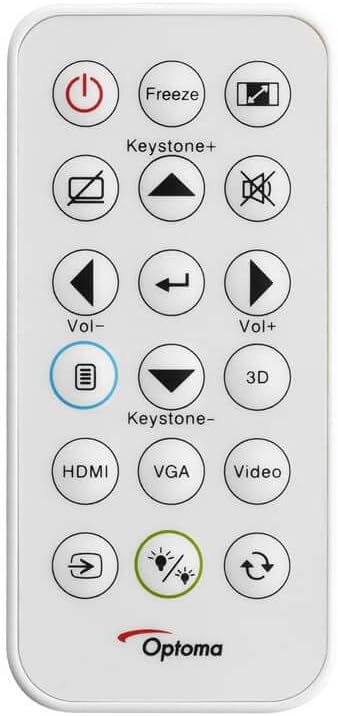
The remote control for the Optoma HD30LV projector, showing buttons for power, input, keystone, volume, and 3D functions.
- Soustředit: Otáčejte ostřícím kroužkem na objektivu, dokud nebude obraz ostrý a jasný.
- Lupa: Adjust the zoom ring on the lens to change the image size without moving the projector.
- Korekce lichoběžníkového zkreslení: Use the 'Keystone+' and 'Keystone-' buttons on the remote control or the projector's control panel to correct trapezoidal image distortion.
- Vstupní zdroj: Press the 'HDMI' button on the remote or the 'Source' button on the projector to cycle through available input sources.
4.3 Enhanced Features
- 4K HDR Input: The projector is compatible with 4K HDR signals, providing enhanced contrast and color. Ensure your source device is configured to output HDR.
- Vylepšený herní režim: Activate this mode through the projector's menu for reduced input lag, optimizing your gaming experience.
- Full 3D: The projector supports Full 3D content from compatible sources. Active DLP Link 3D glasses (sold separately) are required for 3D viewIng.

Visual comparison of different resolutions (SD, HD, Full HD 1080p) to demonstrate the clarity of the HD30LV's native 1080p output.
5. Údržba
Pravidelná údržba zajišťuje optimální výkon a prodlužuje životnost vašeho projektoru.
- Čištění objektivu: Používejte měkký hadřík bez žmolků, speciálně určený pro optické čočky. Vyhněte se abrazivním materiálům nebo agresivním chemikáliím.
- Čištění projektoru Casing: Vnější povrch otřete měkkým, damp tkanina. Nepoužívejte abrazivní čisticí prostředky nebo rozpouštědla.
- Větrání: Ensure the projector's ventilation openings are clear and unobstructed to prevent overheating. Do not block air vents.
- Skladování: Pokud projektor delší dobu nepoužíváte, skladujte jej na chladném a suchém místě, chráněném před prachem a extrémními teplotami.
6. Řešení problémů
If you encounter issues with your Optoma HD30LV projector, refer to the following common problems and solutions:
| Problém | Možné řešení |
|---|---|
| Není zobrazen žádný obrázek | Check power connections. Ensure the correct input source is selected. Verify the video cable is securely connected. |
| Obraz je rozmazaný | Adjust the focus ring on the lens. Ensure the projection surface is flat and the projector is stable. |
| Obrázek je lichoběžníkový | Use the keystone correction function on the remote or projector control panel. Position the projector perpendicular to the screen if possible. |
| Žádný zvuk | Check volume settings on the projector and source device. Ensure external audio systems are correctly connected and powered on. |
| Projektor se přehřívá nebo vypíná | Ensure ventilation openings are clear. Operate the projector in a well-ventilated area. |
For more detailed troubleshooting or issues not listed here, please refer to the comprehensive support section on the Optoma webwebu nebo kontaktujte zákaznickou podporu.
7. Specifikace
| Funkce | Detail |
|---|---|
| Číslo modelu | HD30LV |
| Rozlišení displeje | 1920 × 1080 (1080p Full HD) |
| Jas | 4,500 XNUMX lumenů |
| Technologie připojení | HDMI, USB |
| Speciální funkce | 4K HDR Input, Compact Size, Full 3D, High Brightness, Low Input Lag |
| Rozměry produktu | 9.61 x 12.44 x 4.25 palce (244 x 316 x 108 mm) |
| Hmotnost položky | 6.35 libry (2.88 kg) |
| Výrobce | Optoma Technology Inc. |
| Baterie | 1 Lithium Metal battery required (included for remote) |
8. Záruka a podpora
For information regarding your product's warranty, please refer to the warranty card included with your projector or visit the official Optoma website. Optoma provides customer support for technical assistance, service, and parts.
Online podpora: Navštivte Optoma Support Page for FAQs, downloads, and contact information.
Kontaktní údaje: Refer to your product packaging or the Optoma webweb, kde najdete nejaktuálnější kontaktní údaje zákaznického servisu.


