Důležité bezpečnostní informace
Please read all instructions carefully before using the TOPUTURE Walking Pad. Retain this manual for future reference.
- Ujistěte se, že je podložka na chůzi umístěna na rovném a stabilním povrchu.
- Během provozu držte děti a domácí zvířata v dostatečné vzdálenosti od chůzičky.
- Nepoužívejte chůzicí podložku, pokud má poškozený kabel nebo zástrčku, nebo pokud nefunguje správně.
- Wear appropriate athletic footwear when using the walking pad.
- Nepoužívejte pochůzku venku ani vamp prostředí.
- Always ensure the emergency stop function is accessible and understood before beginning your workout.
- The maximum user weight capacity for this device is 300 lbs. Do not exceed this limit.
Obsah balení
Ověřte, zda jsou v balení přítomny všechny komponenty:
- TOPUTURE Walking Pad Main Unit
- Napájecí kabel
- Dálkové ovládání
- Silicone Oil (for lubrication)
- Uživatelská příručka (tento dokument)
Průvodce nastavením
- Rozbalení: Opatrně vyjměte pochůzku a veškeré příslušenství z obalu.
- Umístění: Place the walking pad on a firm, level surface. Ensure there is adequate clear space around the unit for safe operation (at least 2 feet behind and 1 foot on each side).
- Připojení napájení: Connect the power cord to the walking pad's power input port, then plug the other end into a grounded electrical outlet.
- Počáteční kontrola: Before first use, inspect the running belt for any signs of damage or misalignment.

Figure 1: The TOPUTURE Walking Pad is designed for versatile use, allowing for both walking under a desk and jogging in an open area. Its compact design makes it suitable for home or office environments.
Návod k obsluze
Zapnutí/vypnutí
To power on the walking pad, plug it into an electrical outlet. The LED display will illuminate. To power off, unplug the unit from the outlet.
Pomocí dálkového ovládání
The remote control is the primary interface for operating the walking pad. Ensure the remote has working batteries.
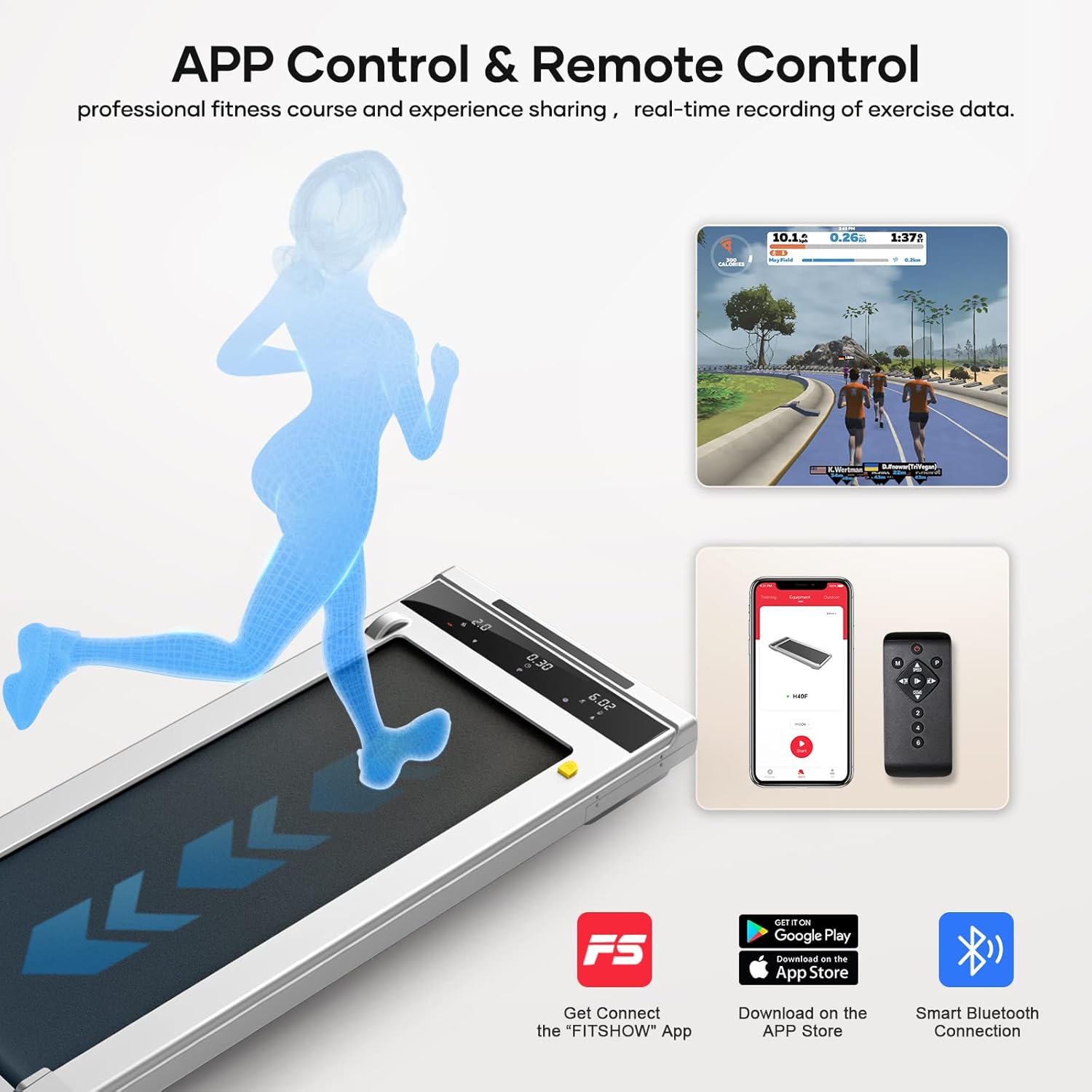
Figure 2: The walking pad can be controlled via the included remote control or through the dedicated "FITSHOW" mobile application, offering flexible operation options.
- Tlačítko napájení (●): Stisknutím spustíte nebo zastavíte chůzi.
- Speed Up (▲): Zvyšuje rychlost pásu.
- Speed Down (▼): Snižuje rychlost pásu.
- Režim (M): Cycles through different display modes (Time, Distance, Calories).
- Program (P): Selects pre-set workout programs (P01-P12).
- Speed Presets (1, 2, 3, 4): Directly sets the speed to common levels.
Funkce LED displeje
Integrovaný LED displej poskytuje data o tréninku v reálném čase.

Figure 3: The multifunction LED display shows key workout metrics including speed, time, distance, and calories burned, allowing users to monitor their progress effectively.
- Rychlost: Displays current belt speed (MPH).
- Čas: Zobrazuje uplynulý čas tréninku.
- Vzdálenost: Indicates distance covered.
- Kalorie: Odhaduje spálené kalorie.
- Program (P01-P12): Shows the currently selected workout program.
- Mode (H1-H3): Indicates the current operating mode (e.g., manual, program).
Provozní režimy
The walking pad supports two primary modes of operation:

Figure 4: The treadmill offers two distinct modes: Walking Mode (0.6-2mph) for light activity, and Jogging Mode (3-6.2mph) for more intense cardiovascular exercise.
- Režim chůze: Speed range from 0.6 MPH to 2 MPH. Ideal for light exercise or use under a standing desk.
- Režim joggingu: Speed range from 3 MPH to 6.2 MPH. Suitable for more vigorous exercise.
App Connectivity (FITSHOW App)
For enhanced control and tracking, download the "FITSHOW" App from your device's app store. Connect via Bluetooth to access professional fitness courses and real-time exercise data recording.
Údržba
Pravidelná údržba zajistí dlouhou životnost a optimální výkon vaší pojízdné podložky.
Mazání
The running belt requires periodic lubrication to reduce friction and wear. Use the provided silicone oil.

Figure 5: The walking pad features a dedicated oil filling hole for convenient lubrication of the running belt, ensuring smooth operation. Integrated wheels allow for easy movement and storage.
- Turn off and unplug the walking pad.
- Locate the lubrication hole on the side of the unit.
- Apply a small amount of silicone oil into the hole.
- Run the walking pad at a low speed (e.g., 1 MPH) for 2-3 minutes to distribute the oil evenly.
- Lubricate every 3-6 months depending on usage frequency.
Čištění
- Wipe down the walking pad's surface with a damp hadříkem po každém použití.
- Nepoužívejte abrazivní čisticí prostředky nebo rozpouštědla.
- Pravidelně vysávejte prach a nečistoty pod pochozí podložkou.
Nastavení pásu
If the running belt feels loose or is slipping, it may need adjustment. Refer to the detailed instructions in the full manual or contact customer support for assistance.
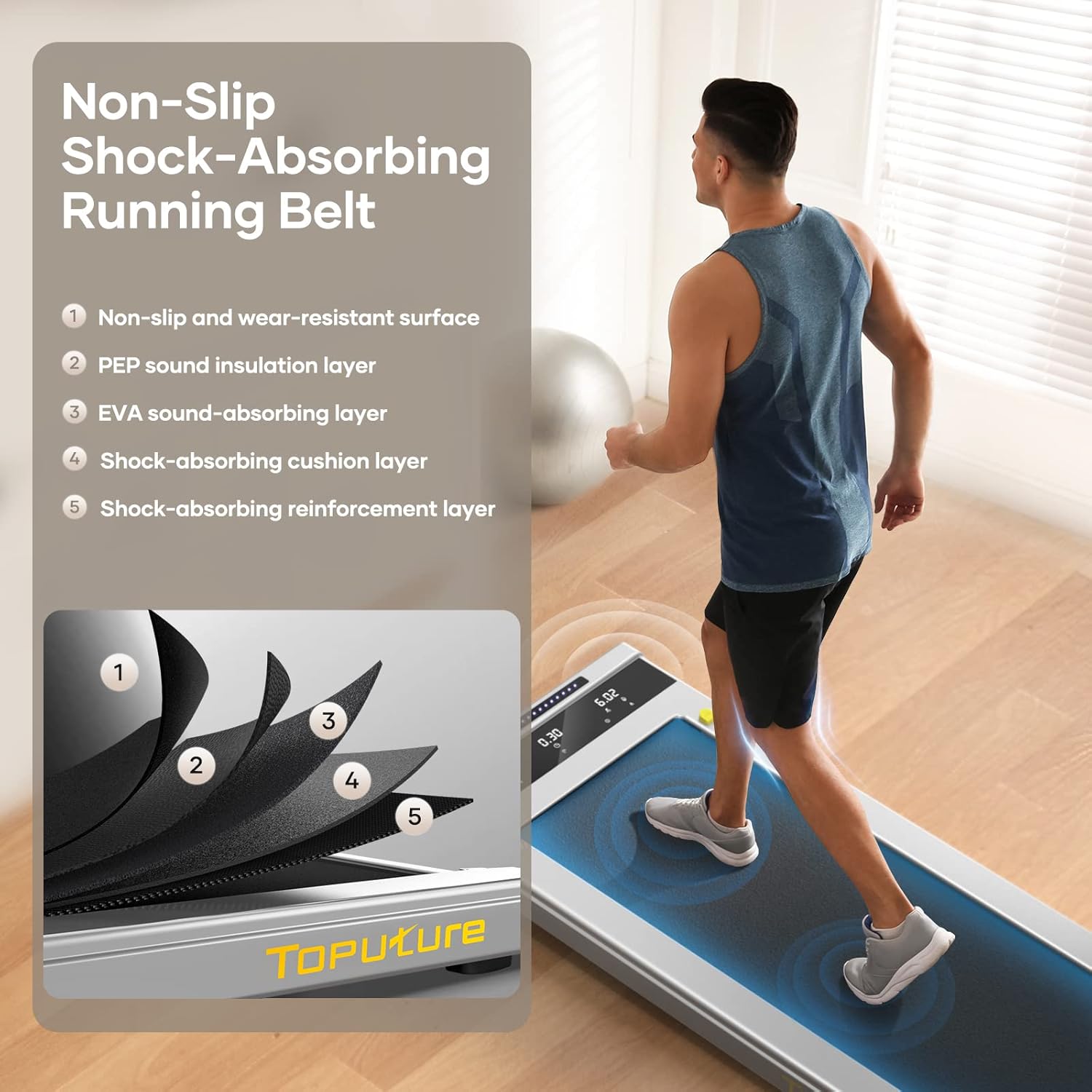
Figure 6: The running belt is constructed with multiple layers, including a non-slip surface, sound insulation, EVA shock absorption, and reinforcement, designed for comfort and durability.
Odstraňování problémů
Běžné problémy a jejich řešení naleznete v následující tabulce:
| Problém | Možná příčina | Řešení |
|---|---|---|
| Chůzicí podložka se nespustí. | Není zapojeno do zásuvky; vypnuté napájení; baterie v dálkovém ovladači vybitá. | Check power connection; ensure power switch is on; replace remote control batteries. |
| Běžecký pás prokluzuje. | Příliš volný řemen; nedostatečné mazání. | Adjust belt tension (refer to full manual); lubricate the belt. |
| Neobvyklý hluk během provozu. | Loose components; lack of lubrication; debris under belt. | Check for loose screws; lubricate belt; clean under the belt. |
| Displej nefunguje správně. | Loose connection; internal fault. | Unplug and replug the unit; contact customer support if issue persists. |
Specifikace
- Značka: TOPUTURE
- Model: Běžecký pás pod stolem
- Výkon motoru: 2.25 HP
- Rozsah rychlosti: 0.6 - 6.2 mph
- Nosnost: 300 liber
- Délka paluby: 40 palce
- Šířka paluby: 16 palce
- Materiál rámu: Legovaná ocel
- Hladina hluku: <45db (as per product information)
- Řízení: LED Touchscreen, App, Remote Control
- Vlastnosti: Lubricating Hole, Portable Design

Figure 7: The walking pad features a running belt with dimensions of 40 inches in length and 16 inches in width, providing ample space for comfortable walking or jogging.

Figure 8: Equipped with a powerful yet quiet 2.25 HP motor, the walking pad operates at less than 45 decibels and supports a maximum user weight of 300 pounds.
Záruka a podpora
For warranty information, technical support, or any inquiries regarding your TOPUTURE Walking Pad, please refer to the warranty card included in your package or contact TOPUTURE customer service directly. Contact details can typically be found on the manufacturer's official webwebu nebo na účtence.