Zavedení
This manual provides detailed instructions for the setup, operation, and maintenance of your TONOR TW630 UHF Dual Wireless Microphone System. Please read this manual thoroughly before using the product to ensure proper function and longevity.
Co je v krabici
Ověřte, zda jsou v balení obsaženy všechny níže uvedené položky:
- 2 x ruční mikrofony
- 1 x Přijímač s 6.35mm konektorem
- 2 x protiskluzové kroužky
- 2 x kryty mikrofonu (pěnové větrné kryty)
- 1 x USB nabíjecí kabel
- 1 x Uživatelská příručka

Image: All components included in the TONOR TW630 package.
Konec produktuview
The TONOR TW630 system features two durable metal handheld microphones and a compact plug-in receiver, designed for clear audio transmission over a UHF frequency band.

Obrázek: Podrobný view of the microphone, showing its display, power button, and channel switch button.
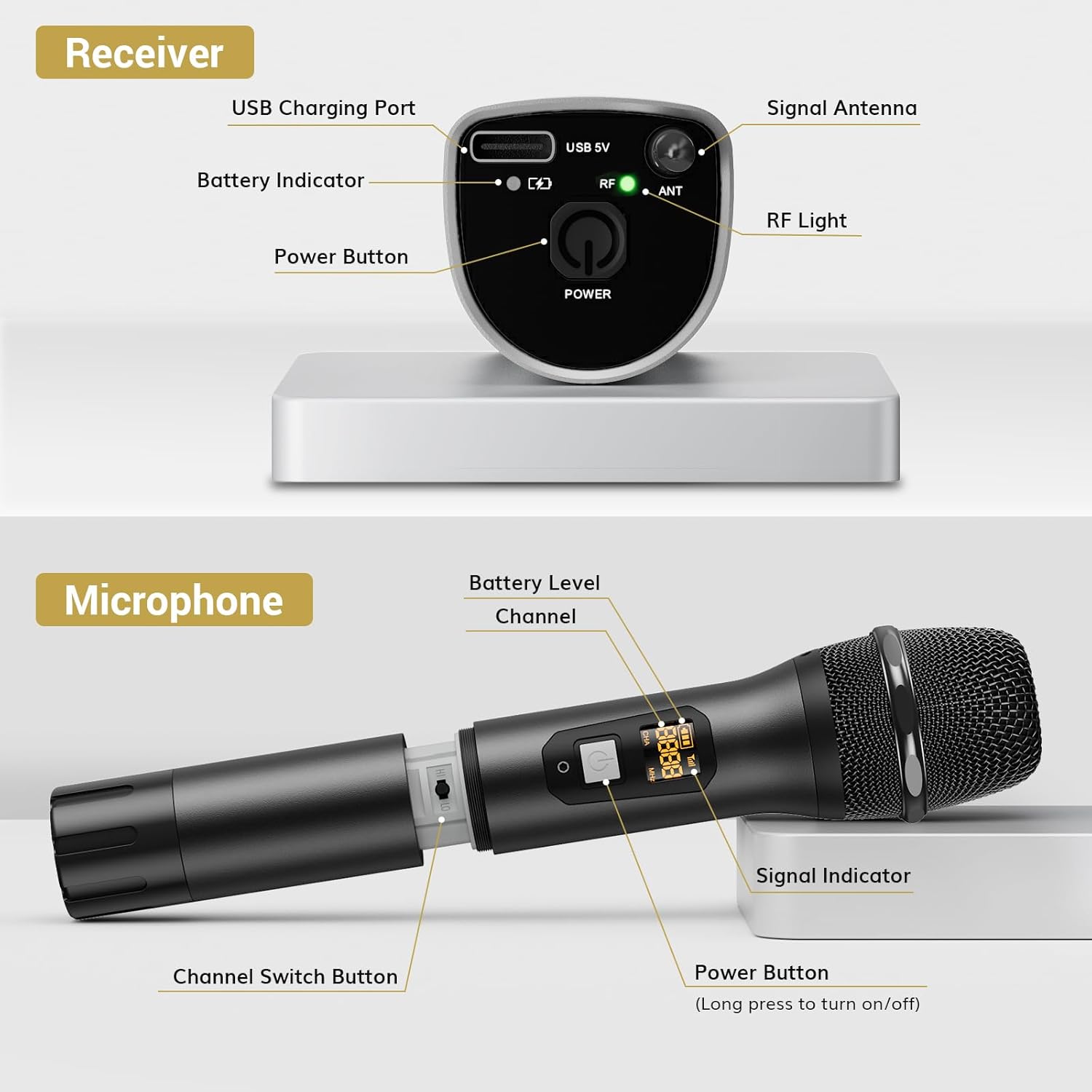
Obrázek: Podrobný view of the receiver, highlighting its charging port, antenna, and indicator lights.
Klíčové vlastnosti:
- Bezdrátová svoboda: Up to 200ft (60m) operating range (line of sight).
- Stabilní signál: 15 adjustable channels to minimize interference.
- Odolná konstrukce: Microphones and receiver are made of rugged metal.
- Prodloužená životnost baterie: Receiver provides up to 6 hours of use on a 2-3 hour charge.
Průvodce nastavením
1. Napájení
- Mikrofony: Each microphone requires 2 x AA batteries (not included). Open the battery compartment at the bottom of the microphone and insert the batteries, observing polarity.
- Přijímač: The receiver has a built-in rechargeable battery. Charge it using the provided USB cable and a 5V adapter (not included). A full charge takes approximately 2-3 hours and provides up to 6 hours of operation.

Image: Instructions for powering the microphone with AA batteries and charging the receiver via USB.
2. Pairing the Microphones and Receiver
The system is designed for automatic pairing:
- Zapněte mikrofon (mikrofony) i přijímač.
- The receiver will automatically sync its frequency with the microphone(s). The RF light on the receiver will illuminate when a stable connection is established.
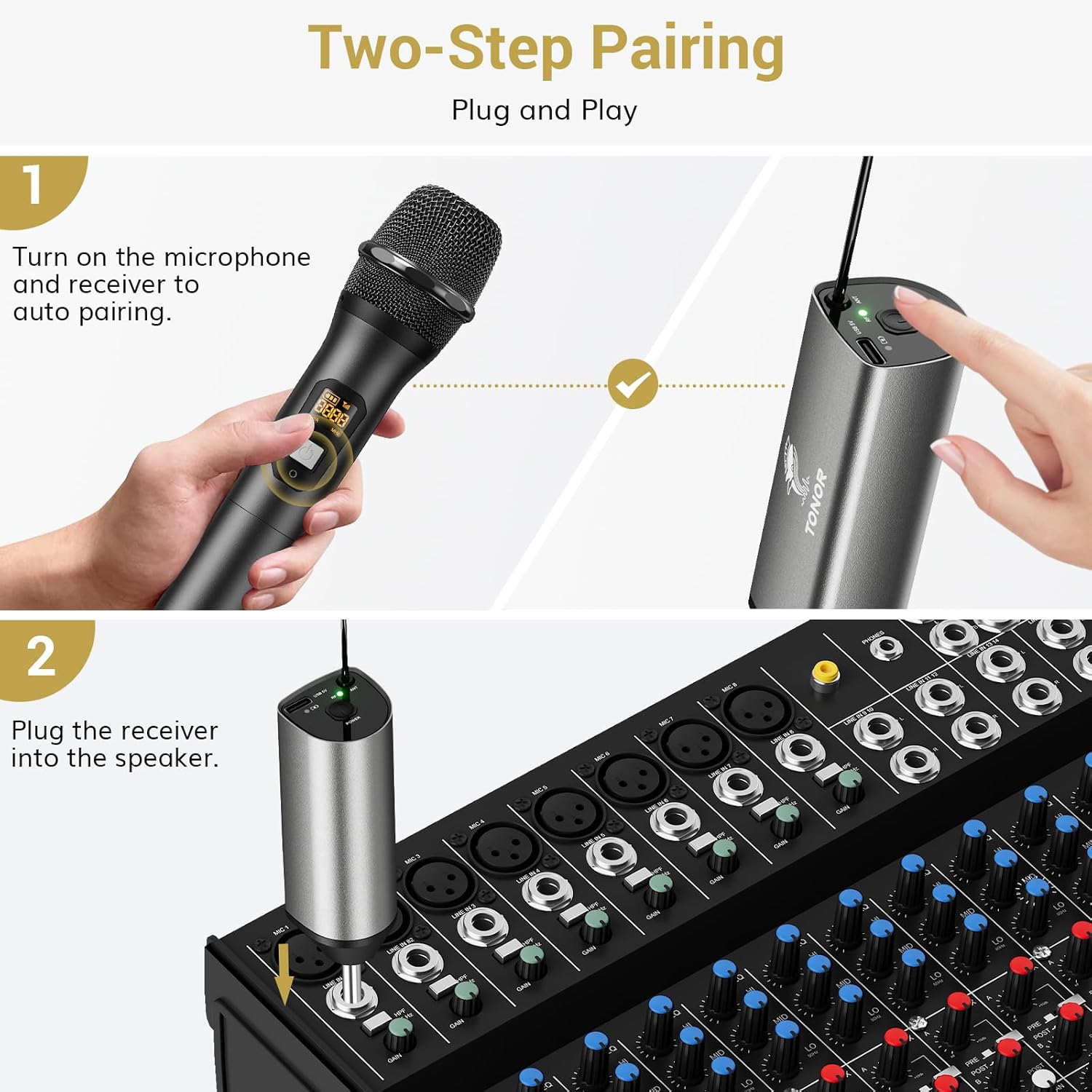
Image: Visual guide for the two-step pairing process and connecting the receiver.
3. Connecting to Audio Devices
Plug the 6.35mm receiver directly into the "MIC IN" input of compatible audio equipment.
- Kompatibilní zařízení: Powered speakers, karaoke machines, amplifiers, mixers, and audio interfaces.
- Nekompatibilní zařízení: This system is not compatible with phones, computers, or tablets directly. An additional 3.5mm (1/8") adapter is required for these devices (not included).

Obrázek: Přamples of compatible audio devices and correct input connection.
Návod k obsluze
Přepínání kanálů
The TW630 system offers 15 adjustable channels to avoid interference. If you experience signal issues or are using multiple sets simultaneously, you can change the microphone's channel:
- To switch channels, briefly press the "Channel Switch Button" located inside the microphone's battery compartment (after unscrewing the bottom part).
- The display on the microphone will show the current channel (CHA) and frequency (MHz).
- The receiver will automatically adjust to the new channel.

Image: Guide to changing microphone channels.
Using Multiple Microphone Sets
Up to 15 sets of TONOR TW630 systems can be used simultaneously without interference. Ensure each set operates on a different channel to prevent signal conflicts.
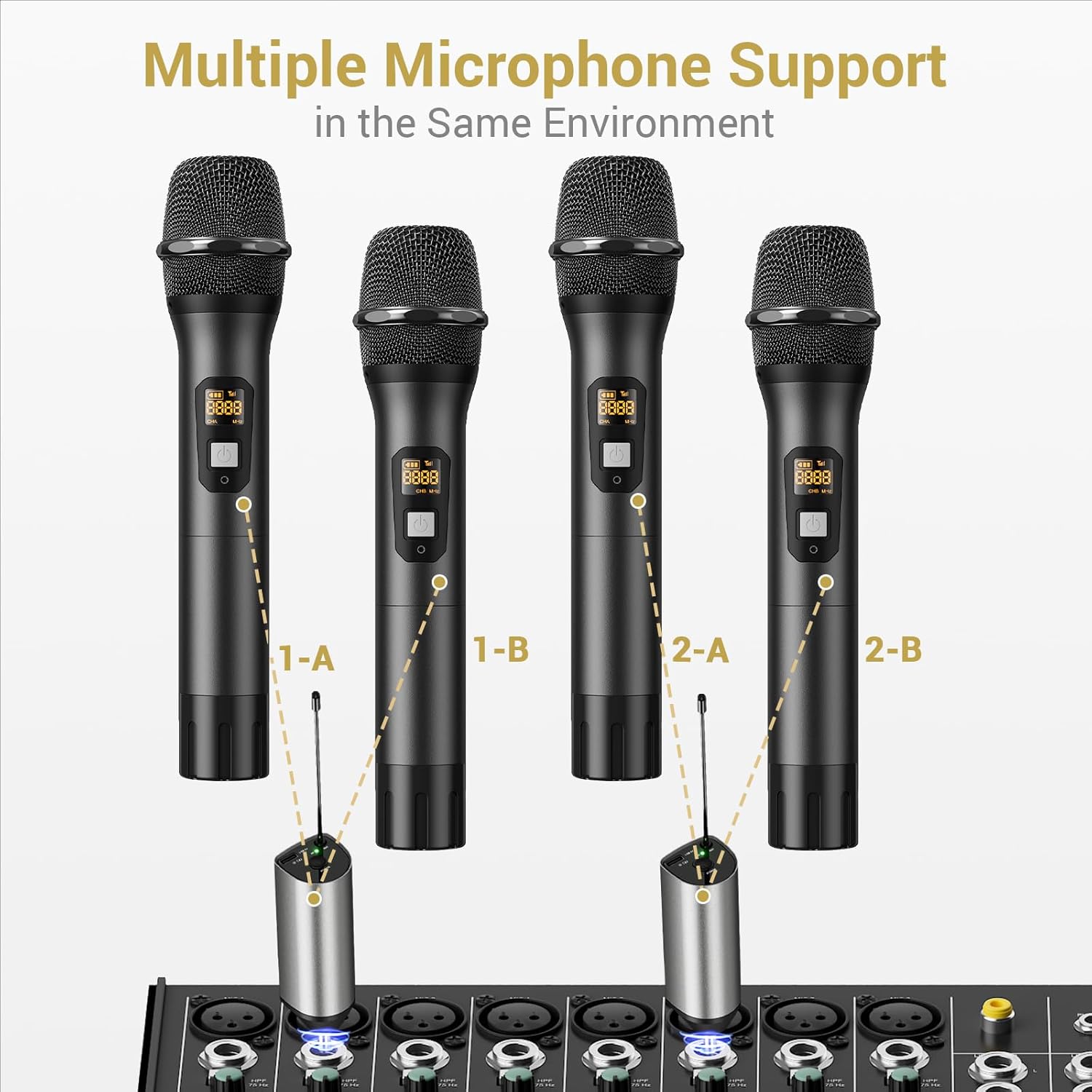
Image: Setup for using multiple microphone systems in the same environment.
Údržba
- Čištění: Wipe the microphones and receiver with a soft, dry cloth. Do not use liquid cleaners or solvents.
- Péče o baterie: Remove AA batteries from microphones if not in use for extended periods to prevent leakage. Recharge the receiver regularly to maintain battery health.
- Skladování: Systém skladujte na chladném a suchém místě mimo dosah přímého slunečního záření a extrémních teplot.
- Kryty mikrofonů: Use the provided foam mic covers to protect against wind noise and moisture.
Odstraňování problémů
| Problém | Možná příčina | Řešení |
|---|---|---|
| Žádný zvuk z mikrofonu |
|
|
| Rušení nebo špatná kvalita zvuku |
|
|
| Přijímač se nenabíjí |
|
|
Specifikace
| Funkce | Detail |
|---|---|
| Značka | TONOR |
| Název modelu | TW630 |
| Číslo modelu položky | TN120106 |
| Technologie připojení | UHF |
| Typ konektoru | Zásuvka 6.35 mm |
| Tvarový faktor mikrofonu | Ruční |
| Materiál | Kov |
| Počet kanálů | 15 |
| Audio Citlivost | 52 decibelů |
| Odstup signálu od šumu | 70 dB |
| Polární vzor | Jednosměrný |
| Zdroj napájení | Battery Powered (Microphones: 2x AA each; Receiver: Rechargeable Lithium Ion) |
| Doba nabíjení přijímače | 2-3 hodin |
| Pracovní doba přijímače | Až 6 hodin |
| Provozní rozsah | 200ft / 60m (line of sight) |
| Hmotnost položky | 1.32 libry (600 gramů) |
| Rozměry balení | 11.18 x 6.42 x 2.99 palce |
Bezpečnostní informace
- Do not expose the product to water or excessive moisture.
- Zabraňte pádu nebo vystavení produktu silným nárazům.
- Use only a 5V adapter for charging the receiver to prevent damage.
- Uchovávejte mimo dosah dětí.
- Nepokoušejte se jednotku rozebírat ani opravovat sami. Kontaktujte kvalifikovaný servisní personál.
Záruka a podpora
For warranty information and technical support, please refer to the official TONOR website or contact TONOR customer service directly. Keep your purchase receipt for warranty claims.
You can visit the TONOR store on Amazon for more information: TONOR Store


