1. Úvod
The FLYLINKTECH 2-in-1 Folding Treadmill is designed for versatile home and office use, offering both a traditional running mode and a compact under-desk walking mode. Equipped with a 2.25 HP ultra-quiet motor, it provides a comfortable exercise environment. This manual provides essential information for the safe and effective operation, maintenance, and troubleshooting of your treadmill.
Key features include 12 pre-set programs, LED display, and multiple control methods including touch screen, remote control, and a dedicated mobile application for tracking exercise data.

Image: The FLYLINKTECH 2-in-1 Folding Treadmill shown in its upright running configuration and its flat, under-desk walking configuration.
2. Důležité bezpečnostní pokyny
Before operating the treadmill, please read all instructions carefully. Keep this manual for future reference. Failure to follow these instructions may result in injury or damage to the product.
- Před zahájením jakéhokoli cvičebního programu se vždy poraďte s lékařem.
- Běžecký pás umístěte na rovný a stabilní povrch s alespoň 2 metry volného prostoru za ním a 0.6 metru po každé straně.
- Ensure the safety key is properly attached to both the treadmill and your clothing before beginning your workout.
- Nedovolte dětem ani domácím zvířatům vstupovat do blízkosti běžeckého pásu, když je v provozu.
- Noste vhodnou sportovní obuv a oblečení. Vyhněte se volnému oblečení, které by se mohlo zachytit o pohyblivé části.
- Nepoužívejte běžecký pás, pokud má poškozený kabel nebo zástrčku, nebo pokud nefunguje správně.
- Odpojte běžecký pás ze zásuvky, pokud jej nepoužíváte, před čištěním nebo před prováděním jakékoli údržby.
- Nepokoušejte se běžecký pás opravovat sami. Pro pomoc kontaktujte zákaznickou podporu.
- Maximální nosnost tohoto běžeckého pásu je 180 kg (380 liber). Nepřekračujte tento limit.
3. Komponenty produktu
Your FLYLINKTECH treadmill comes with the following main components:
- Main Treadmill Unit (including running belt, motor, frame)
- Control Panel with LED Display and Touch Buttons
- Device Holder (for tablet/phone)
- Dálkové ovládání
- Bezpečnostní klíč
- Napájecí kabel
- Uživatelská příručka (tento dokument)
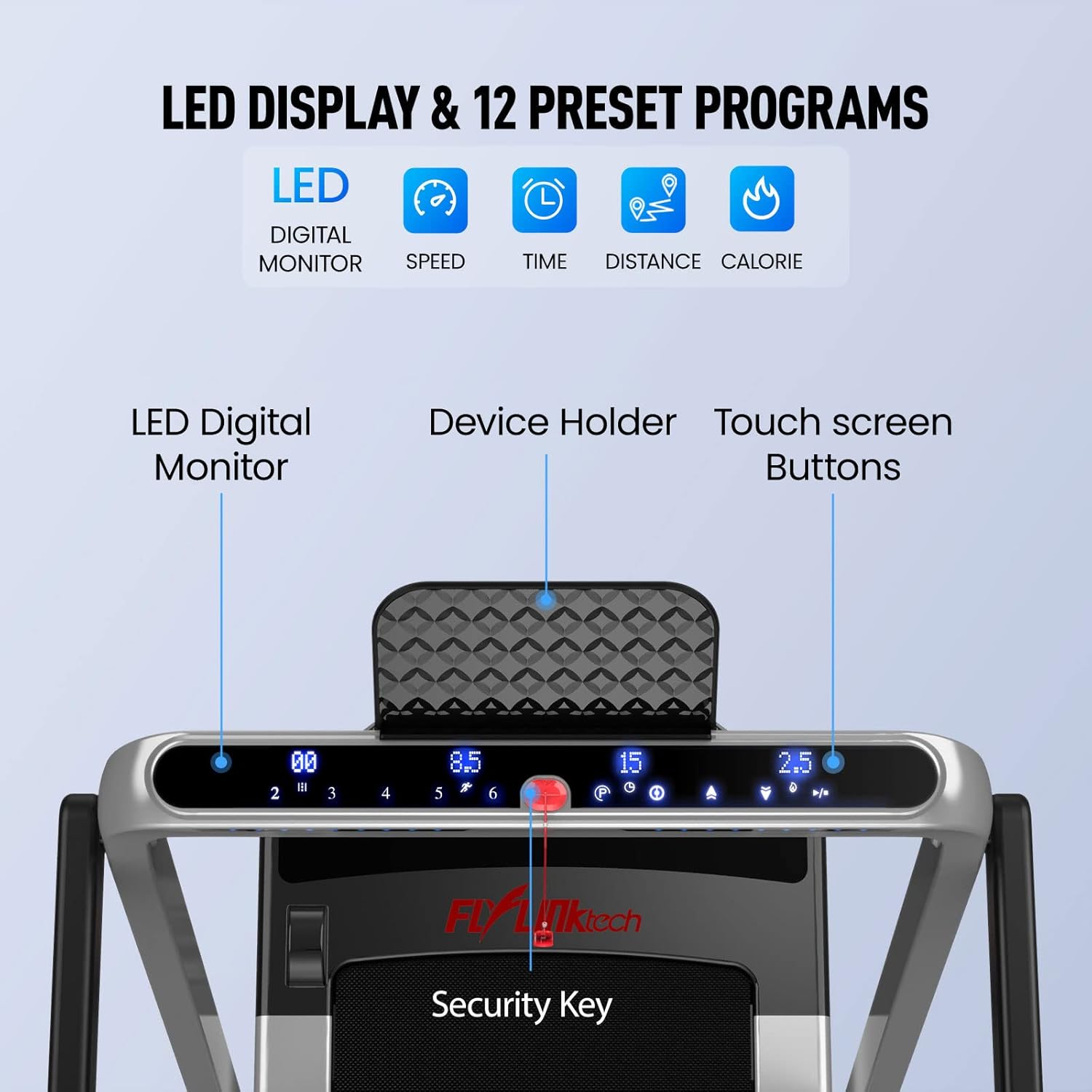
Obrázek: Podrobný view of the treadmill's control panel, highlighting the LED digital monitor, device holder, touch screen buttons, and the security key placement.
4. Nastavení a montáž
The FLYLINKTECH 2-in-1 Folding Treadmill is designed for minimal assembly and is largely ready to use right out of the box. No complex installation is required.
4.1 Unfolding for Running Mode
- Opatrně vyjměte běžecký pás z obalu.
- Umístěte běžecký pás na rovný a stabilní povrch.
- Lift the handrail assembly until it locks securely into the upright position. Ensure all locking mechanisms are engaged.
- Zapojte napájecí kabel do uzemněné elektrické zásuvky.
4.2 Folding for Walking Mode or Storage
To convert to walking mode or for compact storage, the handrail can be folded down.
- Ujistěte se, že je běžecký pás vypnutý a odpojený od sítě.
- Locate the release mechanism for the handrail (refer to the diagram below).
- Press the release mechanism and carefully lower the handrail until it is flat against the running deck.
- For storage, utilize the built-in transport wheels to move the treadmill to a desired location. Its compact design allows it to be stored under furniture, requiring only 4 inches of vertical clearance when fully folded.
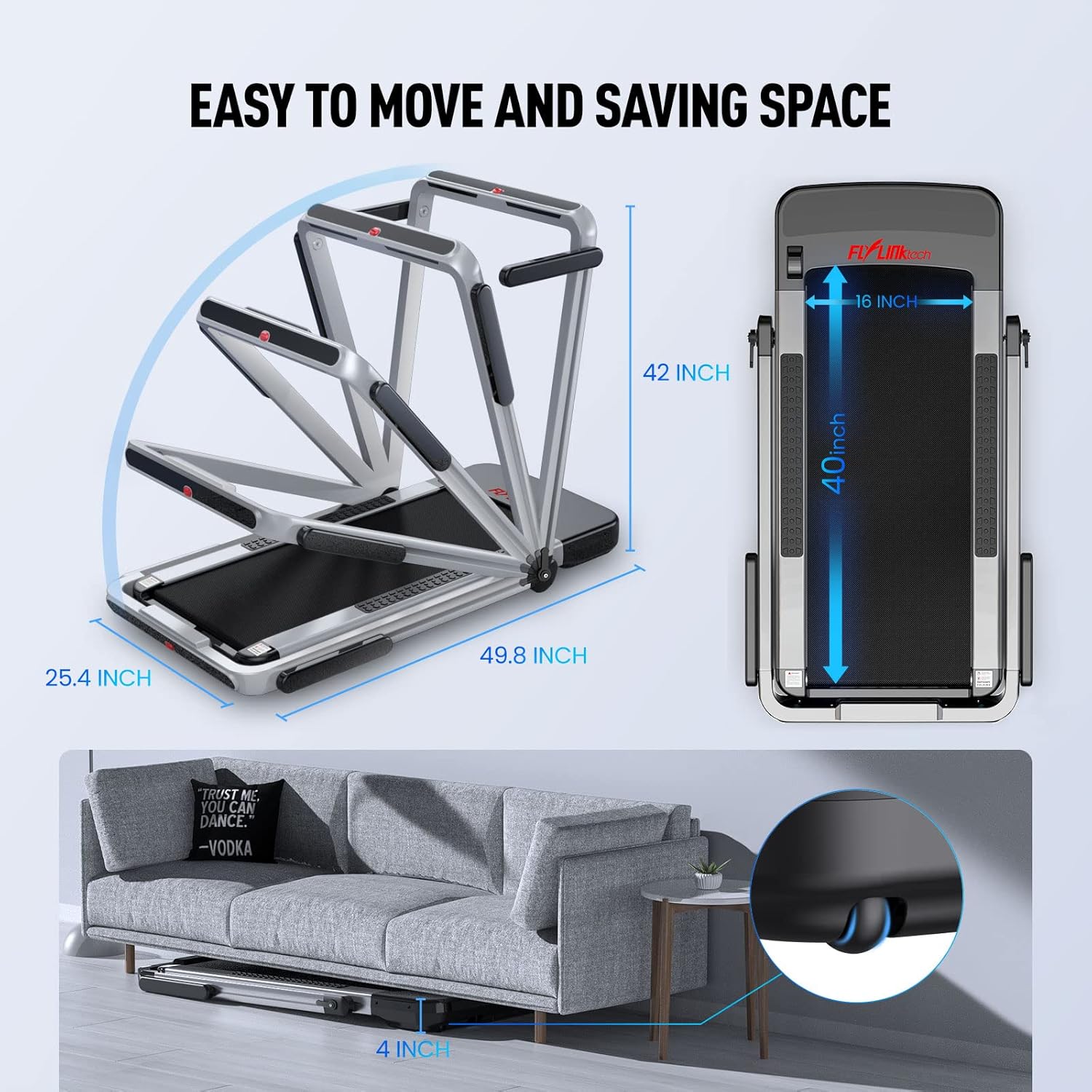
Image: Illustration demonstrating how the treadmill folds for easy movement and space-saving storage, including its folded dimensions (49.8 x 25.4 x 42 inches) and ability to fit under a sofa with 4 inches clearance.
5. Návod k obsluze
5.1 Zapnutí/vypnutí
- Zapojte napájecí kabel do uzemněné zásuvky.
- Flip the main power switch (usually located near the front base of the treadmill) to the "ON" position.
- To turn off, flip the main power switch to "OFF" and unplug the unit.
5.2 Použití bezpečnostního klíče
The safety key is a critical safety feature. The treadmill will not operate without it. Attach the clip end of the safety key to your clothing, and insert the magnetic end into the designated slot on the control panel. Pulling the safety key out will immediately stop the treadmill.
5.3 Operating Modes and Speed Ranges
The treadmill offers two distinct operating modes:
- Provozní režim: With the handrail upright, the speed can be adjusted from 2.5 MPH to 8.7 MPH. This mode is suitable for jogging and running.
- Walking Mode (Under-Desk): With the handrail folded down, the speed range is limited to 0.6 MPH to 2.5 MPH. This mode is ideal for brisk walking while working or for light exercise.
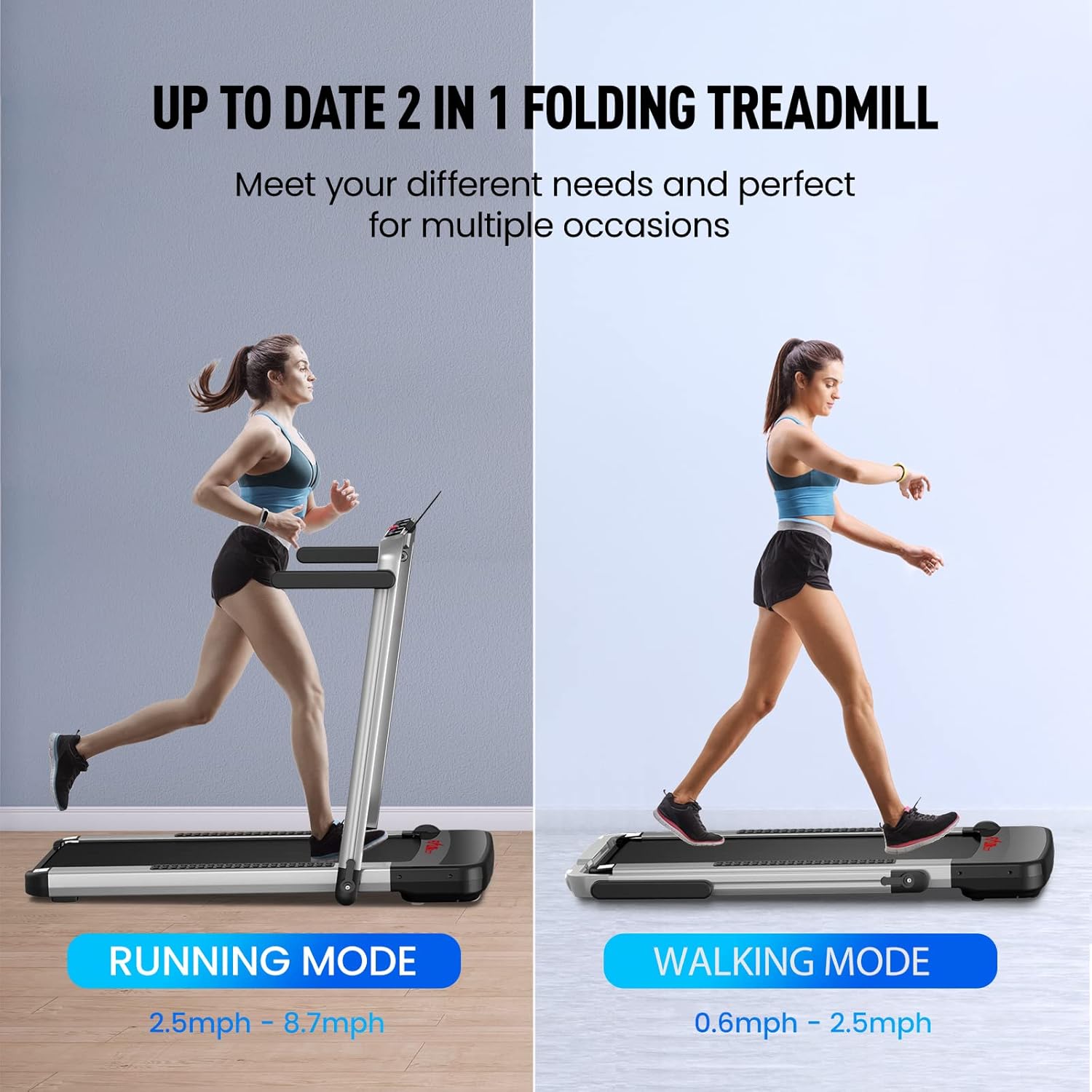
Image: A visual comparison of the treadmill's two modes: Running Mode (2.5mph - 8.7mph) with the handrail up, and Walking Mode (0.6mph - 2.5mph) with the handrail folded down.
5.4 Metody řízení
You can control your treadmill using the touch screen buttons on the console, the remote control, or the dedicated mobile application.
5.4.1 Touch Screen Buttons
The LED display provides real-time feedback on speed, distance, time, and calories burned. Use the touch buttons to start/stop, adjust speed, and select programs.
5.4.2 Dálkové ovládání
The remote control allows for convenient adjustment of speed and instant stopping. Familiarize yourself with the button layout for quick access during your workout.
5.4.3 Mobile Application (Fit Show App)
Download the "Fit Show" app from your device's app store (Google Play or Apple App Store). Connect the app to your treadmill via Bluetooth to record exercise data, participate in fitness courses, and share your progress with other users.

Image: The remote control for the treadmill is shown alongside a smartphone screen illustrating the "Fit Show" application, which allows for smart control and exercise data recording.
5.5 Přednastavené programy
The treadmill includes 12 pre-set programs designed to simulate various terrains and workout intensities. Select a program from the control panel or app to automatically adjust speed and incline (if applicable) throughout your workout.
5.6 Running Belt Features
The treadmill features a 5-layer shock-absorbing non-slip running belt, providing a spacious area of 40" x 16". This multi-layer design is engineered to cushion joints and muscles effectively, reducing impact during exercise.

Image: A cross-section diagram detailing the five layers of the non-slip and shock-absorbing running belt: Wear-resistant Surface, Noise Reduction Layer, High Strength Reinforcement Layer, EVA Shock Absorption Layer, and High Strength Compression Layer.

Image: A close-up of the treadmill's motor area, highlighting its 2.25HP low noise motor, 180kg weight capacity, <60db noise level, 0.6-8.7 MPH speed range, and 16x40 inch running area.
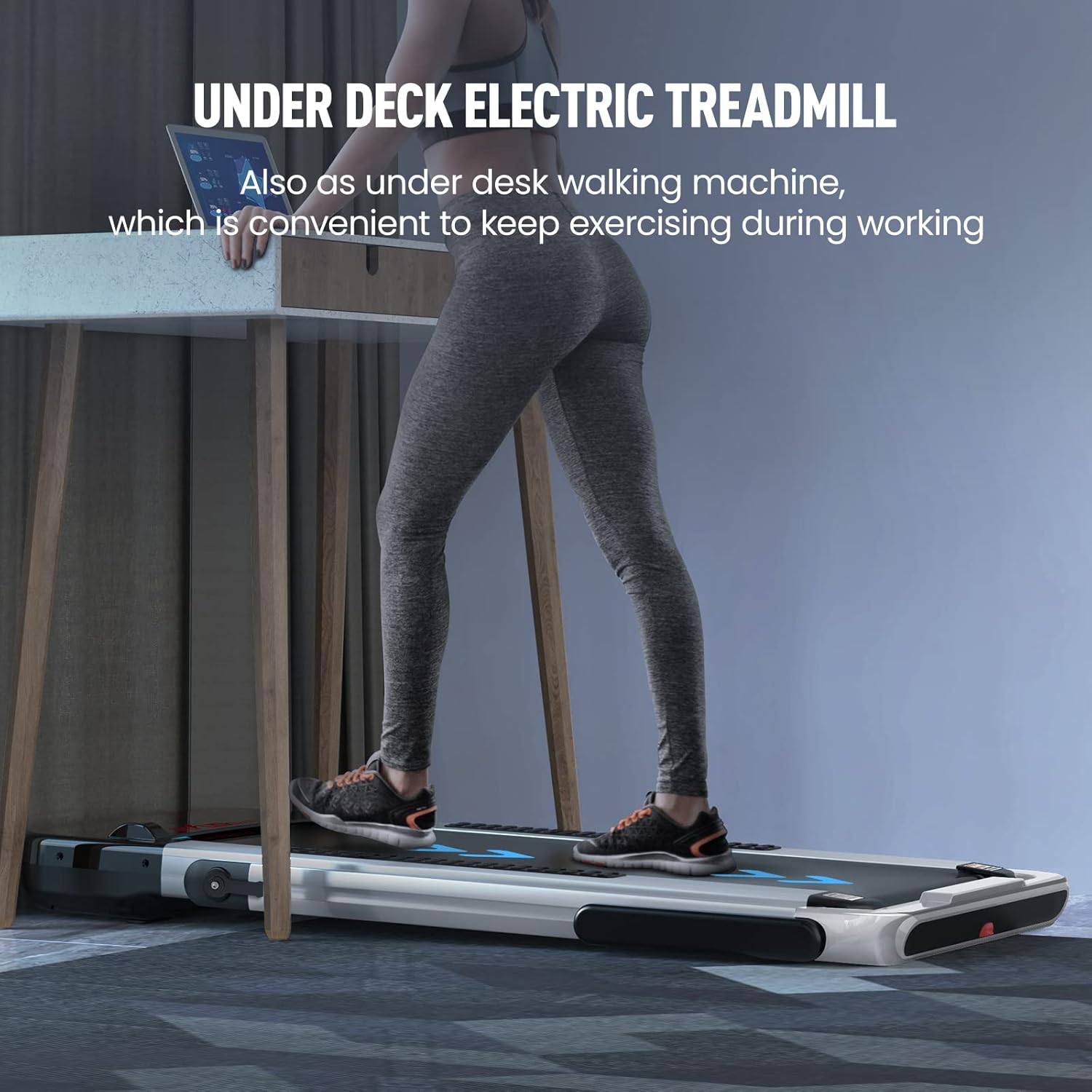
Image: A person is shown using the treadmill in its under-desk walking machine configuration, demonstrating its convenience for exercising while working.
6. Údržba a péče
Pravidelná údržba zajistí dlouhou životnost a optimální výkon vašeho běžeckého pásu.
6.1 Čištění
- Před čištěním vždy odpojte běžecký pás ze zásuvky.
- Otřete povrchy reklamouamp hadříkem a jemným čisticím prostředkem. Nepoužívejte abrazivní čisticí prostředky ani rozpouštědla.
- Keep the control panel free of moisture.
- Vacuum under the treadmill periodically to remove dust and debris that can accumulate around the motor.
6.2 Mazání běžícího pásu
The running belt requires periodic lubrication to reduce friction and extend its lifespan. Refer to the specific lubrication instructions provided with your treadmill's accessories. Typically, silicone lubricant is applied between the running belt and the deck every few months, depending on usage.
6.3 Napnutí a seřízení řemenu
If the running belt feels loose, slips, or drifts to one side, it may need adjustment. Consult the detailed instructions in the full user manual for proper belt tensioning and alignment procedures. Incorrect adjustment can damage the belt or motor.
7. Řešení problémů
Tato část se zabývá běžnými problémy, se kterými se můžete setkat. V případě problémů, které zde nejsou uvedeny, se obraťte na zákaznickou podporu.
| Problém | Možná příčina | Řešení |
|---|---|---|
| Běžecký pás se nezapne. | Napájecí kabel není zapojen do zásuvky; Hlavní vypínač je vypnutý; Jistič je vypnutý. | Ensure power cord is securely plugged in. Check main power switch. Reset household circuit breaker if tripped. |
| Treadmill starts but belt does not move. | Bezpečnostní klíč není správně vložen. | Ensure the safety key is fully inserted into its slot on the console. |
| Běžecký pás prokluzuje nebo váhá. | Řemen je příliš volný; Řemen potřebuje mazání. | Adjust belt tension (refer to full manual). Lubricate the running belt. |
| Neobvyklý hluk z běžeckého pásu. | Loose parts; Debris under belt; Motor issue. | Inspect for loose screws. Clean under the belt. If noise persists, contact customer support. |
| Dálkové ovládání nefunguje. | Dead batteries; Not paired. | Replace batteries. Refer to pairing instructions in the full manual if applicable. |
8. Specifikace produktu
| Funkce | Specifikace |
|---|---|
| Číslo modelu | JF-H-40DC |
| Výkon motoru | 2.25 HP |
| Rozsah rychlosti (provozní režim) | 2.5 - 8.7 mph |
| Rozsah rychlosti (režim chůze) | 0.6 - 2.5 mph |
| Hmotnostní kapacita | 180 kg (380 lb) |
| Velikost běžecké plochy | 40" x 16" |
| Celkové rozměry (rozložené) | 1265 x 645 x 1070 mm (49.8 x 25.3 x 42.1 palce) |
| Skládací rozměry | 1320 x 645 x 115 mm (51.9 x 25.3 x 4.53 palce) |
| Hmotnost produktu | 33.6 kg (74 lb) |
| Materiál | Legovaná ocel |
| Typ zobrazení | LED Digital Monitor |
| Kontrolní metody | Touch Button, Remote Control, APP Control |
| Přednastavené programy | 12 |
9. Záruka a zákaznická podpora
FLYLINKTECH provides a Záruka 12 měsíců for this treadmill, covering manufacturing defects and issues arising from normal use. Please retain your proof of purchase for warranty claims.
For any questions, technical assistance, or warranty claims, please do not hesitate to contact FLYLINKTECH customer service. Our support team is available to assist you.
Kontaktní údaje:
- Refer to the contact details provided on the product packaging or the official FLYLINKTECH webmísto.
- Online support may be available through the official product page or dedicated support portal.


