Zavedení
Thank you for choosing the Baseus Car Bluetooth MP3 Player S-06Black. This device is designed to enhance your in-car audio experience by providing Bluetooth connectivity for music streaming and hands-free calling, along with USB charging capabilities. This manual will guide you through the setup, operation, and maintenance of your new device.
Konec produktuview
The Baseus S-06Black is a versatile car accessory that plugs into your vehicle's cigarette lighter socket. It features a digital display, a multi-function control knob, and dual USB ports for charging.

Image: The Baseus Car Bluetooth MP3 Player S-06Black, showing its compact design, digital display, control knob, and dual USB charging ports.
Nastavení
- Vložte do automobilové zásuvky: Plug the Baseus S-06Black into your car's 12V/24V cigarette lighter socket. The device will power on automatically, and the LED display will light up.
- Nastavte FM frekvenci: The device will display an FM frequency. Tune your car radio to an empty (static-free) FM frequency. Then, press and hold the multi-function knob on the Baseus device until the frequency display flashes. Rotate the knob to match the device's frequency with your car radio's frequency. Press the knob again to confirm.
- Spárovat s Bluetooth: On your smartphone, enable Bluetooth and search for available devices. Select 'Baseus S-06Black' (or similar name) from the list to pair. Once connected, a voice prompt will confirm successful pairing.
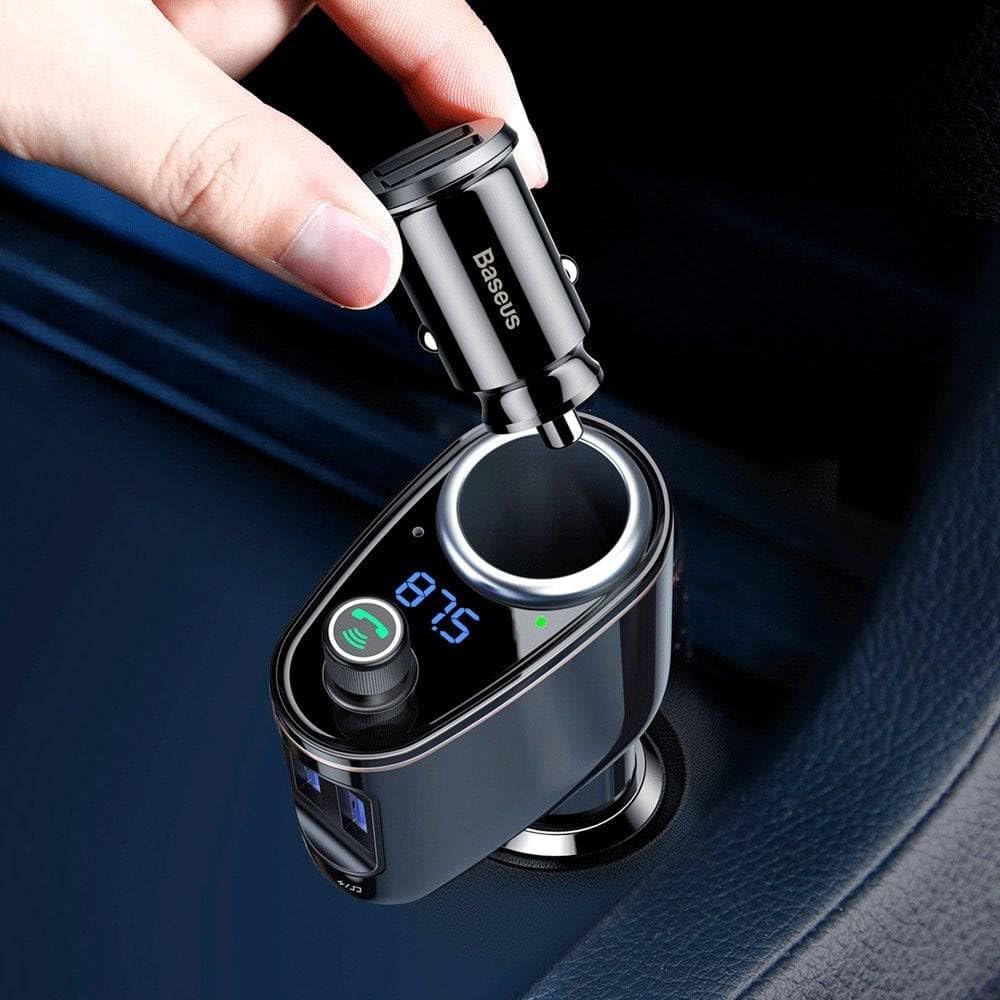
Image: A hand inserting the Baseus car charger into a car's cigarette lighter socket, demonstrating the initial power connection.

Image: A diagram illustrating the connection process: a smartphone connects via Bluetooth to the Baseus player, which then transmits audio via FM to the car's radio system.
Návod k obsluze
Přehrávání hudby
- Bluetooth streamování: Once paired, open your music app on your phone. Audio will be transmitted wirelessly to the Baseus device and then to your car's speakers via the selected FM frequency.
- Control Music: Use the multi-function knob to control playback. Press once to play/pause. Rotate left/right to adjust volume. Press and hold to change FM frequency (as in setup).
- USB přehrávání: Insert a USB flash drive (up to 32GB) containing MP3/WMA/WAV/FLAC files into the designated USB port (usually marked with a music note icon). The device will automatically detect and play music from the drive.

Image: The Baseus player positioned next to a smartphone displaying a music playback interface, indicating active Bluetooth audio streaming.
Hands-free volání
- Přijmout/ukončit hovor: When a call comes in, press the multi-function knob once to answer. Press again to end the call.
- Odmítnout hovor: Stiskněte a podržte multifunkční tlačítko pro odmítnutí příchozího hovoru.
- Opakovaná volba: Double-press the multi-function knob to redial the last outgoing number.
Nabíjecí zařízení
The Baseus S-06Black features dual USB ports for charging your mobile devices. Simply connect your device's USB charging cable to one of the ports. The device supports various charging protocols, providing efficient power delivery.

Obrázek: Detailní záběr view of a USB cable securely plugged into one of the Baseus player's charging ports, demonstrating its device charging capability.
Údržba
- Udržujte zařízení suché a čisté.
- Nevystavujte zařízení po delší dobu extrémním teplotám nebo přímému slunečnímu záření.
- Nepokoušejte se zařízení rozebírat ani opravovat sami. V případě problémů kontaktujte zákaznickou podporu.
- Povrch čistěte měkkým, suchým hadříkem. Nepoužívejte agresivní chemikálie ani abrazivní čisticí prostředky.
Odstraňování problémů
| Problém | Možné řešení |
|---|---|
| Žádné napájení/vypnutí displeje | Ensure the device is fully inserted into the car's cigarette lighter socket. Check the car's fuse for the cigarette lighter. |
| Statický nebo špatná kvalita zvuku | Find a clearer, unused FM frequency on your car radio and match it on the Baseus device. Ensure your phone's volume is at an appropriate level. |
| Nelze spárovat přes Bluetooth | Ensure Bluetooth is enabled on your phone. Forget the device from your phone's Bluetooth settings and try pairing again. Restart both the phone and the Baseus device. |
| USB nabíjení nefunguje | Check if the USB cable is properly connected. Try a different USB cable or device to rule out cable/device issues. Ensure the car's engine is running or the accessory power is on. |
Specifikace
| Funkce | Detail |
|---|---|
| Značka | Baseus |
| Číslo modelu | 6932172628222 |
| Technologie připojení | Bluetooth |
| Standard bezdrátové komunikace | Bluetooth |
| Kompatibilní zařízení | Speaker (and other Bluetooth-enabled devices) |
| Speciální funkce | Car Charger (Autolader) |
| Typ média | MP3 |
| Barva | Černý |
| Zdroj napájení | Car cigarette lighter (12V/24V) |
| USB porty | Dual USB Type A |
Záruka a podpora
The manufacturer's warranty for this product is dependent on the specific terms and conditions at the time of purchase. Please refer to your purchase documentation or contact your retailer for detailed warranty information. For technical support or further assistance, please contact Baseus customer service through their official webwebu nebo kontaktních informací uvedených na obalu produktu.


