1. Úvod
This manual provides essential information for the safe and efficient operation of your PowMr 3000W 24V to 110V Pure Sine Wave Solar Inverter. It includes details on product features, installation, operation modes, maintenance, and troubleshooting. Please read this manual thoroughly before installation and use, and retain it for future reference.

Obrázek 1.1: Přední strana view of the PowMr 3000W Solar Inverter.
2. Bezpečnostní pokyny
Důležitá bezpečnostní opatření:
- Instalaci musí provádět kvalifikovaný personál.
- Ujistěte se, že veškeré zapojení splňuje místní a národní elektrotechnické předpisy.
- Nerozebírejte měnič. Uvnitř nejsou žádné součásti, které by mohl uživatel opravit.
- Zabraňte kontaktu s vodou nebo jinými tekutinami.
- Instalujte v dobře větraném prostoru, mimo dosah hořlavých materiálů.
- Ensure proper grounding before connecting any power sources.
- Ověřte objem baterietagPřed připojením k měniči zkontrolujte e a polaritu.
- Always disconnect all power sources (PV, AC, Battery) before performing any maintenance or wiring.

Image 2.1: The inverter features a 12-layer SmartProtect system, including protections against PV input over-voltage, current, reverse connection, battery over-voltage, AC input over-voltage, and inverter overload.
3. Konec produktuview
3.1 Klíčové vlastnosti
- 3000W Pure Sine Wave Inverter: Provides high-quality AC power suitable for sensitive electronics.
- Built-in 80A MPPT Charge Controller: Maximizes solar power harvesting efficiency (up to 99.9%).
- Wide Compatibility: Supports 24V Lead-Acid and Lithium batteries.
- Multiple Charging Modes: Solar, Utility priority, Solar priority, Utility hybrid charging.
- Three Output Modes: PV priority, Utility priority, Inverter mode.
- Comprehensive Protection: Short-circuit, overload, reverse polarity, overvoltage, podpaltage.
- LCD Display & LED Indicators: Real-time monitoring of system data and operational status.
- Max PV Input Power: 4000W, MPPT Voltage range: 120-400Vdc.
3.2 Identifikace součásti

Image 3.1: Front and rear panel components of the inverter.
- LCD tlačítka
- Montážní otvory
- LCD obrazovka
- LED indikátory
- Komunikační port CAN
- Suchý kontaktní port
- Komunikační port RS485
- USB ladicí port (interní použití)
- AC vstupní terminál
- AC výstupní terminál
- Chladicí ventilátory
- PV vstupní terminál
- Hlavní vypínač napájení
- Konektor pro vstup baterie
- Uzemňovací oko
4. Nastavení a instalace
Před instalací: Ensure the mounting surface is strong enough to support the inverter's weight (approximately 19.1 pounds). Choose a location that is dry, well-ventilated, and protected from direct sunlight and extreme temperatures.
4.1 Schéma zapojení

Image 4.1: Wiring diagram for connecting the inverter to solar panels, battery, AC input (utility/generator), and AC output.
Poznámky k zapojení:
- Základy: Always connect the PE protective conductor (Ground) first.
- Připojení baterie: Connect the 24V battery to the Battery Input Terminal. Recommended battery capacity is 200AH. Ensure correct polarity. The battery must be connected for the system to operate.
- PV vstup: Connect solar panels in series to the PV Input Terminal. Max PV Input Power: 4000W. MPPT Voltage range: 120-400Vdc. Starting voltage > 150V. Total Open Circuit Voltage (VOC) ≤ 450V. Use 12AWG PV wire.
- AC vstup: Connect utility power or a generator to the AC Input Terminal. AC Input Voltage range: 90-140V. Frequency: 50Hz/60Hz. Max AC Bypass Current: 40A. Max AC Charge Current: 40A. Use 10AWG AC wire.
- AC výstup: Connect household and office loads to the AC Output Terminal. AC Output Power ≤ 3000W. Rate Voltage: 120Vac ±5%. Rate Current: 27.5A.
5. Návod k obsluze
5.1 LCD displej a indikátory
The inverter features an LCD display and LED indicators for real-time monitoring of system data and operational status. The LCD display provides more than 20 programmable parameters, including input/output voltage range, battery charging current, battery type, and charging/discharging priority.

Image 5.1: The LCD display provides real-time monitoring of photovoltaic system operating data.
5.2 režimy nabíjení
Měnič podporuje čtyři režimy nabíjení:
- Solární nabíjení: Charges the battery solely from solar power.
- Utility Charge (Solar as backup power): Primarily uses utility power to charge, with solar as a backup.
- Priorita solární energie: Prioritizes solar power for charging, using utility only when solar is insufficient.
- Solar + Utility Charging: Combines solar and utility power to charge the battery.
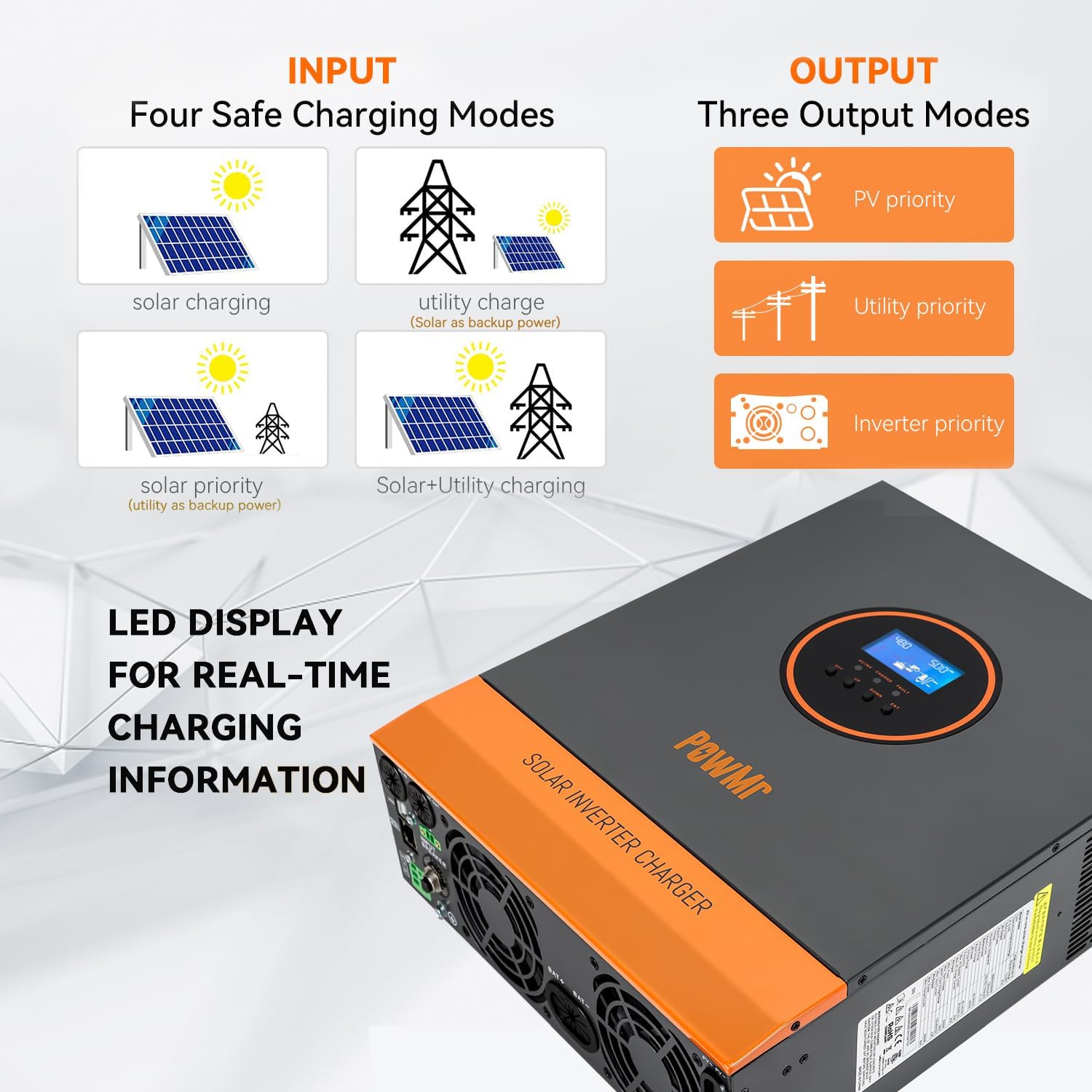
Image 5.2: Visual representation of the four available charging modes.
5.3 Výstupní režimy
The inverter offers three output modes:
- Priorita fotovoltaiky: Prioritizes solar power to supply loads.
- Priorita užitné energie: Prioritizes utility power to supply loads.
- Režim invertoru: Uses battery power (converted by inverter) to supply loads.
5.4 Vzdálené monitorování (volitelné)
The inverter supports remote monitoring and control via the SMARTESS App. A Wi-Fi/GPRS data acquisition module is required and needs to be purchased separately. Download the app from the App Store or Google Play.

Image 5.3: Remote monitoring via the SMARTESS App with an optional Wi-Fi module.
Pro stažení aplikace naskenujte QR kód: Q2721100111238 (Note: Actual download link may vary, refer to product documentation for correct link).
6. Údržba
Regular maintenance ensures optimal performance and longevity of your inverter. Always disconnect all power sources before performing any maintenance.
- Čištění: Periodically clean the exterior of the inverter with a dry cloth. Ensure cooling fan vents are free from dust and debris to prevent overheating.
- Spojení: Check all electrical connections (battery, PV, AC input/output) regularly for tightness and corrosion.
- Stav baterie: Monitor baterie voltage and performance. Refer to your battery manufacturer's guidelines for specific maintenance.
- Prostředí: Zajistěte, aby instalační prostředí zůstalo suché, dobře větrané a v rámci stanoveného provozního teplotního rozsahu.
7. Řešení problémů
The inverter's LCD display will show corresponding fault codes if a problem occurs. Refer to the product's detailed fault code list (typically found in the full user manual) to identify and resolve issues.
Běžné problémy a řešení:
| Problém | Možná příčina | Řešení |
|---|---|---|
| Měnič se nezapíná | Žádné připojení baterie, nízká kapacita baterietage, hlavní vypínač vypnutý. | Zkontrolujte připojení baterie a objtage. Ensure main power switch is ON. |
| Žádný AC výstup | Přetížení, zkrat, porucha měniče. | Reduce load. Check for short circuits in connected appliances. Refer to LCD fault code. |
| Baterie se nenabíjí z fotovoltaiky | Insufficient solar input, PV connection issue, MPPT controller fault. | Check solar panel connections and ensure adequate sunlight. Verify PV input voltage is within range (120-400Vdc). |
| Přehřívání | Blocked cooling vents, excessive ambient temperature, prolonged high load. | Clear vents. Ensure proper ventilation. Reduce load if necessary. |
If the problem persists after attempting these solutions, contact PowMr customer support for assistance.
8. Specifikace
| Parametr | Hodnota |
|---|---|
| Číslo modelu | 3000W-24V-110V |
| Jmenovitý výkon | 3000W |
| Baterie Voltage | 24V DC |
| Výstupní napětí ACtage | 110V/120VAC ±5% |
| AC výstupní frekvence | 60 Hz |
| Průběh | Čistá sinusová vlna |
| MPPT Charge Controller Current | 80A |
| Maximální FV příkon | 4000W |
| MPPT PV objemtage Dosah | 120-400V DC |
| Max PV Open Circuit Voltage | 450V DC |
| AC vstup Voltage Dosah | 90-140V |
| Max Hybrid Charging Current (AC+PV) | 80A |
| Rozměry produktu | 16.53 x 12.59 x 4.72 palce |
| Hmotnost položky | 19.1 libry |
| Kompatibilní typy baterií | Lead-Acid, Lithium |
9. Záruka a podpora
For warranty information and technical support, please contact PowMr directly. Refer to the product packaging or the official PowMr webNejnovější kontaktní údaje a záruční podmínky naleznete na webových stránkách.
Výrobce: PowMr
Datum první dostupnosti: 16. května 2023