1. Úvod
This user manual provides detailed instructions for the SPYMINNPOO Electric Bicycle LCD Display, Model UKC3. It covers essential information regarding product features, installation, operation, maintenance, and troubleshooting. Please read this manual thoroughly before using the product to ensure proper function and longevity.
The UKC3 display is designed to provide crucial riding data for electric bicycles, enhancing your cycling experience with clear and accessible information.
2. Bezpečnostní informace
Vždy dodržujte následující bezpečnostní opatření, abyste předešli zranění nebo poškození produktu:
- Ensure the display is securely mounted before riding.
- Do not attempt to disassemble or modify the display. Unauthorized modifications can void the warranty and pose safety risks.
- Keep the display clean and free from excessive dirt or debris.
- The display has an IP64 waterproof rating, meaning it is protected against dust ingress and splashing water from any direction. However, avoid submerging the device in water.
- If the display shows any abnormal behavior or damage, discontinue use immediately and contact customer support.
3. Vlastnosti produktu
The SPYMINNPOO UKC3 Electric Bicycle LCD Display offers a range of features designed for convenience and performance:
- Odolná konstrukce: Made from high-quality ABS material, ensuring lightweight, strong, and durable performance with excellent toughness.
- Multifunkční displej: Provides essential riding data including speed, battery level, gear indication, and mileage.
- Uživatelsky přívětivé rozhraní: Equipped with intuitive buttons for easy operation, including power on/off, light switch, and data adjustment.
- Kompaktní a přenosné: Its compact and lightweight design occupies minimal space, making it easy to carry and store.
- Vodotěsné a prachotěsné: Features an IP64 waterproof rating and precision technology, offering robust protection against water splashes and dust.
- Široká aplikace: Designed with a 22.2mm mounting diameter, making it a perfect accessory for electric bicycles and electric scooters.
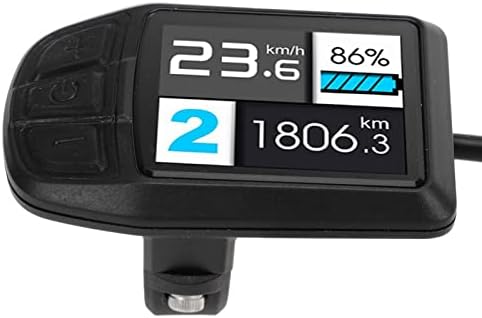
Obrázek 3.1: Přední strana view of the SPYMINNPOO UKC3 Electric Bicycle LCD Display, illustrating its clear screen and control buttons. The display shows current speed (23.6 km/h), battery level (86%), current gear (2), and total mileage (1806.3 km).
4. Nastavení a instalace
Follow these steps to properly install your electric bicycle LCD display:
- Připravte montážní plochu: Identify a suitable location on your electric bicycle's handlebar with a diameter of 22.2mm. Ensure the area is clean and free from obstructions.
- Připojení displeje: Loosen the screw on the display's mounting clamp. Position the display on the handlebar and tighten the screw securely until the display is firm and does not rotate freely. Do not overtighten.
- Připojení kabeláže: Locate the 5-core waterproof plug on the display's cable. Connect this plug to the corresponding port on your electric bicycle's control system. Ensure the connection is secure and fully seated to maintain waterproof integrity.
- Správa kabelů: Route the cable neatly along your bicycle frame, securing it with cable ties if necessary, to prevent it from interfering with moving parts or getting snagged.
- Počáteční kontrola: After installation, perform a quick check to ensure all connections are secure and the display is firmly mounted.

Figure 4.1: Illustration of the display's mounting features, including the 22.2mm diameter handlebar clamp and the removable screw for secure attachment.

Figure 4.2: The display unit with its waterproof plug, highlighting the connection point for the electric bicycle's system.
5. Návod k obsluze
The UKC3 display provides intuitive controls and clear data presentation:
5.1. Funkce tlačítek
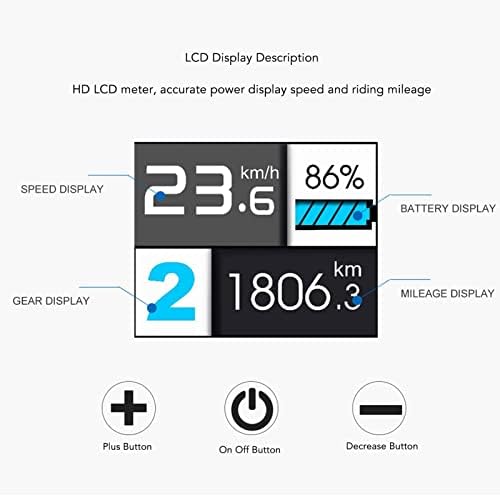
Obrázek 5.1: Přesview of the display interface, detailing the information displayed and the function of each button.
- Tlačítko napájení (Zapnuto/Vypnuto): Press and hold to turn the display on or off. A short press may cycle through display modes or activate/deactivate lights, depending on your e-bike's system.
- Tlačítko Plus (+): Typically used to increase assist level, navigate menus upwards, or increase values in settings.
- Tlačítko pro snížení (-): Typically used to decrease assist level, navigate menus downwards, or decrease values in settings.
5.2. Zobrazení informací
The LCD screen provides the following real-time data:
- Zobrazení rychlosti: Shows your current riding speed in kilometers per hour (km/h).
- Displej baterie: Indicates the remaining battery charge level, allowing you to monitor your power reserves.
- Zobrazení výbavy: Shows the current assist level or gear selected.
- Zobrazení ujetých kilometrů: Displays the total distance traveled (odometer) or trip distance, depending on the selected mode.
6. Údržba
Proper maintenance ensures the longevity and optimal performance of your display:
- Čištění: Použijte měkký, damp cloth to wipe the display screen and body. Avoid using abrasive cleaners, solvents, or harsh chemicals, as these can damage the surface or internal components.
- Ochrana proti vodě a prachu: While the display is IP64 rated, it is recommended to avoid direct high-pressure water jets or prolonged exposure to heavy rain. Ensure the waterproof plug connection remains secure.
- Skladování: Pokud displej delší dobu nepoužíváte, skladujte jej na chladném a suchém místě mimo dosah přímého slunečního záření a extrémních teplot.
- Inspekce: Periodically check the mounting screw and cable connections to ensure they are secure.
7. Řešení problémů
If you encounter issues with your display, refer to the following common troubleshooting tips:
- Displej se nezapíná:
- Check if the power button is pressed and held long enough.
- Verify that the display's cable is securely connected to the e-bike's system.
- Ensure your e-bike's battery has sufficient charge.
- Zobrazená nesprávná data:
- Restart the display by turning it off and on again.
- Check for any loose connections that might affect data transmission.
- Tlačítka nereagují:
- Ujistěte se, že tlačítka nejsou zaseknutá nebo zablokovaná.
- Vyčistěte okolí tlačítek, abyste odstranili veškeré nečistoty nebo nečistoty.
- Water or Moisture Inside Display:
- Immediately turn off the display and disconnect it from power.
- Allow it to dry completely in a well-ventilated area. Do not use heat.
- If the issue persists after drying, contact customer support.
If these steps do not resolve the issue, please contact SPYMINNPOO customer support for further assistance.
8. Specifikace
| Funkce | Specifikace |
|---|---|
| Model | UKC3 |
| Značka | SPYMINNPOO |
| Typ zobrazení | TFT LCD barevný displej |
| Materiál | ABS |
| Rozměry (D x Š) | Přibližně 6.63 x 4.46 cm / 2.6 x 1.8 palce |
| Hmotnost | Přibl. 87 g / 3.07 unce |
| Montážní průměr | 22.2 mm |
| Hodnocení voděodolnosti | IP64 |
| svtage Kompatibilita | 24V/36V/48V/52V |
| Zahrnuté komponenty | 1 x Electric Bike Display, 1 x User Manual |

Figure 8.1: Technical drawing illustrating the precise dimensions of the display unit.
9. Záruka a podpora
For warranty information or technical support, please refer to the documentation provided with your purchase or contact SPYMINNPOO customer service directly. Ensure you have your product model (UKC3) and purchase details ready when contacting support.
For the most up-to-date support information, please visit the official SPYMINNPOO webweb nebo stránku podpory prodejce, u kterého byl produkt zakoupen.

