1. Úvod
This manual provides essential instructions for the safe and efficient operation, setup, and maintenance of your BLUETTI AC180 Portable Power Station and accompanying 200W Solar Panel. Please read this manual thoroughly before using the product to ensure optimal performance and safety. Keep this manual for future reference.

Image 1.1: The BLUETTI AC180 Portable Power Station with its 200W Solar Panel, designed for outdoor use.
2. Bezpečnostní pokyny
Vždy dodržujte následující bezpečnostní pokyny, abyste předešli zranění nebo poškození produktu:
- Jednotku nerozebírejte, neopravujte ani neupravujte.
- Avoid exposure to rain, moisture, or direct sunlight for prolonged periods.
- Udržujte jednotku mimo dosah zdrojů tepla, otevřeného ohně a hořlavých materiálů.
- Ensure proper ventilation during use and charging. Do not block air vents.
- Používejte pouze příslušenství a nabíjecí kabely schválené společností BLUETTI.
- Uchovávejte mimo dosah dětí a domácích zvířat.
- V případě požáru použijte práškový hasicí přístroj. Nepoužívejte vodu.
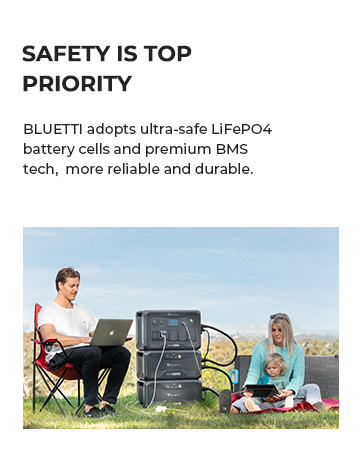
Image 2.1: BLUETTI prioritizes safety with LiFePO4 battery cells and advanced Battery Management System (BMS) technology.
3. Obsah balení
Ověřte, zda je v balení obsaženo vše:
- Přenosná elektrárna BLUETTI AC180
- 200W Solar Panel (ships separately)
- AC nabíjecí kabel
- Solární nabíjecí kabel
- Nabíjecí kabel do auta
- Uživatelská příručka (tento dokument)
4. Konec produktuview
4.1 BLUETTI AC180 Unit
The AC180 features a robust design with multiple output ports and an intuitive display for monitoring power usage and battery status.

Image 4.1: Front panel of the BLUETTI AC180, showing the LCD display, AC outlets, DC output, USB ports, and wireless charging pad.
4.2 200W solární panel
The included 200W solar panel is foldable and designed for portability, featuring built-in kickstands for optimal sun exposure.

Image 4.2: The 200W solar panel with its integrated kickstands, allowing for angle adjustment to maximize solar input.
5. Nastavení
5.1 Počáteční nastavení
- Vybalte všechny součásti a zkontrolujte, zda nejsou poškozené.
- Place the AC180 on a flat, stable surface with adequate ventilation.
- Ensure the unit is fully charged before first use. Refer to the Charging section for details.
5.2 Připojení solárních panelů
To connect the 200W solar panel to your AC180:
- Unfold the solar panel and position it in direct sunlight.
- Adjust the kickstands to achieve an optimal angle (approximately 45 degrees to the sun) for maximum solar input.
- Connect the solar charging cable to the MC4 connector on the solar panel.
- Connect the other end of the solar charging cable to the DC input port on the BLUETTI AC180.
- The LCD display on the AC180 will indicate the incoming solar power.

Image 5.1: Simplified connection diagram for BLUETTI solar panels to compatible power stations, including the AC180.
6. Charging the BLUETTI AC180
The AC180 offers multiple charging options:
6.1 AC Charging (Wall Outlet)
Connect the AC charging cable to the AC input port on the AC180 and then to a standard wall outlet. The AC180 supports up to 1440W Flash Charge, allowing it to reach 80% capacity in approximately 45 minutes and a full charge in about 1 hour.
6.2 Solární nabíjení
As described in the Setup section, connect the 200W solar panel. The AC180 can be fully recharged by the 200W solar panel in approximately 4.8-9.6 hours, depending on sunlight conditions.
6.3 Nabíjení auta
Use the provided car charging cable to connect the AC180 to your vehicle's 12V/24V cigarette lighter port.

Obrázek 6.1: Konecview of the various charging methods available for the BLUETTI AC180.
7. Provoz
7.1 Zapnutí/vypnutí
- Chcete-li jednotku zapnout, stiskněte a podržte hlavní tlačítko napájení, dokud se nerozsvítí displej.
- Chcete-li zařízení vypnout, stiskněte a podržte hlavní tlačítko napájení, dokud se displej nevypne.
7.2 AC/DC Output
- Press the AC button to enable or disable AC output.
- Press the DC button to enable or disable DC output.
- The AC180 provides 1800W continuous output and can boost to 2700W for higher power needs via the BLUETTI App.

Image 7.1: The BLUETTI AC180 features 11 outlets, including 4 AC outlets, 1 car outlet, 1 wireless charging pad, 1 USB-C, and 4 USB-A ports.
7.3 Using the BLUETTI App
Download the BLUETTI App from your smartphone's app store. The app allows you to:
- Monitor power input and output (AC and DC).
- Check remaining battery percentage.
- Remotely turn on/off AC and DC outputs.
- Power on/off the entire unit.

Image 7.2: The BLUETTI App provides real-time control and monitoring of your power station.
7.4 Zobrazení informací
The LCD display provides critical information at a glance:
- Indikátor stavu baterie.
- Input power (W).
- Output power (W) for AC and DC.
- Error codes or warnings.

Image 7.3: The high-visibility screen offers easy-to-read, real-time operational data.
8. Údržba
Proper maintenance ensures the longevity and performance of your BLUETTI AC180:
- Péče o baterie: The AC180 uses LiFePO4 batteries, known for their durability. For optimal lifespan, avoid completely draining the battery frequently. Recharge the unit at least once every 3-6 months if not in regular use.
- Čištění: Use a dry, soft cloth to wipe the exterior of the unit. Do not use harsh chemicals or abrasive materials. Keep the air vents clear of dust and debris.
- Skladování: Store the unit in a cool, dry place, away from direct sunlight and extreme temperatures. Ensure the battery is charged to 50-80% before long-term storage.
9. Řešení problémů
Pokud narazíte na problémy, podívejte se do níže uvedené tabulky, kde najdete běžné problémy a jejich řešení:
| Problém | Možná příčina | Řešení |
|---|---|---|
| Jednotka se nezapne | Baterie je zcela vybitá; Tlačítko napájení nebylo stisknuto dostatečně dlouho. | Charge the unit immediately; Press and hold the power button for 3-5 seconds. |
| AC výstup nefunguje | AC output is disabled; Overload protection activated; Device power exceeds 1800W. | Press the AC button to enable; Reduce connected load; Check device wattage. |
| Solární nabíjení je pomalé nebo nefunguje | Insufficient sunlight; Panel not optimally angled; Dirty panel surface; Cable connection issue. | Ensure direct sunlight and optimal angle; Clean panel; Check cable connections. |
| Přehřívání jednotky | Zablokované větrání; Nadměrné zatížení. | Zajistěte, aby byly větrací otvory volné; snižte připojené zatížení; přesuňte se do chladnějšího prostředí. |
If the problem persists, please contact BLUETTI customer support.
10. Specifikace
Key technical specifications for the BLUETTI AC180 Portable Power Station:
| Funkce | Specifikace |
|---|---|
| Název modelu | AC180 |
| Typ baterie | LiFePO4 (lithium-železo fosfát) |
| Kapacita | 1152 Wh |
| AC výstup | 1800W (Continuous), 2700W (Surge/Power Lifting Mode) |
| Celkový počet prodejen | 11 (4x AC, 1x Car, 1x Wireless Charging Pad, 1x USB-C, 4x USB-A) |
| AC vstup | 1440W Max (Flash Charge) |
| Solární vstup | 500W Max |
| Čas přepínání UPS | <20 ms |
| Rozměry (D x Š x V) | 13.4 cm x 9.7 cm x 12.5 cm |
| Hmotnost | 35.3 liber |
11. Záruka a podpora
BLUETTI provides a 5-year coverage for the AC180 Portable Power Station, ensuring reliability and peace of mind. For detailed warranty terms and conditions, please refer to the official BLUETTI webstránky nebo přiložený záruční list.
For technical assistance, troubleshooting beyond this manual, or any product-related inquiries, please contact BLUETTI customer support. You can also refer to the comprehensive user manual PDF available online for more in-depth information: BLUETTI AC180 User Manual (PDF).

Image 11.1: BLUETTI offers widespread sales and after-service networks for customer support.