Zavedení
This manual provides detailed instructions for the setup, operation, and maintenance of your Dcorn 10-inch LCD HDMI Digital Microscope. Please read this manual thoroughly before using the device to ensure proper functionality and to maximize your viewzkušenosti.

Obrázek 1: Dcorn 10-inch LCD HDMI Digital Microscope. This image displays the complete microscope unit, including the 10-inch LCD screen, the adjustable stand, the microscope lens, two flexible LED side lights, a remote control, and a 32GB SD card.
Obsah balení
Ověřte, zda jsou v balení obsaženy všechny níže uvedené položky:
- 1 x Dcorn 10-inch Digital Microscope Unit
- 1 x Aluminum Stand
- 1 x Prodlužovací trubice
- 1 x Dálkové ovládání
- 1 x 32 GB karta Micro SD
- 1 x USB kabel
- 1 x HDMI kabel
- 1 x napájecí adaptér
- 1 x Uživatelská příručka
- 1 x CD (for PC software/drivers)
Pokyny pro nastavení
- Rozbalte komponenty: Opatrně vyjměte všechny součásti z obalu.
- Sestavte stojan: Attach the microscope unit to the aluminum stand. Ensure it is securely fastened. The stand allows for adjustable height and angle.
- Install Extension Tube (Optional): Pro viewing larger objects like entire coins, insert the provided extension tube between the lens and the microscope body.

Obrázek 2: Comparison of microscope setup with and without the extension tube. The image demonstrates how the 4.7-inch extension tube allows for a wider field of view, enabling the observation of an entire coin, compared to a standard setup.
- Vložte SD kartu: Locate the Micro SD card slot on the microscope unit and insert the included 32GB card. This card is used for storing captured images and videos.
- Připojte napájení: Connect the power adapter to the microscope and plug it into a power outlet.
- Upravit osvětlení: Position the two flexible LED side lights to illuminate your specimen evenly. The main unit also has built-in LEDs.
Návod k obsluze
1. Zapnutí/vypnutí
Stiskněte tlačítko MOC button on the microscope unit to turn it on or off. The LCD screen will display the live view.

Obrázek 3: The 10-inch LCD screen displaying a magnified image of a butterfly, demonstrating the clear visual output of the microscope.
2. Úprava zvětšení a zaostření
- Zvětšení: The microscope offers a magnification range of 10X to 1500X. Adjust the height of the microscope unit on the stand to change the initial magnification.
- Soustředit: Use the focus wheel on the microscope lens to achieve a clear image. Fine-tune the focus for optimal detail.

Obrázek 4: Vizuální examples of different magnification levels (50X, 500X, 1500X) on various specimens, including a plant, an ant, and a coin, illustrating the microscope's zoom capabilities.
3. Adjusting Illumination
The microscope features 6 main LEDs and 2 adjustable side lights. Use the touch controls on the unit or the remote control to adjust the brightness of the LEDs.

Obrázek 5: Demonstration of the dimmable LED touch control. The image shows how to adjust the lighting from 0% to 100% using the controls, with examples of a gold coin under different illumination levels (OFF, 20%, 50%, 100%).
4. Pořizování obrázků a videí
- Fotografování: Stiskněte tlačítko OK button on the unit or the corresponding button on the remote control to take a still image. Images are saved to the Micro SD card.
- Nahrávání videa: Stiskněte tlačítko MENU button and navigate to the video recording option, then press OK to start/stop recording. Videos are saved to the Micro SD card.

Obrázek 6: Icons representing photo and video capture functions, indicating the microscope's capability to record both still images and moving footage.
- Dálkové ovládání: The included remote control allows for hands-free operation, reducing vibrations and ensuring clearer captures.

Obrázek 7: The remote control for the Dcorn digital microscope, designed to prevent screen flicker and provide a seamless viewing experience by allowing adjustments without touching the main unit.
5. Connecting to External Displays (HDMI/USB)
- HDMI výstup: Connect an HDMI cable from the microscope's HDMI port to an external monitor or TV for a larger viewzkušenosti.
- USB výstup: Connect the microscope to a PC (Windows/MacOS) via a USB cable. Install the provided software from the CD for live viewing and advanced controls on your computer.
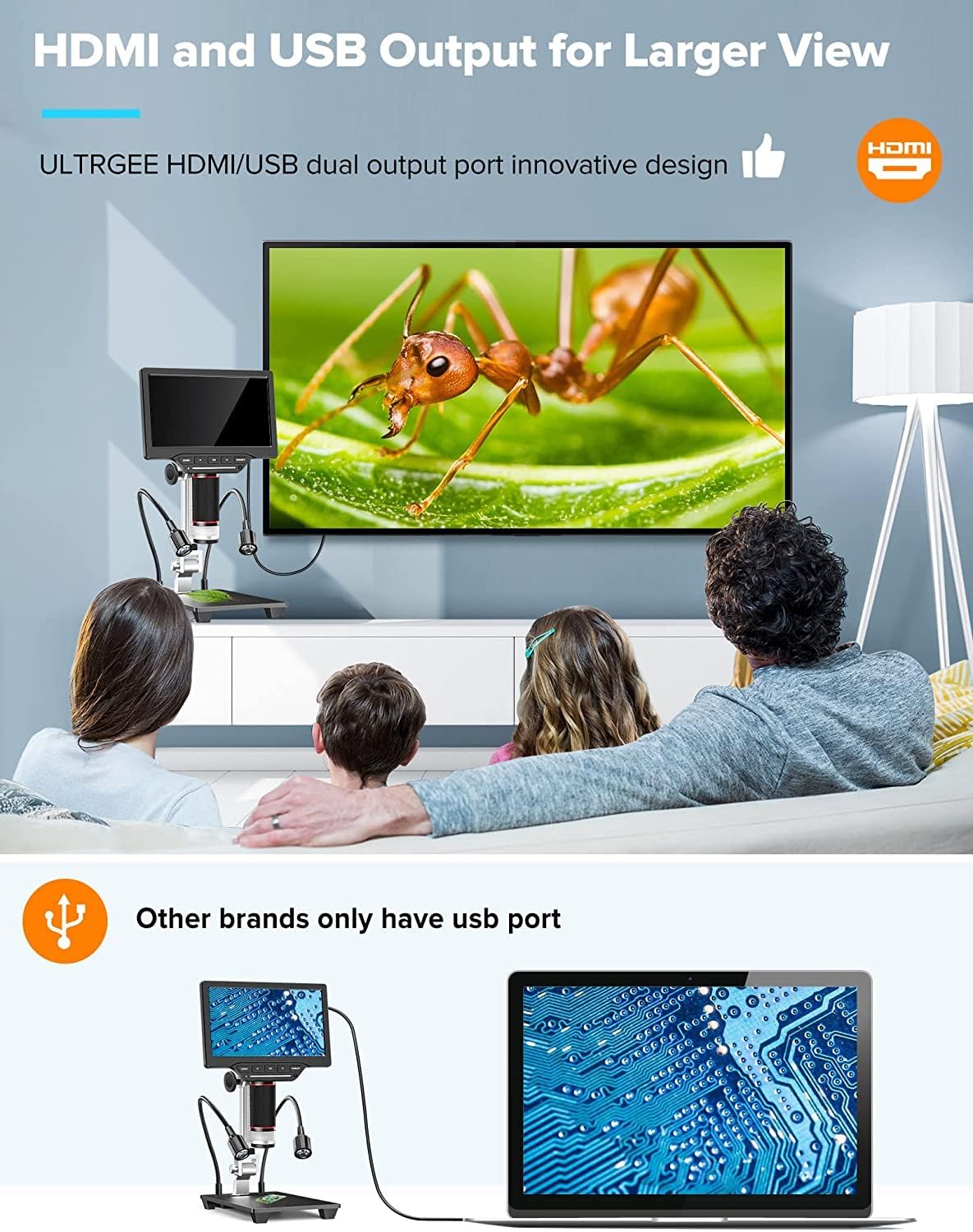
Obrázek 8: The Dcorn microscope connected to an external monitor via HDMI and to a laptop via USB, illustrating its dual output capabilities for a wider viewa sdílení zkušeností.
Údržba
- Čištění objektivu: Use a soft, lint-free cloth specifically designed for optical lenses to gently wipe the microscope lens. Avoid using abrasive materials or harsh chemicals.
- Čištění obrazovky: Use a microfiber cloth to clean the LCD screen. If necessary, slightly damphadřík vodou nebo roztokem na čištění obrazovky.
- Generální úklid: Otřete tělo mikroskopu a stojan suchým nebo lehce navlhčeným hadříkem.amp tkanina.
- Skladování: When not in use, store the microscope in a clean, dry place, away from direct sunlight and extreme temperatures.
Odstraňování problémů
| Problém | Možná příčina | Řešení |
|---|---|---|
| Na obrazovce není žádný obraz | Power not connected; Microscope not turned on; Lens cap still on. | Ensure power adapter is connected and unit is powered on. Remove lens cap. |
| Obraz je rozmazaný | Incorrect focus; Incorrect working distance; Dirty lens. | Adjust the focus wheel. Adjust the height of the microscope. Clean the lens. |
| Cannot capture photos/videos | SD card not inserted; SD card full; SD card corrupted. | Insert SD card. Delete unnecessary files or replace SD card. Format SD card (backup data first). |
| No output to external monitor/PC | Cable not connected properly; Incorrect input selected on external display; Driver not installed (for PC). | Check HDMI/USB cable connections. Select correct input source on monitor/TV. Install software/drivers from the provided CD for PC connection. |
| LED světla nefungují | Lights turned off; Brightness set to 0%. | Turn on lights and increase brightness using touch controls or remote. |
Specifikace
| Značka | Dcorn |
| Číslo modelu | 20230412002 |
| Velikost obrazovky | 10palcový LCD |
| Rozlišení fotoaparátu | 16 megapixelů |
| Rozsah zvětšení | 10x - 1500x |
| Rozlišení videa | 1920x1080 30fps, 1280x1020 60fps |
| Rozlišení fotografie | Up to 5376x3024 (16MP) |
| Skladování | 32GB Micro SD karta (součástí balení) |
| Výstupní porty | HDMI, USB |
| Kompatibilní zařízení | Devices with HDMI port, MacOS, Windows PCs |
| Osvětlení | 6 Main LEDs, 2 Side LEDs (Dimmable Touch Control) |
| Materiál | Kov, ABS |
| Rozměry produktu (D x Š x V) | 11.5 x 20 x 36.5 cm |
| Vodotěsná úroveň | Není vodotěsný |
Záruka a podpora
The Dcorn 10-inch LCD HDMI Digital Microscope comes with a 5-letá záruka. For technical support, warranty claims, or further assistance, please refer to the contact information provided with your purchase or visit the official Dcorn webmísto.
Spare Parts Availability: Information unavailable.
Software Updates Guaranteed Until: Information unavailable.

