Zavedení
The Qanba Obsidian 2 Wired Joystick is a high-performance arcade stick designed for competitive fighting games. It is compatible with PlayStation 5, PlayStation 4, and PC, offering a versatile gaming experience. This manual provides essential information for setting up, operating, and maintaining your Qanba Obsidian 2 joystick.

Figure 1: Qanba Obsidian 2 Arcade Joystick overview, highlighting PS5, PS4, and PC compatibility.
Vlastnosti produktu
- Kompatibilita s více platformami: Fully compatible with PlayStation 5, PlayStation 4, and PC.
- Oficiální licence: Officially licensed Sony peripheral, ensuring seamless integration and performance.
- Prémiové komponenty: Equipped with Sanwa Denshi joystick and 30mm OBSF push buttons for precise and responsive input.
- Kompletní ovládací panel: Features a comprehensive control panel including L3, Turbo, Mute, R3 buttons, and switches for DP/LS/RS and PS5/PS4/PC modes.
- Integrovaný dotykový panel: Includes a touch pad for enhanced functionality in compatible games.
- Audio konektivita: Built-in 3.5mm microphone input with a dedicated mute button for communication.
- Swappable Joystick Tops: Supports interchangeable Sanwa JLF joystick tops, with both ball top and bat top included for user preference.
- Protiskluzová základna: Features an anti-slip base pad for stability during intense gameplay.
- Integrované úložiště: Convenient storage compartments for joystick tops and USB cable.

Obrázek 2: Nahoře view of the Qanba Obsidian 2 joystick, showcasing its layout and glossy finish.
Průvodce nastavením
1. Připojení k systému
- Locate the integrated USB cable stored within the joystick's left storage compartment.
- Connect the USB cable to an available USB port on your PlayStation 5, PlayStation 4, or PC.
- The joystick is plug-and-play; no additional drivers are typically required for basic functionality.
2. Platform Selection
The Qanba Obsidian 2 features a switch on the control panel to select the desired platform mode (PS5, PS4, or PC). Ensure the switch is set to the correct platform for optimal performance.

Figure 3: Control panel detail, highlighting the platform selection switch.
3. Joystick Top Installation (Optional)
The joystick comes with both a ball top and a bat top. To change the joystick top:
- Access the thumb screw at the bottom of the joystick.
- Unscrew the current joystick top.
- Screw on the desired joystick top (ball or bat).
- Ujistěte se, že je bezpečně upevněn.
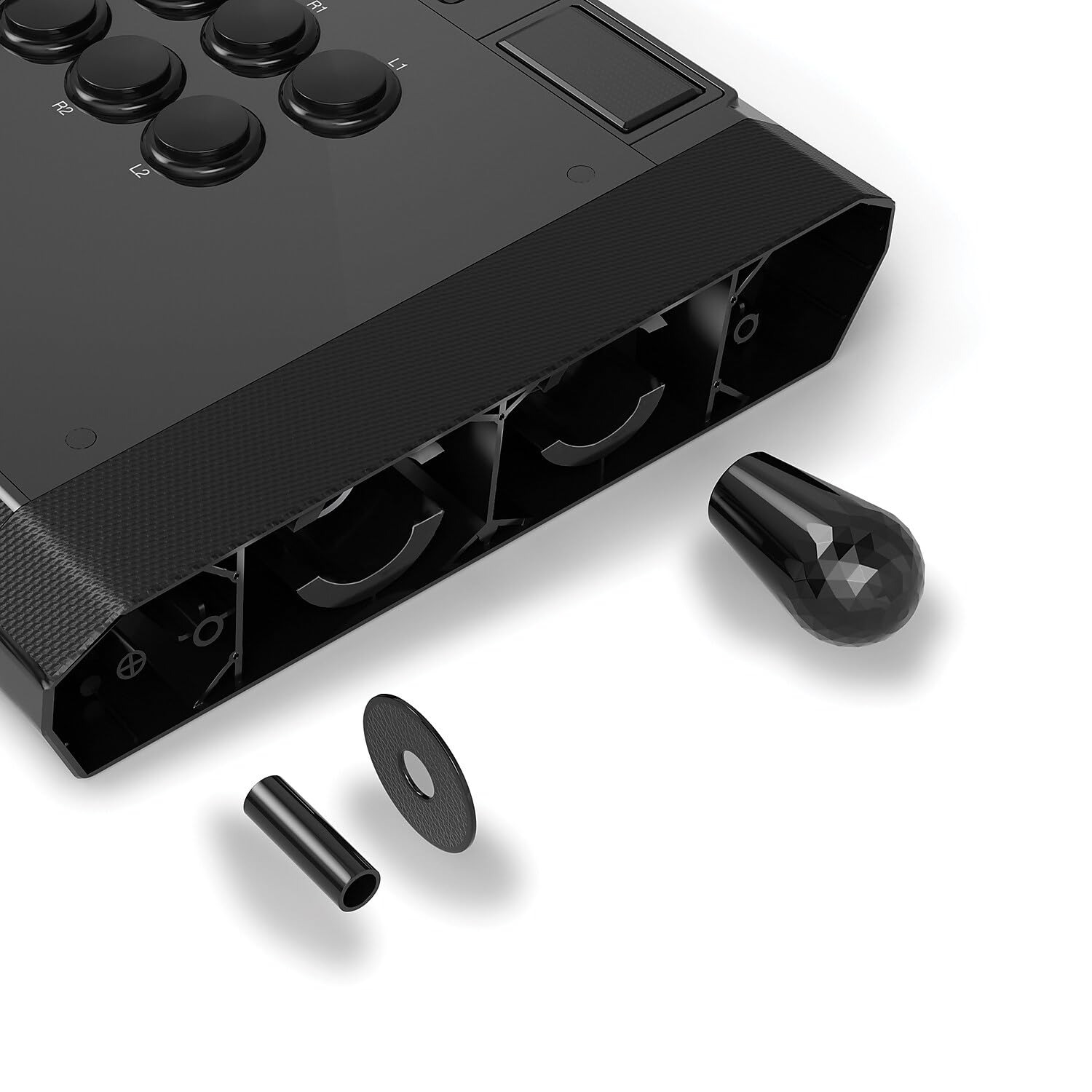
Figure 4: Swappable joystick tops and components.

Figure 5: Illustration of thumb screw access and internal storage for joystick tops and USB cable.
Návod k obsluze
1. Základní ovládací prvky
- joystick: Used for directional input.
- Main Buttons: Eight large buttons (Square, Triangle, X, Circle, R1, R2, L1, L2) for primary game actions.
- Tlačítka na ovládacím panelu:
- Tlačítko PS: PlayStation system button.
- L3/R3: Corresponds to L3/R3 on a standard controller.
- Turbo: Activates turbo function for selected buttons.
- Ztlumit: Mutes the microphone input.
- DP/LS/RS Switch: Changes the joystick's directional input mode (D-Pad, Left Stick, Right Stick).
- PS5/PS4/PC Switch: Selects the compatible platform mode.
- Přepínač zámku turnaje: Disables certain control panel buttons to prevent accidental presses during competitive play.
- Touch Pad: Functions as a touch pad for compatible games and system navigation.
- 3.5mm mikrofonní vstup: Connect a headset for in-game communication.
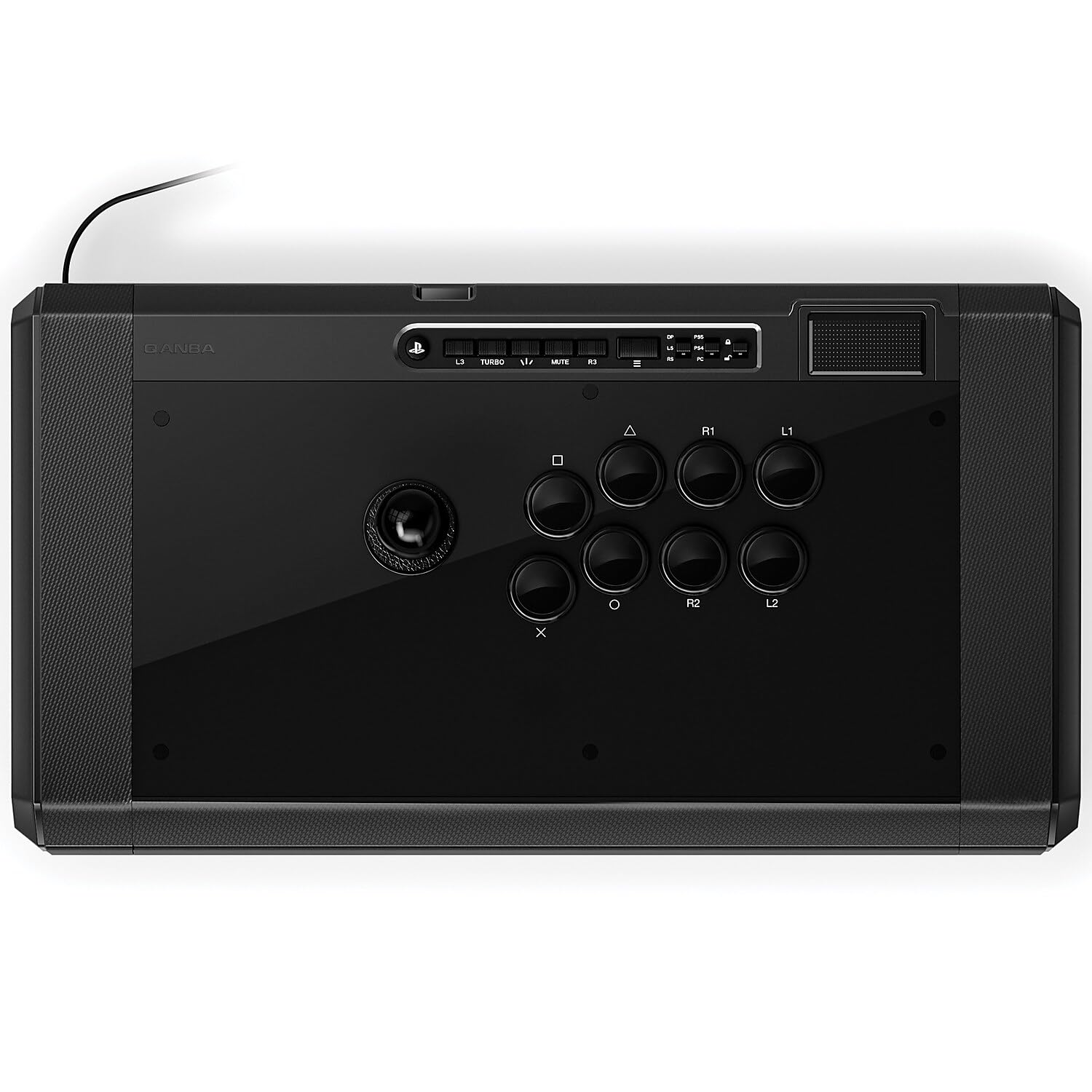
Obrázek 6: Detailní view of the Qanba Obsidian 2 control panel.

Figure 7: Location of the 3.5mm microphone input and mute button.
2. Videoukázka
Pro lepší představu se podívejte na toto oficiální video o produktuview of the Qanba Obsidian 2's features and design.
Video 1: Official Qanba Obsidian 2 Product Overview. This video highlights the key features and design elements of the joystick, including its Sanwa buttons, control panel, and storage options.
Údržba
1. Čištění
The glossy surface of the Qanba Obsidian 2 is prone to fingerprints and smudges. To maintain its appearance and hygiene:
- Use a soft, lint-free cloth (e.g., microfiber) to gently wipe down the surface.
- Pro odolné skvrny lehce otřeteampOmyjte hadřík vodou nebo jemným, neabrazivním čisticím prostředkem. Vyhněte se agresivním chemikáliím.
- Regular cleaning is recommended, especially after extended use.
2. Skladování
Utilize the integrated storage compartments for the USB cable and extra joystick tops to keep them secure and prevent damage when not in use.

Figure 8: USB cable storage compartment.
Odstraňování problémů
| Problém | Možná příčina | Řešení |
|---|---|---|
| Joystick not recognized by system. | Incorrect platform mode selected; Loose USB connection; System driver issue. |
|
| Buttons or joystick unresponsive. | Tournament Lock switch engaged; Internal component issue. |
|
| Mikrofon nefunguje. | Mute button engaged; Headset not properly connected; System audio settings. |
|
For more detailed troubleshooting or advanced issues, please refer to the official User Manual PDF available for download from the manufacturer's webweb nebo stránka produktu.
Specifikace
| Funkce | Detail |
|---|---|
| Číslo modelu | Q7 |
| Kompatibilita | PlayStation 5, PlayStation 4, PC |
| Typ joysticku | Sanwa Denshi JLF |
| Typ tlačítka | Sanwa Denshi 30mm OBSF |
| Konektivita | Kabelové USB |
| Rozměry (D x Š x V) | 19.1 x 10.2 x 4.6 palce (48.6 x 26.0 x 11.6 cm) |
| Hmotnost | 7.4 libry (3.40 kg) |
| Výrobce | QANBA USA,LLC |
| Země původu | Čína |

Figure 9: Physical dimensions and weight of the Qanba Obsidian 2.
Záruka a podpora
The Qanba Obsidian 2 Wired Joystick is manufactured by QANBA USA,LLC. For detailed information regarding product warranty, technical support, and service, please refer to the official user manual PDF or visit the Qanba official webmísto.
Always ensure you are using official channels for support to guarantee authentic assistance and valid warranty claims.


