1. Úvod
The Sony FX3 Full-Frame Cinema Camera (ILME-FX3) is designed for solo shooters and travel applications, serving as a portable cinema camera. It integrates features from both Sony's Cinema Line and Alpha series. The FX3 features a lightweight, handheld form factor with a streamlined profile and a 'cage-free' design, allowing direct attachment of various accessories to the camera body. Its 12.1MP Exmor R BSI CMOS sensor (10.2MP effective in video mode) and BIONZ XR processor enable UHD 4K video capture with internal 10-bit 4:2:2 sampling or 16-bit raw output. The sensor's BSI design enhances clarity and sensitivity, offering an expandable ISO 80-409,600 range and over 15 stops of dynamic range for diverse lighting conditions.
2. Bezpečnostní informace
Please read all safety instructions carefully before using the camera. Retain this manual for future reference.
- Zdroj napájení: Use only the specified battery and charger. Do not attempt to disassemble or modify the battery.
- Voda a vlhkost: This camera is not waterproof. Avoid exposure to rain, moisture, or high humidity to prevent electric shock or malfunction.
- Teplota: Do not expose the camera to extreme temperatures (hot or cold). Operating temperature range is typically 0°C to 40°C (32°F to 104°F).
- Zacházení: S fotoaparátem zacházejte opatrně. Zabraňte jeho pádu nebo silným nárazům.
- Čištění: Use a soft, dry cloth for cleaning. Do not use organic solvents.
- Likvidace: Baterie a elektronické součástky zlikvidujte v souladu s místními předpisy.
3. Obsah balení
Ověřte, zda jsou v balení obsaženy všechny níže uvedené položky:
- Sony FX3 Full-Frame Cinema Camera (ILME-FX3)
- Rukojeť XLR
- Krytka sáněk pro příslušenství
- Sada příslušenství pro patice
- Nabíječka baterií Sony BC-QZ1
- Čepice těla
- Handle Shoe Cap
- Napájecí kabel
- Dobíjecí lithium-iontová baterie Sony NP-FZ100 (2280 mAh)
- Kabel USB typu A na typ C (USB 3.2)
- Lilliput A7S 7" Full HD Monitor
- 2 x SanDisk SecureDigital 64GB Extreme PRO Memory Card
- Měkká taška
- 3 x NP-FZ100 Compatible Battery
- LED světlo
- Čtečka paměťových karet
- Corel Photo Software (PhotoMirage, AfterShot, Painter Essentials, PaintShop Pro, Video Studio)
- Rode VideoMicro Ultracompact Camera-Mount Shotgun Microphone
- 12palcový flexibilní stativ
- Řemínek na ruku
- Peněženka na paměťovou kartu
- Držák krytky objektivu
- Čisticí sada
- HDMI kabel
4. Fotoaparát skončilview
Familiarize yourself with the physical components and controls of your Sony FX3 camera.

Obrázek 4.1: Přední view of the Sony FX3 camera body, showing the E-mount for interchangeable lenses and the full-frame sensor. The grip is visible on the left side.

Obrázek 4.2: Přední view of the Sony FX3 camera with a Zeiss Sonnar FE 55mm F1.8 ZA lens attached. This illustrates the camera's compact form with a lens.

Obrázek 4.3: Zadní view of the Sony FX3, displaying the LCD screen, control dial, and various buttons such as MENU, FOCUS MAG, Fn, DISP, ZEBRA, PEAKING, SHUTTER, and playback controls.
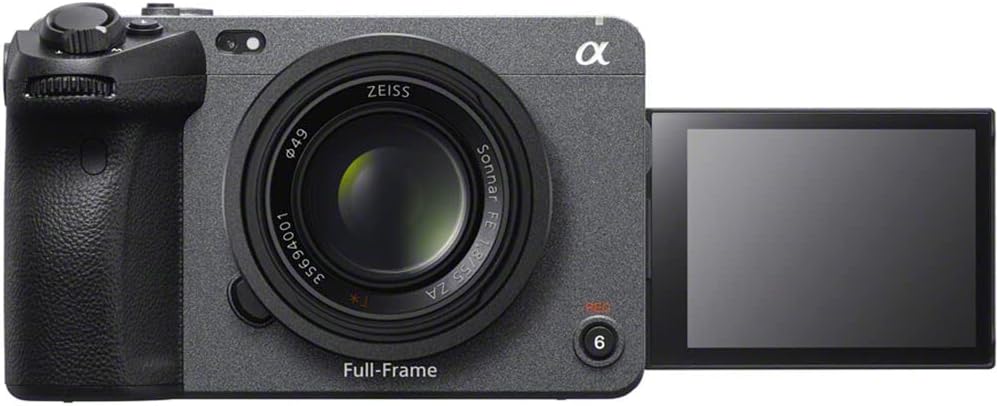
Obrázek 4.4: Přední view of the Sony FX3 with the LCD screen articulated outwards, demonstrating its flexible viewing angles for various shooting scenarios.
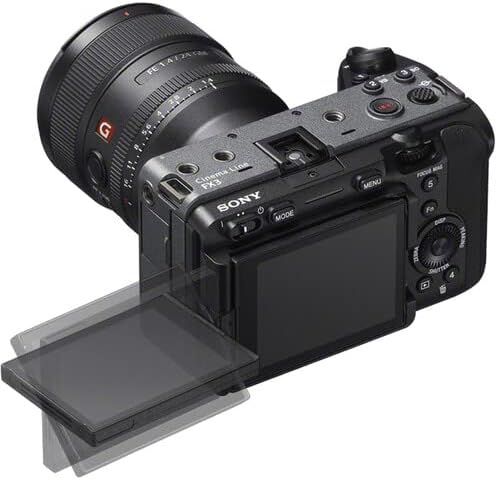
Obrázek 4.5: Top-rear perspective of the Sony FX3, showing the articulated LCD screen, a mounted lens, and top-panel controls including the record button and mode dial.

Obrázek 4.6: Levá strana view of the Sony FX3, revealing the battery compartment and dual CFexpress Type A/SDXC card slots, secured by a lock/open mechanism.

Obrázek 4.7: Pravá strana view of the Sony FX3, displaying various input/output ports including HDMI, USB-C (MULTI), USB-A (CHG), headphone jack, and microphone input with plug-in power.
5. Nastavení
5.1. Instalace a nabíjení baterie
- Open the battery cover on the left side of the camera (refer to Figure 4.6).
- Insert the NP-FZ100 battery with the arrow facing inward until it locks into place.
- Zavřete kryt baterie.
- To charge, remove the battery and insert it into the supplied BC-QZ1 charger. Connect the charger to a power outlet using the power cord. The charging indicator will illuminate during charging and turn off when complete.
5.2. Instalace paměťové karty
- Open the memory card slot cover on the left side of the camera (refer to Figure 4.6).
- Insert a CFexpress Type A or SDXC memory card into the appropriate slot until it clicks. Ensure the card is oriented correctly.
- Zavřete kryt slotu paměťové karty.
- Format the memory card in the camera before first use to ensure optimal performance.
5.3. Připevnění příslušenství
- XLR Handle Unit: Attach the XLR handle unit to the multi-interface shoe on top of the camera. Secure it using the locking mechanism.
- Lilliput A7S 7" Monitor: Connect the monitor to the camera via an HDMI cable (refer to Figure 4.7 for HDMI port location). Mount the monitor using a suitable mounting solution.
- Rode VideoMicro Microphone: Connect the microphone to the camera's microphone input jack (refer to Figure 4.7).
5.4. Počáteční zapnutí a základní nastavení
- Stisknutím tlačítka POWER zapněte fotoaparát.
- Postupujte podle pokynů na obrazovce a nastavte datum, čas a jazyk.
- Adjust basic settings such as video format (e.g., XAVC S-I 4K), frame rate, and picture profile (e.g., S-Cinetone) as needed for your shooting requirements.
6. Ovládání fotoaparátu
6.1. Základní nahrávání videa
- Zapnutí: Zapněte fotoaparát pomocí tlačítka POWER.
- Vyberte režim: Use the MODE button or dial to select your desired shooting mode (e.g., Movie mode).
- Upravit nastavení: Set ISO, aperture, and shutter speed. The FX3 offers an expandable ISO range of 80-409,600.
- Soustředit: Utilize the Fast Hybrid AF system. The camera supports Face Tracking and Eye AF for precise subject focus.
- Spustit/ukončit nahrávání: Press the REC button (often located on the top or front grip) to start recording. Press again to stop.
6.2. Advanced Video Features
- Záznam videa v rozlišení 4K: The camera supports UHD 4K up to 120fps and 1080p up to 240fps.
- Interní nahrávání: Record internally with 10-bit 4:2:2 sampling using XAVC S-I.
- Raw Output: Output 16-bit raw video via HDMI to compatible external recorders.
- Barva Profiles: Use S-Cinetone for cinematic color science, or S-Log3/2 for maximum dynamic range in post-production. 10-bit HLG (Hybrid Log-Gamma) is available for direct HDR productions.
- Dynamický rozsah: Benefit from over 15 stops of dynamic range for capturing detail in both highlights and shadows.
6.3. Přehrávání
- Press the Playback button (often marked with a triangle icon).
- Use the control dial or directional buttons to navigate through your recorded footage.
- Press the center button to play or pause a video.
Oficiální videa produktů
6.1 video: Konecview of the Sony FX3 Full-Frame Cinema Camera, highlighting its key features and design for cinematic production. (Duration: 3:11)
6.2 video: A detailed demonstration of the Sony FX3's advanced functionalities, including autofocus performance and color science. (Duration: 5:23)
7. Údržba
7.1. Čištění fotoaparátu
- Tělo fotoaparátu: Tělo fotoaparátu otřete měkkým, suchým hadříkem. V případě odolných nečistot lehceampen the cloth with water and then wipe dry. Avoid using alcohol or other chemical cleaners.
- Čočka: K odstranění prachu použijte kartáč na objektivy a poté jemně otřete hadříkem na čištění objektivů a roztokem na čištění objektivů.
- Senzor: Sensor cleaning should be performed with extreme care. If dust spots appear on images, use a blower brush. For persistent dust, consult a professional service center.
- LCD obrazovka: Jemně otřete měkkým hadříkem, který nepouští vlákna.
7.2. Skladování
- Pokud fotoaparát delší dobu nepoužíváte, vyjměte z něj baterii.
- Fotoaparát skladujte na chladném a suchém místě, mimo dosah přímého slunečního záření a extrémních teplot.
- Použijte vysoušecí prostředek, abyste zabránili vzniku plísní ve vlhkém prostředí.
8. Řešení problémů
If you encounter issues with your Sony FX3, refer to the following common problems and solutions:
| Problém | Možná příčina / řešení |
|---|---|
| Fotoaparát se nezapne. | Baterie může být vybitá nebo nesprávně vložená. Ujistěte se, že je baterie nabitá a správně vložená. |
| Nelze nahrávat video. | Memory card may be full, locked, or not formatted. Check card status and format if necessary. Ensure sufficient battery charge. |
| Obrázky jsou rozmazané. | Check focus settings (AF/MF). Ensure lens is clean. Verify shutter speed is appropriate for lighting conditions to avoid motion blur. |
| Žádný zvukový záznam. | Check microphone connection. Verify audio recording settings in the camera menu. Ensure microphone is powered if required. |
| Fotoaparát se přehřívá. | Prolonged recording in high ambient temperatures can cause overheating. Allow the camera to cool down. Reduce recording resolution or frame rate if possible. |
9. Specifikace
| Funkce | Detail |
|---|---|
| Značka | Sony |
| Číslo modelu | ILME-FX3 |
| Typ snímače | 12.1MP Full-Frame CMOS Exmor R Sensor (10.2MP effective in video mode) |
| Rozlišení záznamu videa | UHD 4K (up to 120fps), 1080p (up to 240fps) |
| Interní nahrávání | 10-Bit 4:2:2 XAVC S-I |
| Externí výstup | 16-Bit Raw Output via HDMI |
| Dynamický rozsah | 15+ Stops |
| Rozsah ISO | 80 až 409,600 (rozšířené) |
| Systém automatického zaostřování | Phase Detection AF, Face Tracking, Eye AF |
| Barva Profiles | S-Cinetone, S-Log3/2, HLG |
| Sloty pro paměťové karty | Dual CFexpress Type A / SDXC Card Slots |
| Konektivita | USB, HDMI |
| Velikost obrazovky | 7 Inches (Lilliput A7S Monitor) |
| Hmotnost položky | 10.4 pounds (approximate, with accessories) |
| Rozměry produktu | 9.6 x 9.1 x 5.8 inches (approximate, with accessories) |
| Speciální funkce | Proti otřesům, slabé osvětlení, časosběr |
10. Záruka a podpora
This product is covered by Sony's standard warranty. For specific warranty terms and conditions, please refer to the warranty card included with your product or visit the official Sony support webweb. Pro technickou pomoc, řešení problémů nebo servisní dotazy se obraťte na zákaznickou podporu společnosti Sony.
Online zdroje: For the latest firmware updates, detailed manuals, and support articles, please visit the official Sony support webmísto.


