Zavedení
This user manual provides essential information for the safe and efficient operation of your WORKPRO 12V Li-ion Battery Pack Charger. Please read this manual thoroughly before use and retain it for future reference. This charger is specifically designed for WORKPRO 12V Li-ion Battery Packs and is not compatible with other brands or battery types.
Důležité bezpečnostní informace
- Always ensure the charger is connected to a power source within the specified voltage rozsah (100-240VAC).
- Nepokoušejte se nabíjet nedobíjecí baterie.
- This charger is designed exclusively for WORKPRO 12V Li-ion Battery Packs. Using it with incompatible batteries or other brands may cause damage to the charger, battery, or personal injury.
- Do not expose the charger to rain or wet conditions. Use in dry locations only.
- Odpojte nabíječku ze zásuvky, pokud ji nepoužíváte, nebo před čištěním.
- Nepoužívejte nabíječku, pokud utrpěla silný úder, upustila nebo byla jakkoli poškozena.
- Udržujte nabíječku mimo zdroje tepla a přímého slunečního záření.
- Během nabíjení zajistěte dostatečné větrání. Nabíječku nezakrývejte.
Konec produktuview
The WORKPRO 12V Li-ion Battery Pack Charger consists of two main components: the AC-DC adapter and the charging base.
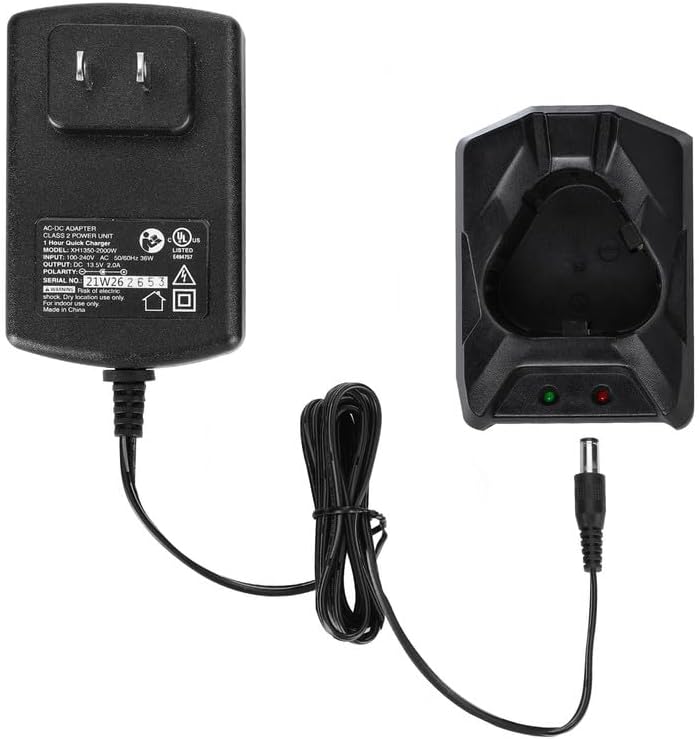
Obrázek 1: Nadview of the WORKPRO 12V Li-ion Battery Pack Charger, showing the AC-DC adapter and the separate charging base connected by a cable.
- AC-DC Adapter: Converts household AC power to the DC power required for charging.
- Nabíjecí základna: The cradle where the 12V Li-ion battery pack is inserted for charging. It features indicator lights to show charging status.
Nastavení
- Rozbalit: Carefully remove the charger and all components from the packaging.
- Připojit: Plug the output cable from the AC-DC adapter into the input port on the charging base.
- Zapnutí: Plug the AC-DC adapter into a standard 100-240VAC wall outlet.

Obrázek 2: The WORKPRO 12V Li-ion Battery Pack Charger plugged into a wall outlet, ready for use. This charger is exclusively for WORKPRO 12V Li-ion Battery Packs.
Návod k obsluze
Nabíjení baterie
- Ensure the charger is properly set up and plugged into a power outlet.
- Insert a compatible WORKPRO 12V Li-ion Battery Pack into the charging base. Ensure it clicks securely into place.
- Observe the indicator lights on the charging base:
- A červené světlo indicates that the battery pack is currently charging.
- A zelené světlo indicates that the battery pack is fully charged.
- The typical charging time for a fully depleted battery pack is approximately 1 hour.
- Once the green light illuminates, the battery is fully charged. Disconnect the battery pack from the charger and unplug the charger from the power outlet.
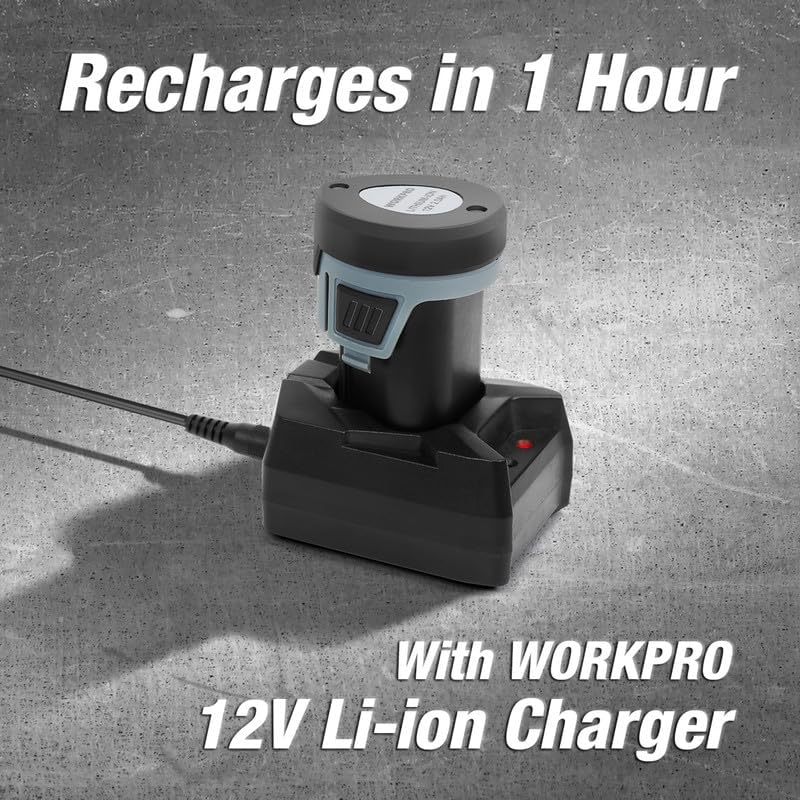
Obrázek 3: A WORKPRO 12V Li-ion Battery Pack inserted into the charging base, with the red indicator light showing that charging is in progress. A full charge typically takes 1 hour.
Oznámení o kompatibilitě
This charger is designed exclusively for WORKPRO 12V Li-ion Battery Packs. It is not compatible with battery packs from other brands or other voltage WORKPRO battery packs (e.g., 20V). Attempting to charge incompatible batteries may result in damage or malfunction.

Obrázek 4: Visual representation of compatible WORKPRO 12V Li-ion Battery Packs and incompatible battery types, including other brands and WORKPRO 20V batteries.
Údržba
- Čištění: Disconnect the charger from the power source before cleaning. Use a soft, dry cloth to wipe the exterior of the charger. Do not use abrasive cleaners or solvents.
- Skladování: Store the charger in a dry, cool place, away from direct sunlight and moisture, when not in use.
- Inspekce: Periodically inspect the charger cord and housing for any signs of damage. If damage is observed, discontinue use and contact customer support.
Odstraňování problémů
| Problém | Možná příčina | Řešení |
|---|---|---|
| Kontrolka nabíječky nesvítí. | No power to the charger; charger or outlet malfunction. | Check if the charger is securely plugged into a working outlet. Try a different outlet. Ensure the adapter cable is firmly connected to the charging base. |
| Red light is always on, but battery does not charge. | Battery not properly seated; incompatible battery; battery fault. | Ensure the battery pack is fully inserted into the charging base. Verify that the battery is a genuine WORKPRO 12V Li-ion Battery Pack. If the issue persists, the battery or charger may be faulty. |
| Green light is always on, even when battery is inserted. | Battery already fully charged; charger malfunction; battery not making proper contact. | Confirm the battery requires charging. Re-insert the battery to ensure proper contact. If the battery is known to be discharged and the light remains green, the charger may be faulty. |
| Charger or battery becomes excessively hot during charging. | Poor ventilation; faulty battery or charger. | Ensure the charger is in a well-ventilated area. Discontinue charging immediately if overheating occurs. Contact customer support. |
Specifikace
| Funkce | Detail |
|---|---|
| Číslo modelu | W126083AE |
| Vstupní objemtage | 100-240VAC, 50/60HZ |
| Výstupní objemtage | 13.5V DC |
| Výstupní proud | 2.0A |
| Doba nabíjení | Přibližně 1 hodina (při plně vybité baterii) |
| Délka nabíjecího kabelu | 1.8 metrů |
| Kompatibilní modely baterií | WORKPRO 12V Li-ion Battery Packs (W123015AE, W123016AE, W121037AE, W125077AE, W125110AE, W009088AE) |
| Hmotnost položky | 8.4 unce (cca 238 gramů) |
| Výrobce | HANGZHOU GREATSTAR INDUSTRIAL CO.LTD |
Záruka a podpora
For warranty information or technical support, please contact WORKPRO customer service. Refer to the product packaging or the official WORKPRO webstránky s nejaktuálnějšími kontaktními údaji.
When contacting support, please have your product model number (W126083AE) and purchase information readily available.
Důležitá poznámka: If you are unsure which products are suitable for this charger, please consult WORKPRO customer service in advance to ensure compatibility and avoid potential issues.


