1. Úvod
Thank you for choosing the Browning Dark Ops Full HD Extreme Trail Camera. This camera is designed for capturing high-quality images and videos of wildlife with its advanced motion-activated system and invisible infrared illumination. This manual provides detailed instructions for setting up, operating, and maintaining your camera to ensure optimal performance.
2. Obsah balení
Prosím, ověřte, zda jsou v balení přítomny všechny položky:
- Browning Dark Ops Full HD Extreme Trail Camera (Main camera unit)
- Montážní popruh
- Návod k použití (tento dokument)
Poznámka: Baterie a SD karta se prodávají samostatně.
3. Fotoaparát skončilview
Familiarize yourself with the key components of your Browning Dark Ops Full HD Extreme Trail Camera.
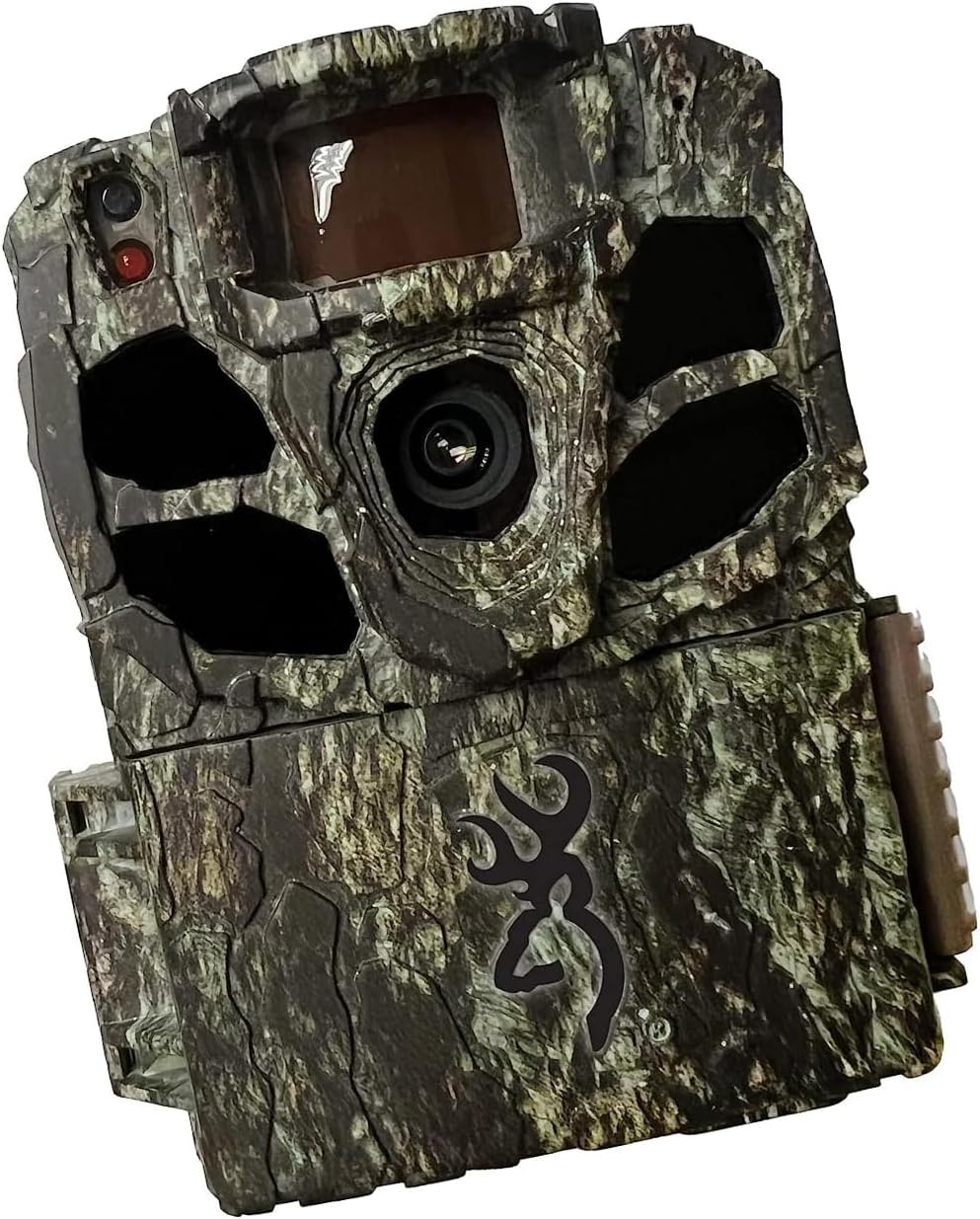
Obrázek 3.1: Přední view of the Browning Dark Ops Full HD Extreme Trail Camera, showcasing its camouflage design and primary lens.

Obrázek 3.2: Vnitřní view of the camera with the front cover open, displaying the LCD screen, navigation buttons (E, arrows), ON/OFF switch, MODE button, SD card slot, and Eject button.
Mezi klíčové komponenty patří:
- Hlavní objektiv: Zachycuje obrázky a videa.
- Infračervené LED diody: Provide invisible illumination for night vision.
- Pohybový senzor (PIR): Detekuje pohyb pro spuštění nahrávání.
- LCD obrazovka: Displays menu options and settings.
- Ovládací tlačítka: Pro navigaci v menu a úpravu nastavení.
- Přepínač ON/OFF: Zapne nebo vypne fotoaparát.
- Tlačítko MODE: Switches between setup, photo, and video modes.
- Slot pro SD kartu: Pro vložení paměťové karty.
- Přihrádka na baterie: Pojme potřebné baterie.
4. Nastavení
4.1 Instalace baterie
- Otevřete kryt kamery uvolněním bočních spon.
- Najděte přihrádku na baterie.
- Vložte 8 baterií typu AA a dbejte na správnou polaritu (+/-) vyznačenou uvnitř přihrádky.
- Bezpečně uzavřete přihrádku na baterie.
4.2 Instalace SD karty
- Vypněte fotoaparát a vyhledejte slot pro SD kartu.
- Vložte kompatibilní SD kartu (až 512 GB, není součástí balení) do slotu, dokud nezacvakne.
- It is recommended to format the SD card using the camera's menu system before first use and periodically thereafter. To format, navigate to the 'Format SD Card' option in the camera's setup menu and confirm.
4.3 Montáž fotoaparátu
- Select a sturdy tree or post at the desired location.
- Provlékněte dodaný montážní popruh otvory na zadní straně fotoaparátu.
- Securely fasten the camera to the tree or post, ensuring it is stable and pointed in the desired direction.
- Adjust the camera's angle to cover the intended area. Ensure no obstructions are directly in front of the lens or motion sensor.
5. Návod k obsluze
5.1 Zapnutí/vypnutí
- To power on: Slide the ON/OFF switch to the 'ON' position. The LCD screen will illuminate.
- To power off: Slide the ON/OFF switch to the 'OFF' position.
5.2 Navigace v nabídce
Use the control buttons (up, down, left, right arrows, and 'E' for Enter) to navigate through the camera's menu options. The 'MODE' button switches between different operational modes.
5.3 Výběr režimu
Press the 'MODE' button to cycle through the following operational modes:
- Režim nastavení: Access camera settings and configurations.
- Režim fotografie: Camera captures still images when triggered.
- Režim videa: Camera records video clips when triggered.
- Timelapse Plus Mode: Captures images at set intervals and also triggers on motion.
5.4 Úprava nastavení
In Setup Mode, you can customize various camera settings:
- Rozlišení obrázku: Select from various resolutions up to 24 Megapixels for still photos.
- Rozlišení videa: Choose 1080p Full HD for video recording.
- Rychlost spouštění: Adjust the trigger speed from 0.135 to 0.7 seconds to capture fast-moving subjects.
- Rozsah blesku: Set the infrared flash range up to 90 feet for night captures.
- Rozsah detekce: Configure the motion detection range up to 80 feet.
- IR osvětlení: Utilize the Radiant 4 LED system for optimal night-time visibility.
- Timelapse Plus: Configure intervals for timelapse photography.
- Smart IR Video: Optimizes infrared recording for efficient storage.
5.5 Správa SD karty
The camera features an SD Card Management system to optimize storage. This system helps overwrite older files when the card is full, ensuring continuous operation. Refer to the camera's menu for specific settings related to SD card management.
6. Klíčové vlastnosti
- Invisible Flash: The Dark Ops Full HD Extreme camera features an invisible flash with the innovative Radiant 4 LED system, capturing high-quality night-time images and videos without disturbing wildlife.
- Široké pole View: S úhlem 55 stupňů view, this camera allows for a broader coverage area, ensuring you capture more of the action.
- HDR Night Photos: The addition of HDR night photos enhances the camera's ability to capture clear and detailed images in low-light conditions.
- Adjustable Trigger Speeds: Users can customize their experience by adjusting the trigger speed to match their specific preferences, ensuring precise and timely capture of wildlife activity.
- Skladování a organizace: The camera includes a unique SD Card Management system and Smart IR Video setting to enhance storage efficiency and optimize infrared recording.
7. Specifikace
| Specifikace | Detail |
|---|---|
| Efektivní rozlišení | 24 MP |
| Rozlišení záznamu videa | 1080p Full HD |
| Max Shutter Speed (Trigger Speed) | 0.135 to 0.7 seconds (adjustable) |
| Rozsah blesku | 90 feet (Infrared IR illumination) |
| Rozsah detekce | 80 stop (nastavitelné) |
| IR LED diody | Radiant 4 LED System |
| Zdroj napájení | Napájení na baterie (8 AA baterie, nejsou součástí balení) |
| Technologie připojení | Wireless (Wi-Fi for certain features/connectivity, though direct remote viewing is not specified) |
| Vnitřní/venkovní použití | Venkovní |
| Úroveň odolnosti proti vodě | IP65 (prachotěsné a chráněné proti tryskající vodě) |
| Rozměry (D x Š x V) | 3.13 x 9.13 x 4.75 palce |
| Hmotnost položky | 1.06 libry |
| Číslo modelu | BTC-6FHDX |
8. Řešení problémů
Pokud se s fotoaparátem setkáte s problémy, podívejte se na následující běžné problémy a jejich řešení:
- Kamera se nezapíná:
- Ujistěte se, že jsou baterie vloženy správně se správnou polaritou.
- Zkontrolujte, zda jsou baterie plně nabité, nebo je vyměňte za nové.
- Ověřte, zda je vypínač ZAP/VYP v poloze „ZAPNUTO“.
- Nebyly pořízeny žádné snímky/videa:
- Confirm the SD card is properly inserted and formatted.
- Zkontrolujte, zda je na SD kartě dostatek volného místa.
- Ensure the camera is in an active recording mode (Photo, Video, or Timelapse Plus).
- Verify that the motion sensor is not obstructed and the detection range is set appropriately.
- Test the camera's motion detection by walking in front of it.
- Špatná kvalita obrazu/videa:
- Čočku fotoaparátu čistěte měkkým suchým hadříkem.
- Adjust image/video resolution settings to a higher quality.
- Ensure the camera is stable and not subject to movement from wind or animals.
- For night images, ensure subjects are within the effective flash range.
- Krátká výdrž baterie:
- Používejte vysoce kvalitní alkalické nebo lithiové baterie.
- Reduce the frequency of captures or video length in settings.
- In cold weather, battery performance can decrease; consider using lithium batteries for better cold-weather performance.
9. Údržba
- Čištění: Regularly clean the camera lens and the PIR sensor window with a soft, lint-free cloth. Avoid abrasive materials or harsh chemicals.
- Péče o baterie: Pokud fotoaparát nebudete delší dobu používat, vyjměte baterie, abyste zabránili jejich vytečení.
- Skladování: Fotoaparát skladujte na chladném a suchém místě mimo dosah přímého slunečního záření a extrémních teplot.
- SD karta: Periodically format your SD card to maintain optimal performance and prevent data corruption.
10. Záruka a podpora
Browning Trail Cameras are covered by a limited warranty. For detailed warranty information, product registration, or technical support, please visit the official Browning Trail Cameras webnebo se obraťte na jejich zákaznický servis. Uschovejte si účtenku jako doklad o koupi pro případ reklamace.
For further assistance, please refer to the contact information provided on the official Browning webmísto: www.browningtrailcameras.com


