1. Úvod
Děkuji za nákupasing the LFF LDR113-EU Kitchen Radio. This manual provides essential information for the safe and efficient operation of your device. Please read it thoroughly before use and retain it for future reference.
The LFF LDR113-EU is a versatile kitchen radio featuring DAB+, FM, and Bluetooth connectivity. It includes dual alarms, a sleep timer, and 60 station presets, designed for both tabletop use and under-cabinet mounting.
2. Bezpečnostní informace
- Zdroj napájení: Používejte pouze dodaný napájecí adaptér. Ujistěte se, že hlasitosttage odpovídá místnímu napájení.
- Voda a vlhkost: Do not expose the device to water, rain, or excessive moisture. Avoid placing liquids near the radio.
- Větrání: Zajistěte dostatečné větrání kolem zařízení. Neblokujte větrací otvory.
- Teplo: Uchovávejte zařízení mimo dosah zdrojů tepla, jako jsou radiátory, topná tělesa, sporáky nebo jiné spotřebiče produkující teplo.
- Čištění: Před čištěním odpojte přístroj od napájení. Použijte měkký, suchý hadřík. Nepoužívejte tekuté ani aerosolové čisticí prostředky.
- Servis: Nepokoušejte se tento výrobek opravit sami. Veškerý servis svěřte kvalifikovanému servisnímu personálu.
- Umístění: Place the radio on a stable, level surface or mount it securely according to the instructions.
3. Obsah balení
Zkontrolujte prosím, zda jsou v balení přítomny všechny položky:
- LFF LDR113-EU Kitchen Radio
- Napájecí adaptér
- Mounting Kit (screws, spacers, mounting template)
- Uživatelská příručka (tento dokument)
4. Konec produktuview
Seznamte se s komponenty a ovládacími prvky rádia.

Obrázek 4.1: Přední view of the LFF LDR113-EU Kitchen Radio, showing the LCD display on the left, control buttons in the center, and a large rotary knob on the right. The buttons include power, mode, menu, info, preset, timer/sleep, and navigation arrows. The rotary knob is for volume and selection.

Obrázek 4.2: Diagram illustrating the key features of the LFF Kitchen Radio, including DAB/DAB+ radio, FM radio, two alarms, sleep timer, Bluetooth connectivity, and 60 station presets.
4.1. Ovládací prvky a displej
- LCD barevný displej: Zobrazuje aktuální režim, informace o stanici, čas a nastavení.
- Vypínač: Zapíná/vypíná rádio.
- Tlačítko režimu: Switches between DAB+, FM, and Bluetooth modes.
- Tlačítko Menu/Informace: Accesses menu options or displays station information.
- Přednastavená tlačítka (1–5): Quick access to saved stations.
- Tlačítko časovače/spánku: Sets sleep timer or alarm functions.
- Navigační tlačítka (nahoru/dolů/vlevo/vpravo): Navigates through menus and station lists.
- Rotary Knob (Volume/Enter): Adjusts volume, scrolls through options, and confirms selections.
5. Nastavení
5.1. Připojení napájení
- Connect the power adapter to the DC IN port on the back of the radio.
- Zapojte napájecí adaptér do elektrické zásuvky.
- The radio will power on or enter standby mode.
5.2. Initial Scan (DAB+ and FM)
Upon first power-on, the radio will typically perform an automatic scan for DAB+ and FM stations. If not, follow these steps:
- Stiskněte tlačítko Režim pro výběr režimu DAB+ nebo FM.
- For DAB+, the radio will usually initiate a full scan automatically. If not, navigate to the 'Full Scan' option in the DAB+ menu and press the rotary knob to confirm.
- For FM, navigate to the 'Auto Scan' option in the FM menu and press the rotary knob to confirm.
- The radio will search for available stations and store them.

Obrázek 5.1: The LFF Kitchen Radio's LCD color screen displaying the main menu with icons for Digital Radio (DAB+), FM Radio, and Bluetooth, indicating available modes.
6. Návod k obsluze
6.1. Zapnutí/vypnutí
Stiskněte tlačítko Moc button to turn the radio on or off (standby mode).
6.2. Výběr režimu
Stiskněte tlačítko Režim button repeatedly to cycle through DAB+, FM, and Bluetooth modes.
6.3. Provoz DAB+ rádia
- In DAB+ mode, use the Nahoru/dolů navigation buttons or the rotary knob to browse available stations.
- Press the rotary knob to select a station.
- Stiskněte Nabídka/Informace na view informace o stanici (např. typ programu, síla signálu).
6.4. Provoz rádia FM
- V režimu FM použijte Nahoru/dolů navigation buttons to tune to stations manually.
- Stiskněte a podržte Nahoru/dolů buttons for automatic station seeking.
- Stiskněte Nabídka/Informace na view informace o stanici.
6.5. Připojení Bluetooth
Connect your smartphone or other Bluetooth-enabled device to the radio.
- Stiskněte tlačítko Režim tlačítko pro výběr režimu Bluetooth. Na displeji se zobrazí „Párování Bluetooth“.
- Na svém mobilním zařízení povolte Bluetooth a vyhledejte dostupná zařízení.
- Select 'LFF LDR113-EU' from the list of devices.
- Once connected, the radio display will show 'Bluetooth Connected'. You can now play audio from your device through the radio.
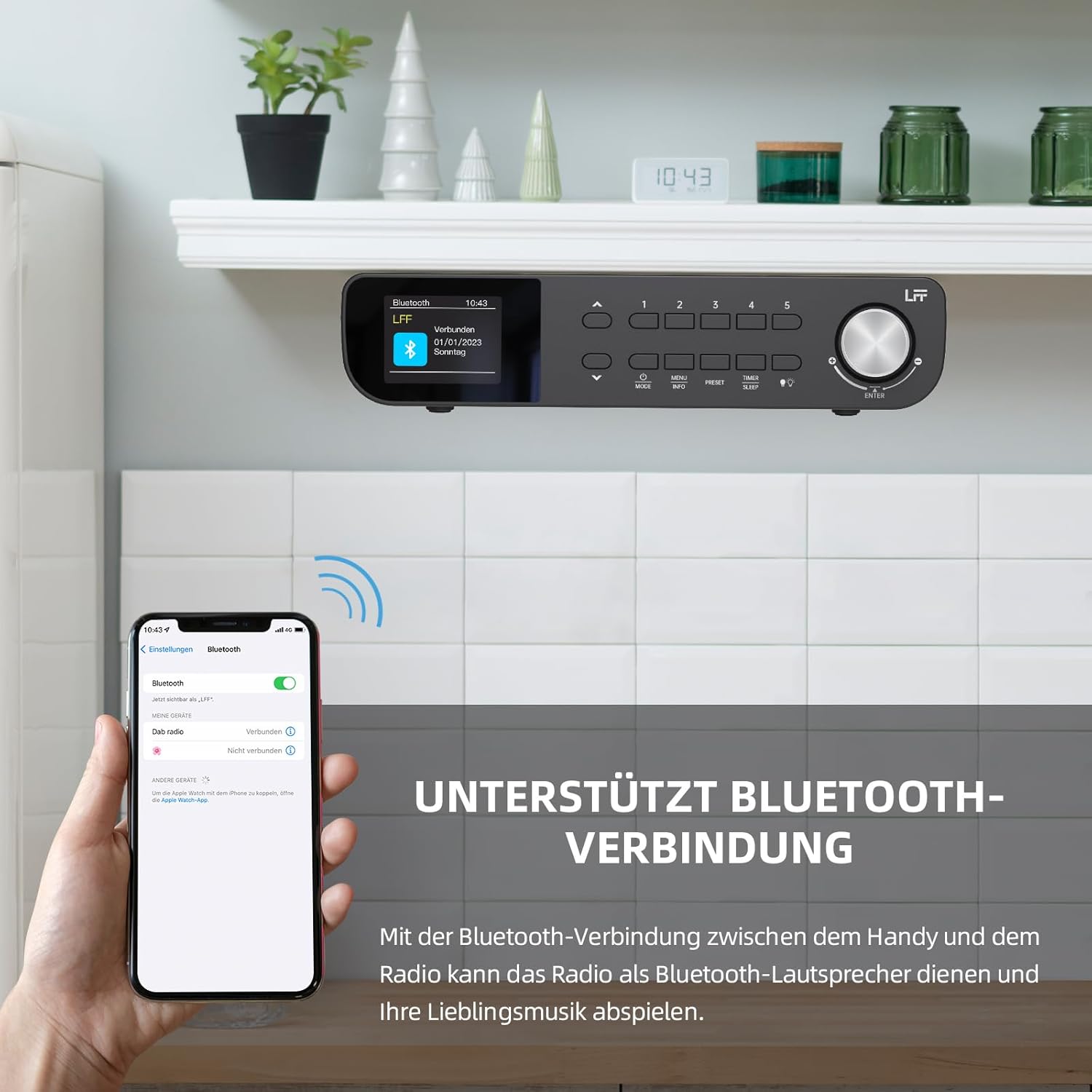
Obrázek 6.1: The LFF Kitchen Radio displaying a successful Bluetooth connection, with a smartphone screen showing the radio as a connected device.

Obrázek 6.2: Detailní záběr view of the radio's display indicating 'LFF' and 'Connected' under the Bluetooth menu, confirming a successful pairing.
6.6. Nastavení alarmů
Rádio má dva nezávislé budíky.
- Stiskněte tlačítko Časovač/Spánek button repeatedly until 'Alarm 1' or 'Alarm 2' appears.
- Use the navigation buttons and rotary knob to set the alarm time, source (DAB+, FM, or Buzzer), and frequency (daily, weekdays, weekends, once).
- Confirm settings by pressing the rotary knob.

Obrázek 6.3: Close-up of the radio's display showing the current time and options to activate or deactivate Alarm 1 and Alarm 2.
6.7. Časovač vypnutí
Časovač vypnutí umožňuje automatické vypnutí rádia po uplynutí nastavené doby.
- Stiskněte tlačítko Časovač/Spánek button repeatedly until 'Sleep Timer' appears.
- Use the navigation buttons or rotary knob to select the desired sleep duration (e.g., 15, 30, 60 minutes).
- Potvrďte stisknutím otočného ovladače.

Obrázek 6.4: Close-up of the radio's display showing the 'Sleep Timer' setting, with an option to set the duration, for example, to 30 minutes.
6.8. Předvolby
Save up to 60 favorite stations for quick access.
- Uložení předvolby: Tune to the desired station. Press and hold one of the Předvolba (1–5) buttons until 'Preset Saved' appears. For additional presets, use the 'Preset Store' option in the menu.
- Vyvolání předvolby: Krátce stiskněte jedno z Předvolba (1–5) buttons. For other presets, navigate to 'Preset Recall' in the menu.
6.9. LED světlo
The radio includes an integrated LED light, useful for illuminating the area below if mounted under a cabinet.
- Stiskněte tlačítko Světlo button (if available, or navigate through menu) to turn the LED light on or off.

Obrázek 6.5: The LFF Kitchen Radio mounted under a kitchen cabinet, with its integrated LED light providing illumination to the countertop below.
6.10. Zobrazte jas
Adjust the display backlight brightness to suit your environment.
- Access the 'Display' or 'Settings' menu.
- Select 'Brightness' and choose from High, Medium, or Low settings.

Obrázek 6.6: A visual comparison of the LFF Kitchen Radio's display at three different backlight brightness levels: High, Medium, and Low, demonstrating the adjustable visibility.
7. Montážní pokyny
The LFF LDR113-EU Kitchen Radio offers flexible placement options: tabletop or under-cabinet mounting.
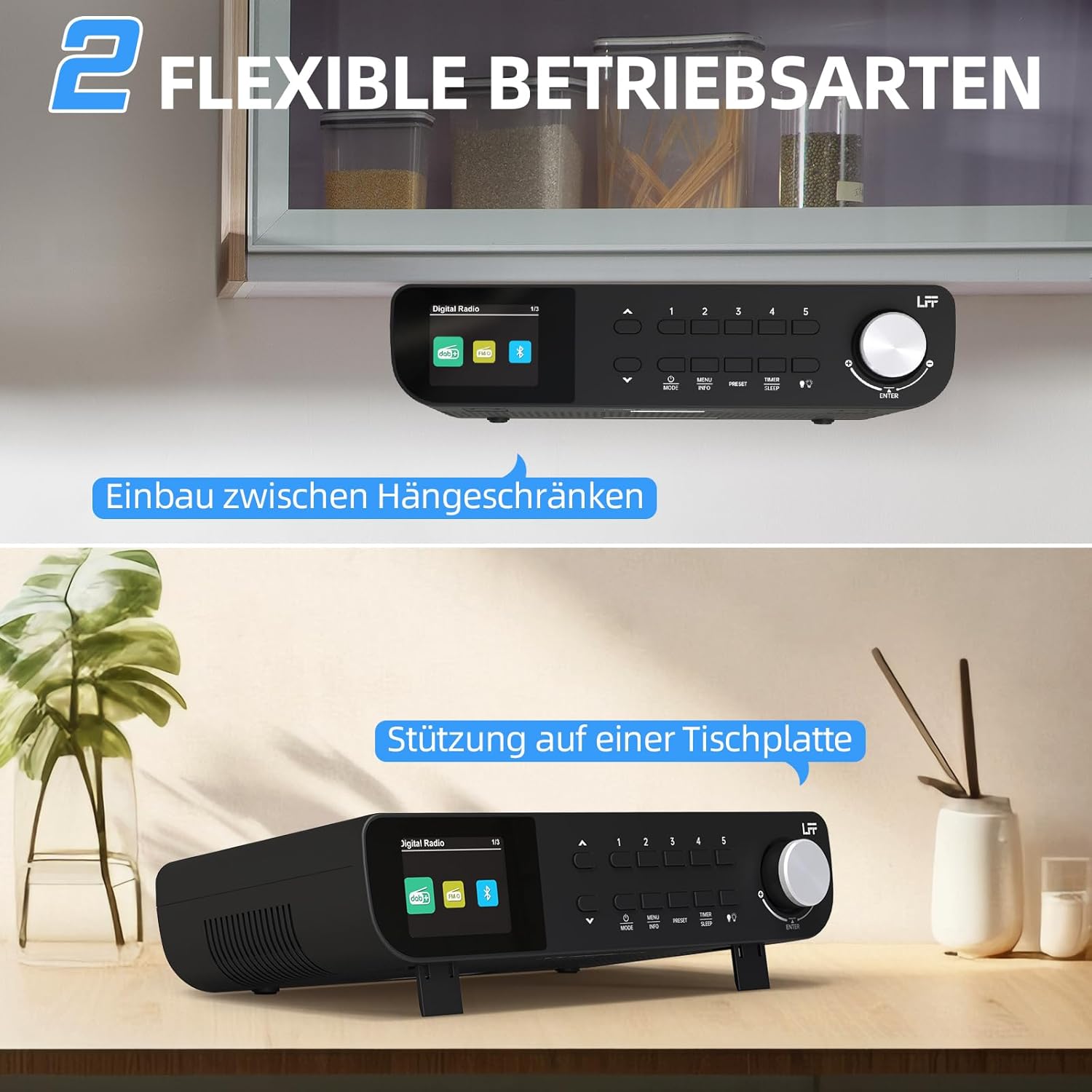
Obrázek 7.1: The LFF Kitchen Radio displayed in two common installation scenarios: mounted underneath a kitchen cabinet and placed freestanding on a tabletop.
7.1. Umístění na stůl
Simply place the radio on a stable, flat surface. Ensure it is not near the edge to prevent accidental falls.
7.2. Under-Cabinet Mounting
For under-cabinet installation, use the provided mounting kit.
- Připravte si místo: Choose a suitable location under a kitchen cabinet, ensuring there is enough space and access to a power outlet.
- Označte otvory pro vrtání: Use the provided mounting template to mark the drill holes on the underside of the cabinet.
- Vrtací pilotní otvory: Na vyznačených místech vyvrtejte vodicí otvory.
- Attach Mounting Plate (if applicable): Some models may include a separate mounting plate. Attach this to the cabinet using the screws.
- Secure the Radio: Align the radio with the mounting holes or plate and secure it using the provided screws. Ensure it is firmly attached.
- Připojte napájení: Zapojte napájecí adaptér.

Obrázek 7.2: Detailed diagram showing the steps for under-cabinet mounting, including measuring distances (e.g., 58mm) and securing the radio with screws.
8. Údržba
- Čištění: To clean the radio, disconnect it from the power supply. Use a soft, dry, lint-free cloth. Do not use abrasive cleaners, waxes, or solvents.
- Anténa: Ensure the antenna is extended for optimal reception in DAB+ and FM modes. Handle it gently to avoid damage.
- Skladování: Pokud rádio skladujete delší dobu, odpojte jej od napájení a uložte na chladném a suchém místě.
9. Řešení problémů
| Problém | Možná příčina | Řešení |
|---|---|---|
| Žádná síla | Napájecí adaptér není připojen nebo je zásuvka vadná. | Zkontrolujte připojení k napájení. Zkuste jinou zásuvku. |
| Špatný příjem DAB+/FM | Anténa není vysunutá, signál je slabý nebo je rušená. | Fully extend the antenna. Reposition the radio. Perform a full scan. |
| Bluetooth se nepřipojuje | Rádio není v režimu párování, zařízení je příliš daleko nebo je již připojeno k jinému zařízení. | Ensure radio is in Bluetooth mode. Move device closer. Disconnect from other devices. |
| Žádný zvuk | Volume too low, mute activated, or incorrect mode. | Increase volume. Check if mute is active. Ensure correct mode (DAB+, FM, Bluetooth). |
| Displej nefunguje | Brightness too low or device malfunction. | Adjust display brightness. If problem persists, contact support. |
10. Specifikace

Obrázek 10.1: Diagram showing the dimensions of the LFF Kitchen Radio: 250mm length, 146mm width, and 55mm height.
| Funkce | Detail |
|---|---|
| Značka | rozšíření LFF |
| Číslo modelu | LDR113-EU |
| Barva | Černý |
| Konektivita | Bluetooth |
| Technologie ladění | DAB Plus, FM |
| Zdroj napájení | Elektrický kabel |
| Frekvence | 108 MHz (max. FM) |
| Rozměry (D x Š x V) | 250 mm x 146 mm x 55 mm |
| Předvolby | 60 |
| Zobrazit | Barevný LCD displej |
| Speciální funkce | Dual Alarms, Sleep Timer, Under-cabinet mounting option, LED Light |
11. Záruka a podpora
This product comes with a standard manufacturer's warranty. Please refer to the warranty card included in your package for specific terms and conditions. For technical support, troubleshooting assistance, or warranty claims, please contact your retailer or the LFF customer service department.


