1. Úvod
This manual provides detailed instructions for the ENDORFY Thock Wireless Mechanical Keyboard, model EY5A078. It covers setup, operation, maintenance, and troubleshooting to ensure optimal performance and longevity of your device. Please read this manual thoroughly before using the keyboard.

Image 1.1: The ENDORFY Thock Wireless Mechanical Keyboard EY5A078. This image displays the full QWERTY layout with illuminated keys, showcasing the keyboard's design and RGB capabilities.
2. Obsah balení
Ověřte, zda jsou v balení přítomny všechny položky:
- ENDORFY Thock Wireless Mechanical Keyboard EY5A078
- USB-C to USB-A Cable (detachable)
- 2.4 GHz USB přijímač
- Stahovač klíčů
- Stahovák spínačů
- Uživatelská příručka (tento dokument)
3. Nastavení a připojení
The ENDORFY Thock Wireless Mechanical Keyboard offers three connection modes: wired, 2.4 GHz wireless, and Bluetooth.
3.1. Kabelové připojení
- Locate the USB-C port on the keyboard (typically on the back or top edge).
- Connect the provided USB-C to USB-A cable to the keyboard.
- Připojte konec kabelu USB-A k volnému portu USB v počítači.
- Klávesnice bude automaticky detekována a připravena k použití.
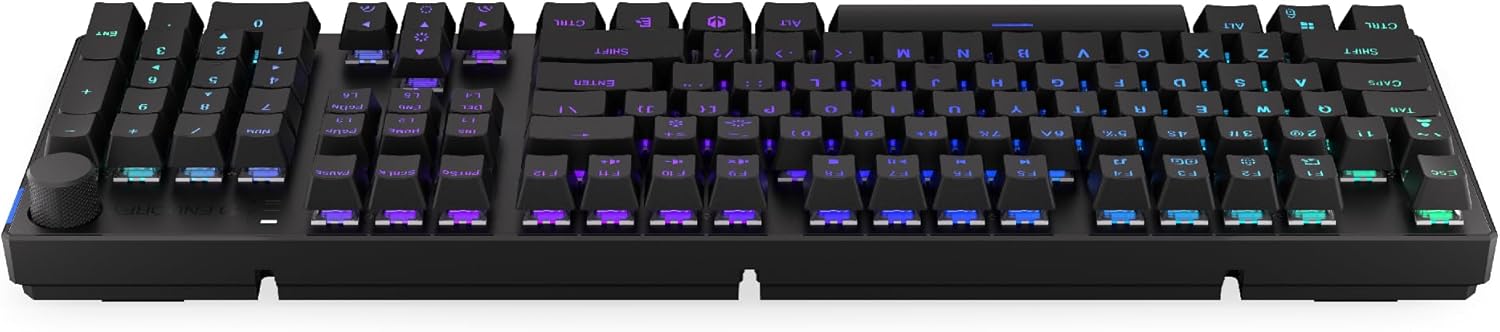
Obrázek 3.1: Boční strana view of the keyboard, highlighting the USB-C port for wired connection and charging.
3.2. Bezdrátové připojení 2.4 GHz
- Locate the 2.4 GHz USB receiver. It may be stored in a compartment on the underside of the keyboard.
- Plug the 2.4 GHz USB receiver into an available USB port on your computer.
- On the keyboard, locate the mode switch (usually on the back or side) and set it to the 2.4 GHz wireless mode (often indicated by a specific icon or "2.4G").
- The keyboard should automatically connect. An indicator light may confirm the connection.

Image 3.2: Underside of the keyboard, showing the compartment for storing the 2.4 GHz USB receiver and adjustable feet.
3.3. Připojení Bluetooth
- On the keyboard, set the mode switch to Bluetooth mode (often indicated by a Bluetooth icon or "BT").
- The keyboard may have multiple Bluetooth profiles (e.g., BT1, BT2, BT3). Select one by pressing Fn + 1, Fn + 2, or Fn + 3. The corresponding indicator light will flash.
- V počítači nebo zařízení otevřete nastavení Bluetooth a vyhledejte nová zařízení.
- Select "ENDORFY Thock Wireless" (or similar name) from the list of available devices.
- Dokončete proces párování podle pokynů na obrazovce.
- Po spárování kontrolka na klávesnici přestane blikat a zůstane svítit nepřetržitě.
4. Provoz
4.1. Key Functions and Shortcuts
The keyboard features various function key combinations (Fn + Key) for multimedia control, lighting adjustments, and other settings.
- Fn + F1–F12: Multimedia and system functions (e.g., volume control, media playback, calculator). Refer to the keycap legends for specific functions.
- Fn + klávesy se šipkami: Adjust RGB lighting effects (e.g., brightness, speed, direction).
- Fn + 1/2/3: Přepínání mezi Bluetooth Profiles.
- Fn + 4: Switch to 2.4 GHz wireless mode.
- Fn + 5: Přepněte do kabelového režimu.
4.2. Ovládání RGB osvětlení
The ENDORFY Thock keyboard features programmable RGB backlighting. Use the following combinations to customize the lighting:
- Fn + šipka doprava: Change lighting effect.
- Fn + šipka doleva: Change lighting effect direction.
- Fn + šipka nahoru: Zvýšit jas.
- Fn + šipka dolů: Snížit jas.
- Fn + Ins: Změnit barvu.
- Fn + Del: Adjust effect speed.
4.3. Ovladač hlasitosti
The dedicated volume knob located on the top right of the keyboard allows for quick audio adjustments.
- Otáčet po směru hodinových ručiček: Zvyšte hlasitost.
- Otočit proti směru hodinových ručiček: Snížit hlasitost.
- Zmáčkni: Ztlumit/Zapnout zvuk.

Image 4.1: Detail of the volume knob and status indicator lights, located on the upper right side of the keyboard.
4.4. Přepínače vyměnitelné za provozu
The ENDORFY Thock keyboard features hot-swappable switches, allowing you to change mechanical switches without soldering. This enables customization of typing feel.
- Odstranění krytky kláves: Pomocí dodaného stahováku na klávesy jemně vyjměte požadovanou klávesu.
- Odstraňte přepínač: Pomocí dodaného stahováku spínačů opatrně uchopte horní a spodní klipsny spínače a vytáhněte jej přímo nahoru.
- Vložit nový přepínač: Align the pins of the new switch with the holes on the PCB. Press the switch firmly until it clicks into place. Ensure pins are not bent.
- Výměna krytky kláves: Nasaďte krytku kláves zpět na nový dřík spínače.

Obrázek 4.2: Detailní záběr view of the Kailh Box Brown mechanical switches, demonstrating the hot-swappable design.
5. Údržba
5.1. Čištění klávesnice
Pravidelné čištění pomáhá udržovat funkčnost a vzhled klávesnice.
- Před čištěním odpojte klávesnici od počítače.
- Pro důkladné vyčištění použijte stahovák na klávesy.
- K odstranění prachu a nečistot z prostoru mezi klávesami použijte stlačený vzduch.
- Wipe keycaps and the keyboard surface with a soft, damp tkanina. Vyhněte se agresivním chemikáliím.
- Ensure the keyboard is completely dry before reconnecting.
5.2. Výměna kláves a spínačů
Refer to Section 4.4 for detailed instructions on replacing keycaps and switches. Use only compatible keycaps and switches to avoid damage.
6. Řešení problémů
| Problém | Možná příčina | Řešení |
|---|---|---|
| Klávesnice nereaguje (kabelová) | Volné připojení kabelu, vadný USB port. | Ujistěte se, že je kabel USB-C bezpečně připojen. Zkuste jiný port USB nebo kabel. |
| Klávesnice nereaguje (bezdrátová) | Low battery, incorrect mode, receiver not plugged in, pairing issue. | Charge the keyboard. Ensure mode switch is set correctly (2.4G or BT). Re-pair Bluetooth or re-insert 2.4 GHz receiver. |
| RGB podsvícení nefunguje | Lighting turned off, low battery, software issue. | Check lighting controls (Fn + Arrow keys). Charge the keyboard. Restart computer. |
| Dvojité stisknutí kláves nebo jejich neregistrace | Dust/debris under switch, faulty switch. | Clean under keycaps with compressed air. If issue persists, replace the switch (refer to Section 4.4). |
7. Specifikace
- Model: EY5A078
- Značka: ENDORFY
- Konektivita: Wired (USB-C), 2.4 GHz Wireless, Bluetooth
- Typ přepínače: Kailh Box Brown (Hot-swappable)
- Klávesnice: PBT Double Shot
- Rozložení: Full-size QWERTY
- Podsvícení: Programovatelné RGB
- Operační systémy: Linux, Mac OS X 10.12 Sierra, Windows 10
- Barva: Černý
- Materiál: Polybutylentereftalát (PBT)
- Speciální vlastnosti: Detachable cable, Volume knob with mute, Hot-swappable switches
- Baterie: Lithium-iontová (součástí balení)
8. Záruka a podpora
ENDORFY products are covered by a manufacturer's warranty. For detailed warranty information, please refer to the warranty card included with your product or visit the official ENDORFY website. For technical support, product inquiries, or service requests, please contact ENDORFY customer support through their official channels.
Oficiální Webmísto: www.endorfy.com
9. Bezpečnostní informace
- Chraňte klávesnici před tekutinami a nadměrnou vlhkostí.
- Nevystavujte klávesnici extrémním teplotám.
- Do not attempt to disassemble or modify the keyboard beyond hot-swapping switches and keycaps, as this may void the warranty and cause damage.
- Používejte pouze dodaný nebo doporučený nabíjecí kabel.
- Baterii a elektronické součástky zlikvidujte zodpovědně v souladu s místními předpisy.


