This manual provides comprehensive instructions for the installation, operation, and maintenance of the Axis F9114 Main Unit. Please read this manual carefully before using the product to ensure proper functionality and safety.
Konec produktuview
The AXIS F9114 is a main unit designed for the F-Series surveillance system. It supports up to four F21 or F7 sensor units, providing a flexible and discreet surveillance solution. This unit acts as the central processing hub for connected camera sensors.
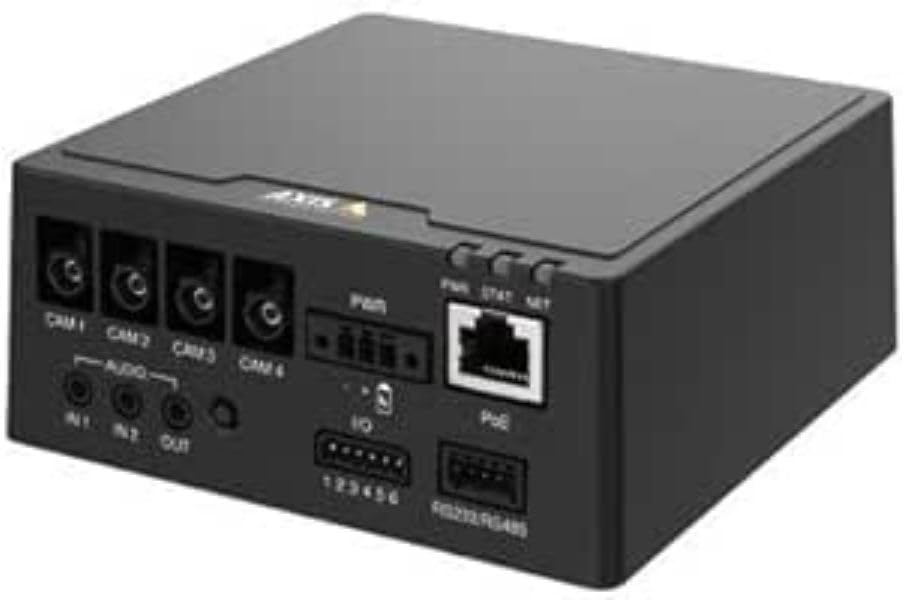
Obrázek 1: Přední view of the AXIS F9114 Main Unit, showing camera input ports (CAM 1-4), audio input/output, power input, I/O ports, and an Ethernet port with PoE support.
Klíčové vlastnosti:
Supports up to 4 Axis F-Series sensor units (e.g., F21, F7).
Central processing unit for video and audio streams.
Kompaktní konstrukce pro flexibilní instalaci.
Integrated Power over Ethernet (PoE) for simplified power and data connectivity.
Multiple I/O ports for external device integration.
Audio input/output capabilities.
Nastavení a instalace
Obsah balení:
AXIS F9114 Main Unit
Průvodce instalací
(Power supply and sensor units sold separately, unless specified)
Connecting Sensor Units:
Ensure the main unit is powered off before connecting any sensor units.
Connect the cables from your AXIS F-Series sensor units (e.g., F21, F7) to the designated "CAM 1", "CAM 2", "CAM 3", and "CAM 4" ports on the rear of the F9114 Main Unit. Ensure a secure connection.
Each sensor unit requires a dedicated port.
Napájení jednotky:
Napájení přes Ethernet (PoE): Connect an Ethernet cable from a PoE-enabled switch or injector to the "PoE" port on the F9114. This will provide both power and network connectivity.
Externí napájení: If PoE is not used, connect a compatible DC power adapter (not included) to the "PWR" input terminal. Refer to specifications for voltage požadavky.
Internetové připojení:
Connect an Ethernet cable from your network to the "PoE" port on the F9114. This provides network access for configuration and video streaming.
Audio a I/O připojení:
Zvuk: Connect external microphones to "IN 1" or "IN 2" and speakers to "OUT" if audio functionality is required.
I/O: Use the "IO" terminal block for connecting external devices such as alarm sensors or relays. Refer to the detailed wiring diagram in the full technical documentation for specific connections.
Operace
Počáteční zapnutí:
Once all connections are secure and power is supplied, the unit will begin its startup sequence. Observe the LED indicators for status.
LED indikátory:
PWR (výkon): Indicates power status. (e.g., Solid green for normal operation).
STAT (Status): Indicates operational status. (e.g., Flashing for network activity, solid for ready).
SÍŤ (Network): Indicates network connection and activity.
Přístup k zařízení:
Use the AXIS IP Utility or a network scanner to discover the IP address of the F9114 on your network.
Otevřete a web browser and enter the IP address to access the device's web rozhraní.
Log in using the default credentials (refer to the installation guide or Axis website for current defaults).
Follow the on-screen instructions to configure network settings, video streams, and other system parameters.
Správa videa:
The F9114 integrates with various video management software (VMS) solutions. Refer to your VMS documentation for adding and managing the device.
Údržba
Čištění: K čištění vnější strany jednotky používejte měkký, suchý hadřík. Nepoužívejte agresivní chemikálie ani abrazivní čisticí prostředky.
Aktualizace firmwaru: Pravidelně kontrolujte systém Axis Communications webweb s aktualizacemi firmwaru. Udržování aktualizovaného firmwaru zajišťuje optimální výkon, zabezpečení a přístup k novým funkcím.
Podmínky prostředí: Ensure the unit is operated within its specified temperature and humidity ranges to prevent damage.
Odstraňování problémů
Běžné problémy a řešení:
Bez napájení:
Verify power cable connection (if using external power).
Ensure PoE switch/injector is active and providing power (if using PoE).
Zkontrolujte zdroj napájení.
Žádné síťové připojení:
Zkontrolujte připojení ethernetového kabelu.
Verify network switch/router functionality.
Confirm IP address settings are correct or DHCP is functioning.
No Video from Sensor Unit:
Ensure sensor unit cables are securely connected to the F9114.
Verify the sensor unit is compatible with the F9114.
Check the sensor unit's status indicators (if available).
Access the F9114 web interface to confirm sensor unit detection and configuration.
Zapomenuté heslo:
Refer to the Axis Communications support documentation for password reset procedures, which typically involve a factory reset button or specific software tools.
For more detailed troubleshooting, refer to the comprehensive support resources available on the Axis Communications webmísto.
Specifikace
Funkce
Detail
Značka
Axis Communications
Číslo modelu
01991-001
Hmotnost položky
1.87 libry
Rozměry produktu (DxŠxV)
19.69 x 19.69 x 11.02 palce
Výrobce
AXIS - KAMERA
ASIN
B0BWNS49VS
Datum první dostupnosti
23. února 2023
Note: Specifications are subject to change without notice. For the most current information, please refer to the official Axis Communications webmísto.
Záruka a podpora
Informace o záruce:
For detailed warranty information, please refer to the warranty statement provided with your product or visit the official Axis Communications webUschovejte si doklad o koupi pro případ reklamace.
Technická podpora:
If you encounter issues that cannot be resolved using this manual or the troubleshooting section, please contact Axis Communications technical support. Support resources, including FAQs, documentation, and contact information, are available on their official webmísto.
Porovnávací tabulky produktů AXIS pro 3. čtvrtletí 2025: Síťové video, audio, řízení přístupu a interkomy Tento dokument společnosti Axis Communications za 3. čtvrtletí roku 2025 poskytuje komplexní srovnávací tabulky produktů pro jejich širokou škálu síťových video, audio, systémů pro kontrolu přístupu a interkomů. Podrobně popisuje specifikace, funkce a informace o modelech napříč různými produktovými řadami, včetně kamer, rekordérů, softwaru a interkomových systémů.
Hlavní jednotka AXIS FA51 Benutzerhandbuch | Instalace a konfigurace Offizielle Benutzerhandbuch für die AXIS FA51 Hlavní jednotka AXIS Communications. Enthält Anleitungen zur Installation, Configuration, Video-Streaming, Aufnahme und Systemverwaltung für Überwachungslösungen.
Instalační příručka pro panoramatickou kameru řady AXIS M43 Tato instalační příručka poskytuje základní informace pro nastavení panoramatických kamer řady AXIS M43, včetně modelů AXIS M4327-P a AXIS M4328-P. Zahrnuje instalační postupy, bezpečnost a dodržování předpisů.
Instalační příručka pro AXIS High PoE Midspan a rozbočovače Instalační příručka pro rozbočovače AXIS T8123 High PoE Midspan a AXIS T8126/T8128 High PoE, která zahrnuje nastavení, specifikace a řešení problémů s řešeními Power over Ethernet.
Instalační příručka pro zařízení AXIS Camera Station řady S20 This installation guide provides essential instructions for setting up and installing the AXIS Camera Station S20 Appliance Series, including models S2008, S2016, and S2024. It covers hardware overview, cable connections, software setup, and network configuration for professional video surveillance systems.