1. Konec produktuview
The BOMGE IEM-590 is a professional UHF wireless in-ear monitor system designed for clear audio monitoring in various professional settings. This system is suitable for stage performances, studio recording, exhibitions, lectures, and public speaking engagements. It provides stable signal transmission and allows users freedom of movement.
Klíčové vlastnosti:
- UHF Wireless Performance: Operates within the 470-608 MHz range, offering a stable and easy-to-use fixed frequency.
- Extended Operating Range: Provides an operating distance of 150 to 160 feet in open, line-of-sight environments.
- Integrated Limiter Circuit: Designed to eliminate audio distortion under excessive input levels.
- Dynamic Expansion Circuit: Enhances the signal-to-noise ratio for clearer audio.
- User-Friendly Interface: Features a simple LED screen for easy monitoring and control.
- Versatile Applications: Ideal for studio recording, live stage shows, exhibitions, speeches, and educational instructions.

Image 1.1: The BOMGE IEM-590 system is suitable for various professional audio applications.
2. Obsah balení
Zkontrolujte prosím, zda jsou všechny níže uvedené položky součástí balení. Pokud některé položky chybí nebo jsou poškozené, kontaktujte prosím zákaznickou podporu.
- 1 x UHF Wireless Transmitter
- 4 x Bodypack Receivers
- 4 x sluchátka do uší
- 1 x napájecí adaptér
- 1 x Anténa
- 2 x 6.5mm to 6.35mm Cables
- 1 x Uživatelská příručka (tento dokument)
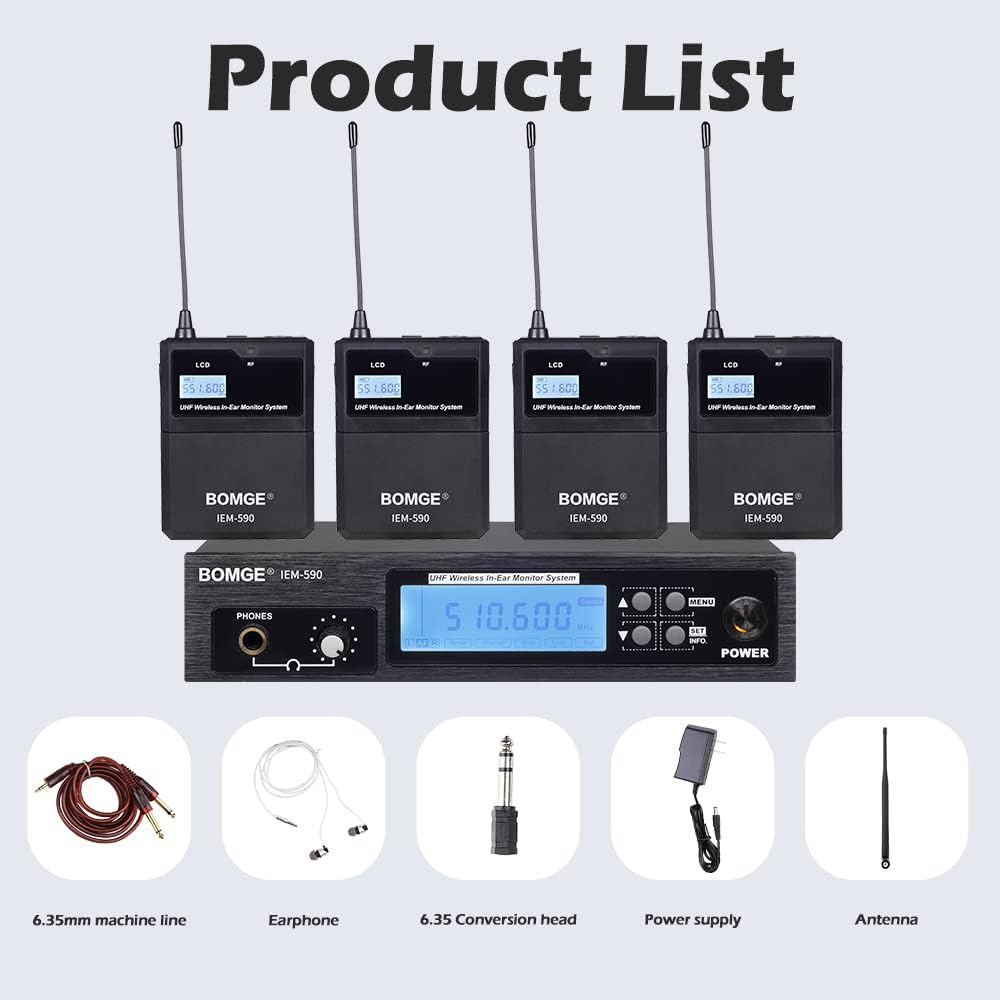
Image 2.1: All components included in the BOMGE IEM-590 package.
3. Bezpečnostní informace
Read and follow all safety instructions to prevent damage to the device or injury to yourself. Keep this manual for future reference.
- Nevystavujte zařízení vodě, vlhkosti ani extrémním teplotám.
- Neumisťujte zařízení do blízkosti zdrojů tepla nebo na přímé sluneční světlo.
- Používejte pouze dodaný napájecí adaptér.
- Nepokoušejte se zařízení rozebírat ani upravovat. Ztratíte tak záruku.
- Uchovávejte mimo dosah dětí.
- Ensure proper ventilation around the transmitter unit.
- Prolonged exposure to high volume levels can cause permanent hearing damage. Use headphones at a comfortable listening level.
4. Pokyny k nastavení
4.1 Nastavení vysílače
- Connect the provided antenna to the ANT port on the rear of the UHF wireless transmitter.
- Connect the power adapter to the DC IN (12-18V) jack on the rear of the transmitter and plug it into a power outlet.
- Connect your audio source (e.g., mixer, audio interface) to the Left & Right Track Input (AF IN L/R) using the provided 6.5mm to 6.35mm cables.
- Press the ON/OFF switch to power on the transmitter. The LCD screen will illuminate.

Image 4.1: Transmitter controls and connections.
4.2 Bodypack Receiver Setup
- Insert two AA batteries (not included) into each bodypack receiver. Ensure correct polarity.
- Connect the in-ear headphones to the 6.35mm headphone output jack on the bodypack receiver.
- Power on each bodypack receiver.
4.3 Pairing Transmitter and Receivers (Set Frequency Band)
To ensure proper operation, the bodypack receivers must be paired with the transmitter on the same frequency band.
- On the transmitter, press the 'INFO' button to view the current group and channel number.
- On the bodypack receiver, press the 'SET' key.
- Press the '↑' or '↓' key on the bodypack to adjust the group number to match the transmitter.
- Press 'SET' again to switch to channel selection.
- Press the '↑' or '↓' key to adjust the channel number to match the transmitter.
- Press the 'SET' key to confirm. The RF light on the bodypack receiver will turn green, indicating successful pairing.

Image 4.2: Steps for setting the frequency band and pairing devices.
5. Návod k obsluze
5.1 Nastavení úrovní zvuku
- On the transmitter, use the Left & Right Transmit Output Volume Adjust knobs to set the overall output level to the bodypack receivers.
- On each bodypack receiver, use the volume control to adjust the listening level of your in-ear headphones to a comfortable volume.
- The transmitter's front panel also features an Earphone Volume Control and Earphone Jack for direct monitoring.
5.2 Monitoring Signal Stability
The system is equipped with features to ensure real-time monitoring and signal stability.
- The LCD screen on the transmitter displays frequency information and signal status.
- Bodypack receivers have an RF indicator light that turns green when a stable signal is received.
- The dynamic expansion circuit helps maintain a high signal-to-noise ratio, reducing interference.

Image 5.1: Bodypack receivers provide real-time monitoring and signal stability.
5.3 Optimizing Wireless Performance
To achieve the best wireless performance and maximum operating distance (150-160 feet), ensure a clear line of sight between the transmitter and receivers. Avoid obstructions such as thick walls, glass, and large metal objects, which can interfere with signal transmission.

Image 5.2: The system's noise filtering capabilities.
6. Údržba
6.1 Čištění
Wipe the transmitter and receivers with a soft, dry cloth. Do not use liquid cleaners or abrasive materials, as they may damage the finish or internal components.
6.2 Výměna baterie
The bodypack receivers require two AA batteries. When the low power indicator light illuminates, replace the batteries promptly to ensure uninterrupted operation. Always use fresh, high-quality batteries.
6.3 Skladování
When not in use for extended periods, store the system in a cool, dry place away from direct sunlight and extreme temperatures. Remove batteries from bodypack receivers before storage to prevent leakage.
7. Řešení problémů
If you encounter issues with your BOMGE IEM-590 system, refer to the following common problems and solutions:
| Problém | Možná příčina | Řešení |
|---|---|---|
| Žádný zvuk ze sluchátek | Headphones not connected properly; Bodypack receiver off; Low battery; Transmitter off; Incorrect frequency pairing; Audio source issue. | Ensure headphones are fully plugged in. Turn on bodypack. Replace batteries. Turn on transmitter. Re-pair frequency (Section 4.3). Check audio source connection and volume. |
| Přerušovaný zvuk nebo statický šum | Interference; Out of range; Low battery; Obstructions. | Move closer to the transmitter. Ensure clear line of sight. Replace batteries. Check for other wireless devices causing interference. |
| Zkreslený zvuk | Input level too high; Receiver volume too high; Damaged cable/headphones. | Reduce input level on the transmitter. Lower volume on the bodypack receiver. Test with different cables or headphones. |
| Bodypack receiver not powering on | Vybité nebo nesprávně vložené baterie. | Vyměňte baterie za nové a dbejte na správnou polaritu. |
Pokud problém přetrvává i po vyzkoušení těchto řešení, kontaktujte zákaznickou podporu.
8. Specifikace
| Funkce | Specifikace |
|---|---|
| Značka | BOMGE |
| Název modelu | IEM-590 |
| Technologie připojení | Bezdrátové (UHF) |
| Specifické použití produktu | Professional use (stage, studio, exhibitions, lectures, speech) |
| Kompatibilní zařízení | Bodypack receivers |
| Hmotnost položky | 1500 gramů (1.5 kg) |
| Kontrolní metoda | Button/Manual Controls |
| Rozměry produktu | 30 x 10 x 4 cm |
| Barva | Černý |
| Jack pro sluchátka | Zásuvka 6.35 mm |
| Sluchátka Form Factor | In-Ear |
| Kontrola hluku | None (features noise filtering circuit) |
| ASIN | B0BWJBPNCP |
9. Záruka a podpora
9.1 Informace o záruce
This product comes with a standard manufacturer's warranty. Please refer to the warranty card included in your package or contact the retailer for specific warranty terms and conditions. The warranty typically covers defects in materials and workmanship under normal use.
9.2 Zákaznická podpora
For technical assistance, troubleshooting beyond this manual, or warranty claims, please contact BOMGE customer support through the retailer where the product was purchased. Have your product model number (IEM-590) and purchase date ready when contacting support.


