1. Úvod
The NGTeco PPS500 is a portable power station designed to provide reliable power for various applications, including emergencies, outdoor activities, and home use. With a 519Wh capacity and multiple output ports, it can charge and power a wide range of electronic devices and small appliances. This manual provides essential information for the safe and efficient operation of your PPS500.
2. Bezpečnostní pokyny
- Jednotku nerozebírejte, neopravujte ani neupravujte.
- Uchovávejte jednotku mimo dosah zdrojů tepla, přímého slunečního záření a hořlavých materiálů.
- Nevystavujte jednotku vodě nebo jiným kapalinám.
- Během používání a nabíjení zajistěte dostatečné větrání.
- Pokud jednotku nepoužíváte, skladujte ji na chladném a suchém místě.
- Uchovávejte mimo dosah dětí a domácích zvířat.
- Používejte pouze originální nebo certifikované příslušenství.
- V případě požáru použijte suchý práškový hasicí přístroj.
3. Obsah balení
Zkontrolujte prosím, zda je ve vašem balíčku obsaženo vše:
- 1 x NGTeco PPS500 Portable Power Station
- 1 x Power Adapter (for AC charging)
- 1 x Solar/Car Charging Cable
- 1 x Uživatelská příručka (tento dokument)
4. Konec produktuview
The NGTeco PPS500 features a comprehensive set of input and output ports to meet diverse power needs. The front panel includes a display for monitoring battery status and power output/input.

Obrázek 4.1: Přední view of the NGTeco PPS500 showing its multiple charging ports and display.
4.1. Porty a funkce
The PPS500 is equipped with 9 charging ports:
- Střídavý výstup (x1): 500W continuous, 1000W peak. For powering standard household appliances.
- Stejnosměrné výstupy (x3): Includes two round DC ports and one cigarette lighter port (Max 14V/8A combined). For DC-powered devices.
- Port USB-C (x1): Power Delivery (PD) 60W. For fast charging compatible smartphones, tablets, and laptops.
- Porty USB-A (x3): Quick Charge 3.0 (QC3.0) support. For charging various USB-powered devices.
- Wireless Charging Pad (x1): 10W maximum. For wirelessly charging compatible devices.
- LED světlo: 300lm with multiple modes (constant, flashing, SOS).

Obrázek 4.2: Close-up of the NGTeco PPS500 control panel and port layout, illustrating the various output options.
5. Nastavení
5.1. Počáteční nabíjení
Before first use, it is recommended to fully charge your NGTeco PPS500. This ensures optimal battery performance and calibration. Use the provided AC power adapter to charge the unit from a wall outlet until the display indicates 100% charge.
5.2. Umístění
Place the power station on a stable, flat surface. Ensure there is adequate space around the unit for ventilation to prevent overheating.
6. Návod k obsluze
6.1. Charging the PPS500
The PPS500 supports multiple charging methods:
- AC nástěnná zásuvka: Connect the provided power adapter to the AC input port and then to a wall outlet.
- Solární panel: Connect a compatible 100-200W solar panel (not included) to the solar input port using the provided solar charging cable. The integrated MPPT controller optimizes solar charging efficiency.
- Nabíječka do auta: Connect the provided car charging cable to the car input port and then to your vehicle's 12V cigarette lighter socket.

Obrázek 6.1: Various methods to charge the NGTeco PPS500, including solar, car, and AC wall charging.

Obrázek 6.2: The NGTeco PPS500 utilizing a solar panel for charging, demonstrating its outdoor capability.
6.2. Použití výstupních portů
To use any output port (AC, DC, USB), press the corresponding power button for that section. The display will show the active output and power consumption.
- AC výstup: Press the AC power button. Plug your device into the AC outlet. Ensure the device's power consumption does not exceed 500W (1000W peak).
- DC výstup: Press the DC power button. Plug your device into any DC or cigarette lighter port.
- USB výstup: Press the USB power button. Plug your device into any USB-A or USB-C port.
6.3. Bezdrátové nabíjení
Place your Qi-compatible device on the wireless charging pad located on top of the unit. Ensure the device is centered for optimal charging. The wireless charging supports up to 10W fast charging and works with most phone cases up to 3mm thick.
6.4. Funkce LED světla
Press the LIGHT button to activate the integrated LED light. Press repeatedly to cycle through different modes: constant illumination, flashing, and SOS signal. The light provides 300 lumens of brightness.

Obrázek 6.3: The NGTeco PPS500 providing emergency lighting with its built-in LED, useful for outdoor activities.
6.5. Battery Capacity and Usage Examples
The PPS500's 519Wh capacity allows for multiple charges and extended operation of various devices:
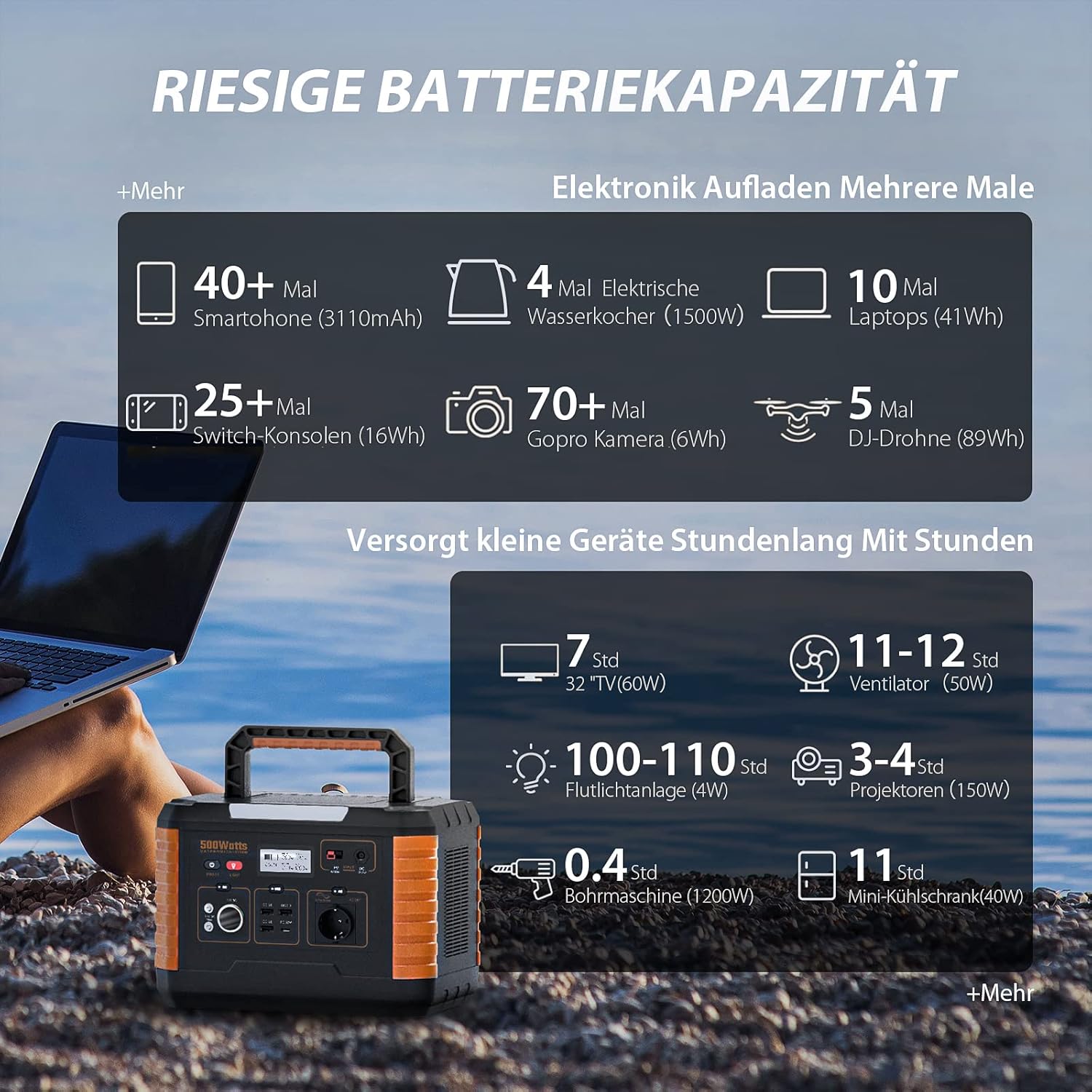
Obrázek 6.4: Examples of device charging and operating times with the NGTeco PPS500's 519Wh battery.
7. Údržba
- Čištění: Use a dry, soft cloth to wipe the surface of the unit. Do not use abrasive cleaners or solvents.
- Skladování: If storing for an extended period, charge the unit to 50-80% every 3-6 months to prolong battery life. Store in a cool, dry environment away from direct sunlight.
- Životnost baterie: The PPS500 is designed for over 2500 charge cycles, ensuring long-term reliability.

Obrázek 7.1: The NGTeco PPS500 battery is designed for over 2500 cycles with overcharge protection.
8. Řešení problémů
| Problém | Možná příčina | Řešení |
|---|---|---|
| Jednotka se nezapíná | Baterie je vybitá. | Nabijte přístroj pomocí síťového adaptéru. |
| AC výstup nefunguje | AC output not enabled; device exceeds 500W. | Press the AC power button; check device wattage. |
| Bezdrátové nabíjení nefunguje | Device not Qi-compatible; misaligned; thick case. | Ensure device is compatible and centered; remove thick case. |
| Pomalé nabíjení solární energií | Insufficient sunlight; panel not optimally angled. | Adjust solar panel angle; ensure full sun exposure. |
9. Specifikace
| Funkce | Detail |
|---|---|
| Číslo modelu | NG-PPS500 |
| Kapacita baterie | 519 Wh / 140400 XNUMX mAh |
| Výstupní výkon AC | 500 W (1000 W Peak) |
| DC výstup | 3 x (Max 14V/8A combined, including car port) |
| Výstup USB-C | 1 x (PD 60W) |
| Výstup USB-A | 3 x (QC3.0) |
| Bezdrátové nabíjení | 10 W Max |
| LED světlo | 300 lm |
| Rozměry | 20.2 x 29.2 x 19.4 cm |
| Hmotnost | 6.2 kg |
| svtage | 230 voltů |
| Doporučené použití | Emergency, Outdoor, Camping, Domov |

Obrázek 9.1: The NGTeco PPS500 is lightweight and portable, weighing 6.2 kg with dimensions of 20.2 x 29.2 x 19.4 cm.
10. Záruka a podpora
NGTeco provides a three-year warranty period for the PPS500 Portable Power Station. We also offer lifetime customer support to assist you with any questions or issues.
Kontaktní údaje:
- Telefon: Please refer to the contact details provided in your product packaging or on the official NGTeco webmísto.
- E-mail: Please refer to the contact details provided in your product packaging or on the official NGTeco webmísto.
- Pracovní doba podpory: Monday - Friday, 6:00 to 18:00 (CET)
For the most up-to-date contact information and support resources, please visit the official NGTeco webmísto.


