1. Úvod
This manual provides comprehensive instructions for the installation, operation, and maintenance of your Morecam J9 Wireless Video Doorbell Camera with Chime. Please read this manual thoroughly before using the product to ensure correct usage and optimal performance. Keep this manual for future reference.
The Morecam J9 Wireless Video Doorbell offers enhanced home security features including 1080P HD video, two-way audio, PIR human detection, night vision, and a wireless chime. It operates on 2.4GHz Wi-Fi and is battery-powered for convenient installation.
2. Obsah balení
Ověřte, zda jsou v balení přítomny všechny níže uvedené položky. Pokud některé položky chybí nebo jsou poškozené, kontaktujte prosím zákaznickou podporu.
- Bezdrátová video kamera Morecam J9
- Bezdrátový zvonek
- Montážní konzola
- Montážní šrouby a nástěnné hmoždinky
- USB nabíjecí kabel
- Uživatelská příručka

Image: The Morecam J9 Wireless Video Doorbell, its accompanying wireless chime, and a smartphone displaying the doorbell's live view rozhraní.
3. Konec produktuview
Familiarize yourself with the components of your doorbell camera and chime.
Kamera zvonku
- Objektiv fotoaparátu: Zachytí video.
- PIR Motion Sensor: Detekuje lidský pohyb.
- Mikrofon: Zaznamenává zvuk pro obousměrnou komunikaci.
- Reproduktor: Výstup zvuku pro obousměrnou komunikaci.
- Tlačítko zvonku: Aktivuje zvonek a odesílá oznámení.
- Kontrolka stavu: Zobrazuje stav zařízení (např. nabíjení, připojení).
- USB nabíjecí port: Pro dobíjení interní baterie.
- Resetovací tlačítko: Používá se pro obnovení továrního nastavení nebo párování.
- Slot pro kartu Micro SD: Pro lokální ukládání videa (podporuje až 128 GB, karta není součástí balení).
Bezdrátový zvonek
- Reproduktor: Vydává zvuk zvonku.
- Tlačítko hlasitosti: Upravuje hlasitost zvonkohry.
- Tlačítko melodie: Changes chime melody.
- Napájecí zástrčka: For connecting to a standard wall outlet.

Image: The Morecam J9 Doorbell Camera mounted outdoors, demonstrating its IP66 weather resistance against rain, snow, heat, and dust.
4. Nastavení
4.1 Charge the Doorbell Camera
- Locate the USB charging port on the doorbell camera.
- Connect the provided USB charging cable to the doorbell and a compatible USB power adapter (not included).
- Charge the doorbell for approximately 8-10 hours before first use. The status indicator light will show charging status and turn off when fully charged.
4.2 Stáhněte si aplikaci
- Hledat the "CloudEdge" app in your smartphone's app store (App Store for iOS or Google Play Store for Android).
- Stáhněte a nainstalujte aplikaci.
- Zaregistrujte se a přihlaste se.
4.3 Pair the Doorbell with the App
- Ujistěte se, že je váš smartphone připojen k síti Wi-Fi s frekvencí 2.4 GHz. Poznámka: 5GHz Wi-Fi není podporováno.
- Otevřete aplikaci CloudEdge a klepnutím na ikonu „+“ přidejte nové zařízení.
- Select "Video Doorbell" from the device list.
- Follow the on-screen instructions to power on the doorbell and enter pairing mode (usually indicated by a flashing blue light).
- Scan the QR code displayed on your phone with the doorbell camera. Hold the phone approximately 15-30 cm (6-12 inches) from the camera lens.
- Once connected, the doorbell will confirm successful pairing, and you can name your device.
4.4 Párování bezdrátového zvonku
- Plug the wireless chime into a standard wall outlet within range of your doorbell camera.
- Press the "Pairing" button on the chime (refer to chime's specific instructions if available).
- Stiskněte tlačítko zvonku na kameře. Mělo by zazvonit zvonění, což znamená úspěšné spárování.
- You can adjust the volume and melody using the respective buttons on the chime.
4.5 Instalace
Choose a suitable location for your doorbell camera, typically near your front door, ensuring a clear view a dobrou sílu signálu Wi-Fi.
- Označte otvory pro vrtání: Place the mounting bracket against the wall at your desired height and mark the positions for drilling.
- Vrtací otvory: Use a drill bit appropriate for your wall type to drill holes at the marked positions.
- Vložte nástěnné kotvy: If installing on masonry or stucco, insert the provided wall anchors into the drilled holes.
- Bezpečný držák: Připevněte montážní držák ke zdi pomocí dodaných šroubů.
- Mount Doorbell: Nasuňte kameru zvonku na montážní držák, dokud bezpečně nezacvakne.
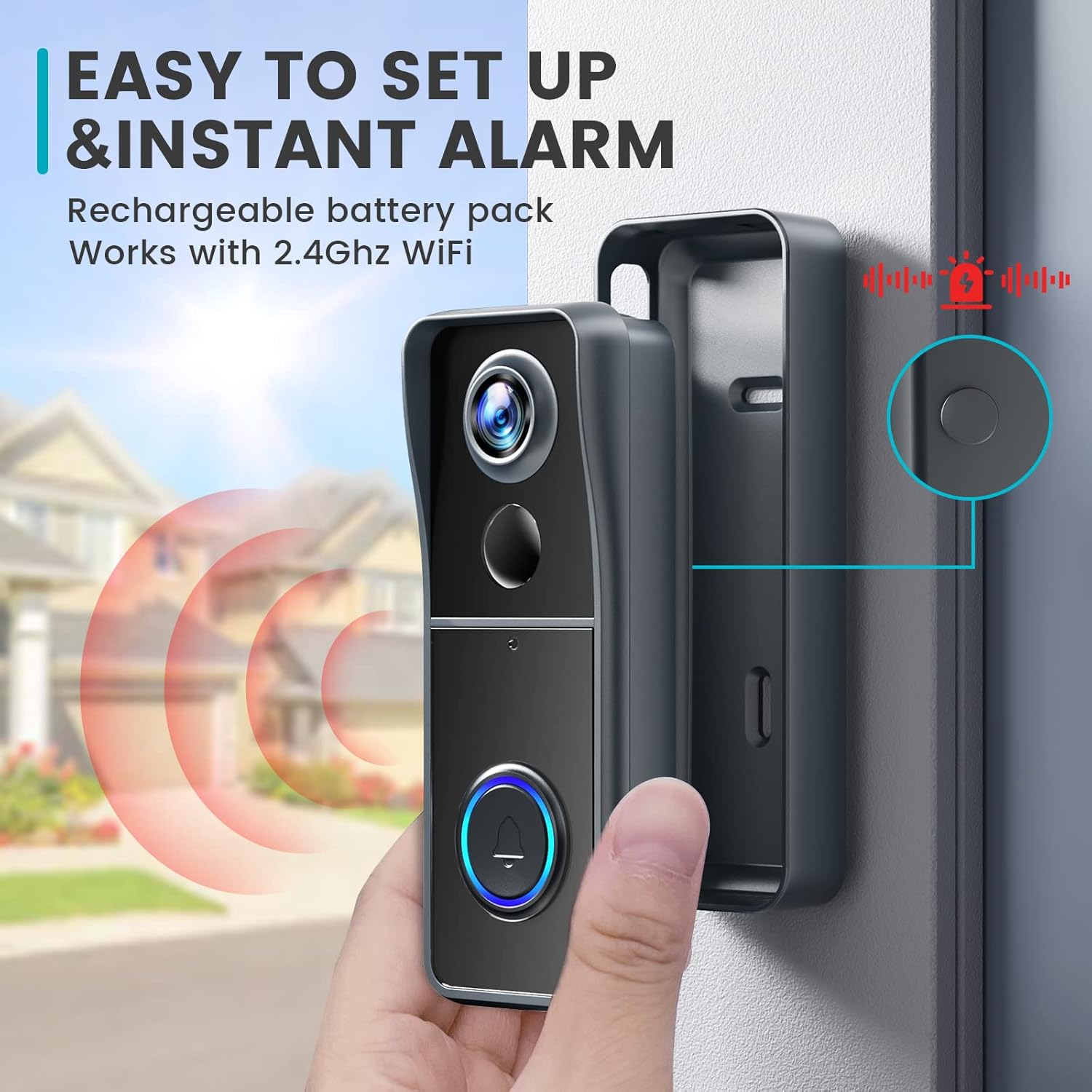
Image: A hand installing the Morecam J9 Doorbell Camera onto its mounting bracket on a wall, illustrating the ease of setup.
5. Návod k obsluze
5.1 Živě View
Open the CloudEdge app and select your doorbell camera to access the live video feed. This allows you to view your doorstep in real-time.
5.2 Obousměrná komunikace
When a visitor presses the doorbell or motion is detected, you will receive a notification on your smartphone. Tap the notification to enter live view and use the microphone icon in the app to speak to the visitor. The doorbell's speaker will transmit your voice.
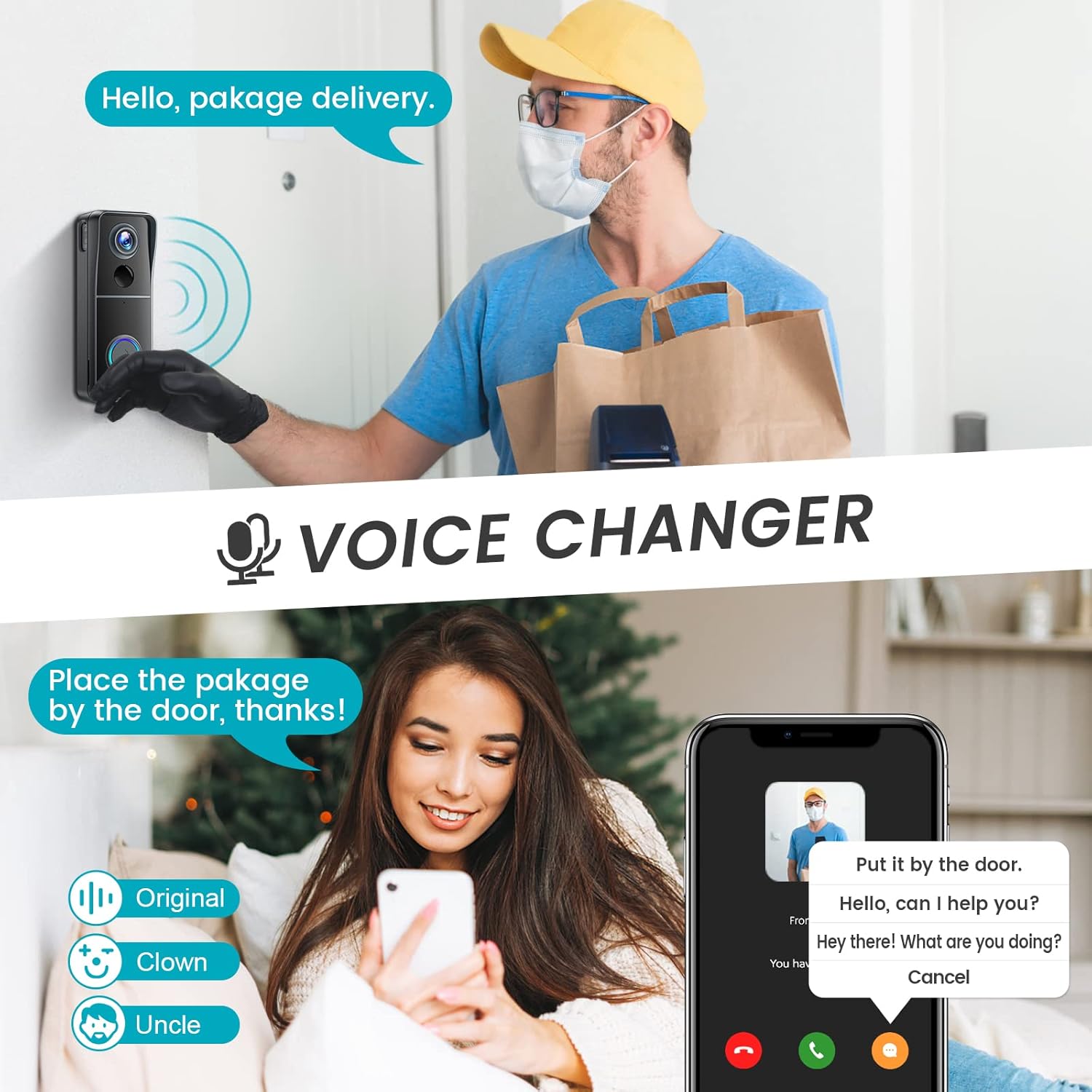
Image: A delivery person at the door and a user interacting via the Morecam J9 Doorbell Camera's two-way communication feature, which includes a voice changer option.
5.3 Zóny detekce osob a pohybu PIR
The doorbell features PIR (Passive Infrared) human detection to minimize false alarms. You can enable and customize this function within the app settings. Additionally, you can define specific motion zones to focus detection on critical areas and ignore irrelevant movements.

Image: A smartphone displaying a notification from the Morecam J9 Doorbell Camera indicating PIR human detection, with a child on rollerblades in the background.

Image: A smartphone screen showing the customizable motion zones feature of the Morecam J9 Doorbell Camera, allowing users to define specific areas for motion detection.
5.4 Hlasový měnič
The Morecam J9 doorbell includes a voice changer feature. During two-way communication, you can select different voice options within the app to modify your voice for privacy or other preferences.
5.5 Noční vidění
The doorbell camera is equipped with infrared (IR) night vision. When ambient light levels are low, the IR lights will automatically activate, providing clear video footage i v úplné tmě.
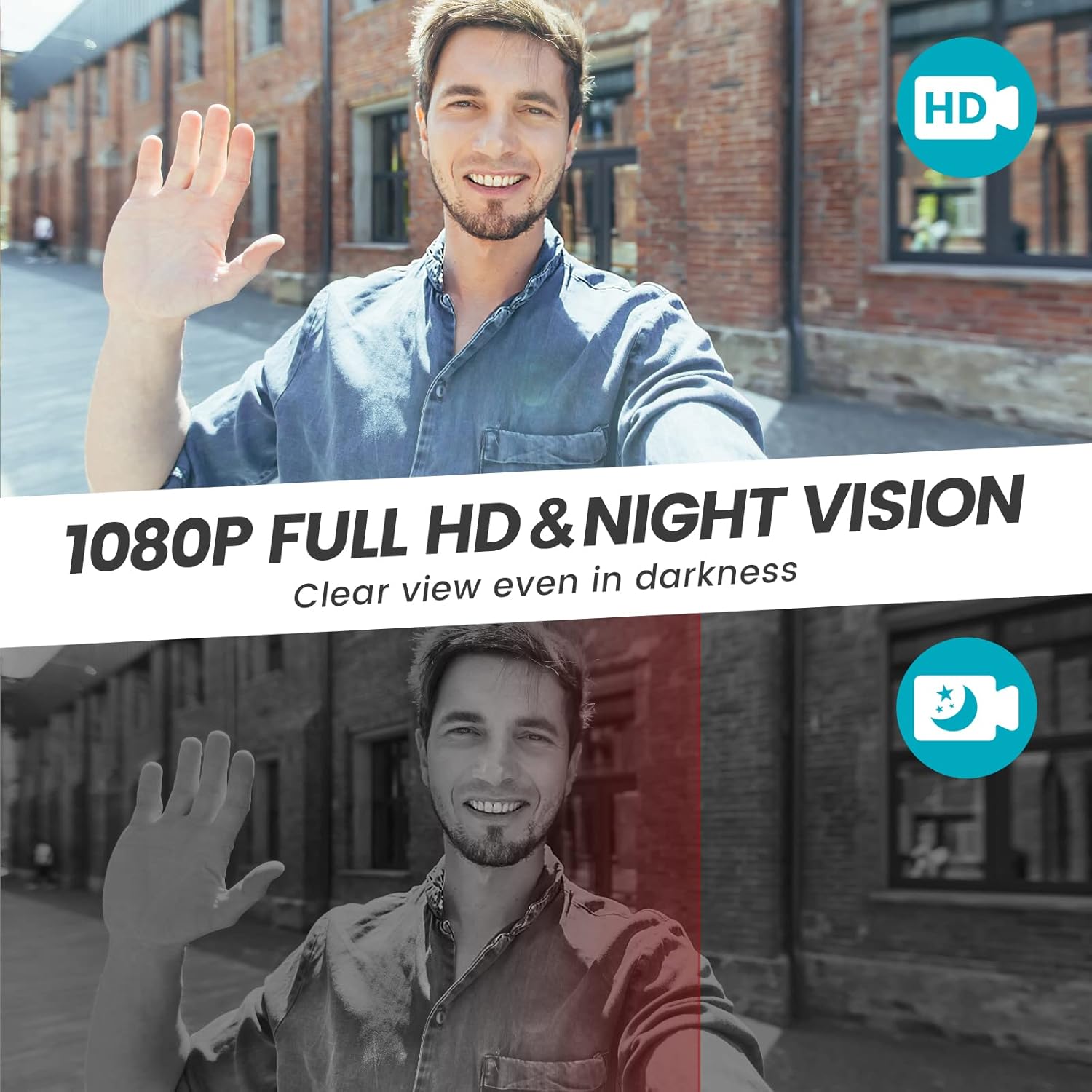
Image: A split image demonstrating the 1080P Full HD video quality of the Morecam J9 Doorbell Camera in daylight and its clear night vision capabilities in darkness.
5.6 Video úložiště
The Morecam J9 supports two storage options for recorded video:
- Micro SD karta: Vložte kartu Micro SD (až 128 GB, není součástí balení) do určeného slotu pro lokální ukládání.
- Cloudové úložiště: A 7-day trial of cloud storage is typically included. You can subscribe to a cloud plan through the app for continuous cloud recording and access.

Image: A hand holding a smartphone displaying the Morecam J9 Doorbell Camera's app interface, highlighting options for live view, history, and cloud storage, with text indicating "No Monthly Fees" for SD card storage and "7-day free cloud storage".
6. Údržba
6.1 Nabíjení baterie
When the battery level is low, you will receive a notification via the app. Remove the doorbell camera from its mounting bracket and recharge it using the provided USB cable. A full charge can take 8-10 hours.
6.2 Čištění
Pravidelně čistěte objektiv kamery a vnější část zvonku měkkým hadříkem.amp cloth to ensure clear video quality and proper sensor function. Avoid using harsh chemicals or abrasive materials.
7. Řešení problémů
- Zvonek se nepřipojuje k Wi-Fi:
- Ujistěte se, že vaše Wi-Fi síť používá frekvenci 2.4 GHz. Sítě 5 GHz nejsou podporovány.
- Check Wi-Fi signal strength at the doorbell's location. Move the doorbell closer to the router if necessary.
- Restart your Wi-Fi router and the doorbell camera.
- Ensure the Wi-Fi password entered in the app is correct. - Žádná oznámení nebyla přijata:
- Check your smartphone's app notification settings to ensure notifications for the CloudEdge app are enabled.
- Verify that motion detection and doorbell press notifications are enabled within the app settings.
- Ensure your phone has an active internet connection. - Špatná kvalita videa:
- Clean the camera lens.
- Ensure adequate Wi-Fi signal strength. Poor signal can affect streaming quality.
- Check for obstructions in front of the camera. - Zvonkohra nezvoní:
- Ensure the chime is plugged into a working power outlet.
- Re-pair the chime with the doorbell camera as described in Section 4.4. - Baterie se rychle vybíjí:
- Frequent motion detection events or live view access can consume more battery. Adjust motion sensitivity and recording duration in the app.
- Ensure the doorbell is fully charged after each charging cycle.
8. Specifikace
| Funkce | Specifikace |
|---|---|
| Název modelu | J9 |
| Rozlišení videa | 1080 Pixels (Effective), 720p (Capture) |
| Viewúhel | 145 stupňů |
| Snímková frekvence | 30 snímků za sekundu |
| Konektivita | Bezdrátové (pouze 2.4 GHz Wi-Fi) |
| Zdroj napájení | Napájení z baterie |
| Speciální funkce | Motion Sensor, Night Vision, Two-Way Audio, Voice Changer |
| Možnosti úložiště | Micro SD karta (až 128 GB), cloudové úložiště |
| Odolnost vůči povětrnostním vlivům | IP66 (implied by feature image) |
| Rozměry (D x Š x V) | 17.9 x 9.8 x 7.5 cm |
| Hmotnost | 431 g |
9. Záruka a podpora
For warranty information, technical support, or further assistance, please refer to the product packaging, the official Morecam website, or contact Morecam customer service directly. Keep your purchase receipt as proof of purchase for warranty claims.


