1. Úvod
This user manual provides essential information for setting up, operating, and maintaining your Intel NUC 12 Enthusiast NUC12SNKi72 Barebone System. The Intel NUC 12 Enthusiast is a compact yet powerful mini PC designed for both creative tasks and gaming, featuring a 12th Gen Intel Core i7 processor and Intel Arc discrete graphics. Its innovative performance hybrid architecture, support for AV1 codec, and AI-enhanced XeSS technology deliver immersive graphics and lightning-fast connectivity in a slim form factor.
2. Co je v krabici
Po otevření balení se prosím ujistěte, že jsou součástí balení všechny následující komponenty:
- Intel NUC 12 Enthusiast Kit - NUC12SNKi72 Barebone System
- Americký napájecí kabel
Poznámka: As a barebone system, memory (RAM), storage (SSD/HDD), and an operating system are not included and must be purchased separately.
3. Konec produktuview
The Intel NUC 12 Enthusiast NUC12SNKi72 is designed for high performance in a small footprint. Below are images illustrating the various aspects of the unit and its connectivity options.
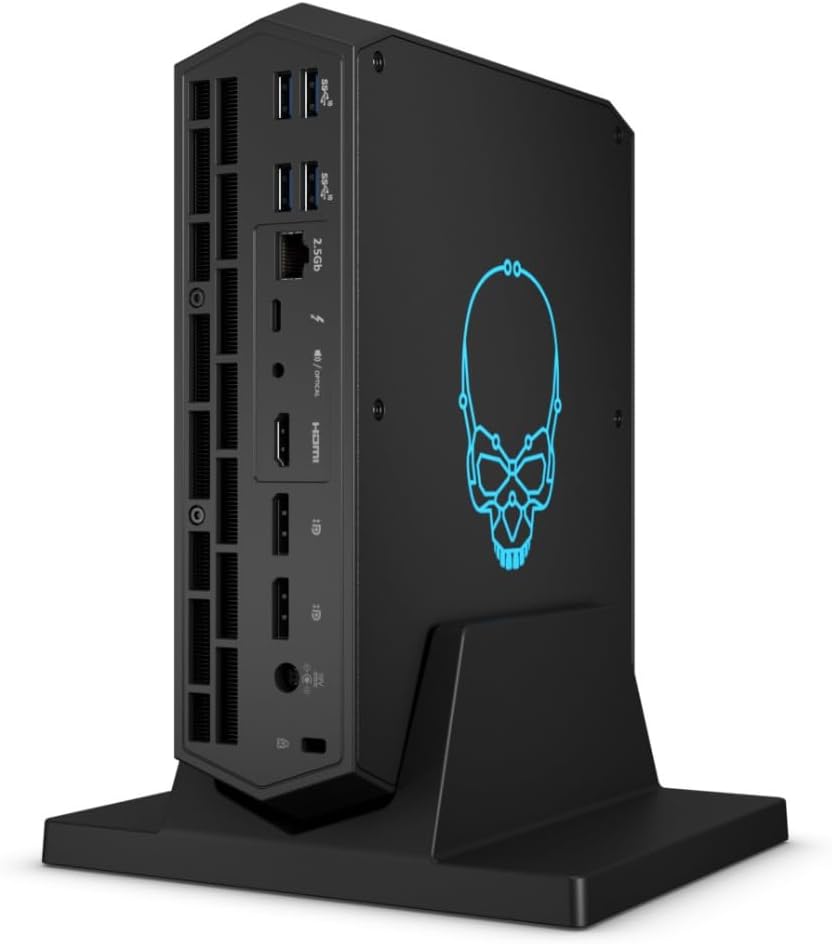
Obrázek 3.1: Přední strana view of the Intel NUC 12 Enthusiast, showcasinjeho kompaktní design a osvětlené logo lebky.
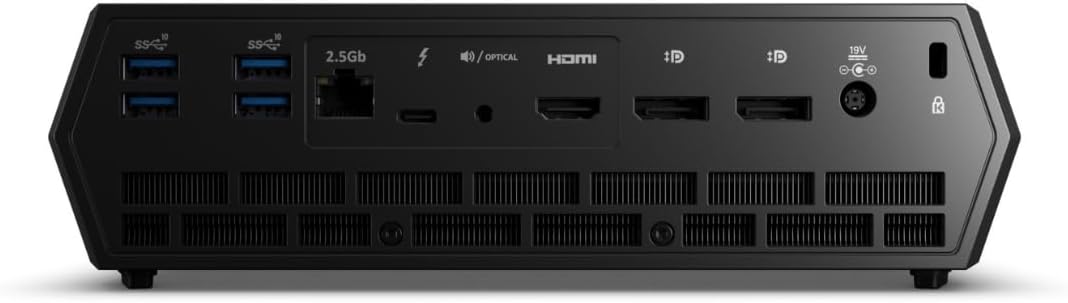
Figure 3.2: Front panel of the Intel NUC 12 Enthusiast, featuring a USB-A port, a USB-C (Thunderbolt) port, an SD card reader, and the power button.

Obrázek 3.3: Strana view of the Intel NUC 12 Enthusiast, highlighting multiple USB-A ports, a 2.5 Gigabit Ethernet port, Thunderbolt ports, HDMI, and DisplayPort connections.

Figure 3.4: Rear panel of the Intel NUC 12 Enthusiast, showing additional USB ports, display outputs, and the power input.
Klíčové vlastnosti:
- Procesor: 12th Gen Intel Core i7-12700H Tetradeca-core (14 Core)
- Grafika: Intel Arc A770M discrete graphics with 16 GB GDDR6 memory
- Paměť: DDR4 SDRAM compatible slots (user-installable)
- Skladování: Supports SSD with Serial ATA-600 interface (user-installable)
- Networking: 2.5 Gigabit Ethernet and Intel Killer Wi-Fi 6E AX1690i (802.11ax)
- Konektivita: Up to 10 USB peripherals supported, including multiple USB 3.2 Gen 2 and Thunderbolt 4 ports.
- Výstupy displeje: Multiple display outputs including HDMI and DisplayPort.
4. Průvodce nastavením
The Intel NUC 12 Enthusiast is a barebone system, requiring the installation of memory (RAM), storage, and an operating system before first use.

Obrázek 4.1: Vnitřní view of the Intel NUC 12 Enthusiast, showing the motherboard, cooling solution, and slots for RAM and storage.
4.1. Instalace paměti (RAM)
- Ensure the NUC is powered off and disconnected from all power sources.
- Carefully open the NUC chassis according to the instructions provided in the quick start guide (not included in this manual).
- Locate the DDR4 SDRAM compatible slots on the motherboard. There are 2 memory slots available.
- Zarovnejte zářez na paměťovém modulu s výstupkem ve slotu.
- Insert the module firmly into the slot at a 45-degree angle, then push down until the clips on both sides snap into place.
4.2. Instalace úložiště (SSD/HDD)
- With the chassis still open, locate the storage drive bay(s) or M.2 slot(s). The system supports SSDs with a Serial ATA-600 interface.
- For M.2 SSDs, insert the drive into the slot and secure it with the provided screw.
- For 2.5-inch drives, place the drive into the bay and connect the SATA data and power cables. Secure the drive with screws if necessary.
- Close the NUC chassis securely.
4.3. Připojení periferií
- Connect your monitor(s) to the HDMI or DisplayPort outputs. The system supports up to 3840x2160 resolution.
- Plug in your keyboard and mouse into any available USB ports. The NUC supports up to 10 USB peripherals.
- For wired internet, connect an Ethernet cable to the 2.5 Gigabit Ethernet port.
- Connect the US Power Cord to the NUC and then to a power outlet.
4.4. Instalace operačního systému
Once memory and storage are installed, power on the NUC. You will need to install an operating system (e.g., Windows 11 x64, Linux) from a bootable USB drive or disc. Follow the on-screen prompts for your chosen operating system. Ensure to install all necessary drivers for optimal performance, which can typically be found on the Intel support webmísto.
5. Návod k obsluze
5.1. Zapnutí/vypnutí
- Zapnutí: Stiskněte tlačítko napájení umístěné na předním panelu.
- Vypnutí: Use the shutdown option within your operating system. For a forced shutdown, press and hold the power button for 5-7 seconds.
5.2. Připojení k síti
- Kabelové připojení: Connect an Ethernet cable to the 2.5 Gigabit Ethernet port. Your operating system should automatically detect the connection.
- Bezdrátové připojení: The NUC supports Wi-Fi 6E (802.11ax). Access your operating system's network settings to connect to a Wi-Fi network.
5.3. Using USB and Thunderbolt Ports
The Intel NUC 12 Enthusiast is equipped with multiple USB 2.0, USB 3.2 Gen 2, and Thunderbolt 4 ports. These can be used to connect a wide range of peripherals such as external hard drives, USB flash drives, printers, and more. Thunderbolt 4 ports offer high-speed data transfer and display capabilities.
6. Údržba
6.1. Čištění
- Regularly clean the exterior of the NUC with a soft, dry, lint-free cloth.
- Use compressed air to clear dust from the ventilation grilles and fan openings to ensure proper airflow and cooling. Do this periodically, especially if the system is in a dusty environment.
- Ensure the NUC is powered off and unplugged before cleaning.
6.2. Aktualizace softwaru
Keep your operating system, drivers (especially graphics and chipset drivers), and BIOS/firmware updated to ensure optimal performance, stability, and security. Visit the official Intel support website for the latest drivers and updates for your NUC12SNKi72 model.
7. Řešení problémů
If you encounter issues with your Intel NUC, refer to the following common troubleshooting steps:
- Bez napájení:
- Ujistěte se, že je napájecí kabel bezpečně připojen k zařízení NUC i k funkční zásuvce.
- Ověřte funkčnost elektrické zásuvky zapojením jiného zařízení.
- Pokud je k dispozici, zkuste jiný napájecí kabel.
- Žádný výstup na displej:
- Zkontrolujte, zda je monitor zapnutý a zda je videokabel (HDMI/DisplayPort) bezpečně připojen k NUC i monitoru.
- Pokud je to možné, zkuste jiný videokabel nebo monitor.
- Ujistěte se, že je na monitoru vybrán správný vstupní zdroj.
- If you recently installed RAM or storage, ensure they are seated correctly.
- Problémy s připojením k síti:
- V případě kabelového připojení zkontrolujte stav ethernetového kabelu a routeru/modemu.
- For wireless connections, ensure Wi-Fi is enabled in your operating system and you are connected to the correct network with the correct password.
- Restart your router/modem and the NUC.
- Update network drivers from the Intel support webmísto.
- Problémy s výkonem systému:
- Ujistěte se, že všechny ovladače, zejména ovladače grafické karty, jsou aktuální.
- Zkontrolujte dostatek volného úložného prostoru.
- Monitor system temperatures to ensure it's not overheating. Ensure proper ventilation.
- Spusťte antivirovou/malwarovou kontrolu.
For more detailed troubleshooting or persistent issues, please refer to the Intel support webnebo kontaktujte jejich zákaznický servis.
8. Specifikace
| Funkce | Detail |
|---|---|
| Značka | Intel |
| Série | NUC 12 Enthusiast |
| Číslo modelu | NUC12SNKi72 |
| Procesor | Intel Core i7-12700H (4.7 GHz, 14 jader) |
| Grafický koprocesor | Intel Arc A770M |
| Velikost paměti RAM grafické karty | 16 GB |
| Memory Type (User Installable) | DDR4 SDRAM |
| K dispozici paměťové sloty | 2 |
| Hard Drive Interface (User Installable) | Serial ATA-600 (SSD) |
| Bezdrátový typ | 802.11ax (Wi-Fi 6E) |
| Ethernet | 2.5 Gigabit Ethernet |
| Počet portů USB | Up to 10 (including USB 2.0, USB 3.2 Gen 2, Thunderbolt 4) |
| Maximální rozlišení obrazovky | 3840x2160 |
| Operating System (Not Included) | Windows 11 x64 (Compatible) |
| Hmotnost položky | 11.73 libry |
| Rozměry produktu (DxŠxV) | 23 x 15 x 13 palce |
| Barva | Černý |
9. Záruka a podpora
Intel products are covered by a manufacturer's warranty. For specific warranty terms, conditions, and duration, please refer to the warranty card included with your product or visit the official Intel support webmísto.
For technical support, driver downloads, product registration, and additional resources, please visit the official Intel support webmísto: www.intel.com/support.


