1. Úvod
Welcome to the Kinstone 10.1" 4G LTE Android Tablet user manual. This guide provides comprehensive instructions for setting up, operating, and maintaining your new tablet. Designed for both work and play, this tablet features an octa-core processor, 8GB RAM, 128GB internal storage (expandable up to 1TB), an 8000mAh battery, and dual SIM slots for enhanced connectivity.

Obrázek 1.1: Přední a zadní strana view of the Kinstone 10.1" Android Tablet, showcasinjeho elegantní design a modul fotoaparátu.
2. Konec produktuview
2.1 Komponenty a funkce
Your Kinstone tablet is equipped with advanced features for a superior user experience. Key components include:
- Zobrazit: 10.1-inch Full HD IPS screen with 1920x1200 resolution, 178° wide viewing angle, and low blue light technology for eye comfort.
- Procesor: High-performance octa-core processor (hexa-core @2.0 GHz Cortex-A55 and dual-core @1.8 GHz Cortex-A75) with 2025 AI Chip.
- Paměť a úložiště: 8 GB RAM a 128 GB interní úložiště, rozšiřitelné až na 1 TB pomocí karty microSD.
- Kamery: 13MP zadní fotoaparát a 5MP přední fotoaparát.
- Baterie: Baterie s kapacitou 8000 mAh pro delší používání.
- Konektivita: 4G VoLTE dual SIM support, Bluetooth 5.0, 2.4/5G dual-band Wi-Fi.
- Zvuk: Dual speakers for stereo effect.
- Porty: Type-C charging port, 3.5mm earphone jack.

Obrázek 2.1: Přesview of the Android 12 OS features, highlighting efficiency, safety, entertainment, and display enhancements.

Figure 2.2: Visual summary of the Kinstone Android tablet's core features and specifications.
3. Nastavení
3.1 Počáteční nabíjení
Before first use, fully charge your tablet. Connect the provided Type-C charging cable to the tablet's charging port and the other end to the charger. Plug the charger into a power outlet. The charging indicator will show the charging status. A full charge typically takes approximately 2 hours.

Figure 3.1: Illustration of the tablet's long-lasting 8000mAh battery life, supporting various activities.
3.2 Zapnutí/vypnutí
- Zapnutí: Press and hold the Power button until the Kinstone logo appears on the screen.
- Vypnutí: Stiskněte a podržte tlačítko Napájení, dokud se nezobrazí nabídka možností napájení. Vyberte „Vypnout“ a potvrďte.
- Restartovat: V nabídce možností napájení vyberte „Restartovat“.
3.3 Průvodce počátečním nastavením
Po prvním zapnutí vás tablet provede průvodcem počátečním nastavením. Postupujte podle pokynů na obrazovce:
- Vyberte svůj jazyk.
- Připojte se k síti Wi-Fi.
- Sign in with your Google account (or create one).
- Nastavte zámek obrazovky (PIN, vzorec, heslo nebo Face ID).
- Review a přijměte obchodní podmínky.
4. Návod k obsluze
4.1 Navigace v rozhraní systému Android
Váš tablet běží na systému Android 12, který nabízí intuitivní uživatelské rozhraní. Mezi běžná gesta patří:
- Klepněte na: Výběr položky nebo otevření aplikace.
- Výpad: Procházení obrazovek nebo seznamů.
- Přiblížení roztažením/roztažením prstů: Pro přiblížení nebo oddálení obrázků a web stránky.
- Dlouhý stisk: Pro přístup k kontextovým nabídkám nebo přesun ikon aplikací.
4.2 Instalace aplikací
Applications can be downloaded and installed from the Google Play Store. Ensure you are connected to the internet before downloading.
- Otevřete Obchod Play aplikace
- Hledat požadovanou aplikaci.
- Klepněte Instalovat a postupujte podle pokynů na obrazovce.
4.3 Použití Face ID
The tablet supports Face Recognition for unlocking. To set up Face ID:
- Přejít na Nastavení > Zabezpečení a soukromí > Odemknutí obličejem.
- Postupujte podle pokynů a zaregistrujte svůj obličej.

Figure 4.1: Display features, including Face Recognition for secure and fast unlocking.
5. Konektivita
5.1 Wi-Fi připojení
Connect to Wi-Fi for internet access:
- Přejít na Nastavení > Síť a internet > Internet.
- Zapněte Wi-Fi.
- Vyberte požadovanou síť a v případě potřeby zadejte heslo.

Figure 5.1: Connectivity options, including dual-band Wi-Fi for fast and stable connections.
5.2 Párování Bluetooth
Pair your tablet with Bluetooth devices like headphones or speakers:
- Přejít na Nastavení > Připojená zařízení > Předvolby připojení > Bluetooth.
- Zapněte Bluetooth.
- Vyberte zařízení, které chcete spárovat, ze seznamu dostupných zařízení.
5.3 4G LTE and Dual SIM
The tablet supports 4G VoLTE with dual SIM slots, allowing for simultaneous calls and browsing. You can use two SIM cards or one SIM card and one microSD card.
- Vyhledejte držák SIM karty na boku tabletu.
- K otevření zásuvky použijte dodaný nástroj pro vysunutí SIM karty.
- Insert your Nano-SIM cards and/or microSD card into the designated slots.
- Gently push the tray back into the tablet.

Figure 5.2: Dual card slot functionality for SIM cards and expandable storage.
6. Použití fotoaparátu
Your tablet is equipped with a 13MP rear camera and a 5MP front camera for capturing photos and videos, and for video calls.
- Otevřete Fotoaparát aplikaci z domovské obrazovky nebo ze zásuvky aplikací.
- Přepínejte mezi předním a zadním fotoaparátem pomocí ikony fotoaparátu.
- Klepnutím na tlačítko spouště pořídíte fotografii nebo na tlačítko nahrávání spustíte/zastavíte nahrávání videa.
- Přístup k různým režimům a nastavením fotoaparátu v aplikaci.
7. Správa baterií
Baterie s kapacitou 8000 mAh poskytuje ampenergie pro každodenní použití. Optimalizace výdrže baterie:
- Snižte jas obrazovky.
- Turn off Wi-Fi, Bluetooth, and 4G when not in use.
- Zavřete aplikace na pozadí.
- Povolit režim úspory baterie v Nastavení > Baterie.
The tablet supports fast charging via its Type-C port.
8. Správa úložiště
Your tablet comes with 128GB of internal storage, which can be expanded up to 1TB using a microSD card.
- To check storage usage: Go to Nastavení > Skladování.
- Pro uvolnění místa: Odstraňte nepotřebné fileodinstalujte nepoužívané aplikace nebo přesuňujte velké soubory files na microSD kartu.

Figure 8.1: Visual representation of the tablet's generous storage capabilities.
9. Údržba
To ensure the longevity and optimal performance of your Kinstone tablet:
- Keep the tablet clean using a soft, lint-free cloth. Avoid harsh chemicals.
- Protect the screen with a screen protector (one is included).
- Nevystavujte tablet extrémním teplotám, přímému slunečnímu záření nebo vlhkosti.
- Regularly update the operating system and applications to the latest versions.
- Perform periodic backups of important data.
10. Řešení problémů
Pokud se s tabletem setkáte s problémy, podívejte se na následující běžná řešení:
| Problém | Možné řešení |
|---|---|
| Tablet se nezapne | Ujistěte se, že je baterie nabitá. Stiskněte a podržte tlačítko napájení po dobu alespoň 10–15 sekund, abyste vynutili restart. |
| Problémy s připojením Wi-Fi | Restart your Wi-Fi router. Go to Settings > Network & internet > Internet, forget the network, and reconnect. Ensure the tablet is within range. |
| Aplikace zamrzají nebo pády | Close the app and reopen it. Clear the app's cache (Settings > Apps > [App Name] > Storage & cache > Clear cache). Ensure the app is updated. |
| Pomalý výkon | Zavřete nepoužívané aplikace. Vymažte mezipaměť a dočasné files. Check storage space and free up if necessary. Restart the tablet. |
| Baterie se rychle vybíjí | Reduce screen brightness. Disable unnecessary features like GPS, Bluetooth, or Wi-Fi when not in use. Check battery usage in settings to identify power-hungry apps. |
If problems persist, contact Kinstone customer support for further assistance.
11. Specifikace
Detailed technical specifications for your Kinstone tablet:
| Funkce | Specifikace |
|---|---|
| Číslo modelu | KST102SA_ROW |
| Operační systém | Android 12 |
| Velikost obrazovky | 10.1 palce |
| Rozlišení obrazovky | 1920x1200 pixelů |
| Procesor | 2 GHz Octa-Core (Unisoc) |
| BERAN | 8 GB DDR4 SDRAM |
| Interní úložiště | 128 GB (Flash Memory) |
| Rozšiřitelné úložiště | Up to 1 TB via MicroSD |
| Grafický koprocesor | Mali-G57 MP1 |
| Bezdrátový typ | 802.11a, 802.11ac (2.4G/5G Dual-band Wi-Fi) |
| Bluetooth | 5.0 |
| Zadní kamera | 13 MP |
| Přední kamera | 5 MP |
| Kapacita baterie | 8000 mAh (lithium-polymerová) |
| Průměrná životnost baterie | 8 hodiny |
| Hmotnost položky | 2 libry |
| Rozměry produktu | 15.8 x 24.1 x 0.8 palce |
| Barva | Šedá |
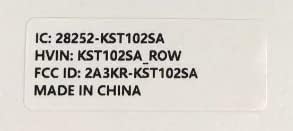
Figure 11.1: Product label with model number and regulatory information.
12. Záruka a podpora
12.1 Záruční servis
Kinstone provides a warranty service for your tablet. Within three months from the date of purchase, Kinstone offers replacement services for eligible issues, not repair. Please retain your proof of purchase.
12.2 Zákaznická podpora
For any questions, technical assistance, or warranty claims, please contact Kinstone customer support. You may also be eligible to receive a compatible leather case by contacting the seller after receiving your tablet.
Visit the official Kinstone store for more information and support: Kinstone Store on Amazon


