1. Úvod
Welcome to the ECOVACS DEEBOT T9 Robot Vacuum Cleaner and Mop user manual. This document provides essential information for the proper setup, operation, maintenance, and troubleshooting of your new robotic cleaning device. The DEEBOT T9 is designed to provide efficient and thorough cleaning of your home with advanced features such as 3000 Pa suction power, OZMO Pro 2.0 oscillating mopping, TrueMapping 2.0 dToF navigation, and smart obstacle avoidance.
2. Konec produktuview a obsah balení
The ECOVACS DEEBOT T9 combines powerful vacuuming with an oscillating mopping system to deliver a comprehensive cleaning experience. Key features include:
- Výkonné sání: Up to 3,000 Pa for effective dirt, crumb, and pet hair removal.
- OZMO Pro 2.0 Oscillating Mopping: High-frequency vibration (480 times/min) for superior mopping performance.
- Inteligentní vyhýbání se překážkám: Utilizes structured light technology and 3D imaging for precise object detection and navigation.
- Navigace TrueMapping 2.0: Advanced laser navigation for accurate and efficient mapping of your home.
- 3D mapování: Create and manage detailed 2D and 3D maps within the ECOVACS HOME App.
- Air Freshener Module: Integrated system to distribute fragrance while cleaning (capsule not included).

Obrázek 2.1: DEEBOT T9 Accessories. The package typically includes the robot, instruction manual, docking station, disposable mopping pads, side brushes, the OZMO Pro Oscillating System, and a pre-installed air freshener module.
3. Nastavení
3.1 Vybalení a počáteční umístění
- Opatrně vyjměte všechny součásti z obalu.
- Choose a suitable location for the docking station. Ensure it is placed against a wall with at least 0.5 meters of clear space on either side and 1.5 meters in front.
- Plug the docking station into a power outlet.
3.2 Instalace bočních kartáčů
Gently press the side brushes onto their respective posts on the underside of the DEEBOT until they click into place.
3.3 Počáteční nabíjení
Place the DEEBOT onto the docking station. Ensure the charging contacts on the robot align with those on the station. The robot will begin charging automatically. For first-time use, allow the DEEBOT to fully charge before operation.
3.4 Nastavení aplikace ECOVACS HOME
- Stáhněte si Aplikace ECOVACS HOME z obchodu s aplikacemi vašeho mobilního zařízení.
- Open the app and follow the on-screen instructions to create an account and add your DEEBOT T9. This typically involves scanning a QR code on the robot.
- Connect the DEEBOT to your home Wi-Fi network through the app.
4. Provoz
4.1 Spuštění a pozastavení čištění
Press the Auto Mode button on the DEEBOT or use the ECOVACS HOME App to start a cleaning cycle. Press again to pause. The DEEBOT will automatically return to its docking station when cleaning is complete or when its battery is low.
4.2 Režimy čištění a sací výkon
The DEEBOT T9 offers multiple cleaning modes and adjustable suction power levels (Silent, Standard, Strong, Super Mode) to suit different cleaning needs. These can be selected via the ECOVACS HOME App.

Obrázek 4.1: DEEBOT T9 suction power and cleaning modes. The robot offers up to 3000 Pa suction power with four adjustable levels.
4.3 OZMO Pro 2.0 Oscillating Mopping
Attach the OZMO Pro 2.0 oscillating mopping system and fill the water tank. The system vibrates 480 times per minute, mimicking manual scrubbing for effective stain removal. The DEEBOT features carpet detection and will avoid mopping carpeted areas when the mopping pad is attached.
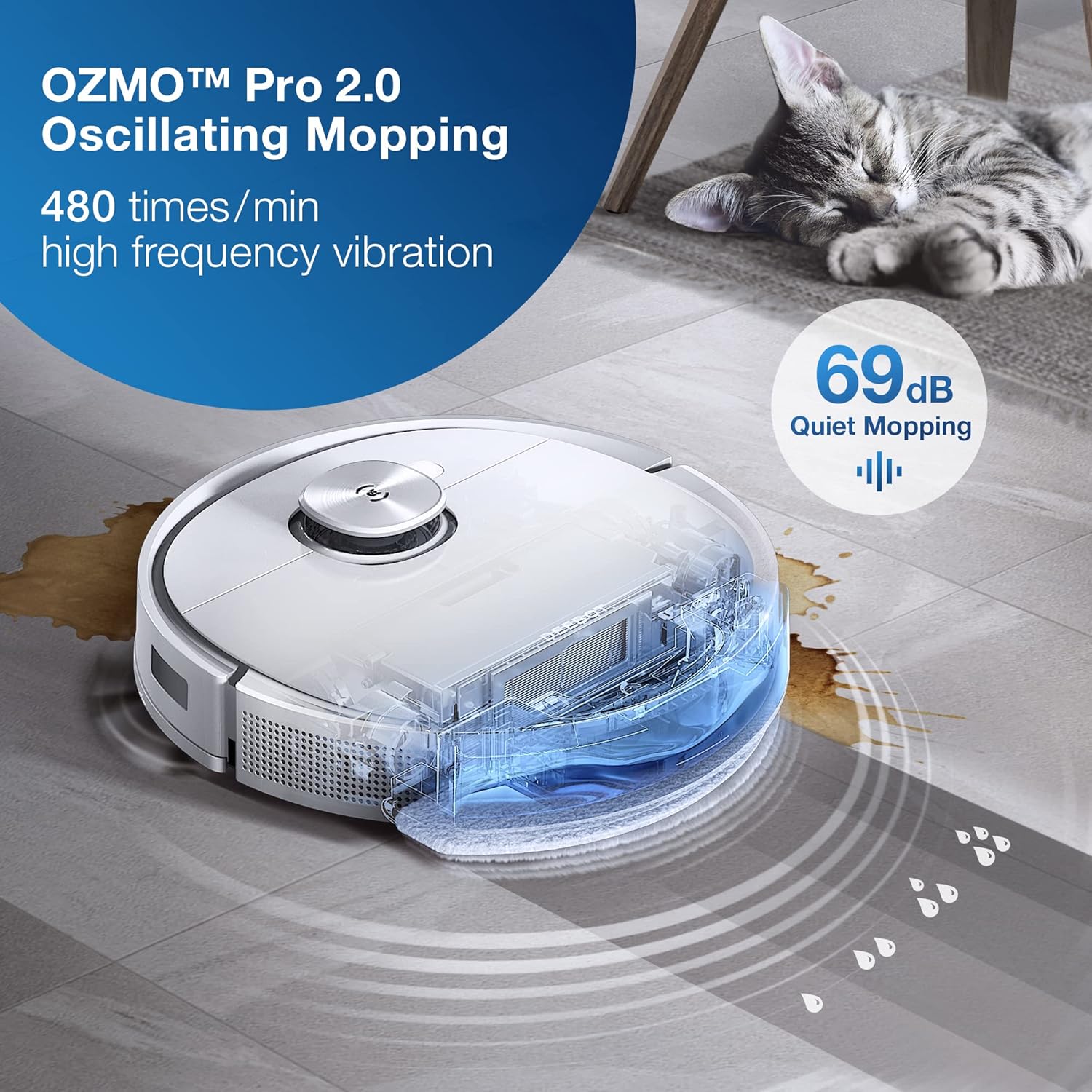
Obrázek 4.2: DEEBOT T9 OZMO Pro 2.0 Oscillating Mopping. The system provides high-frequency vibration for thorough floor cleaning.
4.4 TrueMapping 2.0 Navigation and Obstacle Avoidance
The DEEBOT T9 uses TrueMapping 2.0 dToF navigation for precise mapping and efficient cleaning paths. Its smart obstacle avoidance technology, based on 3D imaging, accurately detects and navigates around objects like cables, slippers, and dustbins, preventing entanglement and collisions.

Obrázek 4.3: Smart Obstacle Recognition and Avoidance. The DEEBOT T9 intelligently avoids obstacles for uninterrupted cleaning.

Obrázek 4.4: Accurate Navigation and Mapping. The DEEBOT T9 maps your home quickly and precisely.
4.5 3D Mapping and App Control
The ECOVACS HOME App allows you to view and manage detailed 2D and 3D maps of your home. You can set virtual boundaries, designate specific cleaning areas, schedule cleaning times, and customize cleaning preferences. The app supports mapping multiple floors.
4.6 Funkce osvěžovače vzduchu
The DEEBOT T9 includes an air freshener module. If desired, insert an air freshener capsule (sold separately) into the designated slot. The robot will then distribute fragrance throughout your home during cleaning cycles. This feature can be controlled via the app.

Obrázek 4.5: Indoor Mobile Fragrance System. The DEEBOT T9 can refresh your home's air while cleaning.
5. Údržba
Regular maintenance ensures optimal performance and extends the lifespan of your DEEBOT T9.
5.1 Emptying the Dustbin and Cleaning the Filter
The dustbin should be emptied after each cleaning cycle. Remove the dustbin, open its lid, and discard collected debris. Tap the HEPA filter gently to remove dust. The filter can be rinsed with water if necessary, but ensure it is completely dry before reinstallation.
5.2 Čištění hlavního kartáče a bočních kartáčů
Periodically remove the main brush and side brushes. Use the cleaning tool provided to cut and remove any hair or debris tangled around them. Ensure the brushes are free of obstructions for effective cleaning.
5.3 Péče o mopovací podložku
After each mopping session, remove and clean the mopping pad. Disposable pads should be discarded. Reusable pads can be hand-washed or machine-washed and air-dried.
5.4 Čištění senzorů a nabíjecích kontaktů
Wipe the DEEBOT's sensors (e.g., anti-drop sensors, obstacle detection sensors) and the charging contacts on both the robot and the docking station with a clean, dry cloth to ensure proper function.
6. Řešení problémů
If your DEEBOT T9 encounters issues, refer to the following common troubleshooting steps:
- DEEBOT gets stuck frequently: Ensure the cleaning area is free of excessive cables, small objects, or thick rugs that might impede movement. The DEEBOT may struggle with high thresholds (over 15mm). Consider using virtual boundaries in the app for problematic areas.
- Špatný čisticí výkon: Check if the dustbin is full, the filter is clogged, or the brushes are tangled with hair. Clean these components as described in the Maintenance section. Ensure the suction power is set appropriately for the surface.
- Vytírání není účinné: Verify the water tank is filled and the mopping pad is correctly attached and clean. Ensure the mopping level in the app is set to a suitable intensity.
- DEEBOT cannot find docking station: Ensure the docking station is properly powered and has clear space around it. Clean the charging contacts on both the robot and the station.
- Problémy s připojením aplikace: Restart your router, the DEEBOT, and your mobile device. Ensure your Wi-Fi network is 2.4GHz, as some robots may not support 5GHz networks.
- Neobvyklé zvuky: Check for foreign objects caught in the main brush, side brushes, or wheels.
For persistent issues, consult the ECOVACS HOME App for further diagnostics or contact ECOVACS customer support.
7. Specifikace
| Značka | ECOVACS |
| Název modelu | T9 |
| Speciální funkce | Oscillating Mopping, Smart Obstacle Avoidance |
| Barva | Přírodní |
| Typ filtru | HEPA |
| Zdroj napájení | Napájení z baterie |
| Kontrolní metoda | App |
| Form Factor | Přenosný |
| Hmotnost položky | 7 kg 320 g |
| Rozměry položky (DxŠxV) | 35.3 x 35.3 x 9.4 centimetrů |
| Doporučení pro povrch | Koberec, Tvrdé podlahy |
8. Bezpečnostní informace
Please read and follow all safety instructions before using your DEEBOT T9 to prevent injury or damage.
- Do not operate the DEEBOT in wet environments or near standing water.
- Udržujte volné oblečení, vlasy a části těla v dostatečné vzdálenosti od otvorů a pohyblivých částí.
- Do not allow children or pets to play with the DEEBOT. Supervise children when the robot is in operation.
- Před čištěním odstraňte z podlahy všechny volné kabely, malé předměty nebo křehké předměty, abyste zabránili jejich zamotání nebo poškození.
- Používejte pouze originální nabíjecí dok a napájecí adaptér od společnosti ECOVACS.
- Do not use the DEEBOT to pick up large debris, liquids, burning or smoking materials, or sharp objects.
- Ensure the DEEBOT is turned off and unplugged from the docking station before performing any maintenance or cleaning.
9. Záruka a podpora
Informace o záruce naleznete v záruční kartě dodané s vaším produktem nebo navštivte oficiální webové stránky ECOVACS. website. If you encounter any issues that cannot be resolved using this manual, please contact ECOVACS customer support for assistance. Contact details can typically be found on the ECOVACS website or within the ECOVACS HOME App.


