1. Úvod
Thank you for choosing the Dkelincs 47.2 Inch Red T-Shaped Gaming Desk. This manual provides detailed instructions for assembly, operation, maintenance, and troubleshooting to ensure you get the best experience from your new desk. Please read this manual carefully before assembly and retain it for future reference.
2. Konec produktuview
The Dkelincs H200 Gaming Desk is designed for both gaming and home office use, featuring a sturdy T-shaped metal frame and a durable carbon fiber textured desktop. It includes convenient accessories like a headphone hook and a cup holder to enhance your workspace.
Klíčové vlastnosti:
- Robustní konstrukce: T-shaped metal legs and frame provide stability.
- Povrch z uhlíkových vláken: Smooth, scratch-resistant, waterproof, and sweat-proof desktop.
- Ergonomický design: Includes a headphone hook and cup holder for convenience.
- Nastavitelné opěrky nohou: Zajišťuje stabilitu na nerovném povrchu.
- Prostorná pracovní plocha: Ample space for monitors, keyboard, mouse, and other gaming gear.
Rozměry:
The desk measures approximately 47.2 inches (L) x 23.6 inches (W) x 29.3 inches (H).

Obrázek 2.1: Konecview of the Dkelincs Gaming Desk with key dimensions (Length 47.2", Width 23.6", Height 29.3") indicated.

Image 2.2: The Dkelincs Gaming Desk showcasing a typical setup with a monitor, keyboard, mouse, tablet, headphones, and a cup holder.
3. Pokyny k nastavení
Assembly of the Dkelincs Gaming Desk is designed to be straightforward and typically takes about 15 minutes. Please ensure all components are present before beginning.
Zahrnuté komponenty:
- Gaming Desk components (desktop, legs, frame)
- Háček na sluchátka
- Držák na pohár
- Montážní manuál
- Tool Kit (includes necessary wrenches and screws)
Montážní kroky:
- Rozbalte komponenty: Opatrně vyjměte všechny díly z obalu a položte je na čistý, měkký povrch, abyste zabránili poškrábání. Zkontrolujte, zda jsou přítomny všechny uvedené součásti.
- Sestavte rám: Attach the T-shaped legs to the main support frame using the provided screws and tools. Ensure all connections are secure but do not overtighten initially.
- Připojit plochu: Carefully place the desktop onto the assembled frame. Align the pre-drilled holes on the desktop with the frame. Secure the desktop using the appropriate screws.
- Instalace příslušenství: Attach the headphone hook and cup holder to the designated locations on the desk frame or desktop edge as per the assembly manual.
- Nastavení vyrovnávacích nožiček: Once the desk is fully assembled, place it in its desired location. Adjust the leveling feet at the bottom of the legs to ensure the desk is stable and does not wobble on uneven floors.
- Konečné utažení: Once the desk is level and stable, go back and securely tighten all screws.

Obrázek 3.1: Bývalýample of the Dkelincs Gaming Desk fully assembled and set up with a computer, monitor, and PC tower.
4. Návod k obsluze
The Dkelincs Gaming Desk is designed for versatile use, accommodating various setups for gaming, studying, or working.
Použití na počítači:
- The spacious 47.2"L x 23.6"W desktop can comfortably hold multiple monitors, a keyboard, mouse, and other peripherals.
- The carbon fiber texture provides a smooth surface for mouse movement and is resistant to minor spills.
Použití příslušenství:
- Háček na sluchátka: Utilize the integrated hook to keep your headphones organized and easily accessible, preventing clutter on your desk.
- Držák poháru: Place your beverage in the cup holder to prevent accidental spills on your electronics and workspace.

Obrázek 4.1: Pohled shora dolů view illustrating the spacious desktop layout, accommodating a keyboard, mouse, and highlighting the edge design.

Image 4.2: The Dkelincs Gaming Desk demonstrating its versatility for gaming, writing, and multi-monitor work setups.


Obrázek 4.3: Detailní views of the integrated cup holder and headphone hook.
5. Údržba
Proper care and maintenance will extend the life and appearance of your Dkelincs Gaming Desk.
Čištění pracovní plochy:
- The carbon fiber surface is waterproof and sweat-proof. For general cleaning, wipe the desktop with a soft, damp tkanina.
- For tougher stains, use a mild soap solution and then wipe dry immediately. Avoid abrasive cleaners or harsh chemicals, as these can damage the finish.
Rám a nohy:
- Wipe the metal frame and legs with a dry or slightly damp hadříkem k odstranění prachu.
- Pravidelně kontrolujte všechny šrouby a spoje, zda jsou pevně utažené. V případě potřeby je dotáhněte pro zachování stability.

Image 5.1: Illustration of the desktop's waterproof property and its construction from P2 level environmental board.
6. Řešení problémů
If you encounter any issues with your Dkelincs Gaming Desk, refer to the following common problems and solutions:
Chvění stolu:
- Příčina: Nerovná podlaha nebo uvolněné spoje nohou.
- Řešení: Adjust the leveling feet at the bottom of each leg until the desk is stable. Ensure all assembly screws are securely tightened.

Image 6.1: Detail of an adjustable foot, which can be rotated to stabilize the desk on uneven surfaces.
Chybějící části:
- Příčina: Chyba balení nebo ztráta během vybalování.
- Řešení: Double-check all packaging materials. If parts are still missing, contact Dkelincs customer service immediately with your purchase details.
Škrábance na pracovní ploše:
- Příčina: Ostré předměty nebo abrazivní čištění.
- Řešení: While the carbon fiber surface is scratch-resistant, it is not scratch-proof. Use mouse pads and avoid dragging sharp objects across the surface. Minor scratches may be less visible due to the textured finish.
7. Specifikace
| Funkce | Detail |
|---|---|
| Číslo modelu | H200 |
| Značka | Dkelincs |
| Rozměry produktu (D x Š x V) | 47.2 cm x 23.6 cm x 29.3 cm |
| Materiál pro stolní počítače | Carbon Fiber Textured Wood (P2 Level Environmental Board) |
| Materiál rámu | Legovaná ocel |
| Barva | Červený |
| Hmotnost | Přibližně 40 liber |
| Speciální funkce | Adjustable Leg Pads, Headphone Hook, Cup Holder |
| Montáž Vyžadována | Ano |
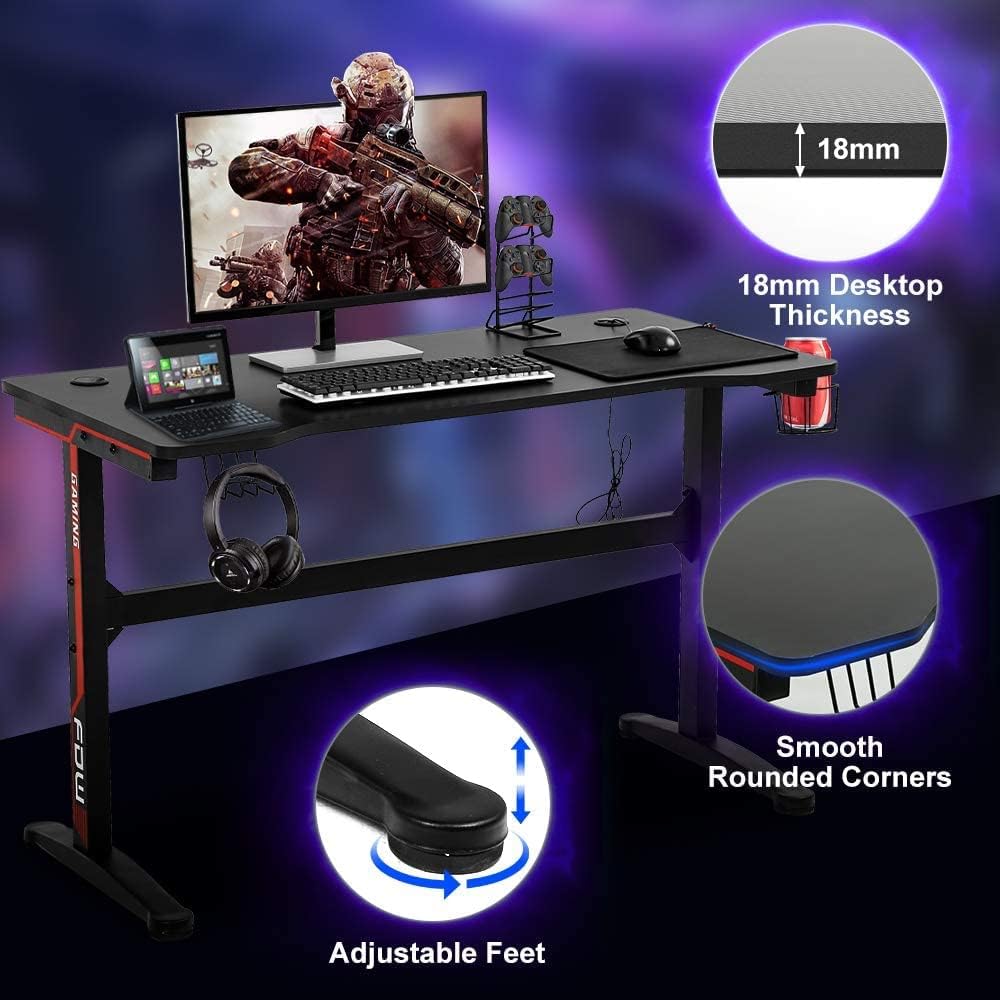
Image 7.1: Visual details of the desk, including 18mm desktop thickness, smooth rounded corners, and adjustable feet.
8. Informace o záruce
The Dkelincs H200 Gaming Desk comes with a Omezená záruka. Please refer to the warranty card included in your product packaging for specific terms, conditions, and duration of coverage. This warranty typically covers manufacturing defects and material flaws under normal use.
9. Zákaznická podpora
For any questions, concerns, or assistance with your Dkelincs Gaming Desk, please do not hesitate to contact our customer service team. We are committed to providing prompt and helpful support.
Kontaktní údaje:
- Refer to the contact details provided in your product packaging or on the official Dkelincs webmísto.
- When contacting support, please have your model number (H200) and purchase information readily available.