1. Konec produktuview
The Nexxt Wireless Security Camera offers a robust solution for both indoor and outdoor surveillance. Designed for ease of use and versatility, these cameras provide high-definition video, motion detection, two-way audio, and night vision capabilities, all powered by a built-in rechargeable battery for wire-free operation.
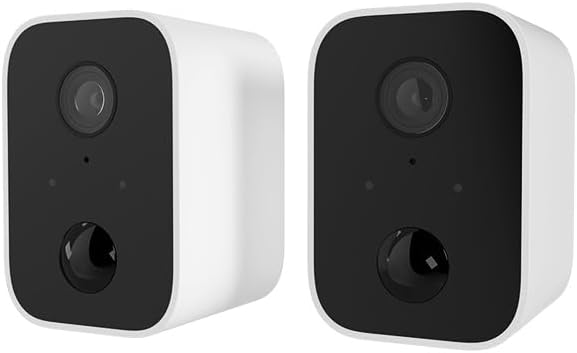
Image: Two Nexxt Wireless Security Cameras, showcasing their compact, white design with black camera faces.
Klíčové vlastnosti:
- 1080P HD Live Video: Crystal clear real-time video and playback.
- Vestavěná baterie: Wire-free design for flexible placement and continued operation during power outages.
- IP65 Odolnost proti povětrnostním vlivům: Durable construction suitable for outdoor use in various weather conditions.
- Detekce pohybu: Sends instant notifications to your smartphone upon detecting movement up to 26ft away.
- Obousměrný zvuk: Communicate directly through the camera using the built-in speaker and microphone.
- Noční vidění: Equipped with IR LEDs for clear vision in low-light or dark conditions.
- Lokální a cloudové úložiště: Supports micro-SD card (not included) for local storage and optional cloud storage (subscription required).
- Integrace chytré domácnosti: Kompatibilní s Amazon Alexa a Google Assistant pro hlasové ovládání.

Image: A single Nexxt security camera surrounded by icons representing its features: Full 1080P HD, Motion detection, Two-way communication, Night vision, Voice activated, IP65 weatherproof, Micro-microSD™ slot, Wall mount bracket included, and Cloud ready.
2. Obsah balení
Please verify that all items are present and in good condition upon opening the package. If any items are missing or damaged, please contact customer support.
- 2 x Nexxt Wireless Security Cameras
- 2 x montážní držáky
- 2 x USB nabíjecí kabely
- 1 x Průvodce rychlým startem
- Montážní šrouby a nástěnné hmoždinky

Image: The retail packaging for the Nexxt Smart Wi-Fi battery camera 2-pack, showing the cameras and key features on the box.
3. Průvodce nastavením
3.1 Nabíjení fotoaparátu
Before initial use, fully charge both cameras. Connect the provided USB charging cable to the camera's charging port and a standard USB power adapter (not included). The charging indicator light will show the charging status.
3.2 Downloading the Nexxt App
Hledat "Nexxt Home" in the Apple App Store or Google Play Store and download the application. Create an account or log in if you already have one.
3.3 Spárování fotoaparátu
- Open the Nexxt Home app and tap the "+" icon to add a new device.
- Select "Security Camera" from the device list.
- Follow the on-screen instructions to put the camera into pairing mode (usually involves pressing a reset button until an indicator light flashes).
- Připojte svůj smartphone k 2.4 GHz Wi-Fi síti. Poznámka: Sítě 5 GHz nejsou podporovány.
- The app will display a QR code. Hold your camera approximately 6-8 inches (15-20 cm) in front of your phone's screen until you hear a prompt from the camera.
- Once paired, the camera will connect to your Wi-Fi network, and you can name your device within the app.
3.4 Montáž fotoaparátu
The Nexxt Wireless Security Camera can be easily mounted indoors or outdoors. Choose a location that provides the desired viewúhlu a je v dosahu vaší sítě Wi-Fi.

Image: A Nexxt security camera mounted on an exterior wall, demonstrating its weatherproof design and easy installation.
- Určete vhodný montážní povrch.
- Použijte dodaný montážní držák jako šablonu k označení otvorů pro vrtání.
- V případě montáže do sádrokartonu nebo zdiva vyvrtejte pilotní otvory a vložte do nich hmoždinky.
- Připevněte montážní držák k povrchu pomocí dodaných šroubů.
- Připevněte kameru k montážnímu držáku a podle potřeby upravte úhel.

Image: A Nexxt security camera detached from its mounting bracket, showing the connection point for easy installation and removal.
4. Provoz
4.1 Živě View
Open the Nexxt Home app and select your camera from the device list to access the live video feed. You can view foo v reálném časetage odkudkoli s připojením k internetu.
4.2 Detekce pohybu
The camera's motion sensors detect movement up to 26 feet away. When motion is detected, the camera will record a short clip and send a notification to your smartphone. You can adjust motion sensitivity and set detection zones within the app settings.

Image: A dog and a child playing in a yard, with a 'Motion detection' icon overlay, illustrating the camera's ability to detect activity.
4.3 Obousměrný zvuk
To use two-way audio, tap the microphone icon in the live view rozhraní aplikace. Poté můžete mluvit přes telefon a váš hlas bude promítán reproduktorem kamery. Uvolněte ikonu pro poslech.
4.4 Noční vidění
Kamera se při slabém osvětlení automaticky přepne do režimu nočního vidění a poskytne tak jasný černobílý videozáznam.tage. This feature ensures continuous surveillance 24/7.
4.5 Možnosti úložiště
- Karta Micro SD: Insert a micro-SD card (up to 128GB, not included) into the camera's slot for local storage of recordings.
- Cloudové úložiště: Nexxt offers optional cloud storage plans for secure, off-site storage of your video recordings. Refer to the Nexxt Home app for subscription details.
4.6 Hlasové ovládání
Integrate your Nexxt camera with Amazon Alexa or Google Assistant for convenient voice control. Follow the instructions in the Nexxt Home app to link your account with your preferred smart home platform. You can then use voice commands to view živé přenosy na kompatibilních chytrých displejích.
5. Údržba
5.1 Správa baterie
To maximize battery life, ensure the camera is fully charged before deployment. The Nexxt Home app will notify you when the battery level is low. Regular charging is recommended, especially for cameras in high-traffic areas with frequent motion detection.
5.2 Čištění fotoaparátu
Periodically clean the camera lens and housing with a soft, dry cloth to ensure clear image quality. Avoid using harsh chemicals or abrasive materials that could damage the camera.
5.3 aktualizací firmwaru
Nexxt Solutions may release firmware updates to improve performance, add new features, or address security vulnerabilities. The Nexxt Home app will notify you of available updates. It is recommended to keep your camera's firmware up to date for optimal performance and security.
6. Řešení problémů
| Problém | Možná příčina | Řešení |
|---|---|---|
| Fotoaparát se nezapne | Slabá baterie; Tlačítko napájení nebylo správně stisknuto | Charge the camera fully; Press and hold the power button for a few seconds. |
| Nelze se připojit k Wi-Fi | Incorrect Wi-Fi password; Camera too far from router; Only 2.4GHz supported | Verify password; Move camera closer to router; Ensure you are connecting to a 2.4GHz network. |
| Detekce pohybu nefunguje | Sensitivity too low; Detection zone not set; App notifications disabled | Adjust sensitivity in app; Configure detection zones; Enable notifications for Nexxt Home app. |
| Two-way audio not clear | Poor network connection; Obstruction near microphone/speaker | Check Wi-Fi signal strength; Ensure no obstructions; Reduce background noise. |
| Night vision is blurry | Dirty lens; IR LEDs obstructed | Clean the camera lens; Ensure nothing is blocking the IR LEDs. |
7. Technické specifikace
| Funkce | Specifikace |
|---|---|
| Název modelu | Battery (Built-in Battery 2PK) |
| Rozlišení záznamu videa | 1080p HD |
| Vnitřní/venkovní použití | Venkovní, Vnitřní |
| Zdroj napájení | Napájení z baterie |
| Protokol připojení | Wi-Fi (pouze 2.4 GHz) |
| Typ ovladače | Amazon Alexa, Google Assistant |
| Typ montáže | Držák na zeď |
| Hodnocení mezinárodní ochrany | IP65 odolný proti povětrnostním vlivům |
| Typ upozornění | Zvuk a pohyb |
| Hmotnost položky | 1.52 libry (za pár) |
| Rozměry balení | 11.69 x 6.5 x 2.56 palce |
| UPC | 798302057661 |
8. Záruka a podpora
8.1 Informace o záruce
Nexxt Solutions products typically come with a 2-year warranty from the date of purchase, covering defects in materials and workmanship. Please retain your proof of purchase for warranty claims. The warranty does not cover damage caused by misuse, accidents, unauthorized modifications, or natural disasters.
8.2 Zákaznická podpora
For technical assistance, troubleshooting, or warranty inquiries, please visit the official Nexxt Solutions website or contact their customer support team. You can often find FAQs, video tutorials, and contact information on their support pages.
Online podpora: www.nexxtsolutions.com/support
Please have your product model number (Built-in Battery 2PK) and purchase date ready when contacting support.


