1. Úvod
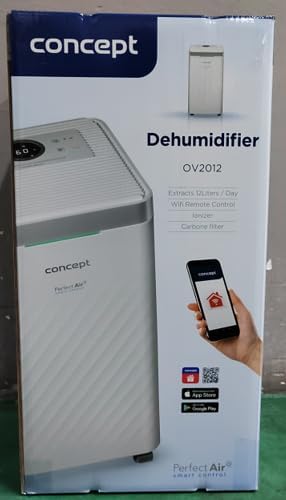
The Concept OV2012 is a versatile appliance designed to improve indoor air quality by combining dehumidification with air purification. This device effectively reduces excess humidity, which can contribute to mold growth and discomfort, while simultaneously filtering airborne pollutants. It features a triple filtration system, intuitive touch controls, and smart app connectivity for convenient operation.

Obrázek 1: Přední strana view of the Concept OV2012 Dehumidifier.
2. Bezpečnostní informace
Před použitím spotřebiče si pečlivě přečtěte všechny bezpečnostní pokyny. Nedodržení těchto pokynů může vést k úrazu elektrickým proudem, požáru nebo vážnému zranění.
- Zajistěte napájení objtage odpovídá štítku s výkonem na spotřebiči.
- Neprovozujte jednotku s poškozeným napájecím kabelem nebo zástrčkou.
- Uchovávejte spotřebič mimo dosah vody a jiných tekutin. Neponořujte jej.
- Neblokujte vstupy ani výstupy vzduchu. Zajistěte kolem jednotky dostatečný prostor pro správné proudění vzduchu.
- Před čištěním, údržbou nebo pokud přístroj delší dobu nepoužíváte, odpojte jej ze zásuvky.
- Tento spotřebič není určen k používání osobami (včetně dětí) se sníženými fyzickými, smyslovými nebo duševními schopnostmi nebo bez dostatečných zkušeností a znalostí, pokud nejsou pod dohledem nebo jim nebyly poskytnuty instrukce.
- Nepoužívejte spotřebič v prostorách, kde se vyskytují hořlavé plyny nebo páry.
3. Komponenty produktu
Familiarize yourself with the main parts of your Concept OV2012 dehumidifier.
- Ovládací panel: Touch-sensitive interface for setting modes and functions.
- Vývod vzduchu: Where processed air is released.
- Vstup vzduchu/kryt filtru: Located at the rear, provides access to the air filters.
- Nádrž na vodu: Sbírá kondenzovanou vodu.
- Průběžný odvodňovací výstup: Port for attaching a hose for continuous water drainage.
- 360° Rolling Wheels: Pro snadný pohyb jednotky.

Obrázek 2: Zadní view of the dehumidifier, showing air intake and water tank.
4. Ovládací panel a displej
The OV2012 features an intuitive touch control panel with a digital display and LED indicators.
Obrázek 3: Detailní view dotykového ovládacího panelu.
- Vypínač: Zapíná nebo vypíná jednotku.
- Výběr režimu: Cycles through operating modes (Automatic, Continuous, Laundry Drying, Fan).
- Humidity Slider/Buttons: Upravuje požadovanou úroveň vlhkosti.
- Tlačítko časovače: Sets the delayed on/off time (up to 24 hours).
- Rychlost ventilátoru: Adjusts fan speed (usually two levels).
- Tlačítko ionizátoru: Activates or deactivates the ionizer function.
- LED indikátor vlhkosti: Changes color based on current room humidity:
- Červený: High humidity (RH > 70%)
- Zelený: Satisfactory humidity (70% ≥ RH ≥ 50%)
- Modrý: Low humidity (RH < 50%)
5. Počáteční nastavení
- Rozbalení: Opatrně vyjměte odvlhčovač z obalu. Obal uschovejte pro budoucí skladování nebo přepravu.
- Umístění: Place the unit on a firm, level surface. Ensure there is at least 20 cm of clear space around all sides for optimal airflow. The 360° rolling wheels allow for easy positioning.
- Připojení napájení: Zapojte napájecí kabel do uzemněné elektrické zásuvky.
- Nádrž na vodu: Ujistěte se, že je nádržka na vodu správně vložena do přístroje.
6. Provozní režimy
The OV2012 offers four distinct operating modes to suit various needs:
- Automatický režim: The dehumidifier automatically maintains the humidity level you select. The unit will cycle on and off to achieve and sustain the target humidity.
- Nepřetržitý provoz: Ideal for long-term drying of very wet areas. In this mode, the unit runs continuously regardless of the ambient humidity. It is recommended to use the continuous drainage hose in this mode.
- Režim sušení prádla: Accelerates the drying of laundry and helps prevent moisture buildup in the room, reducing the risk of mold.
- Fan Mode (Air Purification without Dehumidification): In this mode, the compressor is off, and only the fan and filtration system operate to purify the air without removing moisture.
Using the Concept Home Mobile Application
The OV2012 can be controlled remotely via the Concept Home mobile application, available for iOS and Android devices. This app allows you to:
- Zapněte nebo vypněte jednotku.
- Select desired operating modes.
- Check the current air status in the room.
- Create a precise operating schedule for the dehumidifier.

Figure 4: The Concept Home mobile application for remote control.
7. Odvod vody
Vypouštění vodní nádrže
When the 2.2-liter water tank is full, the unit will automatically shut off, and an indicator light will illuminate. Carefully remove the water tank, empty it, and reinsert it securely to resume operation.
Nepřetržité odvodňování
For continuous operation without needing to empty the water tank, attach the included hose to the continuous drainage outlet. Direct the hose to a suitable drain, ensuring it is sloped downwards for proper water flow. This allows the unit to operate uninterrupted.
8. Údržba a čištění
Pravidelná údržba zajišťuje optimální výkon a dlouhou životnost vašeho odvlhčovače.
Filtrační systém
The OV2012 features a triple filter system:
- Prachový filtr: Captures coarse impurities like dust particles, hair, fur, and pollen. This filter should be cleaned regularly.
- Filtr s aktivním uhlím: Absorbs toxic, suffocating, and foul-smelling gases and vapors, such as formaldehyde, benzene, and cigarette smoke. This filter requires periodic replacement (Optional accessory: Carbon filter - 42394390).
- Ionizátor: Refreshes and purifies the air by increasing negatively charged ions, neutralizing odors and absorbing positively charged particles, viruses, and bacteria.
To clean the dust filter, remove the rear filter cover, gently remove the filter, and clean it with a vacuum cleaner or rinse it with water. Ensure it is completely dry before reinserting. Replace the activated carbon filter as recommended by the manufacturer or when you notice a decrease in odor removal effectiveness.

Figure 5: Illustration of the triple filtration system.
Čištění vodní nádrže
Periodically clean the water tank with mild detergent and warm water to prevent mold and bacterial growth. Rinse thoroughly and dry before reinserting.
Čištění exteriéru
Otřete vnější část jednotky měkkým, damp tkanina. Nepoužívejte abrazivní čisticí prostředky nebo rozpouštědla.
9. Průvodce odstraňováním problémů
Pokud se s odvlhčovačem setkáte s problémy, podívejte se na následující běžné problémy a jejich řešení:
| Problém | Možná příčina | Řešení |
|---|---|---|
| Jednotka se nezapne | No power supply; Water tank full or incorrectly inserted. | Check power cord connection; Empty and reinsert water tank correctly. |
| Žádné odvlhčování | Room temperature too low; Air filters clogged; Humidity setting too high. | Ensure room temperature is above 5°C; Clean or replace filters; Lower the desired humidity setting. |
| Jednotka je hlučná | Jednotka není na rovném povrchu; Vzduchový filtr je ucpaný. | Place unit on a flat, stable surface; Clean or replace air filters. |
| Water tank full indicator remains on after emptying | Water tank not fully inserted; Sensor malfunction. | Push the water tank firmly into place; If problem persists, contact customer support. |
Pokud problém přetrvává i po vyzkoušení těchto řešení, kontaktujte zákaznickou podporu.
10. Technické specifikace
| Funkce | Specifikace |
|---|---|
| Číslo modelu | OV2012 |
| Dehumidification Performance (max) | 12 litrů/den (při 30 °C, 80 % relativní vlhkosti) |
| Objem vodní nádrže | 2.2 litrů |
| Spotřeba energie | 210 W (Note: Product description also mentions 245W, refer to product label for exact value) |
| Úroveň hluku | ≤ 45 dB |
| Rozměry (Š x H x V) | 250 × 250 × 460 mm (25 × 25 × 46 cm) |
| Hmotnost položky | 10.82 kg |
| Délka kabelu | 1.8 m |
| Provozní režimy | 4 (Automatic, Continuous, Laundry Drying, Fan) |
| Filtrační systém | Dust filter, Activated Carbon filter, Ionizer |
| Řízení | Touch control, Mobile App (Concept Home) |
| Speciální funkce | Automatic Shut-off, Timer, 360° wheels, LED Humidity Indicator |

Obrázek 6: Rozměry produktu.
11. Záruka a zákaznická podpora
For warranty information, please refer to the warranty card included with your product or contact your local Concept distributor. For technical support, spare parts, or service inquiries, please contact Concept customer service. Contact details may be found on the product packaging or the official Concept webmísto.
Example contact information from product packaging (may vary by region):
- CZ: Zavolejte nám +420 465 471 400, www.my-concept.cz
- SK: Zavolajte nám +421 326 583 465, www.my-concept.sk
- PL: Zadzwoń do nas +48 71 339 04 44, www.my-concept.pl


