Zavedení
The mophie powerstation Go is a versatile portable device designed to provide power in various emergency situations. It functions as a car jump starter, a portable power bank for mobile devices, and a bright LED work light. This manual provides essential instructions for safe and effective use, maintenance, and troubleshooting of your powerstation Go.
Bezpečnostní informace
Před použitím tohoto výrobku si přečtěte všechna bezpečnostní varování a pokyny. Nedodržení těchto pokynů může vést k úrazu elektrickým proudem, požáru nebo vážnému zranění.
- Do not expose the powerstation Go to moisture or extreme temperatures.
- Nepokoušejte se zařízení rozebírat nebo upravovat.
- Uchovávejte mimo dosah dětí.
- Ensure proper polarity when connecting jumper cables to a vehicle battery. Incorrect connection can cause damage or injury.
- Use only the provided jumper cables and charging accessories.
- Vyhněte se dlouhodobému vystavení přímému slunečnímu záření.
- If the device becomes excessively hot, discontinue use immediately.
Obsah balení
- mophie powerstation Go
- Mini Jumper Cables
- Nabíjecí kabel (USB-C na USB-A)
- Uživatelská příručka
Konec produktuview
Familiarize yourself with the components of your mophie powerstation Go.


- LED svítilna: Located at one end, provides bright illumination.
- Pracovní světlo: Integrated into the body, offers broad area lighting.
- Vypínač: Activates the device and checks battery status.
- LED indikátor baterie: Zobrazuje zbývající úroveň nabití.
- Výstupní port USB-A: Pro nabíjení mobilních zařízení.
- Port pro startovací kabel: Dedicated port for connecting the mini jumper cables.
- Vstupní port USB-C: For recharging the powerstation Go.
Nastavení: Počáteční nabíjení
Before first use, fully charge your mophie powerstation Go.
- Connect the provided USB-C charging cable to the USB-C input port on the powerstation Go.
- Connect the other end of the charging cable to a compatible USB wall adapter (not included) or a powered USB port.
- The LED battery indicator lights will illuminate and flash, indicating the charging status. All four lights will be solid when fully charged.
- Doba nabíjení se může lišit v závislosti na zdroji napájení.
Návod k obsluze
1. Startování vozidla pomocí kabelu
Ensure the powerstation Go is at least 50% charged before attempting to jump start a vehicle.
- Connect the mini jumper cables to the jumper cable port on the powerstation Go. Ensure a secure connection.
- Připojte červený clamp to the positive (+) terminal of the vehicle's dead battery.
- Připojte černý clamp to a metal part of the vehicle's chassis (unpainted, non-moving part) or the negative (-) terminal of the battery, if accessible and safe.
- Once connected, the powerstation Go will automatically perform safety checks. Wait for the indicator light on the jumper cable connector to turn solid green.
- Start your vehicle. If it doesn't start immediately, wait 30 seconds and try again. Do not attempt more than three consecutive jump starts.
- Once the vehicle starts, immediately disconnect the black clamp, pak červená clamp, and finally disconnect the jumper cables from the powerstation Go.
2. Nabíjení mobilních zařízení
Use the USB-A output port to charge your smartphone, tablet, or other USB-powered devices.

- Connect your device's USB charging cable to the USB-A output port on the powerstation Go.
- The powerstation Go will automatically begin charging your device. The LED battery indicator lights will show the remaining charge.
- Po dokončení nabíjení odpojte zařízení.
3. Using the LED Flashlight and Work Light
The powerstation Go features both a focused LED flashlight and a broad work light.
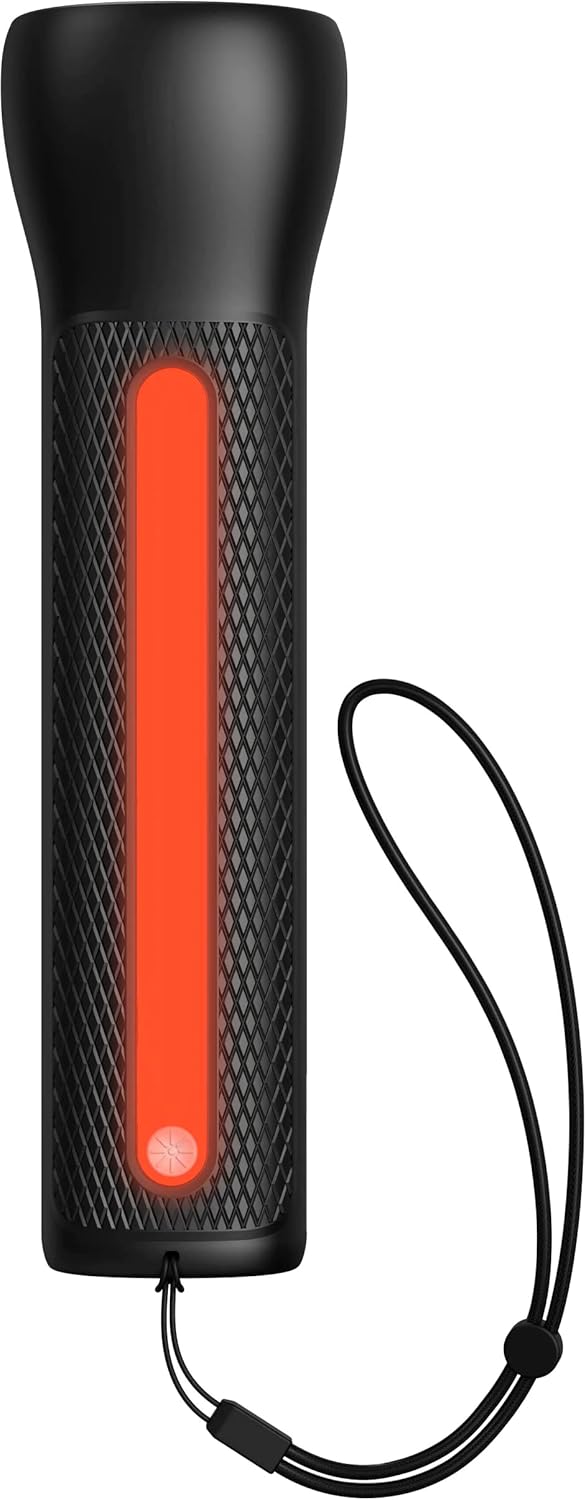

- To activate the LED Flashlight: Press and hold the power button for 2 seconds. Press again to cycle through modes (high, low, strobe, off).
- To activate the Work Light: Double-press the power button. Double-press again to cycle through modes (white, red, flashing red, off).
Údržba
- Čištění: Otřete zařízení měkkým, suchým hadříkem. Nepoužívejte agresivní chemikálie ani abrazivní materiály.
- Skladování: Store the powerstation Go in a cool, dry place away from direct sunlight. For optimal battery life, recharge the device every 3 months if not in regular use.
- Péče o baterie: The internal battery is not user-replaceable. Do not attempt to open the device.
Odstraňování problémů
| Problém | Možná příčina | Řešení |
|---|---|---|
| Zařízení se nenabíjí | Charging cable or adapter faulty; port obstruction. | Try a different USB-C cable and wall adapter. Ensure ports are clean and free of debris. |
| Vehicle not jump starting | Low powerstation Go charge; incorrect cable connection; severely dead battery. | Ensure powerstation Go is fully charged. Verify correct clamp polarity. Check vehicle battery for severe damage. Consult vehicle manual. |
| Mobile device not charging | Powerstation Go battery low; faulty USB cable; device incompatibility. | Recharge powerstation Go. Try a different USB cable. Ensure your device is compatible with standard USB charging. |
| Světla nefungují | Powerstation Go battery low; incorrect button press. | Recharge powerstation Go. Refer to "Using the LED Flashlight and Work Light" section for correct operation. |
Specifikace
- Značka: mophie
- Číslo modelu: mpsgrgd-FL36630
- Číslo dílu výrobce: 401107454
- Kapacita baterie: 9900 mAh (36.6 Wh)
- svtage: 12 Volts (for jump starting)
- Hmotnost produktu: 1.07 kg
- Rozměry: 30.3 x 24.69 x 10.79 cm (balení)
- Speciální vlastnosti: LED Indicator Lights, 450-lumen LED Flashlight, Spark-proof Jumper Cables
- Automotive Service Type: Nákladní automobil, Auto
Záruka a podpora
For warranty information and customer support, please visit the official mophie webnebo se obraťte na jejich zákaznický servis. Uschovejte si doklad o koupi pro případ reklamace.
Online podpora: www.mophie.com/support


