1. Úvod
This manual provides essential instructions for setting up, operating, maintaining, and troubleshooting your Kinstone 10.1-inch 4G LTE Android Tablet. Please read this guide thoroughly to ensure optimal performance and longevity of your device.
The Kinstone tablet features a 10.1-inch Full HD IPS display, an octa-core processor, 8GB RAM, 128GB internal storage (expandable up to 1TB), an 8000mAh battery, and dual SIM card slots for 4G LTE connectivity. It operates on the Android operating system.

Obrázek 1.1: Přední a zadní strana view of the Kinstone 10.1-inch Android Tablet. The front displays a screen with '5G WiFi', 'Widevine L1 Netflix', '128GB+1TB', 'Octa-core CPU', and '8000mAh Face ID'. The back shows the camera module and 'Kinstone' branding.
2. Nastavení
2.1 Co je v krabici
- Tablet x 1
- Nabíjecí kabel x 1
- Nabíječka x 1
- SD card removal tool x 1
- Návod k použití x 1
- Tablet protective film x 1
- Leather case x 1

Image 2.1: A diagram illustrating the tablet's physical features such as the earphone jack, TF expand slot, Type-C port, power/reset button, volume buttons, speaker, and 13MP camera. It also lists the contents of the package.
2.2 Počáteční nabíjení
Before first use, fully charge the tablet using the provided Type-C charging cable and adapter. The 8000mAh battery ensures extended usage. A full charge typically takes several hours.
2.3 Zapnutí/vypnutí
- Zapnutí: Press and hold the Power button until the Kinstone logo appears.
- Vypnutí: Stiskněte a podržte tlačítko napájení a poté z možností na obrazovce vyberte možnost „Vypnout“.
- Restartovat: Stiskněte a podržte tlačítko napájení a poté z možností vyberte „Restartovat“.
2.4 Instalace SIM karty a karty MicroSD
The tablet supports dual SIM cards or one SIM card and one MicroSD card for expandable storage up to 1TB. Use the provided SD card removal tool to open the tray.
- Na boku tabletu vyhledejte slot pro kartu SIM/MicroSD.
- Insert the SD card removal tool into the small hole next to the tray and gently push until the tray ejects.
- Vložte kartu (karty) Nano-SIM a/nebo kartu MicroSD do určených slotů v držáku. Dbejte na správnou orientaci.
- Opatrně vložte zásobník zpět do tabletu.

Image 2.2: A close-up of the tablet's side, highlighting the dual card slot for SIM and MicroSD cards. It also shows the 13MP rear camera and 5MP front camera, along with a graphic indicating 4G VoLTE support.

Image 2.3: The tablet screen showing '8GB RAM', '128GB ROM', and '1TB Expandable' storage. A small inset image demonstrates how to insert a MicroSD card into the tablet's slot.
2.5 Síťové připojení
- Wi-Fi: Go to Settings > Network & internet > Wi-Fi. Turn on Wi-Fi and select your desired network. Enter the password if prompted. The tablet supports 2.4GHz and 5GHz dual-band Wi-Fi.
- Mobilní data (4G LTE): If a SIM card is installed, go to Settings > Network & internet > Mobile network to configure mobile data settings. The tablet supports 4G VoLTE for simultaneous calls and data.
3. Návod k obsluze
3.1 Funkce displeje
The 10.1-inch Full HD IPS display offers a resolution of 1920x1200 pixels with a 178° wide viewing angle. It includes low blue light screen technology for eye comfort.

Image 3.1: The tablet screen displaying vibrant content, with icons indicating 'FHD 1920*1200 In-cell Full HD', '2.4GHz+5.0GHz WiFi', 'Low Blue Light Screen', and 'Thin Metal Design'.
3.2 Výkon a operační systém
Powered by an octa-core processor (hexa-core @2.0 GHz Cortex-A55 and dual-core @1.8 GHz Cortex-A75) and 8GB RAM, the tablet ensures smooth multitasking and app performance. It runs on the Android operating system, offering an intuitive user experience.

Image 3.2: Graphics illustrating the tablet's internal components, including an '8-Core 2.0GHz' processor, '8GB+128GB RAM+ROM', 'A75' architecture, and a '12nm 2025 New AI Chip'.

Image 3.3: The tablet screen displaying the Google Play Store and various app icons, with text indicating 'The latest Android 12 OS' and features like 'Efficiency Upgrade', 'Safety Upgrade', 'Entertainment Upgrade', and 'Display Upgrade'.
Funkce 3.3 fotoaparátu
The tablet is equipped with a 13MP rear camera and a 5MP front camera, suitable for capturing photos, recording videos, and video calls.
3.4 Konektivita
The tablet supports Bluetooth 5.0 for connecting wireless accessories and 4G LTE for mobile data and voice calls (VoLTE).
4. Údržba
4.1 Péče o baterii
Pro maximalizaci životnosti vaší 8000mAh baterie:
- Vyhněte se extrémním teplotám.
- Používejte pouze dodanou nabíječku a kabel.
- Nenechávejte baterii často úplně vybít.
- Pro dlouhodobé skladování nabijte tablet přibližně na 50 % a vypněte jej.

Image 4.1: A graphic illustrating the long-lasting battery life of the tablet, showing '720 Standby Hours', '14H Gaming', '24H Reading', and '16H Movies', powered by an 8000mAh battery.
4.2 Čištění
K čištění obrazovky a těla tabletu používejte měkký hadřík, který nepouští vlákna. Nepoužívejte agresivní chemikálie ani abrazivní materiály.
4.3 Aktualizace softwaru
Pravidelně kontrolujte a instalujte aktualizace systému, abyste zajistili, že váš tablet má nejnovější funkce, bezpečnostní záplaty a vylepšení výkonu. Přejděte do Nastavení > Systém > Aktualizace systému.
5. Řešení problémů
If you encounter issues with your Kinstone tablet, refer to the following common solutions:
- Tablet se nezapíná: Ujistěte se, že je baterie nabitá. Připojte nabíječku a před opětovným zapnutím počkejte několik minut.
- Tablet freezing or unresponsive: Stiskněte a podržte tlačítko napájení po dobu přibližně 10–15 sekund pro vynucení restartu.
- Problémy s připojením k Wi-Fi: Try restarting your Wi-Fi router. On the tablet, forget the network and reconnect. Ensure you are within range of the Wi-Fi signal.
- Problémy s nabíjením: Ensure the charging cable and adapter are securely connected and undamaged. Try a different compatible Type-C charger if available.
- Pomalý výkon: Close unnecessary background applications. Clear cache for frequently used apps. Consider performing a factory reset if performance issues persist (back up your data first).
For persistent issues not resolved by these steps, please contact Kinstone customer support.
6. Specifikace
| Funkce | Specifikace |
|---|---|
| Číslo modelu | KST102SA_ROW |
| Operační systém | Android |
| Velikost obrazovky | 10.1 palce |
| Rozlišení obrazovky | 1920x1200 Pixels (Full HD IPS) |
| Procesor | Osmijádrový (2 GHz) |
| BERAN | 8 GB |
| Interní úložiště | 128 GB |
| Rozšiřitelné úložiště | Až 1 TB (MicroSD) |
| Kapacita baterie | 8000 XNUMX mAh |
| Průměrná životnost baterie | 8 hodiny (v závislosti na využití) |
| Zadní kamera | 13 MP |
| Přední kamera | 5 MP |
| Bezdrátové připojení | 802.11a/ac (2.4/5G Dual-band Wi-Fi), 4G LTE |
| Bluetooth | 5.0 |
| Porty | Typ C, 3.5mm audio konektor |
| Rozměry (DxŠxV) | 15.8 x 24.1 x 0.8 palce |
| Hmotnost položky | 2 libry |

Image 6.1: The back of the Kinstone tablet, displaying the 'Kinstone' logo and regulatory information including the model number 'KST102SA_ROW' and FCC ID.
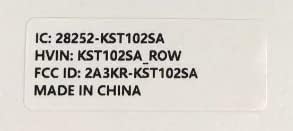
Image 6.2: A label detailing the tablet's identification: 'IC: 28252-KST102SA', 'HVIN: KST102SA_ROW', and 'FCC ID: 2A3KR-KST102SA', indicating it is 'MADE IN CHINA'.
7. Informace o záruce
Kinstone products are covered by a limited warranty. Please refer to the warranty card included in your product packaging or visit the official Kinstone webPodrobné záruční podmínky naleznete na webových stránkách. Uschovejte si doklad o koupi pro případ reklamace.
8. Podpora
For further assistance, technical support, or service inquiries, please contact Kinstone customer support through their official webwebu nebo kontaktních informací uvedených v dokumentaci k produktu.


