1. Úvod
The AUTOPHIX 7360 is a professional full systems diagnostic scan tool designed specifically for Toyota, Lexus, and Scion vehicles manufactured after 1996. This device provides comprehensive diagnostic capabilities, allowing users to read and clear fault codes, view live data streams, and perform various special functions across all major vehicle systems. Its user-friendly interface and robust features make it an essential tool for vehicle maintenance and troubleshooting.

Image 1.1: The AUTOPHIX 7360 diagnostic scan tool, featuring its display screen, navigation buttons, and OBDII connector cable.
2. Nastavení
2.1 Obsah balení
Ověřte, zda jsou v balení přítomny všechny komponenty:
- Diagnostický přístroj AUTOPHIX 7360
- OBDII kabel (integrovaný)
- Uživatelská příručka (tento dokument)
- Kabel USB (pro aktualizace, pokud jsou k dispozici)
2.2 Připojení k vozidlu
- Vyhledejte 16pinový datový konektor (DLC) vozidla. Obvykle se nachází pod palubní deskou na straně řidiče.
- Ujistěte se, že je zapalování vozidla v poloze VYPNUTO.
- Firmly plug the AUTOPHIX 7360's OBDII cable into the vehicle's DLC.
- Turn the vehicle's ignition to the ON position (engine off). The device will power on automatically.
3. Návod k obsluze
3.1 Basic OBDII Functions
The AUTOPHIX 7360 provides comprehensive OBDII diagnosis for all OBDII compliant vehicles (after 1996). Navigate to the 'OBDII' menu option on the device.

Image 3.1: Screen illustrating the full OBDII functions, including Read & Erase Error Codes, Data Stream, EVAP System, DTC Lookup, Vehicle Information, I/M Readiness, Turn Off MIL, and System Status.
- Read & Erase Error Codes: Retrieve Diagnostic Trouble Codes (DTCs) and clear them from the vehicle's ECU.
- Živý datový stream: View real-time sensor data from the vehicle's various systems.
- Test připravenosti I/M: Check the readiness of the emission-related monitors.
- Test systému EVAP: Perform tests on the Evaporative Emission Control System.
- Informace o vozidle: Display the vehicle's VIN, Calibration ID, and Calibration Verification Number.
- Vyhledávání DTC: Provides definitions for generic and manufacturer-specific trouble codes.
3.2 Advanced Diagnostic Functions (Full Systems)
This tool can access and diagnose all major systems in Toyota, Lexus, and Scion vehicles. Select the 'For Toyota' menu option to begin a full system scan.

Image 3.2: Display showing the range of full system diagnostics, including Transmission, Air Conditioner, Front Radar Sensor, Immobilizer, Central Gateway, Tire Pressure Monitor, Engine System, SRS Airbag, Navigation System, TMPS System, Audio System, Cruise Control, Active Noise Control, Theft Deterrent, Power Source Control, Steering Pad Switch, Combination Master Switch, Road Sign Assist, and Clearance Warning.
Mezi podporované systémy patří mimo jiné:
- Systém motoru
- Protiblokovací brzdový systém (ABS)
- Doplňkový zádržný systém (SRS/Airbag)
- Snímač úhlu řízení (SAS)
- Battery Management System (BMS)
- Elektronická parkovací brzda (EPB)
- Systém monitorování tlaku v pneumatikách (TPMS)
- Přenos
- Klimatizace
- Přední radarový senzor
- Imobilizér
- Navigační systém
- Audio systém
- Tempomat
- Hybrid Control (as shown in Image 3.3)
- Smart Key System (as shown in Image 3.3)

Obrázek 3.3: Příkladamples of professional diagnostic functions, including Air Bleeding, Reset Memory, Initialization, Hybrid Control, Sliding Roof, Steering Angle Adjust, Smart Key, Electronic Parking Brake, Steering Angle Learning, AFS, Sound System, and Interior Monitoring.
3.3 Speciální servisní funkce
The AUTOPHIX 7360 supports a wide array of special functions for maintenance and service resets. Navigate to the 'Special Functions' menu.

Obrázek 3.4: Konecview of advanced full functions, including Service Reset, TMPS Reset, SAS Reset, Battery Registration, Throttle Learning, Airbag Reset, Oil Reset, DPF Reset, ABS Bleeding, EPB Reset, BMS Reset, SRS Reset, ETCS Reset, Injector Coding, DPF Regeneration, and CBS Reset.
- Reset oleje: Po výměně oleje resetujte kontrolku údržby oleje.
- Učení škrticí klapky: Znovu naučte polohu škrticí klapky.
- Resetování EPB (elektronické parkovací brzdy): Deactivate and reactivate the brake control system, assist with brake fluid control, open and close brake pads, and set brakes after disc or pad replacement.
- Reset systému TPMS (monitorování tlaku v pneumatikách): Reset tire pressure values after tire rotation or sensor replacement.
- Injector Quantity Adjustment: Adjust injector coding after replacement.
- DPF (Diesel Particulate Filter) Reset/Regeneration: Perform DPF regeneration and reset the DPF light.
- Registrace baterie: Register a new battery to the vehicle's Battery Management System (BMS).
- Resetování airbagu: Clear airbag crash data.
- Steering Angle Sensor (SAS) Learning: Kalibrujte snímač úhlu řízení.
- Krvácení z ABS: Proveďte postupy odvzdušnění brzd.
- Resetování BMS: Reset the Battery Management System.
- Reset ETCS: Reset elektronického systému řízení škrticí klapky.
3.4 Správa baterie
The device offers accurate battery health checks and a professional battery registration function.

Image 3.5: Visual guide for accurate battery check, showing voltage ranges for Too Low, Normal, Slightly Low, and Too High conditions before and after starting the car.
Kontrola baterie: The tool can display the current battery status, indicating voltage levels before and after starting the vehicle to assess battery health.
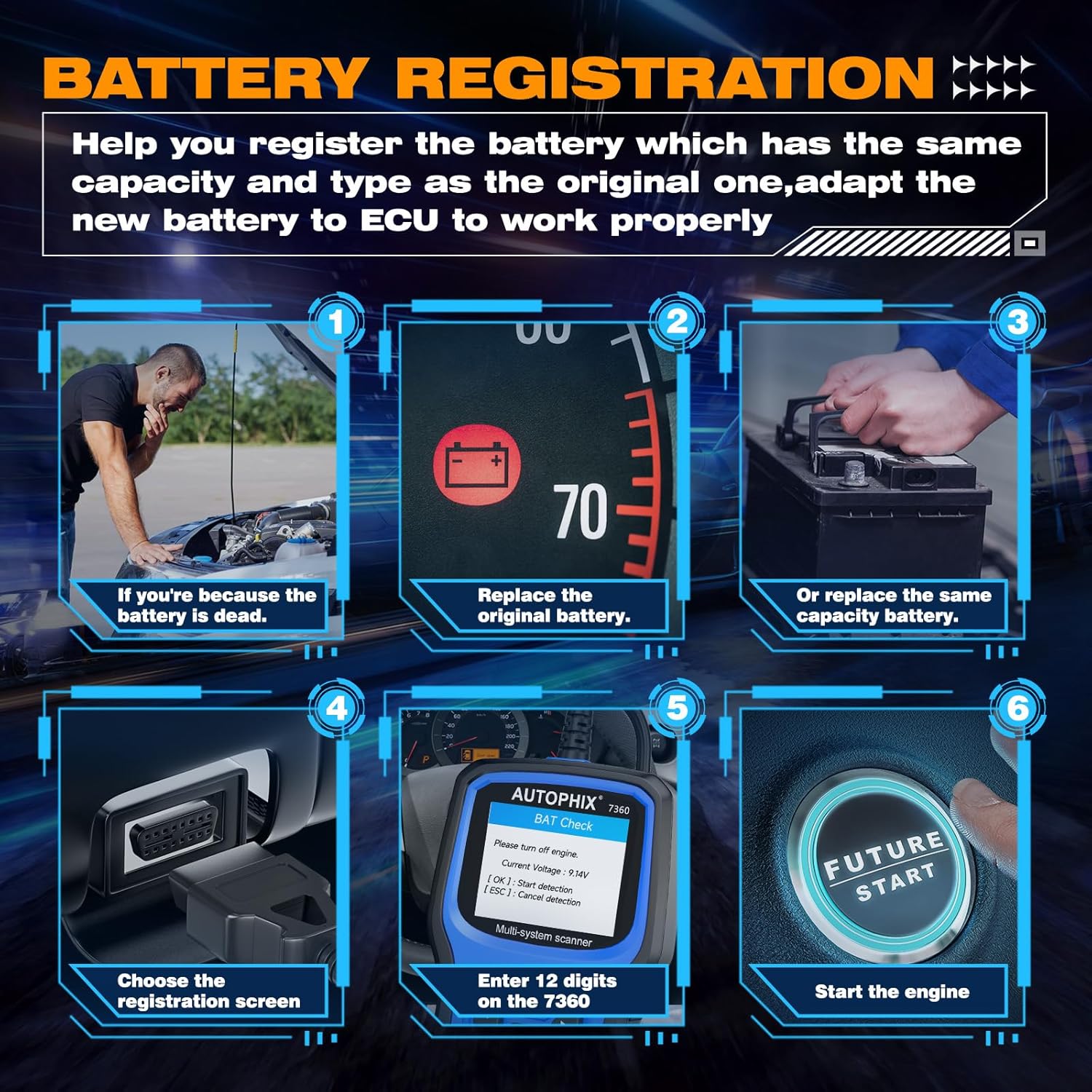
Image 3.6: Step-by-step guide for battery registration, including scenarios for dead battery, replacing original battery, replacing with same capacity battery, choosing registration screen, entering 12 digits, and starting the engine.
Registrace baterie: When replacing a vehicle battery, it is crucial to register the new battery with the vehicle's ECU to ensure proper charging and battery life. The 7360 allows you to:
- Store current battery and mileage readings for replacement records.
- Delete stored measurement values (charge state, current, voltage, teplota atd.).
- Initialize the battery management system for the new battery.
4. Compatibility and Language Support
The AUTOPHIX 7360 is designed for broad compatibility with Toyota, Lexus, and Scion vehicles from 1996 onwards.

Image 4.1: Visual representation of broad compatibility for Lexus, Toyota, and Scion models, along with flags indicating 12 supported languages.
4.1 Kompatibilita s vozidly
The tool supports a wide range of models within the Toyota, Lexus, and Scion families, including but not limited to:
- Lexus: CT, ES, GS, GX, HS, IS, LC, LFA, LM, LS, LX, NX, RC, RX, SC, UX.
- Toyota: Rav4, Camry, Corolla, 4Runner, Highlander, C-HR, Aqua, Alphard, Corolla Cross, Crown, FJ Cruiser, Avalon, Land Cruiser, Mirai, Prius, Sequoia, Sienna, Supra, Tacoma, Tundra, Venza, Yaris.
- Scion: FR-S, iA, iM, iQ, iQ EV, tC, xA, xB, xD.
4.2 Jazyková podpora
The device supports 12 languages, allowing users from various regions to operate the tool comfortably:
- angličtina
- Němec
- francouzština
- italština
- španělština
- portugalština
- polština
- ruština
- norský
- dánština
- švédský
- Finnish (Suomalainen)
5. Údržba
5.1 Čištění
Pro zachování výkonu a vzhledu zařízení jej pravidelně čistěte měkkým hadříkemamp tkanina. Nepoužívejte abrazivní čisticí prostředky nebo rozpouštědla.
5.2 Skladování
When not in use, store the AUTOPHIX 7360 in a dry, cool environment, away from direct sunlight and extreme temperatures. Keep it in its original packaging or a protective case to prevent damage.
5.3 Aktualizace softwaru
Periodically check the official AUTOPHIX website for software updates. Updates may include new vehicle models, bug fixes, and improved functionalities. Follow the instructions provided on the website for the update process, typically involving connecting the device to a computer via USB.
6. Řešení problémů
If you encounter issues with your AUTOPHIX 7360, refer to the following common troubleshooting steps:
- Zařízení se nezapne: Ensure the OBDII cable is securely connected to the vehicle's DLC and the vehicle's ignition is in the ON position. Check the vehicle's battery voltage.
- Chyba v komunikaci: Verify that the vehicle supports the OBDII protocol. Ensure the ignition is ON. Try connecting to a different vehicle to rule out a vehicle-specific issue.
- Obrazovka zamrzá nebo zařízení nereaguje: Disconnect the device from the vehicle, wait a few seconds, and then reconnect it. If the issue persists, perform a software update.
- Incorrect readings or functions: Ensure the device software is up to date. Verify that the correct vehicle make/model is selected if prompted.
7. Specifikace
| Funkce | Specifikace |
|---|---|
| Značka | AUTOPHIX |
| Číslo modelu | 7360 |
| Rozměry produktu | 26.49 x 19.99 x 5 cm |
| Hmotnost položky | 540 g |
| Barva | Modrý |
| Velikost obrazovky | 2.8 palce |
| Zdroj napájení | Battery Powered (via OBDII connection) |
| Operační systém | Windows XP (for PC connection/updates) |
| První dostupný termín | 2. listopadu 2022 |
8. Záruka a podpora
For warranty information and technical support, please refer to the official AUTOPHIX webnebo se obraťte přímo na jejich zákaznický servis. Uschovejte si účtenku jako doklad o koupi pro případné reklamace.


