1. Úvod
The Formuler Z11 Pro Max is an advanced Android 11 streaming media player designed to deliver a high-quality entertainment experience. Featuring 4K resolution support, Wireless AX connectivity, and a Gigabit LAN port, this device provides robust performance for streaming various media content. This manual provides essential information for setting up, operating, and maintaining your Formuler Z11 Pro Max.
2. Co je zahrnuto
Zkontrolujte prosím, zda jsou ve vašem balení přítomny všechny níže uvedené položky:
- Formuler Z11 Pro Max Unit
- HDMI kabel
- Napájecí kabel
- Dálkové ovládání
- IR Remote Extension
- 7 Colours Wireless Keyboard (Extra Accessory)
- Magnetic Car Mount (Extra Accessory)

Figure 2.1: Formuler Z11 Pro Max packaging and included accessories, including the main unit, remote, cables, wireless keyboard, and car mount.
3. Konec produktuview
Familiarize yourself with the components and features of your Formuler Z11 Pro Max.
3.1 Vlastnosti zařízení

Figure 3.1: The Formuler Z11 Pro Max device, showcasing its core features such as Android 11 operating system, 4GB DDR4 RAM, 32GB storage, 6th generation AX Wireless, Gigabit LAN, and 4K HDR10+ video support.
3.2 Porty a připojení

Obrázek 3.2: Zadní view of the Formuler Z11 Pro Max, displaying the Gigabit LAN port, HDMI output, USB 2.0 port, Micro SD Card slot, IR Extension port, and Power Input (12V/1A).
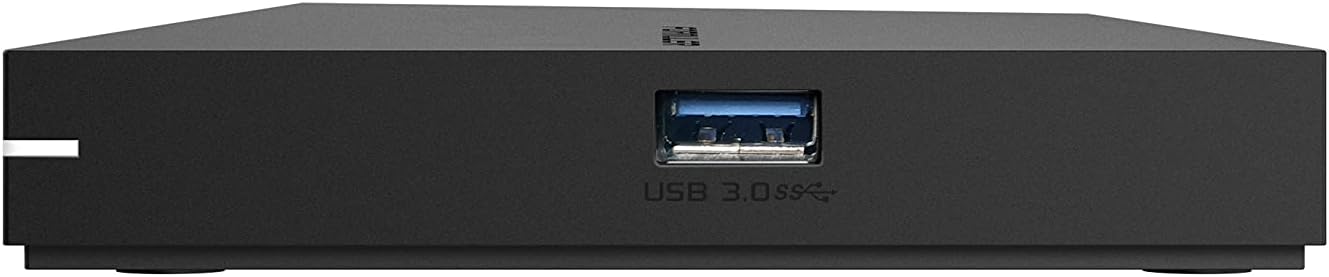
Obrázek 3.3: Strana view of the Formuler Z11 Pro Max, showing the USB 3.0 port for high-speed data transfer.
3.3 Dálkové ovládání

Figure 3.4: Diagram of the Formuler IR1 Premium Learning IR Remote, illustrating the functions of each button for both STB and TV control, including power, volume, channel navigation, menu access, and learning mode.
3.4 Dodávané příslušenství

Figure 3.5: The included 7-color wireless mini keyboard with a USB receiver, offering enhanced navigation and typing capabilities for the streaming media player.

Figure 3.6: The included magnetic car mount, designed for securing compatible devices in a vehicle.
4. Pokyny k nastavení
Follow these steps to set up your Formuler Z11 Pro Max.

Figure 4.1: Visual guide for the initial installation steps of the Formuler Z11 Pro Max.
- Připojení k televizi: Connect one end of the HDMI cable to the HDMI port on your Formuler Z11 Pro Max and the other end to an available HDMI input on your television.
- Připojte napájení: Plug the power cable into the 'Power Input' port on the Formuler Z11 Pro Max, then connect the other end to a power outlet.
- Power On TV and Select Input: Turn on your television and use its remote control to select the correct HDMI input source that corresponds to where you connected the Formuler Z11 Pro Max.
- Internetové připojení:
- Kabelová síť: For a wired connection, connect an Ethernet cable from your router or modem to the 'Gigabit LAN' port on the Formuler Z11 Pro Max.
- Bezdrátová síť: For a wireless connection, the device will prompt you to select your Wi-Fi network and enter the password during the initial setup process.
- Počáteční nastavení: Follow the on-screen instructions to complete the initial setup, which typically includes language selection, Google account login, and network configuration.
5. Návod k obsluze
This section provides general guidance on operating your Formuler Z11 Pro Max.
5.1 Používání dálkového ovladače
The included remote control allows you to navigate the user interface and control playback. Refer to Figure 3.4 for a detailed button layout and their functions. The remote also features a learning mode to control basic TV functions.
5.2 Navigace v rozhraní Android TV
The Formuler Z11 Pro Max runs on Android 11, providing a user-friendly interface. Use the directional pad and 'OK' button on your remote to navigate through menus, select applications, and confirm actions. The 'Back' button returns to the previous screen, and the 'Home' button takes you to the main Android TV home screen.
5.3 Instalace aplikací
You can download and install various applications from the Google Play Store directly on your device. Ensure you are logged in with a Google account to access the store.
5.4 Přehrávání médií
The device supports 4K resolution and various media formats. You can play content from installed streaming apps, local storage (via USB or Micro SD card), or network shares.
6. Údržba
Správná údržba zajistí dlouhou životnost a optimální výkon vašeho zařízení.
- Čištění: K čištění vnější strany zařízení používejte měkký, suchý hadřík. Nepoužívejte tekuté čisticí prostředky ani abrazivní materiály.
- Větrání: Ujistěte se, že je zařízení umístěno v dobře větraném prostoru, aby se zabránilo přehřátí. Neblokujte větrací otvory.
- Aktualizace softwaru: Periodically check for and install software updates to ensure you have the latest features and security enhancements. These can usually be found in the device's settings menu.
- Cyklus napájení: If the device becomes unresponsive, disconnect the power cable, wait 10 seconds, and then reconnect it to perform a power cycle.
7. Řešení problémů
Tato část se zabývá běžnými problémy, se kterými se můžete setkat.
7.1 Bez napájení
- Ensure the power cable is securely connected to both the device and a working power outlet.
- Ověřte funkčnost elektrické zásuvky zapojením jiného zařízení.
7.2 No Picture/Signal on TV
- Check that the HDMI cable is firmly connected to both the Formuler Z11 Pro Max and your TV.
- Ujistěte se, že je váš televizor nastaven na správný vstupní zdroj HDMI.
- Zkuste jiný kabel HDMI nebo jiný port HDMI na televizoru.
7.3 Problémy se síťovým připojením
- Kabelové: Ensure the Ethernet cable is properly connected to the device and your router. Check your router's status.
- Bezdrátový: Go to Settings > Network & Internet to verify your Wi-Fi connection. Ensure the Wi-Fi password is correct. Restart your router and the Formuler Z11 Pro Max.
7.4 Dálkové ovládání nereaguje
- Vyměňte baterie v dálkovém ovladači.
- Ujistěte se, že mezi dálkovým ovladačem a infračerveným přijímačem zařízení nejsou žádné překážky.
- If using the IR Extension cable, ensure it is properly connected and positioned.
8. Specifikace
Detailed technical specifications for the Formuler Z11 Pro Max.
| Funkce | Specifikace |
|---|---|
| Výstupní rozlišení | 4K (3840 x 2160) |
| BERAN | 4GB DDR @2400MHz |
| Skladování | 32GB eMMC |
| Operační systém | Android 11 |
| Bezdrátové připojení | AX 2x2 |
| Bluetooth | 5.0 |
| Ethernet | 1000 M (gigabit) |
| Rozměry (D x Š x V) | 105 mm x 105 mm x 21 mm (4.13 x 4.13 x 0.83 palce) |
| Hmotnost | 1.83 libry |
| Porty | 1x Power Input, 1x USB 3.0, 1x USB 2.0, 1x HDMI, 1x Gigabit LAN, 1x Micro SD Card, 1x IR Extension |
| Barva | Černý |
| Výrobce | Formuler Z11 Pro Max |
9. Záruka a podpora
For warranty information and technical support, please refer to the documentation provided with your purchase or visit the official Formuler webweb. Zdroje podpory obvykle zahrnují nejčastější dotazy, průvodce řešením problémů a kontaktní informace na zákaznický servis.


