1. Úvod
Welcome to the user manual for your new Formuler Z11 Pro streaming media player. This guide provides essential information for setting up, operating, maintaining, and troubleshooting your device. Please read this manual thoroughly to ensure optimal performance and longevity of your product.
2. Konec produktuview
The Formuler Z11 Pro is a powerful 4K Android 11 streaming media player designed to deliver a superior entertainment experience. It features robust hardware and versatile connectivity options.
Klíčové vlastnosti:
- Formuler Z11 Pro Android 11 Operating System
- 2GB RAM and 16GB ROM for smooth performance and ampúložiště
- 4K (3840 x 2160) Output Resolution for stunning visuals
- Dual Band 5G 2x2 AC Wi-Fi for fast and stable wireless connectivity
- Gigabit LAN (1000M) for high-speed wired network connections
Technické specifikace:
- CPU: RealTek RTD1319C
- GPU: Mali-G57 MC1
- BERAN: 2GB DDR @2400MHz
- Skladování: 16GB eMMC
- Operační systém: Android 11
- Bezdrátový: Dual-Band 2x2 AC Wireless
- Bluetooth: 5.0
- Ethernet: 1000 M (gigabit)
- Dimensions (L/W/T): 105mm / 105mm / 21mm
- Barva: Černý
- Porty: 1x Power Input, 1x USB 3.0, 1x USB 2.0, 1x HDMI, 1x Gigabit LAN, 1x Micro SD Card, 1x IR Extension

Figure 2.1: The Formuler Z11 Pro streaming media player, its remote control, and product packaging.
3. Nastavení
Follow these steps to set up your Formuler Z11 Pro for the first time:
- Připojení k televizi: Use an HDMI cable (not included) to connect the HDMI port on the Formuler Z11 Pro to an available HDMI input on your television.
- Připojení k napájení: Plug the power adapter into the "Power Input" port on the device and then into a wall outlet.
- Připojení k internetu:
- Kabelové připojení: For optimal performance, connect an Ethernet cable from your router to the "Gigabit LAN" port on the device.
- Bezdrátové připojení: If using Wi-Fi, the device will prompt you to select your network and enter the password during the initial setup wizard.
- Vložení karty Micro SD (volitelné): If you wish to expand storage, insert a Micro SD card into the designated slot.
- IR Extension (Optional): If you plan to place the device out of sight, connect the IR extension cable to the "IR Extension" port and position the IR receiver in a visible location.
- Zapnutí: Zařízení by se mělo automaticky zapnout. Pokud ne, stiskněte tlačítko napájení na dálkovém ovladači.
- Průvodce počátečním nastavením: Follow the on-screen instructions to complete the initial setup, including language selection, network configuration, and Google account sign-in.

Figure 3.1: Rear ports of the Formuler Z11 Pro, including Gigabit LAN, HDMI, USB 2.0, Micro SD, IR Extension, and Power Input.
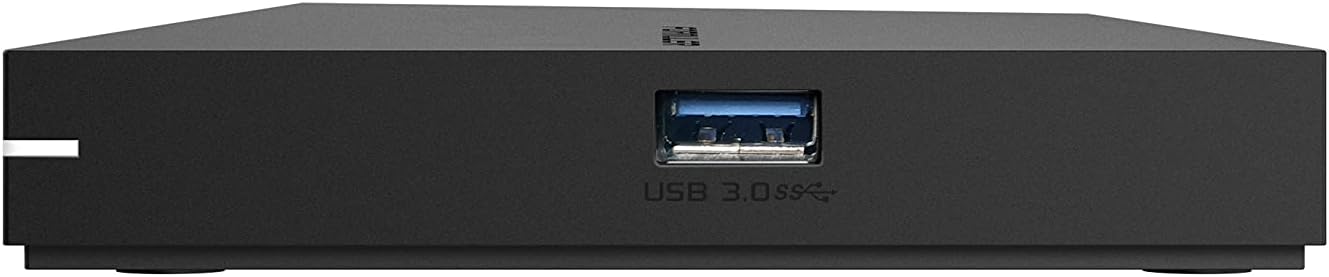
Obrázek 3.2: Strana view of the Formuler Z11 Pro, highlighting the USB 3.0 port.
4. Návod k obsluze
Your Formuler Z11 Pro runs on Android 11, providing access to a wide range of applications and features.
4.1 Funkce dálkového ovládání
The included remote control is your primary interface for navigating the device. Familiarize yourself with its buttons:

Figure 4.1: Formuler IR1 Premium Learning IR Remote with TV Control. Key buttons include Power (TV/STB), Number Pad, Navigation (OK, Vol, Ch), Info, Guide, Menu, Back, Home, Playback controls, and colored function buttons.
- Power (TV/STB): Press once to put TV/STB into standby mode. Press and hold for Learning mode.
- Ovládání TV: OK, Source, Vol-, Vol+ (Learning mode).
- Číselná klávesnice: Direct channel number input.
- Oblíbené kanály: Show/set favorite channels.
- Barevná tlačítka: Hotkey functions, follow on-screen instructions.
- Info: Press twice to show detailed information.
- Průvodce: Show grid EPG (Electronic Program Guide).
- svazek: Adjust STB volume.
- OK: Vybrat.
- Navigační šipky: Move Cursor, Channel List navigation.
- Ch: Change channels Page Up/Down.
- Menu: Show Main Menu.
- Zadní: Previous menu.
- Domov: Go to System Home screen.
- Ovládání přehrávání: Timeshift/Resume, Pause playback, Start recording.
4.2 Applications and Features
- MyTVOnline3: This is the best media viewing client for IPTV services. It offers advanced features for professional and user-friendly experience.
- Obchod Google Play: Download and install a wide variety of Android applications, including streaming services, VPNs, games, and web prohlížeče.
- YouTube: Access YouTube content directly from your device.
- Prohlížeč médií: Procházení a přehrávání místních médií files from connected USB drives or Micro SD cards.
- Nahrávání na USB (DVR): Utilize the USB ports to connect external storage and record your favorite shows. The remote includes a dedicated record button.
- Podpora VPN: The device supports VPN integration, allowing for secure and private browsing. A 30-day free trial to ExpressVPN may be included.
5. Údržba
Proper maintenance ensures the longevity and optimal performance of your Formuler Z11 Pro.
- Čištění: K čištění vnější strany zařízení používejte měkký, suchý hadřík. Nepoužívejte tekuté čisticí prostředky ani abrazivní materiály.
- Větrání: Ensure the device is placed in a well-ventilated area. Do not cover ventilation openings.
- Teplota: Nevystavujte zařízení extrémním teplotám nebo přímému slunečnímu záření.
- Aktualizace firmwaru: Periodically check for and install firmware updates to ensure your device has the latest features and security enhancements. These are typically found in the device's settings menu.
6. Řešení problémů
If you encounter issues with your Formuler Z11 Pro, try the following solutions:
- Bez napájení:
- Zkontrolujte, zda je napájecí adaptér bezpečně připojen k zařízení a do zásuvky.
- Ensure the wall outlet is functioning correctly.
- Žádný obraz/zvuk:
- Ověřte, zda je kabel HDMI bezpečně připojen k zařízení i k televizoru.
- Ujistěte se, že je váš televizor nastaven na správný vstupní zdroj HDMI.
- Check the volume settings on both the device and your TV.
- Žádné internetové připojení:
- For wired connections, ensure the Ethernet cable is properly connected and your router is working.
- For wireless connections, re-enter your Wi-Fi password in the network settings. Ensure your Wi-Fi router is on and broadcasting.
- Restart your router and the Formuler Z11 Pro.
- Dálkové ovládání nereaguje:
- Vyměňte baterie v dálkovém ovladači.
- Ujistěte se, že mezi dálkovým ovladačem a infračerveným přijímačem zařízení nejsou žádné překážky.
- Zamrzání/pád aplikace:
- Zavřete a znovu otevřete aplikaci.
- Clear the app's cache and data in the Android settings.
- Restart the Formuler Z11 Pro.
7. Warranty and Protection Plans
For information regarding the product warranty, please refer to the warranty card included in your product packaging or visit the official Formuler website. Additionally, extended protection plans may be available for purchase to cover your device beyond the standard warranty period. These plans typically offer:
- Dvouletý ochranný plán
- Dvouletý ochranný plán
- Complete Protect: A monthly plan covering eligible past and future purchases.
Please check with your retailer or the Formuler website for details on coverage, terms, and pricing of these protection plans.
8. Podpora
If you require further assistance or have questions not covered in this manual, please contact Formuler customer support through their official website or consult their online resources.
Oficiální Webmísto: www.formuler.tv (Napřample, replace with actual if known)
For the latest FAQs, software updates, and community forums, please visit the support section of the Formuler webmísto.


