1. Úvod
Thank you for choosing the AgfaPhoto Powerstation PPS 600 Pro. This portable power bank is designed to provide reliable power for various devices during outdoor activities, travel, and emergency situations. This manual provides essential information for safe operation, setup, maintenance, and troubleshooting. Please read it thoroughly before using the product.
2. Bezpečnostní pokyny
- Jednotku nerozebírejte, neopravujte ani neupravujte. Nesprávná montáž může způsobit požár nebo zranění.
- Nevystavujte jednotku ohni ani extrémním teplotám (nad 60 °C / 140 °F).
- Nepoužívejte ani neskladujte přístroj v koupelně ani v místě vystaveném vodě či vlhkosti.
- Do not drop, hit, or subject the unit to strong impacts.
- Uchovávejte mimo dosah dětí.
- Používejte pouze doporučené příslušenství a nabíjecí kabely.
- Během používání a nabíjení zajistěte dostatečné větrání, aby nedošlo k přehřátí.
- In case of leakage from the battery, avoid contact with skin and eyes. Rinse affected areas with water and seek medical attention.
3. Obsah balení
Ověřte, zda jsou v krabici přítomny všechny položky:
- AgfaPhoto Powerstation PPS 600 Pro
- Power Cord (for AC charging)
- Car Cigarette Lighter Adapter
- Uživatelská příručka
4. Konec produktuview
Familiarize yourself with the ports, buttons, and display of your Powerstation PPS 600 Pro.

Image: Front panel of the AgfaPhoto Powerstation PPS 600 Pro, showing the LCD screen, DC output, USB-A ports, USB-C port, and AC output switch.
The unit features a clear LCD display that shows battery level, input power, and output power. Various ports are available for charging different devices simultaneously.
- LCD displej: Zobrazuje stav baterie, vstupní/výstupní proudtage a indikátory chyb.
- DC výstup: For devices requiring DC power.
- Porty USB-A: Pro nabíjení chytrých telefonů, tabletů a dalších zařízení napájených přes USB.
- Port USB-C: Pro zařízení kompatibilní s rychlým nabíjením.
- AC výstup: Standard wall outlet for appliances.
- Vstupní port: For charging the power station itself.
5. Nastavení
5.1 Počáteční nabíjení
Before first use, fully charge your AgfaPhoto Powerstation PPS 600 Pro. This ensures optimal battery performance and longevity.
- Connect the provided power cord to the AC input port on the power station.
- Zapojte druhý konec napájecího kabelu do standardní zásuvky ve zdi.
- The LCD display will show the charging status. The unit is fully charged when the battery indicator shows 100%.
Charging can also be done via a solar panel (sold separately) or a car cigarette lighter adapter.

Image: Illustration of the three charging methods for the power station: via car cigarette lighter, AC wall adapter, and solar panel.
6. Návod k obsluze
6.1 Zapnutí/vypnutí
- To turn on the unit, press and hold the main power button for a few seconds. The LCD display will illuminate.
- Chcete-li přístroj vypnout, znovu stiskněte a podržte hlavní tlačítko napájení, dokud se displej nevypne.
6.2 Nabíjení externích zařízení
The Powerstation PPS 600 Pro offers multiple output options:
- USB výstup: Connect your USB-powered devices (smartphones, tablets, drones, cameras) to the USB-A or USB-C ports. The unit will automatically detect and begin charging.
- AC výstup: For devices requiring standard wall power (laptops, mini-refrigerators, LED TVs), press the AC ON/OFF button to activate the AC outlet. Plug your device into the AC outlet. Remember to turn off the AC output when not in use to conserve battery.
- DC výstup: For 12V DC devices, connect them to the DC output port.

Image: The AgfaPhoto Powerstation PPS 600 Pro connected and charging a laptop, demonstrating its use for portable electronics.

Image: The power station in use during a power outage, providing light and charging a smartphone, highlighting its emergency backup capability.
7. Údržba
7.1 Skladování
- Store the power station in a cool, dry place, away from direct sunlight and heat sources.
- Pro dlouhodobé skladování nabíjejte zařízení přibližně na 50–80 % každé 3–6 měsíců, aby se zachovala jeho životnost.
- Avoid storing in environments with high humidity or extreme temperatures.
7.2 Čištění
- K čištění vnějšku jednotky používejte měkký, suchý hadřík.
- Nepoužívejte abrazivní čisticí prostředky nebo rozpouštědla.
- Ujistěte se, že všechny porty jsou bez prachu a nečistot.
8. Řešení problémů
If you encounter issues with your Powerstation PPS 600 Pro, refer to the following common problems and solutions:
| Problém | Možná příčina | Řešení |
|---|---|---|
| Jednotka se nezapne | Baterie je zcela vybitá. | Nabijte přístroj pomocí síťového adaptéru. |
| No output from AC port | AC output not activated. Device exceeds power limit. | Press the AC ON/OFF button. Check device wattage against unit specifications. |
| Slow charging of external devices | Device requires higher current. Cable issue. | Ensure you are using the correct USB port (e.g., USB-C PD). Try a different cable. |
| Jednotka se přehřívá | Poor ventilation. Excessive load. | Ensure vents are clear. Reduce the number or power of connected devices. Allow unit to cool down. |
Pokud problém přetrvává, kontaktujte prosím zákaznickou podporu.
9. Specifikace
Technical details for the AgfaPhoto Powerstation PPS 600 Pro:
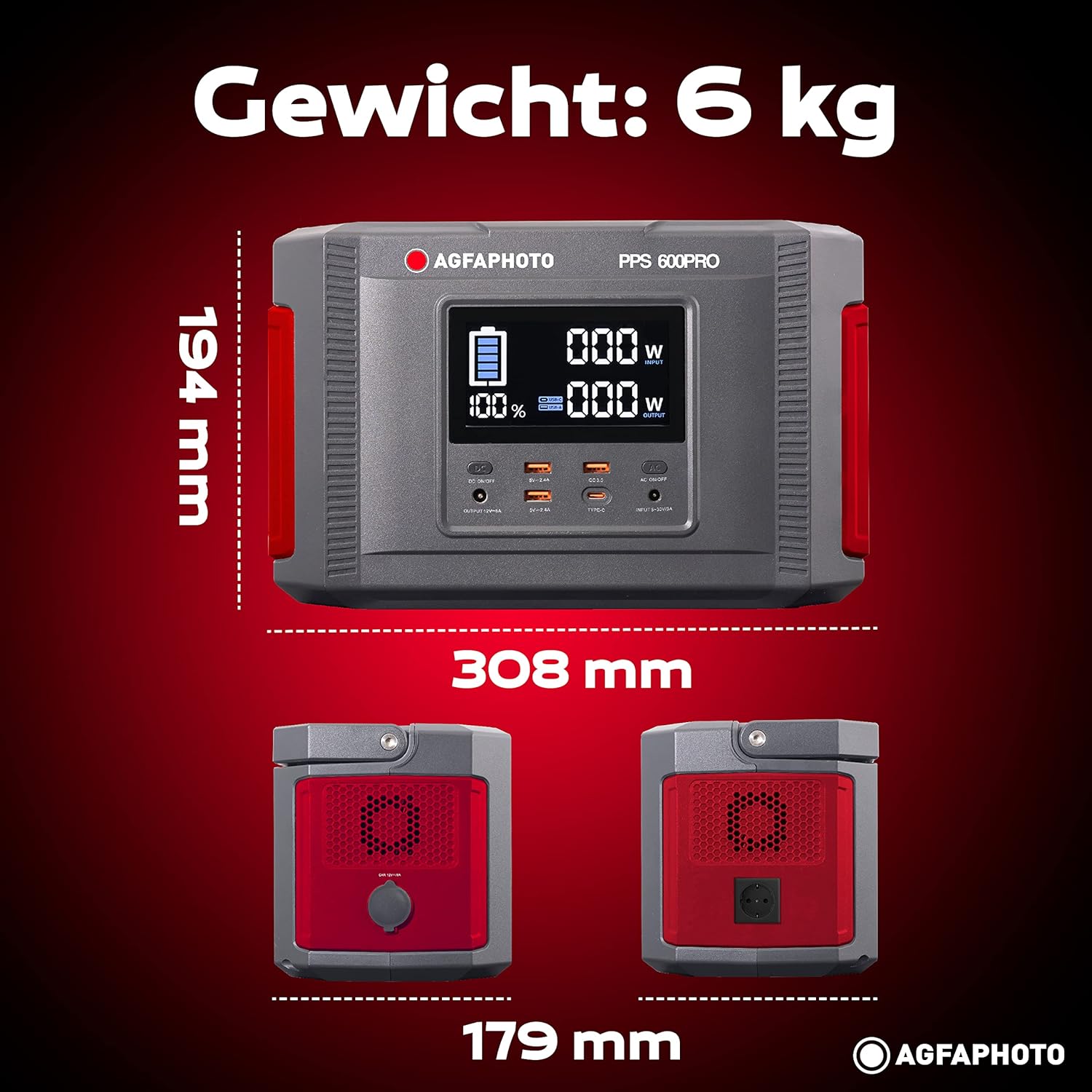
Image: Visual representation of the AgfaPhoto Powerstation PPS 600 Pro's dimensions (308 x 179 x 194 mm) and weight (6 kg).
| Funkce | Specifikace |
|---|---|
| Značka | AgfaPhoto |
| Číslo modelu | 717-854742 (PPS600) |
| Kapacita baterie | 644 Wh |
| Output Power (Continuous) | 600 W |
| Výstupní výkon (špičkový) | 1000 W |
| svtage | 220 voltů |
| Hmotnost položky | 6.1 kg |
| Rozměry (D x Š x V) | 308 x 179 x 194 mm |
| Zdroj napájení | Battery Powered (Solaire, électricité) |
| Doporučená použití | Mobile phones, cameras, laptops, tablets |
| Zahrnuté komponenty | Power cord, USB ports, LCD screen, car cigarette lighter adapter |
| Speciální funkce | Kompaktní provedení |
10. Záruka a podpora
AgfaPhoto products are manufactured to high-quality standards and are covered by a manufacturer's warranty. For specific warranty terms and conditions, please refer to the warranty card included with your product or visit the official AgfaPhoto webmísto.
For technical support, troubleshooting assistance, or spare parts inquiries, please contact AgfaPhoto customer service. Contact details can typically be found on the product packaging or the official brand webmísto.


