Zavedení
The VSYSTO H10 is a comprehensive 4-channel HD 1080P backup camera system designed for various large vehicles such as semi-trailers, vans, tractors, and RVs. It features a 10.1-inch monitor, GPS functionality, and infrared night vision cameras to enhance driving safety and recording capabilities. This manual provides detailed instructions for the setup, operation, and maintenance of your VSYSTO H10 system.
Co je v krabici
Po vybalení se prosím ujistěte, že jsou přítomny všechny následující komponenty:
- Host with bracket (10.1-inch monitor)
- 4 x HD 1080P Cameras
- GPS modul
- Dálkové ovládání
- Napájecí kabel
Nastavení
Follow these steps to connect and prepare your VSYSTO H10 system for use:
- Připojení kamer: Connect each of the four cameras to the corresponding input ports on the main monitor unit using the provided cables.
- Připojení GPS modulu: Plug the GPS module into its designated port on the monitor.
- Připojte napájení: Connect the power cable to the monitor and then to a suitable 12V/24V power source in your vehicle.
- Initial Power-On Test: Power on the system to verify that all cameras are displaying correctly on the monitor before proceeding with permanent installation.
Video: VSYSTO H10 Truck Dash Cam Unboxing and Basic Operation. This video demonstrates the initial connection of the cameras, GPS, and power cable to the main monitor unit. It also shows the system powering on and displaying camera feeds, along with basic remote control functions and menu navigation.
Návod k obsluze
This section details how to operate your VSYSTO H10 system using the monitor buttons and remote control.
Funkce dálkového ovládání
- Červené tlačítko: Short press to switch to a full-screen display of the left camera. Short press again to return to the original multi-camera display mode.
- Modré tlačítko: Short press to switch to a full-screen display of the right camera. Short press again to return to the original multi-camera display mode.
- Double Click Any Button: Double-click either the Red or Blue button to switch to backup camera mode, displaying the rear camera in full screen with parking guidelines. Double-click again to return to the original display mode.
Funkce tlačítek monitoru
(*Please press the OK button to stop recording before entering the menu page for settings adjustments.)
- Tlačítko nabídky: Press this button (located on the monitor) to enter the main menu page.
- "Front" Page (Play Icon): Select this option from the menu to view videos saved by the front and rear cameras.
- "Side" Page (Play Icon): Select this option from the menu to view videos saved by the left and right cameras.
- Settings Page (Gear Icon): Access various system settings including:
- Čas filmového klipu
- Zvukový záznam
- MIC Sensitivity
- Monitorování parkování
- Parkovací citlivost
- Čas vypnutí filmu
- Pípnutí
- Nastavení hodin
- Formát data
- Rychlost Stamp
- Upozornění na překročení rychlosti
- Front/Rear/Left/Right Camera Mirroring
- Úspora energie na LCD
- Nastavení podsvícení
- Úroveň ochrany
- Stav GPS
- Výběr časového pásma
- Format Setup
- Verze firmwaru
- Memory Card Page (SD Card Icon): Use this option to format the inserted memory cards.
- Language Setting Page (Globe Icon): Select this option to switch between different display languages.
- Tlačítko V1/V2: Press this button to cycle through different camera display modes, including 1, 2, 3, or 4 split-screen views.
- "-" Button (Down Button): In video recording status, short press to toggle the sound recording function on or off.
- Tlačítko OK: Press to pause or start video recording.
- "+" Button (Up Button): In video recording status, short press to lock or unlock the currently recording video file, čímž se zabrání jeho přepsání.
- Vypínač: Short press to put the monitor into sleep mode. Long press to turn the recorder completely on or off.
Klíčové vlastnosti
The VSYSTO H10 system offers several advanced features for enhanced vehicle monitoring:
10.1-inch Screen Monitor
Enjoy a large, clear view with the 10.1-inch monitor. It includes a sunshade and adjustable backlight brightness for optimal visibility in various lighting conditions. The remote control allows for easy switching between multi-perspective, full-screen, and split-screen display modes.

The 10.1-inch monitor provides clear day and infrared night vision views from all four cameras, with flexible mounting options.
Infračervené noční vidění
The 4-channel HD 1080P waterproof cameras (Left, Right, Rear) are equipped with IR LED and IR CUT technology, ensuring clear image quality even in low-light or nighttime conditions. Long wired connections provide stable video transmission.
Infrared night vision cameras provide clear visibility in dark environments, crucial for safety.
1TB Video Storage Support
The system supports simultaneous recording from all four cameras. It features dual SD card slots, with each slot supporting a maximum of 512GB, allowing for a total of 1TB video storage. High-quality Class 10 or above micro SD cards are required for optimal performance.

Dual SD card slots enable extensive video storage, up to 1TB, for continuous recording.
Timed Recording (Parking Guard)
Configure the system to continue recording for a set duration (2h/4h/8h/12h) after the vehicle's power is turned off. This feature requires the battery voltage to remain above 11.8V to function.

The Parking Guard feature allows for configurable timed recording after the vehicle is parked, providing continuous surveillance.
Auxiliary Driving Function
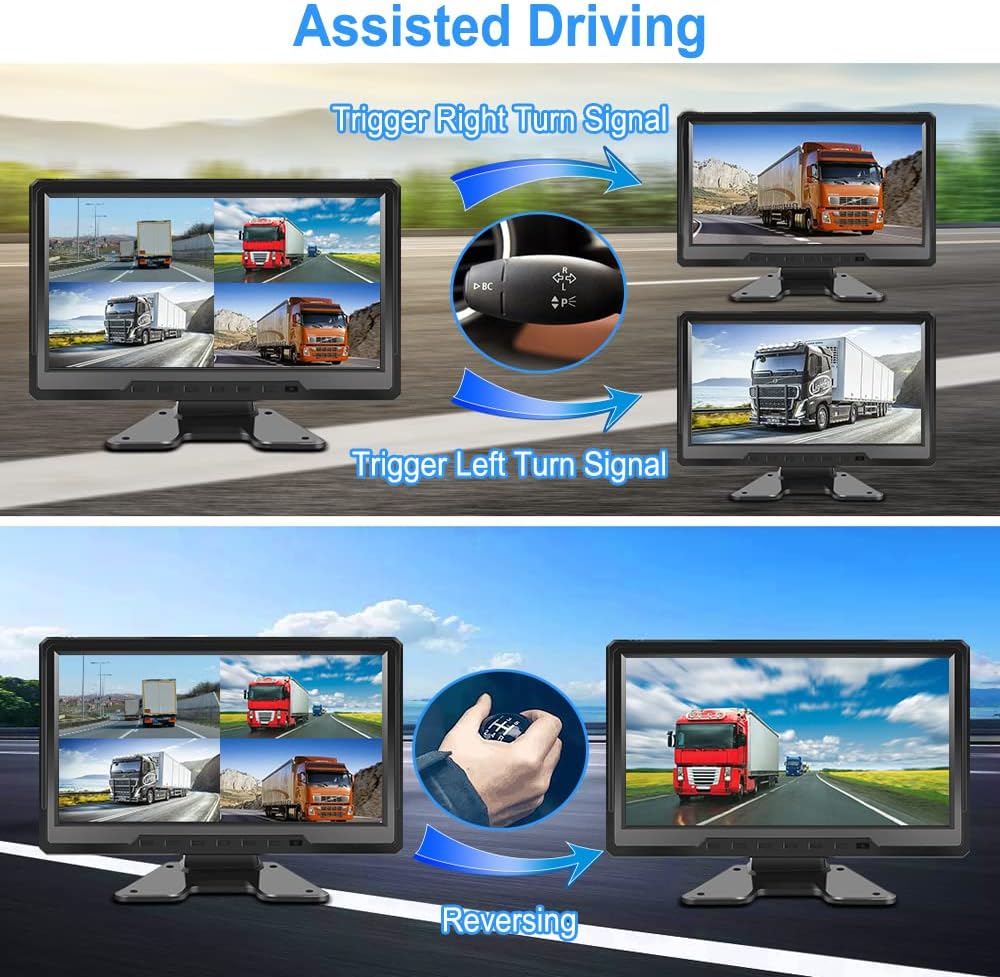
When the auxiliary yellow cable on the camera is connected, the system provides enhanced driving assistance. The rear camera image is displayed full-screen with reversing guidelines when the vehicle is in reverse. Activating the left or right turn signal will display the corresponding camera image in full screen, aiding in observing the surrounding environment.

Assisted Driving functions provide full-screen camera views when reversing or using turn signals for improved awareness.
Multifunctional DVR System with GPS & Temperature Sensor
The DVR system supports seamless loop recording with adjustable video lengths (1/2/3/5 minutes). A built-in G-sensor detects impacts and automatically locks video files. The car charging cable displays battery voltage. Integrated GPS and a temperature sensor provide real-time data on ambient temperature, driving speed, altitude, atmospheric pressure, longitude, and latitude. Recorded video driving tracks can be viewed using the dedicated DV Player computer software.

The system integrates GPS for tracking and a temperature sensor for environmental monitoring, enhancing data collection.
Multiple Split Screen Modes
The system offers various split-screen modes, allowing you to view multiple camera feeds simultaneously. You can easily switch between different layouts using the remote control.
Multiple split-screen modes provide flexible viewing options for all connected cameras.
No Blind Spot
With four strategically placed cameras, the system provides a 360-degree all-round observation of road conditions, effectively eliminating blind spots around your vehicle.

Four cameras ensure comprehensive 360-degree coverage, eliminating blind spots for safer driving.
Údržba
Proper maintenance ensures the longevity and optimal performance of your VSYSTO H10 system:
- Čištění: Regularly clean the monitor screen and camera lenses with a soft, dry cloth. Avoid abrasive cleaners that may damage surfaces.
- Spojení: Periodically check all cable connections to ensure they are secure and free from damage. Loose connections can lead to signal loss or intermittent operation.
- SD karty: Use only Class 10 or higher micro SD cards. Format the SD cards regularly (e.g., once a month) to maintain recording efficiency and prevent data corruption. Back up important video files před formátováním.
- Podmínky prostředí: Avoid exposing the system to extreme temperatures, direct sunlight for prolonged periods, or excessive moisture. While cameras are waterproof, the monitor should be protected from direct water exposure.
Odstraňování problémů
If you encounter issues with your VSYSTO H10 system, refer to the following common problems and solutions:
- No Power to Monitor:
- Check if the power cable is securely connected to both the monitor and the vehicle's power source.
- Ensure the vehicle's ignition is on or the power source is active.
- Verify the vehicle's fuse for the power outlet is intact.
- Bez zobrazení kamery:
- Ensure all camera cables are securely connected to the monitor.
- Check the monitor's display settings to ensure the correct camera input or split-screen mode is selected.
- Inspect camera cables for any visible damage.
- Recording Issues (e.g., no recording, corrupted files):
- Confirm that SD cards are properly inserted into both slots.
- Format the SD cards through the monitor's menu.
- Ensure the SD cards are Class 10 or higher and not full. Replace if necessary.
- Check recording settings in the menu (e.g., loop recording duration).
- GPS nefunguje:
- Ensure the GPS module is securely connected to the monitor.
- Place the GPS module in a location with a clear, unobstructed view z nebe.
- Check GPS status in the system settings.
- Dálkové ovládání nereaguje:
- Zkontrolujte a vyměňte baterii v dálkovém ovladači.
- Ensure there are no obstructions between the remote and the monitor's IR receiver.
Specifikace
| Funkce | Specifikace |
|---|---|
| Rozměry produktu | 1.65 x 9.92 x 7.68 palce |
| Hmotnost položky | 8.18 libry |
| Číslo modelu položky | H10 |
| Baterie | Vyžaduje 1 lithiovou baterii (součástí balení) |
| Technologie připojení | Pomocný |
| Technologie displeje | LED |
| Další funkce displeje | Bezdrátový |
| Velikost obrazovky | 10 palce |
| Kontrolní metoda | Vzdálený |
| Pole View | 170 stupňů |
| Rozlišení záznamu videa | 1080p |

Obraz: Product dimensions for the VSYSTO H10 monitor and cameras.
Záruka a podpora
VSYSTO products are designed for reliability and performance. For warranty information, technical assistance, or any questions regarding your VSYSTO H10 system, please contact VSYSTO customer support through their official website or the retailer where the product was purchased. Please have your model number (H10) and purchase details ready when contacting support.


