1. Úvod
This user manual provides comprehensive instructions for the installation, operation, and maintenance of your Weiser SmartCode Keypad Electronic Deadbolt. This advanced keyless entry system offers enhanced security and convenience for your home.
The SmartCode deadbolt features a sleek design, a backlit keypad for visibility, and the ability to store up to 50 user codes. It operates on 4 AA batteries and includes SmartKey re-key technology for added security and flexibility.
2. Bezpečnostní informace
Please read and understand all instructions before installing and using this product. Keep this manual for future reference.
- Do not attempt to disassemble or modify the lock. This may cause damage to the product and void the warranty.
- Use only the specified battery type (4 AA alkaline batteries). Do not mix old and new batteries or different types of batteries.
- Při vkládání baterií dbejte na správnou polaritu.
- Keep all keys and user codes in a secure location.
- Avoid exposing the lock to extreme temperatures or direct moisture.
- Regularly check the lock's functionality and battery level.
3. Obsah balení
Před zahájením instalace ověřte, zda jsou všechny komponenty přítomny:

Image: Complete package contents of the Weiser SmartCode Keypad Electronic Deadbolt.
- Electronic Deadbolt (Exterior Keypad Assembly)
- Electronic Deadbolt (Interior Battery Unit)
- Západka
- Úderová deska
- Montážní deska
- Instalační materiál (šrouby)
- 2 kláves
- Nástroj SmartKey
- Instalační manuál (tento dokument)
Note: 4 AA batteries are required and not included in the package.
4. Nastavení a instalace
The Weiser SmartCode deadbolt is designed for easy installation. For a seamless setup experience, it is highly recommended to use the free BILT app, which provides step-by-step interactive 3D instructions with voice and video guidance.
4.1 Kompatibilita dveří
This lock is designed to fit standard doors 1-3/8" to 1-3/4" (35 mm - 44 mm) thick with an adjustable backset (2-3/8" or 2-3/4"). It is ideal for most exterior and interior residential doors.
4.2 Kroky instalace (viz výše)view)
- Připravte dveře: Ensure your door is properly drilled and aligned for a deadbolt installation.
- Nainstalujte západku: Insert the latch into the door edge, ensuring the correct backset is selected.
- Instalace vnější sestavy: Place the exterior keypad assembly onto the door, feeding the cable through the cross bore.
- Nainstalujte montážní desku: Secure the mounting plate to the door using the provided screws, ensuring the cable passes through the plate.
- Connect the Cable and Install Interior Assembly: Connect the cable from the exterior assembly to the interior battery unit. Mount the interior unit to the mounting plate.
- Nainstalujte baterie: Insert 4 AA alkaline batteries into the interior unit, observing polarity.
- Proveďte proces manipulace s dveřmi: This crucial step teaches the lock the orientation of your door. Follow the specific instructions in the full manual or BILT app.
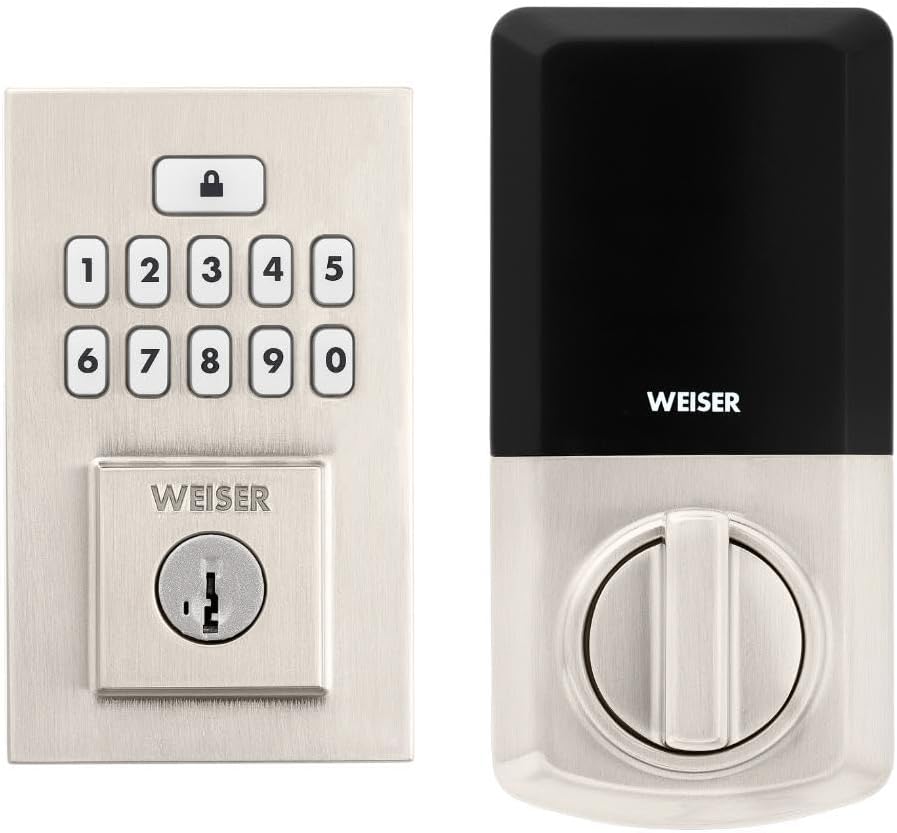
Image: Assembled Weiser SmartCode Keypad Electronic Deadbolt, showing both exterior and interior components.

Image: Close-up of the exterior keypad, featuring the backlit numeric buttons and keyhole.
5. Návod k obsluze
5.1 Zamykání dveří
- Zamykání jedním dotykem: Press the Lock button (top button with padlock icon) on the keypad. The deadbolt will extend.
- Funkce automatického zamykání: If enabled, the deadbolt will automatically extend after a set period (e.g., 30 seconds) once unlocked.
5.2 Odemknutí dveří
- Použití uživatelského kódu: Enter your personalized 4-8 digit user code on the keypad. The deadbolt will retract.
- Použití klíče: Vložte fyzický klíč do klíčové dírky a otočením odemkněte.
5.3 Programování uživatelských kódů
The lock supports up to 50 user codes and 1 master code. Refer to the detailed programming instructions in the full manual for adding, deleting, or modifying codes.
- Hlavní kód: The master code is used to add and delete user codes. It does not unlock the door.
- Uživatelské kódy: These codes are used to unlock the door.


Image: Icons illustrating user management, programming, and auto-lock features.
5.4 SmartKey Re-key Technology
The SmartKey re-key technology allows you to re-key your lock in seconds, maintaining key control and protecting against lost, stolen, or unauthorized keys without removing the lock from your door. Use the provided SmartKey tool and follow the instructions carefully.

Image: SmartKey Security feature, demonstrating how to re-key the lock.
6. Údržba
6.1 Výměna baterie
The lock operates on 4 AA alkaline batteries. When the batteries are low, the lock will provide an audible and/or visual low battery warning. Replace all four batteries simultaneously to ensure optimal performance.
- Remove the battery cover on the interior unit.
- Vyjměte staré baterie a řádně je zlikvidujte.
- Vložte nové alkalické baterie typu AA a dbejte na správnou polaritu (+/-).
- Nasaďte kryt baterie.
Note: Battery life can vary based on usage frequency and environmental conditions. If the auto-lock feature is frequently used, battery life may be shorter.
6.2 Čištění
Zámek očistěte měkkým hadříkemamp hadříkem. Nepoužívejte abrazivní čisticí prostředky, rozpouštědla ani chemické spreje, protože by mohly poškodit povrchovou úpravu a elektronické součástky.
7. Řešení problémů
| Problém | Možná příčina | Řešení |
|---|---|---|
| Lock does not respond or keypad is not lit. | Vybité baterie. | Vyměňte všechny čtyři baterie AA. |
| Lock beeps 3 times during programming or code entry. | Incorrect code, programming error, or lock not handed correctly. | Verify the code. Re-attempt programming steps carefully. Perform the door handing process again. If issues persist, reset the unit to factory settings (refer to full manual). |
| Deadbolt extends when door is open (Auto-lock issue). | The lock does not have a sensor to detect if the door is open or closed. Auto-lock activates after the set time regardless of door position. | This is normal operation. Ensure the door is closed before the auto-lock time expires, or disable the auto-lock feature if it causes inconvenience. |
| Keypad is difficult to see at night. | Backlight not active. | The keypad is backlit and stays lit for 30 seconds after inactivity. Ensure there is enough battery power. |
| Lock is not operating smoothly. | Misalignment of door or strike plate, or internal mechanism issue. | Check door and frame alignment. Ensure the strike plate is correctly installed. If the issue persists, contact customer support. |
8. Specifikace
| Funkce | Detail |
|---|---|
| Číslo modelu | 9GED92600-003 |
| Rozměry produktu | 6.99 x 2.86 x 13.97 cm (2.75 x 1.13 x 5.5 palce) |
| Hmotnost položky | 454 g (1 lb) |
| Barva | Saténový nikl |
| Styl | Moderní |
| Dokončit | Kartáčovaný |
| Materiál | Kov |
| Typ zámku | Deadbolt, Electronic |
| Klávesnice | 10-Button, Backlit |
| Uživatelské kódy | Up to 50 user codes, 1 master code |
| Zdroj napájení | 4 AA baterií (nejsou součástí balení) |
| Kompatibilita tloušťky dveří | 1-3/8" to 1-3/4" (35 mm - 44 mm) |
| Backset | Nastavitelný 2-3/8" nebo 2-3/4" |
| Speciální funkce | Weather Resistant, Anti-Bump, Auto-Lock, One-Touch Lock, Back-Lit Keypad, SmartKey Security |
| Třída ANSI | 2. třída |
| Země původu | Čína |
9. Záruka a podpora
9.1 Informace o záruce
The Weiser SmartCode Keypad Electronic Deadbolt comes with a 1-letá záruka od data nákupu. Tato záruka se vztahuje na vady materiálu a zpracování při běžném používání. Uschovejte si prosím doklad o koupi pro případné reklamace.
For full warranty details and limitations, please refer to the official Weiser webwebu nebo kontaktujte zákaznickou podporu.
9.2 Zákaznická podpora
For technical assistance, troubleshooting, or warranty inquiries, please contact Weiser customer support:
- Online podpora: Visit the official Weiser website for FAQs, video tutorials, and contact forms.
- Telefonická podpora: Refer to the contact information provided on the Weiser packaging or website for phone support hours.
- Aplikace BILT: Utilize the BILT app for interactive 3D installation and programming guidance.
When contacting support, please have your product model number (9GED92600-003) and purchase date available.


