1. Úvod
The Xiaomi Smart Pet Food Feeder is designed to simplify pet feeding by providing automated and controlled food dispensing. With a 3.6 L capacity, it is suitable for cats and small to medium-sized dogs. This feeder integrates with the Mi Home APP, allowing for precise control over feeding times and quantities. Equipped with dual sensors, it monitors food levels and alerts you when the reservoir is low. It also features a battery backup system, ensuring continuous operation even during power outages. The feeder is constructed from durable, food-safe materials that are easy to disassemble and clean.

Obrázek 1: Přední strana view of the Xiaomi Smart Pet Food Feeder. This image shows the sleek, minimalist design of the feeder, with its main body and integrated food bowl.
2. Konec produktuview a Komponenty
Understanding the components of your feeder is essential for proper setup and maintenance.

Obrázek 2: Rozložené view of the feeder's components. This diagram illustrates the main parts including the lid, desiccant cartridge, food container, smart control system, food-grade stainless steel bowl, emergency power supply system (battery compartment), fluid dispensing system, and security lock.
Mezi klíčové komponenty patří:
- Víčko: Secures the food container.
- Desiccant Cartridge: Helps keep food fresh.
- Nádoba na potraviny: Stores dry pet food (3.6 L capacity).
- Inteligentní řídicí systém: Manages feeding schedules and app connectivity.
- Food-Grade Stainless Steel Bowl: Odnímatelné pro snadné čištění.
- Emergency Power Supply System: Battery compartment for backup power.
- Fluid Dispensing System: Mechanism for portion control.
- Bezpečnostní zámek: Prevents accidental opening.
3. Klíčové vlastnosti
- 24-Hour Automatic Pet Feeding: Schedule meals for consistent feeding.
- Fixed Timing and Dosing: Precise control over meal times and portion sizes.
- Wide Kibble Compatibility: Supports kibble diameters from 5–12 mm.
- Remote Food Addition via App: Dispense food anytime, anywhere using the Mi Home app.
- Programmed Power with Backup: Continues feeding even without electricity or internet, thanks to stored schedules and battery power.
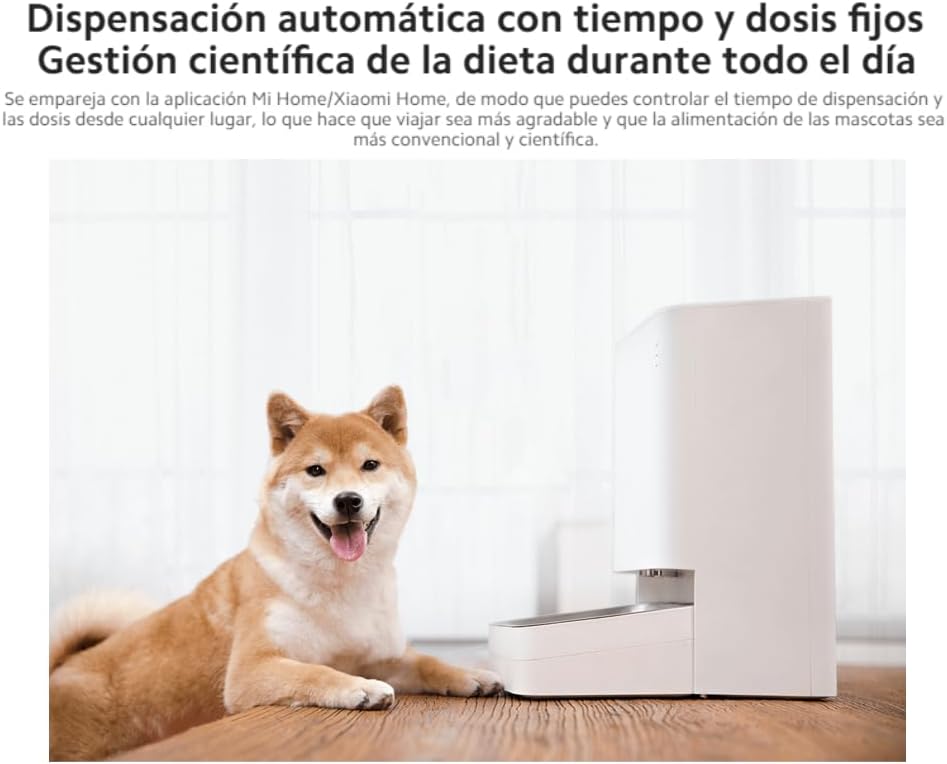
Figure 3: A dog sitting next to the feeder, illustrating its use in a home environment. The image highlights the automatic dispensing feature and scientific diet management.
4. Průvodce nastavením
4.1 Vybalení
Carefully remove all components from the packaging. Ensure all parts listed in Section 2 are present and undamaged.
4.2 Připojení napájení
The feeder can be powered via AC adapter or battery backup.
- Napájení střídavým proudem: Connect the power adapter to the feeder's power port and plug it into a wall outlet.
- Bateriová záloha: Pro nepřerušované krmení při výpadku proudutages, install four AA batteries into the battery compartment located at the bottom of the feeder.
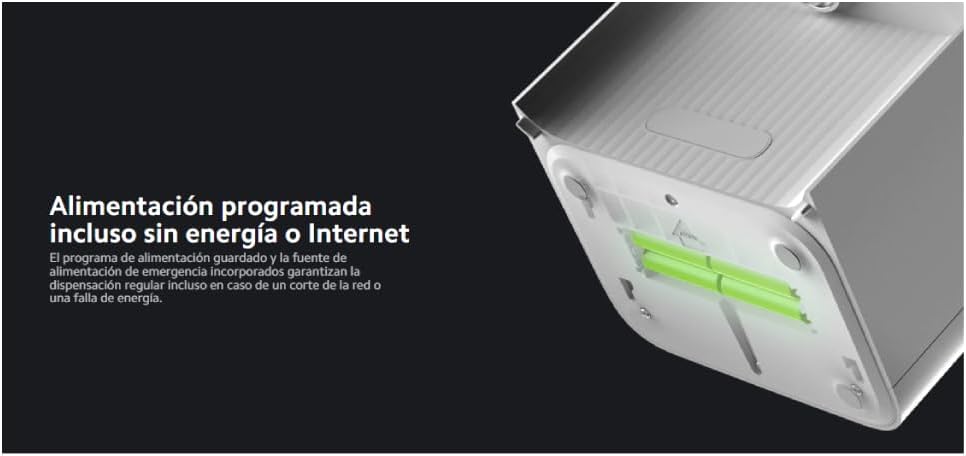
Obrázek 4: View of the battery compartment at the bottom of the feeder, showing where to insert AA batteries for emergency power. This ensures programmed feeding continues even if the main power is lost.
4.3 Plnění nádoby na potraviny
- Otevřete víko nádoby na potraviny.
- Ensure the desiccant cartridge is properly placed to maintain food freshness.
- Pour dry pet food into the container. Do not overfill.
- Bezpečně zavřete víko.
4.4 Připojení k aplikaci Mi Home
For smart control and scheduling, connect your feeder to the Mi Home app:
- Stáhněte si aplikaci Mi Home/Xiaomi Home z obchodu s aplikacemi ve vašem zařízení.
- Otevřete aplikaci a podle pokynů na obrazovce přidejte nové zařízení.
- Select the Xiaomi Smart Pet Food Feeder from the list of available devices.
- Follow the app's prompts to connect the feeder to your Wi-Fi network.
5. Provoz
5.1 Scheduling Feeds
Use the Mi Home app to set up a feeding schedule:
- Open the Mi Home app and select your Smart Pet Food Feeder.
- Navigate to the 'Automatic feeding schedule' section.
- Set desired feeding times and portion sizes (in grams).
- Uložte si rozvrh. Krmítko bude automaticky dávkovat krmivo v naprogramovaných časech.

Figure 5: Screenshot of the Mi Home app interface, demonstrating how to set up and manage automatic feeding schedules. Users can define specific times and quantities for each meal.
5.2 Manual Dispensing
You can manually dispense food directly from the feeder or via the app:
- Na zařízení: Press the manual feed button on the feeder (refer to product diagram for location).
- Přes aplikaci: In the Mi Home app, select the 'Tap to add food remotely' option to dispense a single portion.
5.3 Remote Feeding
The app allows you to dispense food remotely, even when you are away from home, provided the feeder is connected to Wi-Fi.
6. Bezpečnostní prvky
The Xiaomi Smart Pet Food Feeder incorporates several safety features to ensure the well-being of your pet and the durability of the device:
- Lid Security Lock: Prevents pets or children from accidentally opening the lid and accessing the food container.
- Anti-Resistance Mechanism: The smart feeder detaches if resistance is encountered during dispensing, preventing paw injuries.
- Pletený nylonový kabel: The power cable is braided for increased durability and bite resistance.
- Foldable Power Cable: Designed to prevent tripping hazards and ensure the power cable does not interfere with the food compartment.
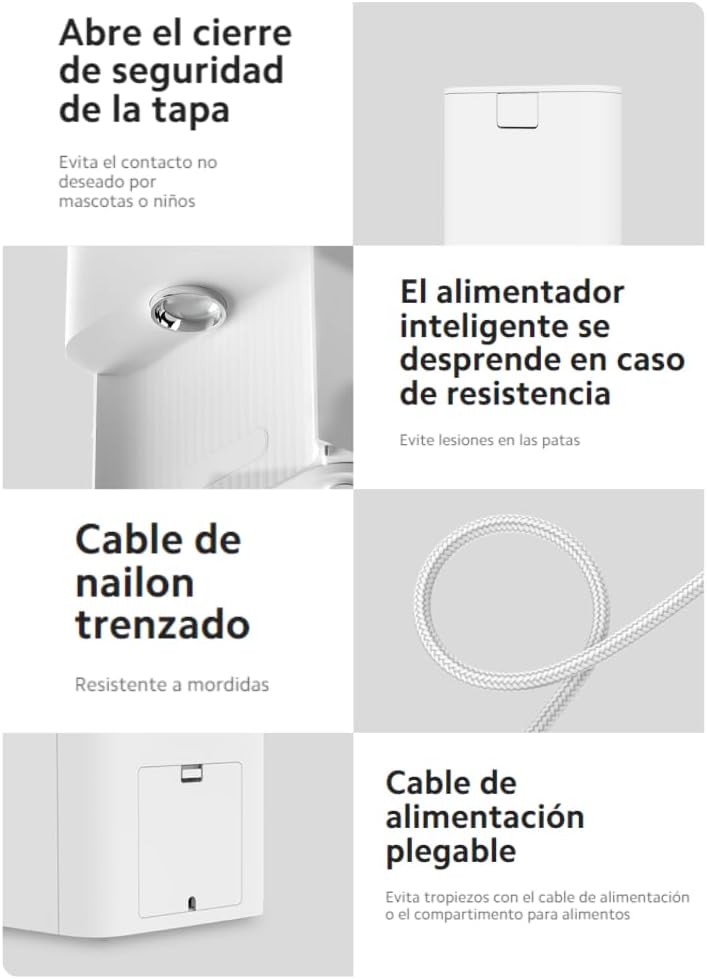
Figure 6: Illustrations of the feeder's safety features, including the lid lock, anti-resistance detachment, braided nylon cable, and foldable power cable design.
7. Údržba a čištění
Regular cleaning ensures hygiene and extends the life of your feeder. The food-contact parts are designed for easy removal and cleaning.

Figure 7: Close-up of the food-grade 304 stainless steel bowl. This image emphasizes the quality of materials used for food contact, which are removable for cleaning.
- Demontáž: Carefully disassemble the food-contact components, including the food bowl, food compartment, and dispensing blade. Refer to the product overview schéma pro pomůcku.
- Čištění: Wash all disassembled parts by hand using mild soap and water. Ensure all food residue is removed.
- Sušení: Thoroughly dry all components before reassembly to prevent moisture buildup.
- Opětovná montáž: Reassemble the feeder, ensuring all parts are correctly aligned and secured.
Důležité: Do not immerse the main unit (containing electronic components) in water. Wipe it clean with a damp pouze plátno.
8. Specifikace
| Funkce | Specifikace |
|---|---|
| Značka | XIAOMI |
| Číslo modelu | 6934177787874 |
| Hmotnost položky | 8.62 libry |
| Rozměry produktu (DxŠxV) | 7.09 x 14.96 x 12.2 palce |
| Materiál | Plastic (main body), 304 Stainless Steel (food bowl) |
| Kapacita potravin | 3.6 litrů |
| Kibble Diameter | 5–12 mm |
| Zdroj napájení | AC Adapter, 4x AA Batteries (backup) |
| Konektivita | Wi-Fi (Mi Home App) |
| Cílový druh | Kočka, pes (malá až střední plemena) |
9. Řešení problémů
If you encounter issues with your Xiaomi Smart Pet Food Feeder, try the following solutions:
- Krmítko nevydává krmivo:
- Zkontrolujte, zda je nádoba na potraviny prázdná.
- Ensure the feeder is powered on and connected to the AC adapter or has charged backup batteries.
- Verify that the dispensing mechanism is not jammed by oversized kibble or debris.
- Check the feeding schedule in the Mi Home app for correct settings.
- Problémy s připojením aplikace:
- Ensure your Wi-Fi network is active and the feeder is within range.
- Restartujte Wi-Fi router a napájecí adaptér.
- Potvrďte, že je aplikace Mi Home aktualizována na nejnovější verzi.
- Try re-pairing the feeder with the app if the connection is lost.
- Nečerstvé jídlo:
- Ensure the desiccant cartridge is properly placed and replaced periodically as recommended by the manufacturer.
- Make sure the lid is securely closed after refilling.
For persistent issues, please refer to the official Xiaomi support resources.
10. Záruka a podpora
For warranty information, technical support, or service inquiries, please visit the official Xiaomi webnebo se obraťte přímo na jejich zákaznický servis. Uschovejte si účtenku jako doklad o koupi pro případ reklamace.
Oficiální obchod Xiaomi: Navštivte obchod XIAOMI na Amazonu


