Konec produktuview
The Baseus Bowie WM05 True Wireless Earbuds are designed to provide a superior audio experience by effectively eliminating ambient noise and offering seamless transitions between various listening modes. These earbuds feature a low-latency mode for synchronized audio and video, making them ideal for gaming and media consumption. With a large-capacity battery and efficient wireless technology, they offer extended usage throughout the day. An intelligent AI neural network algorithm enhances voice clarity during calls by filtering out surrounding noise, ensuring your conversations are loud and clear. The earbuds are available in a cream white finish.
Mezi klíčové vlastnosti patří:
- Effective ambient noise isolation and seamless mode switching.
- Low-latency mode for smooth audio and video synchronization.
- Large capacity battery with low-power wireless technology for extended use.
- Quick charging: up to two hours of battery life with only 10 minutes of charging.
- AI neural network algorithm for clear call quality by filtering ambient noise.

Image: Baseus Bowie WM05 True Wireless Earbuds shown inside their charging case, highlighting their compact and sleek design.
Obsah balení
Ujistěte se prosím, že balení obsahuje všechny položky:
- 1 x Pair of Baseus Bowie WM05 True Wireless Earbuds
- 1 x nabíjecí pouzdro
- Nabíjecí kabel 1 x USB-C
- 3 x Pairs of Eartips (Small, Medium, Large)
- 1 x Uživatelská příručka

Image: The retail packaging of the Baseus Bowie WM05 earbuds, displaying the product and key features.
Průvodce nastavením
1. Počáteční nabíjení
Před prvním použitím sluchátka a nabíjecí pouzdro plně nabijte. Připojte dodaný kabel USB-C k nabíjecímu portu na pouzdře a ke zdroji napájení. Kontrolka na pouzdře bude ukazovat stav nabíjení.

Obrázek: Nahoře view of the Baseus Bowie WM05 charging case, showing the Baseus logo and smooth finish.
2. Spárování se zařízením
- Ujistěte se, že jsou sluchátka v nabíjecím pouzdře a že je víko pouzdra otevřené.
- Na svém zařízení (chytrém telefonu, tabletu atd.) povolte Bluetooth.
- Hledat new Bluetooth devices. The earbuds should appear as "Baseus Bowie WM05".
- Select "Baseus Bowie WM05" to pair. Once connected, a voice prompt will confirm successful pairing.
- The earbuds will automatically connect to the last paired device when removed from the case and Bluetooth is enabled on the device.
Návod k obsluze
Nošení sluchátek
Choose the correct size eartips for a comfortable and secure fit. Insert the earbuds into your ears and gently twist them until they feel snug and the sound quality is optimal.
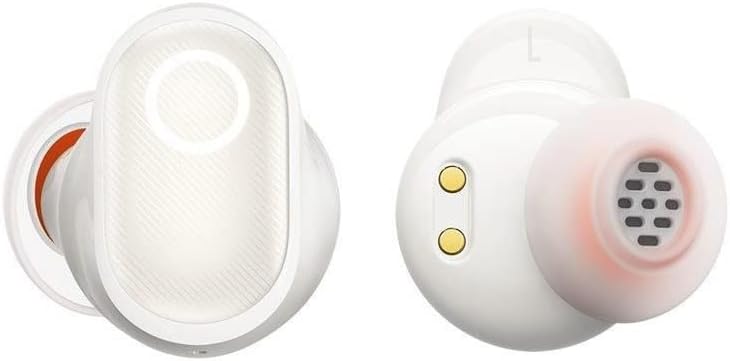
Obrázek: Podrobný view of the Baseus Bowie WM05 earbuds, showing the in-ear design and charging contacts.
Dotykové ovládání
The Baseus Bowie WM05 earbuds feature touch-sensitive areas for easy control of music playback, calls, and modes.
| Akce | Řízení |
|---|---|
| Přehrát/Pozastavit | Dvakrát klepněte na kterékoli sluchátko |
| Další stopa | Trojité klepnutí na pravé sluchátko |
| Předchozí stopa | Trojité klepnutí na levé sluchátko |
| Přijmout/ukončit hovor | Dvakrát klepněte na kterékoli sluchátko |
| Odmítnout hovor | Stiskněte a podržte jedno ze sluchátek po dobu 2 sekund |
| Aktivace režimu s nízkou latencí | Stiskněte a podržte levé sluchátko po dobu 2 sekund |
| Toggle Noise Control (ANC/Transparency) | Stiskněte a podržte pravé sluchátko po dobu 2 sekund |
| Aktivujte hlasového asistenta | Quadruple-tap either earbud |
Údržba a péče
Proper maintenance ensures the longevity and optimal performance of your Baseus Bowie WM05 earbuds.
- Čištění: Pravidelně čistěte sluchátka a nabíjecí pouzdro měkkým, suchým hadříkem, který nepouští vlákna. Nepoužívejte abrazivní čisticí prostředky ani rozpouštědla.
- Špunty do uší: Sejměte ušní ocásky a v případě potřeby je očistěte jemným mýdlem a vodou. Před opětovným nasazením se ujistěte, že jsou zcela suché.
- Kontakty pro nabíjení: Gently wipe the charging contacts on both the earbuds and inside the case with a dry cotton swab to prevent accumulation of dirt or debris.
- Skladování: Pokud sluchátka nepoužíváte, uložte je do nabíjecího pouzdra, aby byla chráněna a zůstala nabitá. Nevystavujte je extrémním teplotám.
- Voděodolnost: The earbuds are not waterproof. Avoid exposure to excessive moisture, rain, or submersion in water.
Odstraňování problémů
Pokud narazíte na problémy se sluchátky, podívejte se na následující běžná řešení:
- Žádný zvuk:
- Ujistěte se, že jsou sluchátka nabitá.
- Zkontrolujte připojení Bluetooth na vašem zařízení.
- Zvyšte hlasitost na sluchátkách i na zařízení.
- Zkuste znovu spárovat sluchátka.
- Sluchátka se nespárují:
- Ujistěte se, že jsou sluchátka v režimu párování (otevřete víko pouzdra).
- Vypněte a zapněte Bluetooth na vašem zařízení.
- Forget "Baseus Bowie WM05" from your device's Bluetooth list and try pairing again.
- Ujistěte se, že k sluchátkům nejsou připojena žádná jiná zařízení.
- Problémy s nabíjením:
- Zkontrolujte, zda je kabel USB-C správně připojen.
- Zkuste jiný kabel USB-C nebo napájecí adaptér.
- Vyčistěte nabíjecí kontakty na obou sluchátkách i v pouzdře.
- Špatná kvalita hovoru:
- Ujistěte se, že máte sluchátka správně nasazená v uších.
- Zkontrolujte silný signál Bluetooth (zůstaňte blízko zařízení).
- Ujistěte se, že mikrofon není nijak zakrytý.
If problems persist, please contact Baseus customer support.
Specifikace
| Funkce | Detail |
|---|---|
| Značka | Baseus |
| Název modelu | Bowie WM05 |
| Číslo modelu položky | NGTW200002 |
| Barva | Krémová bílá |
| Umístění uší | In-Ear |
| Kontrola hluku | Aktivní potlačení hluku |
| Technologie připojení | Bezdrátový |
| Technologie bezdrátové komunikace | Bluetooth |
| Rozměry produktu | 10 x 5 x 3 cm |
| Hmotnost položky | 230 gramů |
| Baterie | 1 Non-standard battery required. (Included) |
| První dostupný termín | 8. září 2022 |
Záruka a podpora
Baseus products are manufactured to the highest quality standards. For information regarding warranty coverage, please refer to the warranty card included in your product packaging or visit the official Baseus webmísto.
For technical support, troubleshooting assistance, or any product-related inquiries, please contact Baseus customer service through their official channels. Contact information can typically be found on the product packaging or their official webmísto.


