Zavedení
This manual provides detailed instructions for the proper use and maintenance of your Cellularline FINE Transparent TWS Wireless In-Ear Earbuds. Please read this manual thoroughly before using the product to ensure optimal performance and longevity.
The Cellularline FINE Transparent TWS Wireless In-Ear Earbuds feature a distinctive transparent design, showcasing the internal components of both the earbuds and their charging case. Designed for comfort and high-quality audio, these earbuds offer up to 3.5 hours of playtime per charge, extended to a total of 10 hours with the charging case. They include intuitive touch controls for managing calls and music, and an auto-pairing function for effortless connection. The Double Master function allows for independent use of either earbud.
Bezpečnostní informace
- Nevystavujte sluchátka ani nabíjecí pouzdro extrémním teplotám, vlhkosti nebo kapalinám.
- Avoid dropping, impacting, or disassembling the device. This may void the warranty.
- Uchovávejte mimo dosah dětí a domácích zvířat.
- Používejte pouze dodaný nabíjecí kabel nebo jeho certifikovaný ekvivalent.
- Poslouchejte při střední hlasitosti, abyste předešli poškození sluchu.
- Nepoužívejte sluchátka v situacích, kdy by neschopnost slyšet okolní zvuky mohla být nebezpečná (např. při řízení, jízdě na kole, chůzi v dopravní zácpě).
Obsah balení
Zkontrolujte prosím balení, zda neobsahuje následující položky:
- Cellularline FINE Transparent TWS Wireless In-Ear Earbuds (Left and Right)
- Nabíjecí pouzdro
- USB nabíjecí kabel
- Uživatelská příručka
Konec produktuview
The Cellularline FINE earbuds are designed for ease of use and a distinctive aesthetic. Below is an overview z hlavních komponent.
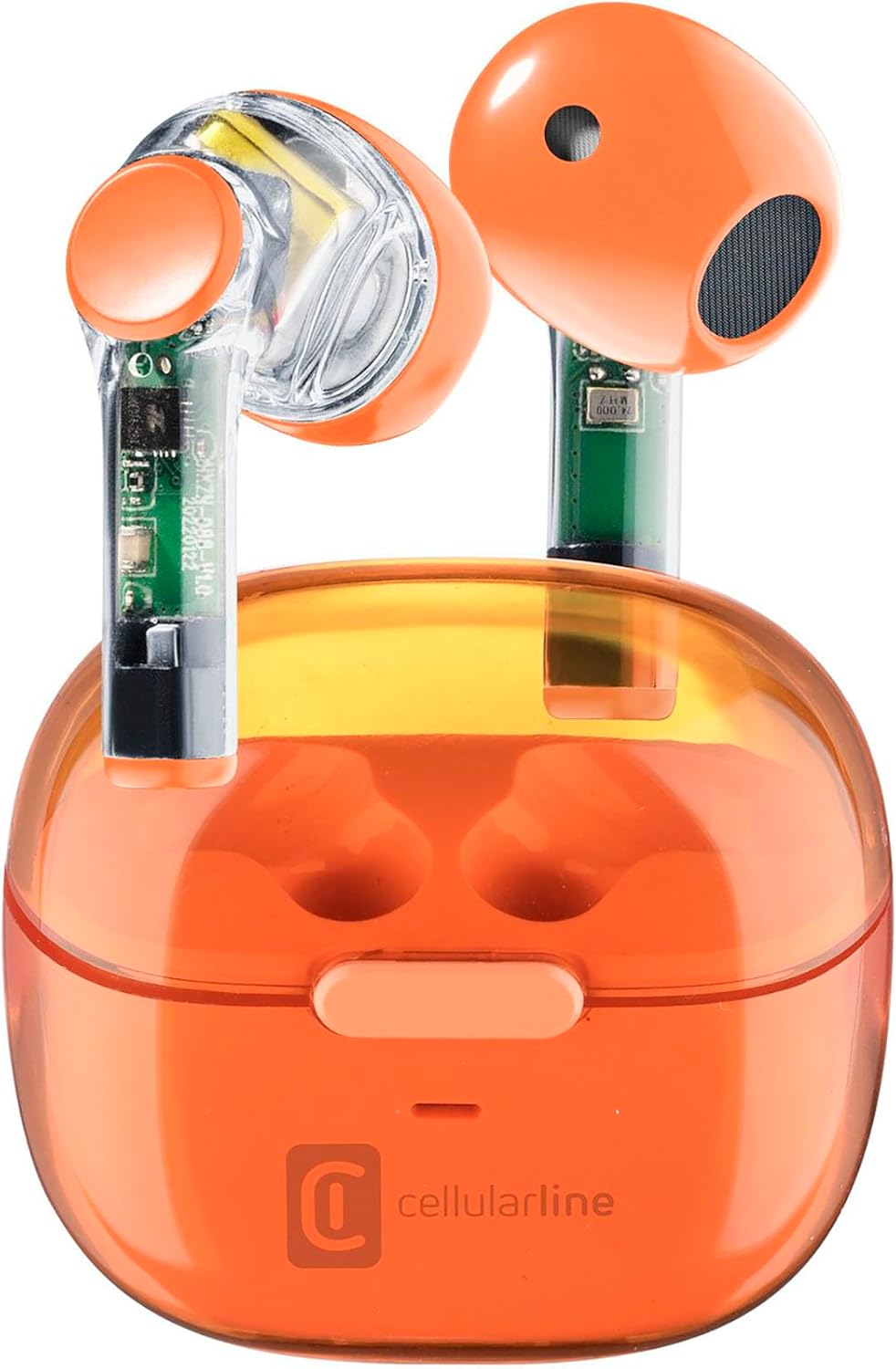
Image: Cellularline FINE Transparent TWS Wireless In-Ear Earbuds in their charging case. The earbuds and case feature a transparent orange design, revealing internal circuitry.

Obrázek: Detail view highlighting the transparent design of the Cellularline FINE earbuds, showing the internal components.
Komponenty:
- Sluchátka: Left and Right, with touch control surfaces and microphones.
- Nabíjecí pouzdro: Houses and charges the earbuds, with a charging port and LED indicator.
- Oblast dotykového ovládání: Nachází se na vnější straně každého sluchátka a slouží k různým funkcím.
- Mikrofon: Integrated into each earbud for calls.
Nastavení
1. Nabíjení sluchátek a pouzdra
Před prvním použitím sluchátka a nabíjecí pouzdro plně nabijte.
- Vložte obě sluchátka do nabíjecího pouzdra. Ujistěte se, že jsou správně usazena.
- Connect the USB charging cable to the charging port on the case and to a compatible USB power source (e.g., computer, wall adapter).
- The LED indicator on the charging case will show the charging status. Once fully charged, the indicator will change or turn off.
- A full charge provides approximately 3.5 hours of playtime for the earbuds, and the case can provide up to 4 additional charges, totaling 10 hours of playtime.

Image: Illustration showing the earbuds and charging case, indicating 3.5 hours of playtime per single charge and 10 hours of total playtime with the charging case.
2. Pairing with Your Device (Auto-Pairing)
The earbuds feature an auto-pairing function for quick and easy connection.
- Ujistěte se, že je na vašem zařízení zapnuté Bluetooth.
- Otevřete nabíjecí pouzdro a vyjměte obě sluchátka. Sluchátka se automaticky zapnou a přejdou do režimu párování.
- On your device, search for Bluetooth devices and select "Cellularline FINE" (or similar name) from the list.
- Po připojení uslyšíte zvukové potvrzení a sluchátka budou připravena k použití.
- Při dalším použití se sluchátka po vyjmutí z pouzdra automaticky připojí k poslednímu spárovanému zařízení.

Image: A smartphone displaying a music player interface, with the Cellularline FINE earbuds and charging case nearby, illustrating the fast Bluetooth pairing process.
3. Nošení sluchátek do uší
Pro optimální kvalitu zvuku a pohodlí se ujistěte, že jsou sluchátka správně usazena v uších.
- Každé sluchátko jemně vložte do odpovídajícího ucha (levé pro levé, pravé pro pravé).
- Upravte sluchátko tak, aby vám bylo bezpečné a pohodlné.

Image: A woman smiling while wearing the Cellularline FINE earbuds, demonstrating comfort and stability during use.
Návod k obsluze
Dotykové ovládání
The Cellularline FINE earbuds feature intuitive touch controls on each earbud. The specific functions may vary slightly depending on your device and operating system.
| Akce | Funkce |
|---|---|
| Jedno klepnutí (Levé nebo pravé sluchátko) | Přehrát/pozastavit hudbu, přijmout/ukončit hovor |
| Dvojité klepnutí (Pravé sluchátko) | Další stopa |
| Dvojité klepnutí (Levé sluchátko) | Předchozí stopa |
| Trojité klepnutí (Levé nebo pravé sluchátko) | Aktivujte hlasového asistenta |
| Dlouhé stisknutí (Pravé sluchátko) | Zvýšit hlasitost |
| Dlouhé stisknutí (Levé sluchátko) | Snížit hlasitost |
| Dlouhé stisknutí (2 sekundy) během příchozího hovoru | Odmítnout hovor |
Single Earbud Use (Double Master Function)
The Double Master function allows you to use either the left or right earbud independently. This is useful for calls or when you need to be aware of your surroundings.
- Simply remove one earbud from the charging case. It will automatically connect to your device.
- The other earbud can remain in the case or be used later.
- To switch back to stereo mode, simply remove the second earbud from the case.
Údržba
Čištění
- Pravidelně čistěte sluchátka a nabíjecí pouzdro měkkým, suchým hadříkem, který nepouští vlákna.
- Nepoužívejte abrazivní čisticí prostředky, alkohol ani chemická rozpouštědla.
- Jemně odstraňte ušní maz nebo nečistoty z koncovek sluchátek a mřížky reproduktoru pomocí malého měkkého kartáčku nebo vatového tamponu.
- Ensure the charging contacts on both the earbuds and the case are clean and free of dust.
Skladování
- Pokud sluchátka nepoužíváte, vždy je ukládejte do nabíjecího pouzdra, abyste je chránili a udrželi je nabité.
- Přístroj skladujte na chladném a suchém místě, mimo dosah přímého slunečního záření a extrémních teplot.
Odstraňování problémů
If you encounter any issues with your Cellularline FINE earbuds, refer to the following common solutions:
| Problém | Možné řešení |
|---|---|
| Sluchátka se nepárují ani nepřipojují |
|
| Funkční pouze jedno sluchátko |
|
| Nízká hlasitost nebo špatná kvalita zvuku |
|
| Sluchátka se nenabíjejí |
|
Specifikace
| Funkce | Detail |
|---|---|
| Značka | Buněčná linie |
| Číslo modelu | BTFINETWSO |
| Barva | Průhledná oranžová |
| Umístění uší | In-Ear |
| Form Factor | In-Ear |
| Izolace hluku | Akustická izolace |
| Technologie připojení | Bezdrátové (Bluetooth) |
| Zahrnuté komponenty | Sluchátka |
| Nabíjecí baterie | Yes (Lithium-ion) |
| Speciální funkce | Volume Control, Microphone Included |
| Kontrolní metoda | Dotek |
| Doporučená použití | Music Listening, Phone Calls, Sports, Outdoor Leisure |
| Kompatibilní zařízení | Laptops, Tablets, Mobile Phones, Music Production Equipment |
| Materiál | Plast |
| Hrací doba sluchátek | Až 3.5 hodin |
| Celková doba přehrávání (s pouzdrem) | Až 10 hodin |
Záruka a podpora
Cellularline products are designed and manufactured to the highest quality standards. For information regarding warranty coverage, technical support, or service, please refer to the official Cellularline webnebo se obraťte přímo na jejich zákaznický servis. Uschovejte si doklad o koupi pro případ reklamace.
Další pomoc naleznete na adrese: www.cellularline.com


