Zavedení
Thank you for choosing the ROCAM CR1023 7-Inch Digital Alarm Clock. This manual provides detailed instructions for setting up, operating, and maintaining your new alarm clock. Please read this manual thoroughly before use to ensure optimal performance and longevity of your device.

The ROCAM CR1023 digital alarm clock features a large blue LED display, with a smartphone and wireless earbuds charging via its integrated USB ports.
Obsah balení
Zkontrolujte prosím balení, zda neobsahuje následující položky:
- 1 x ROCAM CR1023 Digital Alarm Clock
- 1 x Power Adapter with Cable (AC 100-240V compatible)
- 1 x Uživatelská příručka

The package includes the ROCAM CR1023 digital alarm clock, a power adapter with cable, and a user manual.
Vlastnosti produktu
- 7-Inch Large LED Display: Clear and bold digital time display.
- Duální budíky: Nastavte si dva nezávislé budíky pro různé časy buzení.
- Funkce odložení: Poskytuje dalších 9 minut spánku.
- Adjustable Brightness (Dimmer): 0-100% dimming for display.
- Dotykové ovládání nočního světla: Integrated night light with adjustable brightness.
- USB & Type-C Charging Ports: Conveniently charge your mobile devices (5V, 1A output).
- 7stupňové nastavení hlasitosti: Customize alarm volume.
- 12/24 Hour & DST Mode: Switch between time formats and activate Daylight Saving Time.
- Bateriová záloha: Zachovává nastavení času a budíku i při výpadku napájenítag(vyžaduje 2 baterie AAA, nejsou součástí balení).
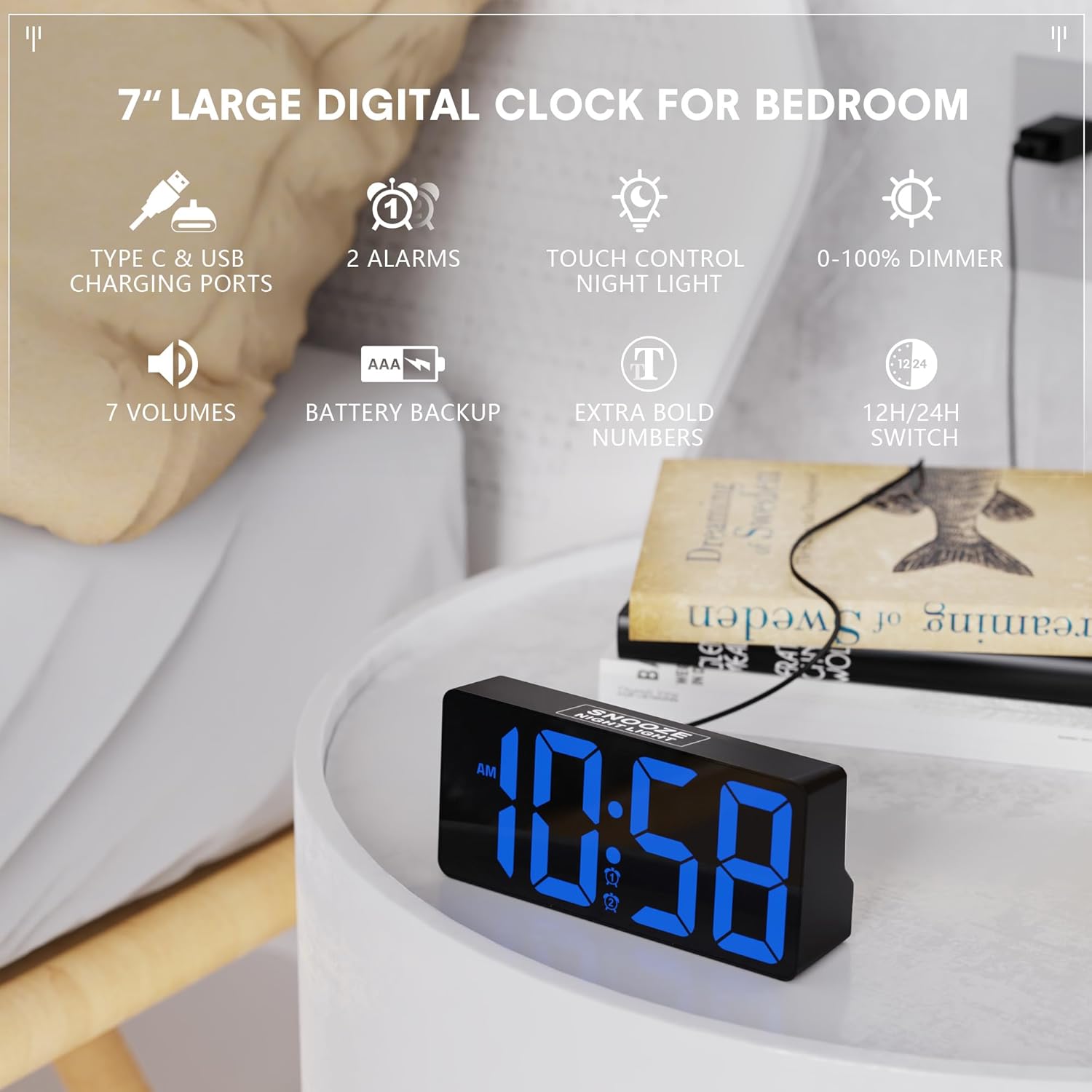
This image illustrates the ROCAM CR1023 digital alarm clock's main features, including its 7-inch display, dual alarms, touch-controlled night light, and USB charging capabilities.
Nastavení
1. Připojení napájení
- Unpack the alarm clock and all accessories.
- Connect the provided power adapter cable to the DC IN port on the back of the clock.
- Plug the power adapter into a standard AC 100-240V wall outlet. The clock display will light up.
2. Battery Backup Installation (Optional but Recommended)
The battery backup function is designed to save your time and alarm settings during a power outage. The display will not remain on when operating on battery backup alone.
- Vyhledejte přihrádku na baterie na spodní straně hodin.
- Otevřete kryt bateriového prostoru.
- Insert 2 x 1.5V AAA batteries (not included) according to the polarity markings (+/-).
- Bezpečně zavřete kryt bateriového prostoru.
Návod k obsluze
1. Nastavení času
- Stiskněte a podržte LETNÍ ČAS button on the back of the clock until the hour digits flash.
- Použijte + or - tlačítka pro nastavení hodiny.
- Stiskněte tlačítko LETNÍ ČAS znovu stiskněte tlačítko pro potvrzení hodin a přechod k nastavení minut. Číslice minut budou blikat.
- Použijte + or - tlačítka pro nastavení minut.
- Stiskněte tlačítko LETNÍ ČAS ještě jednou tlačítko pro potvrzení a ukončení režimu nastavení času.
2. Nastavení alarmů (Alarm 1 a Alarm 2)
Hodiny podporují dva nezávislé budíky.
- Stiskněte a podržte POPLACH 1 tlačítko (pro alarm 1) nebo POPLACH 2 button (for Alarm 2) on the back until the alarm hour digits flash.
- Použijte + or - tlačítka pro nastavení hodiny budíku.
- Press the respective alarm button again to confirm the hour and move to minute setting. The alarm minute digits will flash.
- Použijte + or - tlačítka pro nastavení minut budíku.
- Press the respective alarm button one more time to confirm and exit alarm setting mode.
3. Activating/Deactivating Alarms
- Krátce stiskněte POPLACH 1 or POPLACH 2 tlačítko pro zapnutí nebo vypnutí budíku.
- An alarm icon will appear on the display when the alarm is active.

The dual alarm feature allows for two separate wake-up times, and the snooze function provides an additional 9 minutes of sleep.
4. Funkce odložení buzení
Když zazní budík, dotkněte se ODLOŽENÍ/NOČNÍ SVĚTLO area on the top of the clock to activate the snooze function. The alarm will pause for 9 minutes and then sound again.
5. Display Brightness Adjustment (Dimmer)
Otočte DIMMER knob on the back of the clock to adjust the display brightness from 0% (off) to 100% (brightest).

The clock offers a 0-100% adjustable dimming feature, allowing users to set the display brightness from completely off to high, suitable for any environment.
6. Funkce nočního světla
Dotkněte se ODLOŽENÍ/NOČNÍ SVĚTLO area on the top of the clock to turn the night light on or off. Hold the touch area to adjust the brightness of the night light.
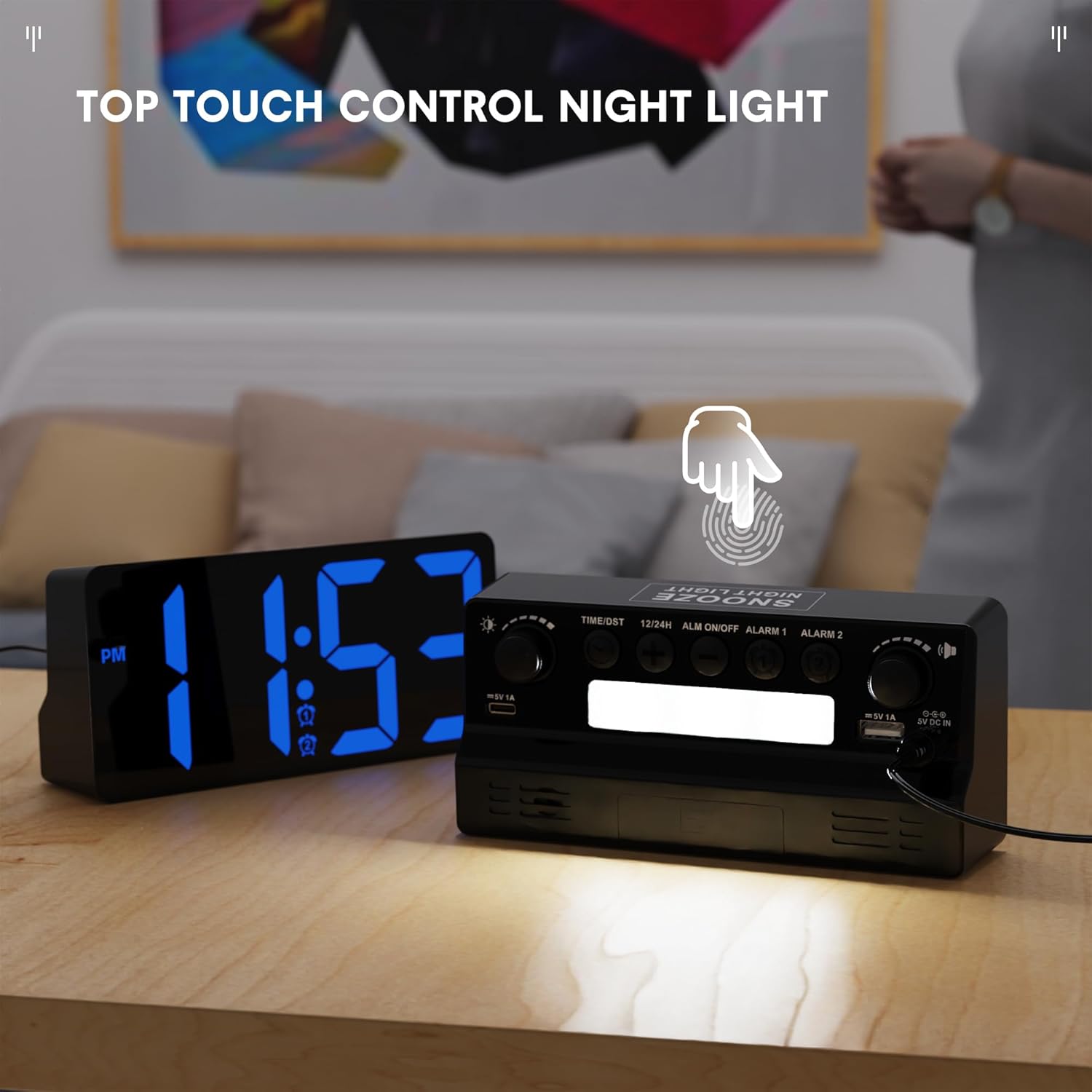
The integrated night light can be activated and controlled via a touch-sensitive area on the top of the clock, providing soft illumination.
7. 12/24 Hour Format and DST
- Krátce stiskněte 12/24 hod button on the back to switch between 12-hour and 24-hour time formats.
- Krátce stiskněte LETNÍ ČAS button to activate or deactivate Daylight Saving Time (DST). An indicator will appear on the display when DST is active.

Users can easily switch between 12-hour and 24-hour time formats, and activate Daylight Saving Time (DST) mode as needed.
Using the USB and Type-C Charging Ports
The ROCAM CR1023 features both a standard USB-A port and a Type-C port (5V, 1A output) for charging your mobile devices.
- Connect your device's charging cable to either the USB-A or Type-C port on the back of the clock.
- Ensure the clock is powered via the AC adapter for the charging ports to function.
- The charging ports are for convenience and provide standard 5V/1A output. Charging speed may vary depending on your device.

The clock provides convenient charging for mobile devices through its integrated USB and Type-C ports, as shown with two smartphones connected.
Specifikace
| Funkce | Detail |
|---|---|
| Model | CR1023 |
| Zobrazit | 7-inch LED HD Display |
| Vstup AC adaptéru | AC 100-240V |
| Zobrazit stmívač | 0-100% nastavitelné |
| USB nabíjecí porty | Type C & USB (5V, 1A) |
| Záložní baterie | 2 x 1.5V AAA baterie (nejsou součástí balení) |
| Hmotnost produktu | Přibl. 0.23 kg (0.5 lb) |
| Rozměry produktu | Přibližně 16.5 x 7.6 x 4.5 cm (6.5 x 3 x 1.77 palce) |
Údržba
- Čištění: Hodiny otřete měkkým, suchým hadříkem. Nepoužívejte abrazivní čisticí prostředky ani rozpouštědla.
- Umístění: Place the clock on a stable, flat surface away from direct sunlight, heat sources, and moisture.
- Výměna baterie: If using battery backup, replace AAA batteries annually or when they are depleted to ensure settings are retained during power interruptions.
Odstraňování problémů
- Zobrazení hodin je prázdné:
- Ensure the power adapter is securely plugged into both the clock and a working wall outlet. If using battery backup during a power outage, the display will be blank, but settings are retained.
- Budík se nespustí:
- Check if the alarm is activated (alarm icon visible on display). Ensure the alarm volume is not set to minimum. Verify the alarm time is set correctly.
- USB/Type-C charging not working:
- Confirm the clock is connected to AC power. Check if the charging cable is properly connected to both the clock and your device. Ensure your device is compatible with 5V/1A charging.
- Čas je po výpadku proudu nesprávnýtage:
- If backup batteries were not installed or were depleted, the time may reset. Re-set the time manually. Ensure fresh AAA batteries are installed for future backup.
Záruka a podpora
Informace o záruce nebo technickou podporu získáte na kontaktních údajích uvedených při nákupu nebo na oficiálních webových stránkách ROCAM. webUschovejte si účtenku jako doklad o koupi pro případ reklamace.