1. Konec produktuview
The NexiGo PJ30 is a native 1080P LCD projector designed for both indoor and outdoor entertainment. It delivers crisp, clear images with 500 ANSI lumens brightness and supports Dolby Sound for an immersive audio experience. Equipped with 5G Wi-Fi and Bluetooth 5.1, it offers versatile connectivity options for various devices.
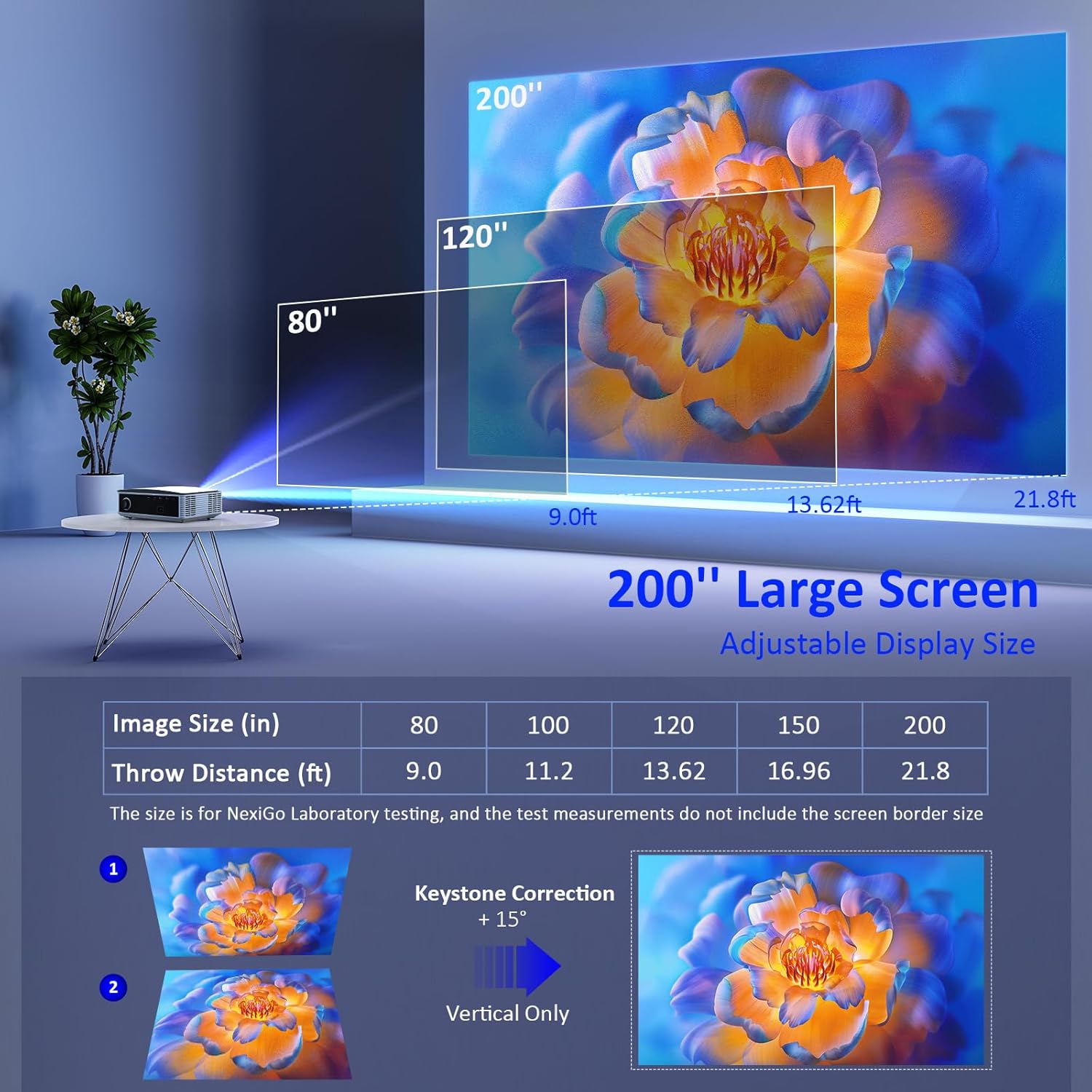
Image: The NexiGo PJ30 projector, a compact white device with a black lens, positioned to project an image.
Klíčové vlastnosti:
- Native 1080P Resolution & 500 ANSI Lumens: Provides high-resolution, bright, and clear images.
- Bezdrátové zrcadlení obrazovky: Supports 5G Wi-Fi for seamless mirroring from iOS, Android, and Windows devices.
- Dolby Sound & Bluetooth 5.1: Built-in speaker with lifelike Dolby sound and Bluetooth 5.1 for external audio devices.
- Široká kompatibilita: Multiple ports including HDMI, USB, AV, and 3.5mm audio jack for various devices.
- Velikost velkého displeje: Adjustable projection from 42" to 200" with a projection distance of 4.8ft to 21.8ft.
- Digitální zoom: Easily adjust screen size with the remote control (available for local video via USB).
2. Co je v krabici
Upon unboxing your NexiGo PJ30 projector, ensure all the following items are present:
- NexiGo PJ30 Projector
- Dálkové ovládání (2 x AAA baterie nejsou součástí balení)
- Napájecí kabel
- AV kabel
- Uživatelská příručka
- Cleaning Kit (cloth and cotton swabs for lens/screen)
3. Nastavení
Umístění a instalace
The NexiGo PJ30 offers flexible installation options to suit your environment:
- Stolní držák: Umístěte projektor na rovný povrch.
- Držák na strop: Install the projector upside down on the ceiling (mounting hardware not included).
- Montáž na stěnu: Secure the projector to a wall shelf (shelf not included).

Image: Diagrams illustrating desktop, ceiling, and wall mounting options for the projector.
Připojování k napájení
- Připojte napájecí kabel ke vstupnímu portu projektoru.
- Zapojte druhý konec napájecího kabelu do elektrické zásuvky.
Projekční vzdálenost a velikost projekčního plátna
Adjust the distance between the projector and the screen to achieve your desired display size. The optimal projection distance ranges from 4.8ft to 21.8ft for screen sizes between 42" and 200".

Image: A diagram showing recommended throw distances for various screen sizes (80" at 9.0ft, 120" at 13.62ft, 200" at 21.8ft).
4. Návod k obsluze
Zapnutí/vypnutí
- Stisknutím tlačítka napájení na projektoru nebo na dálkovém ovladači zapnete nebo vypnete zařízení.
Zaostření a korekce lichoběžníkového zkreslení
- Otáčejte zaostřovacím kroužkem na objektivu projektoru, dokud nebude obraz jasný.
- Use the keystone dial on the rear of the projector to correct any trapezoidal distortion of the image.
Výběr zdroje vstupu
Projektor podporuje více vstupních zdrojů:
- HDMI: Connect devices like TV boxes, gaming consoles (PS5), laptops, or TV sticks via HDMI 1 or HDMI 2 ports.
- USB: Connect USB flash drives for direct media playback.
- AV: Pro připojení starších zařízení použijte dodaný AV kabel.
- Bezdrátové zrcadlení obrazovky: For iOS, Android, and Windows devices.

Image: The rear panel of the NexiGo PJ30 projector highlighting HDMI, USB, AV, and 3.5mm audio jack ports, with icons of compatible devices like iPhones, iPads, laptops, TV boxes, and USB drives.
Bezdrátové zrcadlení obrazovky
The PJ30 supports 5G Wi-Fi for wireless screen mirroring. Navigate to the 'MultiScreen' option in the input source menu.
- Pro zařízení se systémem iOS: Connect your iOS device and the projector to the same Wi-Fi network. Open Control Center on your iOS device, tap 'Screen Mirroring', and select the projector's name (e.g., NexiGo-PJ30-XXXX).
- For Android/Windows Devices: Ensure your device supports Miracast or Wi-Fi Display. Connect the projector to Wi-Fi. On your device, open display settings or screen mirroring and select the projector's name.
- Note: Due to copyright protection, streaming services like Netflix, Amazon Prime Video, and Hulu do not support screen mirroring.

Image: The NexiGo PJ30 projector displaying a racing game on a large screen, with icons for 5G WiFi and Bluetooth 5.1, and logos for iOS, Android, and Windows devices, indicating wireless screen mirroring capability.
Bluetooth audio připojení
Pro vylepšený zvukový zážitek připojte externí Bluetooth reproduktory nebo sluchátka.
- Go to 'Settings' on the projector's main menu and select 'Bluetooth'.
- Povolte Bluetooth a vyhledejte dostupná zařízení.
- Select your desired Bluetooth speaker or headphones from the list to pair.

Image: The NexiGo PJ30 projector on a coffee table, surrounded by sound waves, with headphones and a Bluetooth speaker, illustrating its immersive Dolby Audio capabilities.
Nastavení obrazu
Access 'Settings' from the main menu to adjust various picture parameters:
- Režim projekce: Adjust based on projector orientation (Normal Front, Normal Back, Invert Front, Invert Back).
- Měřítko obrázku: Scale the image up or down (e.g., 100% to 99%).
- Poměr stran: Choose between Auto, 4:3, or 16:9.
- Režim obrazu: Select predefined modes (Standard, Soft, Dynamic) or customize your own.
Digitální zoom
Use the remote control to digitally zoom in or out on the projected image.
- Note: Digital zoom functionality is only available when playing local video content via a USB connection.

Image: A person using a remote control to adjust the digital zoom on a projected image of a dolphin, showing 0.5X and 2X zoom levels.
5. Vlastnosti
The NexiGo PJ30 projector is engineered to provide a versatile and high-quality viewzkušenosti:
- Vysoký jas: With 500 ANSI lumens, the projector delivers bright images suitable for various lighting conditions.
- Dlouhotrvající LED dioda Lamp: The energy-saving LED light bulb technology ensures a lifespan of up to 30,000 hours, equivalent to approximately 10 years with 8 hours of daily use.
- Všestranná zábava: Ideal for home theater setups, gaming, outdoor movie nights, and presentations.

Image: A collage of four images depicting different uses for the NexiGo PJ30 projector: home theater, playing games, outdoor movie night, and as a holiday gift.
Oficiální video produktu
Video: An official product video from NexiGo USA showcasing the features and capabilities of the PJ30 Native 1080P Movie Projector, including its brightness, sound, and connectivity options.
6. Údržba
Čištění prachového filtru
To maintain optimal performance and prolong the projector's life, regularly clean the dust filter.
- Locate the dust filter cover on the bottom of the projector.
- Gently press and slide out the dust filter.
- Clean the filter with a soft, dry cloth or a small brush to remove accumulated dust.
- Vložte čistý filtr zpět do jeho slotu, dokud nezacvakne.
- It is recommended to clean the dust filter monthly.

Obrázek: Detailní záběr view of the NexiGo PJ30 projector showing the removable dust cover at the bottom, with text indicating the importance of regular cleaning.
Čištění objektivu
Use a soft, lint-free cloth to gently wipe the projector lens. Avoid using abrasive cleaners or excessive force.
7. Řešení problémů
- Bez obrázku: Ensure the power cable is securely connected and the projector is turned on. Check the input source selection matches your connected device. Verify HDMI/AV cables are properly connected.
- Rozmazaný obrázek: Adjust the focus ring on the lens. Ensure the projector is within the recommended projection distance. Use keystone correction to fix distorted images.
- Žádný zvuk: Check the volume settings on both the projector and your connected device. If using Bluetooth, ensure it's properly paired and connected. If using external speakers via 3.5mm jack, ensure the cable is fully inserted.
- Problémy se zrcadlením obrazovky: Ensure both the projector and your device are connected to the same 5G Wi-Fi network. Some streaming apps do not support mirroring due to copyright.
- Přehřívání: Ensure the projector's vents are not blocked. Clean the dust filter regularly.
8. Specifikace
| Funkce | Detail |
|---|---|
| Číslo modelu | PJ30 |
| Nativní rozlišení | 1920 x 1080 (1080P) |
| Jas | 500 ANSI Lumens |
| Technologie připojení | 5G Wi-Fi, Bluetooth 5.1 |
| Velikost displeje | 42" až 200" |
| Projekční vzdálenost | 4.8 m až 21.8 m |
| Podpora zvuku | Dolby Sound, Built-in Speaker, 3.5mm Audio Jack |
| Vstupní porty | 2x HDMI, 2x USB, AV, 3.5mm Audio Jack |
| Hmotnost položky | 5.51 libry |
| Rozměry produktu | 12.2 x 8.66 x 3.14 palce |
9. Záruka a podpora
For warranty information and technical support, please refer to the official NexiGo website or contact their customer service directly. The product was first available on September 1, 2022.
Výrobce: Nextight INC


