Zavedení
This manual provides detailed instructions for the installation, operation, and maintenance of your Blaupunkt MEMPHIS440BT 6.2" In-Dash Touch Screen DVD Receiver. Please read this manual thoroughly before using the product to ensure proper functionality and to prevent damage.
Konec produktuview
The Blaupunkt MEMPHIS440BT is a versatile in-dash multimedia receiver featuring a 6.2-inch touch screen display. It supports DVD/CD playback, Bluetooth connectivity for hands-free calling and audio streaming, USB and SD card media playback, and AM/FM radio. The unit is designed to be the central entertainment system in your vehicle.

Obrázek: Přední strana view of the Blaupunkt MEMPHIS440BT in-dash receiver with its remote control. The receiver features a 6.2-inch touch screen displaying various function icons like Radio, Disc, USB, SD, and Bluetooth. The remote control has numerous buttons for navigation and media control.
Bezpečnostní informace
- Always operate the vehicle safely. Do not operate the unit's functions that distract you from safe driving.
- Ensure proper wiring connections to prevent short circuits and electrical hazards.
- Pokud si nejste jisti některým krokem instalace, poraďte se s odborníkem.
- Nevystavujte jednotku vlhkosti ani extrémním teplotám.
Nastavení a instalace
Obsah balení
- Blaupunkt MEMPHIS440BT DVD Receiver
- Dálkové ovládání
- Kabelový svazek
- Montážní hardware
- Uživatelská příručka (tento dokument)
Schéma zapojení
Refer to the detailed wiring diagram provided in the separate installation guide for specific connections. Ensure all connections are secure and correctly matched to your vehicle's electrical system.
Obrázek: Boční view of the Blaupunkt MEMPHIS440BT receiver, illustrating the various ports and connections on the rear and side panels, including the USB and Mini SD slots on the front left side.
Montáž jednotky
- Demontujte stávající autorádio z palubní desky.
- Connect the wiring harness to the vehicle's wiring and the MEMPHIS440BT.
- Slide the MEMPHIS440BT into the dashboard opening until it clicks into place.
- Zajistěte jednotku pomocí dodaných montážních šroubů.
Návod k obsluze
Zapnutí/vypnutí
Stiskněte tlačítko MOC button (usually a knob on the left side) to turn the unit on or off. Hold for 2 seconds to power off.
Rozhraní dotykové obrazovky
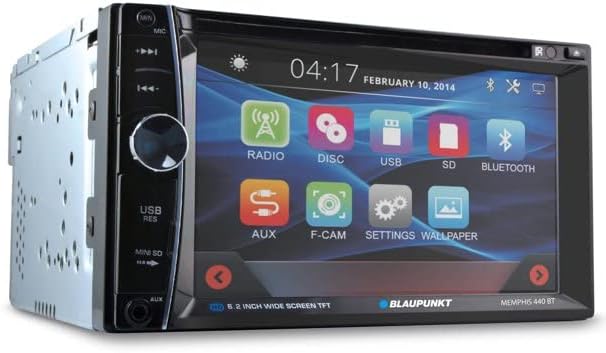
The 6.2-inch touch screen allows for intuitive control of all functions. Tap icons to select modes (Radio, Disc, USB, SD, Bluetooth, AUX, F-CAM, Settings, Wallpaper).

Obrázek: Zkosená přední strana view of the Blaupunkt MEMPHIS440BT receiver, highlighting the touch screen interface with its main menu icons and the physical control knob on the left side.
Párování pomocí Bluetooth
- V hlavní nabídce klepněte na Bluetooth ikona.
- Povolte na svém mobilním zařízení Bluetooth a vyhledejte dostupná zařízení.
- Select "MEMPHIS440BT" from the list.
- Pokud se zobrazí výzva, zadejte výchozí PIN kód „0000“.
- Po spárování můžete volat/přijímat hovory a streamovat zvuk.
Media Playback (DVD/CD/USB/SD)
- DVD/CD: Insert a disc into the slot. The unit will automatically switch to Disc mode.
- USB: Insert a USB drive into the USB port. Tap the USB icon to access files.
- SD: Insert a miniSD card into the SD card slot. Tap the SD icon to access files.

Obrázek: Detail view of the USB port and Mini SD card slot located on the front left side of the Blaupunkt MEMPHIS440BT receiver, beneath a protective flap.
Provoz rádia
- Klepněte na Rádio icon to enter radio mode.
- Use the touch screen controls to scan for stations, tune manually, or select preset stations.
- To save a station, tune to the desired frequency, then press and hold a preset button on the screen.
Údržba
- Čištění: Use a soft, dry cloth to clean the touch screen and unit exterior. Do not use abrasive cleaners or solvents.
- Péče o disky: Disky držte za hrany. Udržujte je čisté a bez škrábanců.
- Aktualizace firmwaru: Zkontrolujte oficiální Blaupunkt webpravidelně kontrolujte dostupné aktualizace firmwaru na webu.
Odstraňování problémů
| Problém | Možná příčina | Řešení |
|---|---|---|
| Žádná síla | Nesprávné zapojení; Spálená pojistka | Zkontrolujte připojení napájení a uzemnění; v případě potřeby vyměňte pojistku. |
| Žádný zvuk | Příliš nízká hlasitost; Aktivováno ztlumení; Problém s kabeláží reproduktoru | Zvyšte hlasitost; Deaktivujte ztlumení; Zkontrolujte připojení reproduktorů. |
| Bluetooth se nepřipojuje | Device not in pairing mode; Incorrect PIN | Ensure device is discoverable; Re-enter PIN "0000". |
| Chyba disku | Znečištěný nebo poškrábaný disk; Nesprávný formát disku | Clean disc; Try a different disc; Ensure disc is compatible. |
Specifikace
- Velikost obrazovky: 6.2 palce
- Typ displeje: LCD dotyková obrazovka
- Typ média: DVD, CD, USB, SD
- Konektivita: Bluetooth
- Číslo modelu položky: MEMPHIS440BT
- Hmotnost položky: 4.25 libry
- Rozměry balení: 9.69 x 9.17 x 6.85 palce
- Výrobce: BLAUPUNKT
Záruka a podpora
For warranty information and technical support, please refer to the warranty card included with your product or visit the official Blaupunkt webUschovejte si účtenku jako doklad o koupi pro případ reklamace.
Blaupunkt Official Webmísto: www.blaupunkt.com


