
1. Úvod
Noorio Hub je navržen tak, aby vylepšil váš domácí bezpečnostní systém tím, že poskytuje lokální úložiště, rozšiřuje pokrytí WiFi a integruje různá zařízení Noorio do soudržné sítě. Tato příručka obsahuje základní informace pro nastavení, provoz a údržbu vašeho Noorio Hub.

Obrázek: Noorio Hub umístěný na konferenčním stolku v moderním obývacím pokoji, ilustrující jeho decentní design.
2. Co je v krabici
Před zahájením instalace se ujistěte, že jsou k dispozici všechny položky:
- Noorio Smart HUB
- Nabíjecí kabel o délce 3.28 stop
- Nabíjecí zástrčka
- Uživatelská příručka
- Wi-Fi kabel o délce 4.92 metru
3. Konec produktuview & Funkce
Noorio Hub nabízí několik klíčových funkcí pro vylepšení vašeho bezpečnostního systému:
- Vylepšený bezpečnostní systém: Kompatibilní se zařízeními Noorio, včetně modelů kamer (B200, B210, B211, B310, B311) a zvonků (D110). Poznámka: Není kompatibilní s modely B200SE, CL200, CS201 a řadou T. Propojte své kamery a zvonky do koordinované bezpečnostní sítě pro pokročilou ochranu. Podporuje připojení až 4 kamer.
- Žádné skryté náklady a velká kapacita: Noorio Hub nabízí 32 GB vestavěného úložiště, které vám umožní ukládat všechny důležité informace.tage bez jakýchkoli dalších poplatků za cloudové úložiště, což poskytuje ampprostor pro všechny vaše bezpečnostní potřeby za nulové měsíční náklady.
- Soukromí na prvním místě: Centrum vám umožňuje bezpečně ukládat nahraná data v pohodlí domova. Bez přístupu třetích stran, což vám zaručuje větší klid.
- Rozšířené pokrytí WiFi: Náš Hub zvyšuje pokrytí vaší WiFi sítě, poskytuje stabilní připojení pro vaše bezpečnostní kamery Noorio a snižuje vybíjení baterie.
Kompatibilita

Obrázek: Diagram znázorňující kompatibilitu Noorio Hub s kamerami B200/B210/B211, kamerami B310 a zvonky D110.
Neslučitelnost
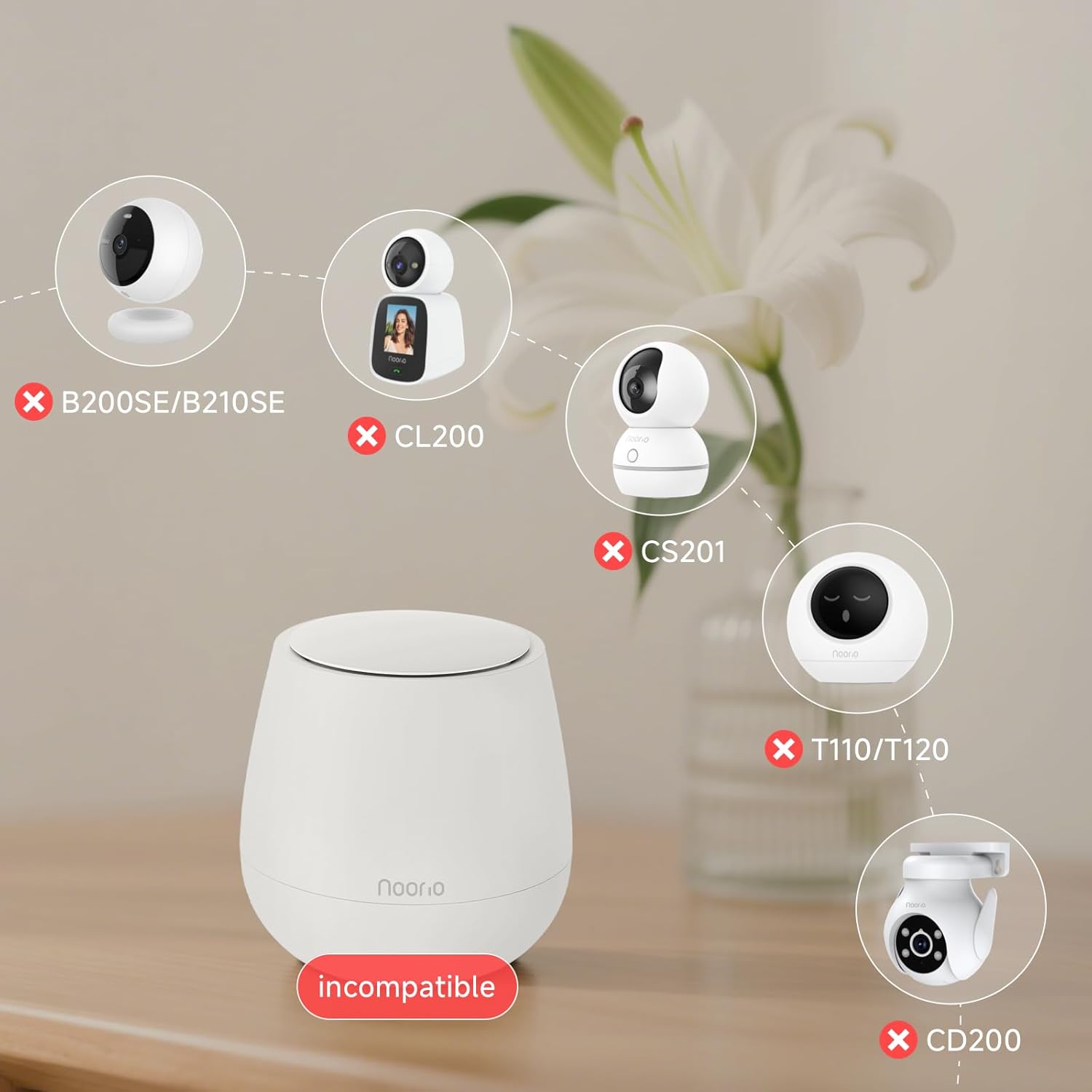
Obrázek: Diagram znázorňující nekompatibilitu Noorio Hubu se zařízeními B200SE/B210SE, CL200, CS201, T110/T120 a CD200.
4. Průvodce nastavením
Chcete-li nastavit Noorio Hub a připojit zařízení, postupujte podle těchto kroků:
- Zapnutí: Zapojte Noorio Hub do elektrické zásuvky.
- Připojení k routeru: Připojte Hub k routeru pomocí ethernetového kabelu.
- Stáhnout aplikaci: Stáhněte si aplikaci Noorio z obchodu s aplikacemi ve vašem zařízení.
- Přidat centrum k účtu: Otevřete aplikaci a podle pokynů na obrazovce přidejte Centrum k vašemu účtu.
- Přidat kamery: Jakmile je Hub připojen, přidejte do aplikace kamery. Během procesu nastavení kamery vyberte Hub jako síť WiFi. To umožní Hubu bezproblémově připojit a spravovat vaše kamery.
5. Návod k obsluze
Správa lokálního úložiště
Noorio Hub je dodáván s 32GB vestavěným lokálním úložištěm, což eliminuje potřebu měsíčních poplatků za cloudové úložiště. Všechny nahrané fotografie...tage se ukládá přímo do rozbočovače, což zajišťuje, že vaše data zůstanou soukromá a bezpečná ve vaší domácnosti.

Obrázek: Mikročip s číslem „32 GB“ označujícím lokální úložnou kapacitu hubu.
Rozšířené pokrytí WiFi
Hub funguje jako extender WiFi signálu a poskytuje stabilnější a spolehlivější připojení pro vaše bezpečnostní kamery Noorio. To pomáhá snížit vybíjení baterie vašich kamer tím, že zajišťuje jejich silný signál.
Obrázek: Nad hlavou view obývacího pokoje s kruhovými vlnami vycházejícími z Noorio Hubu, ilustrujícími rozšířené pokrytí WiFi.
Funkce ochrany osobních údajů
Vaše data jsou chráněna a uložena lokálně, což zajišťuje, že k vašim zaznamenaným informacím nemají přístup žádné třetí strany. Tento design upřednostňuje vaše soukromí a klid.

Obrázek: Ikony představující ochranu soukromí a lokální úložiště s ikonou zámku nad centrem.
6. Údržba
Pro zajištění optimálního výkonu vašeho Noorio Hubu a připojených zařízení zvažte následující tipy pro údržbu:
- Napájení: Ujistěte se, že rozbočovač zůstává připojen ke stabilnímu zdroji napájení.
- Internetové připojení: Ověřte, zda je připojení ethernetového kabelu k routeru bezpečné.
- Nabíjení zařízení: U zařízení Noorio napájených z baterií sledujte stav baterie pomocí aplikace a v případě potřeby ji dobíjejte. Zvažte použití kompatibilních solárních panelů (prodávají se samostatně), abyste minimalizovali ruční dobíjení.
- Aktualizace softwaru: Pravidelně kontrolujte aplikaci Noorio, zda nejsou k dispozici aktualizace firmwaru pro hub a připojená zařízení, abyste měli jistotu, že máte nejnovější funkce a vylepšení zabezpečení.
7. Řešení problémů
Pokud narazíte na problémy s Noorio Hubem, vyzkoušejte následující běžné kroky pro řešení potíží:
- Žádné připojení: Pokud je rozbočovač offline, zkontrolujte napájení a připojení ethernetového kabelu. Restartujte rozbočovač a router.
- Problémy s párováním zařízení: Ujistěte se, že vaše zařízení jsou kompatibilní s hubem (viz část o kompatibilitě). Zkuste zařízení resetovat a znovu jej spárovat prostřednictvím aplikace.
- Slabý signál WiFi: Přemístěte rozbočovač do centrálnějšího umístění nebo blíže k zařízením se slabým signálem.
- Úložiště plné: Pokud je úložiště plné, znovuview a smazat staré footagz aplikace pro uvolnění místa.
V případě přetrvávajících problémů se prosím obraťte na zákaznickou podporu.
8. Specifikace
| Rozměry produktu | 4.09 x 4.09 x 4.09 palce |
| Hmotnost položky | 1.25 libry |
| Číslo modelu položky | Smart Hub |
| Značka | Noorio |
| Barva | Bílý |
| Hardwarové rozhraní | USB |
| Speciální funkce | Napájeno |
| Kompatibilní zařízení | Digitální fotoaparáty |
9. Záruka a podpora
Pro technickou pomoc, informace o záruce nebo jakékoli další dotazy se prosím obraťte na zákaznický servis Noorio:
- Telefon: 800-642-5905 (9:00 - 18:00 ET, pracovní den)
- E-mail: podpora@nooriolife.com
Pravost produktu můžete také ověřit naskenováním unikátního kódu Transparency na obalu pomocí aplikace Transparency pro originální produkty Noorio.

Obrázek: Chytrý telefon skenuje kód transparentnosti na obalu produktu.


