Zavedení
The Docooler Bone Conduction Speaker is a compact, portable audio device designed to transform various surfaces into sound-producing diaphragms. Utilizing bone conduction technology, it offers a unique audio experience with enhanced bass and volume depending on the surface it is placed upon. This manual provides essential information for the safe and effective use of your speaker.
Bezpečnostní informace
Přečtěte si prosím a dodržujte tyto bezpečnostní pokyny, abyste předešli poškození zařízení nebo zranění osob:
- Nevystavujte reproduktor extrémním teplotám ani přímému slunečnímu záření.
- Zabraňte pádu zařízení nebo jeho vystavení silným nárazům.
- Keep the speaker away from water and liquids, as it is not waterproof.
- Nepokoušejte se zařízení rozebírat, opravovat ani upravovat. Ztratíte tak záruku.
- Používejte pouze dodaný nabíjecí kabel a kompatibilní napájecí adaptér.
- Vyhněte se delšímu poslechu při vysoké hlasitosti, abyste předešli poškození sluchu.
Obsah balení
Ověřte, zda jsou v balení přítomny všechny položky:
- Docooler Bone Conduction Speaker (1 unit)
- Nabíjecí kabel USB typu C (1 kus)
- Uživatelská příručka (tento dokument)
- Adhesive Pads / Suction Cup (for mounting)
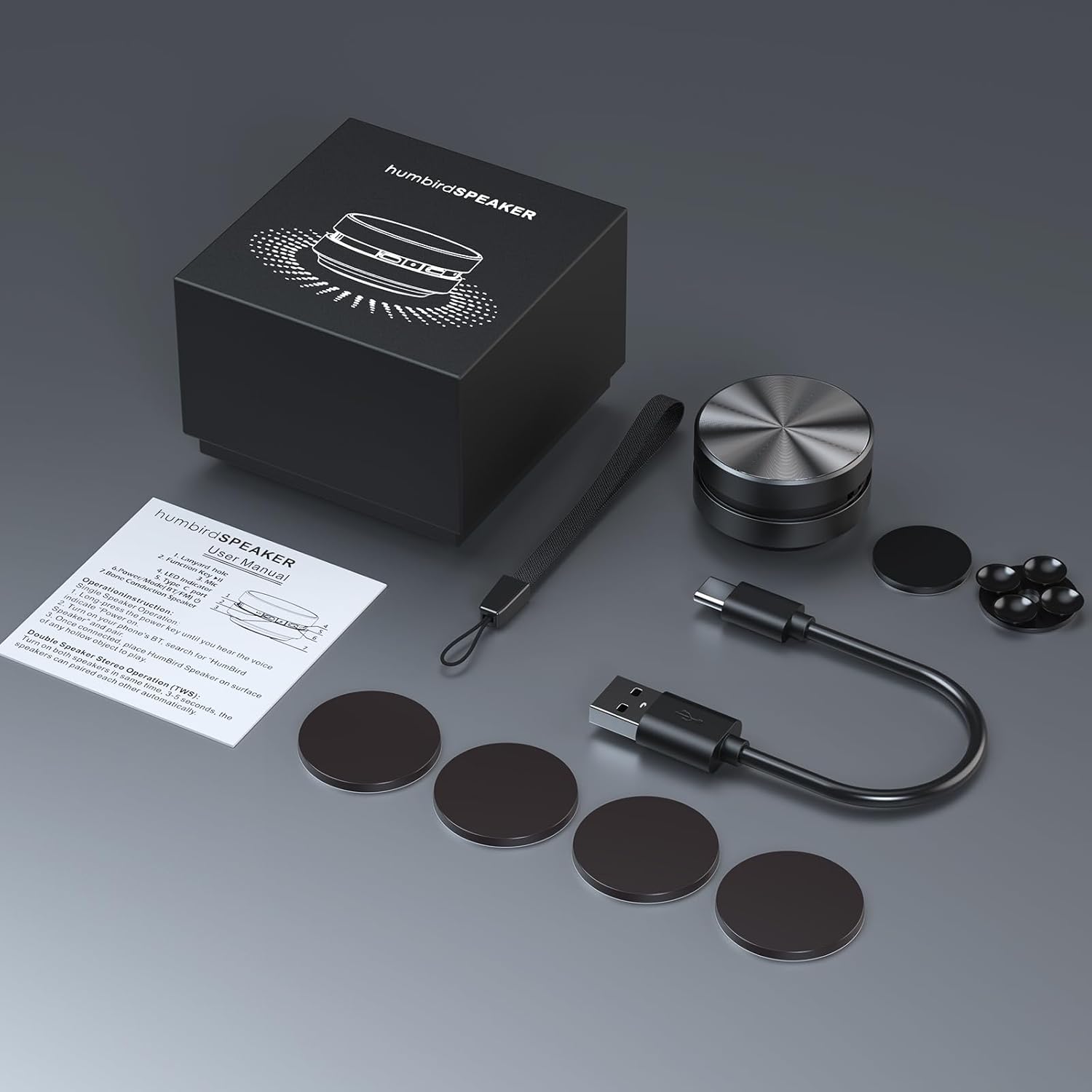
Image: Contents of the Docooler Bone Conduction Speaker package, showing the speaker, charging cable, and various adhesive pads for mounting.
Konec produktuview
The Docooler Bone Conduction Speaker is a compact device with a minimalist design. It features a durable aluminum alloy casing and a Type-C charging port. The speaker utilizes Bluetooth 5.0 for wireless connectivity and supports True Wireless Stereo (TWS) pairing for an enhanced audio experience.

Obrázek: Přední strana view of the Docooler Bone Conduction Speaker, highlighting its key features such as Bone Conduction technology, Bluetooth 5.0, TWS, Type-C Charging Port, Fast Charge, and Aviation Aluminum Alloy construction.
Nastavení
1. Nabíjení reproduktoru
- Připojte dodaný kabel USB typu C k nabíjecímu portu reproduktoru.
- Druhý konec kabelu zapojte do kompatibilního zdroje USB (např. síťového adaptéru, USB portu počítače).
- Kontrolka bude zobrazovat stav nabíjení (podrobnosti naleznete v části o LED indikátorech).
- Plné nabití obvykle trvá přibližně 1–2 hodiny.
2. Párování Bluetooth (jeden reproduktor)
- Press and hold the power button on the speaker until the indicator light flashes, indicating pairing mode.
- Na smartphonu nebo jiném zařízení s podporou Bluetooth povolte Bluetooth a vyhledejte dostupná zařízení.
- Select "Humbird Speaker" (or similar name) from the list of devices.
- Once connected, the indicator light will remain solid, and you will hear a confirmation tone.
3. Párování True Wireless Stereo (TWS) (dva reproduktory)
For a stereo sound experience, you can pair two Docooler Bone Conduction Speakers together:
- Ujistěte se, že jsou oba reproduktory plně nabité a vypnuté.
- Power on both speakers simultaneously. They will automatically attempt to pair with each other within 3-5 seconds.
- Once successfully paired, one speaker will act as the master (left channel) and the other as the slave (right channel). The indicator lights will reflect their connected status.
- Now, connect your smartphone or Bluetooth device to the master speaker as described in the "Bluetooth Pairing (Single Speaker)" section.

Image: Two Docooler Bone Conduction Speakers positioned for True Wireless Stereo (TWS) pairing, demonstrating their ability to create a wider soundstage.
Návod k obsluze
1. Zapnutí/vypnutí
- Zapnutí: Stiskněte a podržte tlačítko napájení po dobu přibližně 3 sekund.
- Vypnout: Stiskněte a podržte tlačítko napájení po dobu přibližně 3 sekund.
2. Ovládání přehrávání
- Přehrát/pozastavit: Jednou krátce stiskněte tlačítko napájení.
- Další skladba: Dvakrát stiskněte tlačítko napájení.
- Předchozí skladba: Třikrát stiskněte tlačítko napájení.
3. Nastavení hlasitosti
Volume is primarily controlled via your connected Bluetooth device (smartphone, tablet, etc.). The speaker itself does not have dedicated volume buttons.
4. Using with Different Surfaces
The unique feature of this bone conduction speaker is its ability to use various surfaces as sound amplifiers. Experiment with different materials to discover unique sound profiles:
- Hollow Objects: Cardboard boxes, plastic containers, or hollow wooden surfaces often produce a fuller sound with enhanced bass.
- Skleněné povrchy: Windows or glass tables can create a clear, crisp sound.
- Dřevěné povrchy: Desks, guitars, or wooden panels can offer a warm, resonant tone.
- Car Dashboards: Can provide an immersive in-car audio experience.
Use the included adhesive pads or suction cup to securely attach the speaker to your chosen surface. The sound quality will vary significantly based on the material, size, and hollowness of the surface.

Image: The bone conduction speaker demonstrated on different surfaces, including a guitar, a kitchen countertop, a mirror, and a car dashboard, illustrating its versatility in sound production.
Údržba
To ensure the longevity and optimal performance of your Docooler Bone Conduction Speaker, follow these maintenance tips:
- Čištění: Reproduktor otřete měkkým, suchým hadříkem. Nepoužívejte abrazivní čisticí prostředky, líh ani rozpouštědla.
- Skladování: Pokud reproduktor nepoužíváte, skladujte jej na chladném a suchém místě mimo dosah přímého slunečního záření a extrémních teplot.
- Péče o baterie: For best battery life, avoid fully discharging the speaker frequently. Charge it regularly, even if not used for extended periods.
Odstraňování problémů
| Problém | Možné řešení |
|---|---|
| Reproduktor se nezapne. | Ujistěte se, že je reproduktor plně nabitý. Připojte jej ke zdroji napájení a zkuste to znovu. |
| Nelze spárovat přes Bluetooth. | Make sure the speaker is in pairing mode (flashing indicator light). Turn off and on Bluetooth on your device. Ensure the speaker is within range (up to 10 meters). |
| Žádný zvuk nebo nízká hlasitost. | Increase the volume on your connected device. Ensure the speaker is placed on a suitable surface. Try a different surface. Check if the speaker is properly connected. |
| Párování TWS se nezdařilo. | Ensure both speakers are powered off before attempting TWS pairing. Power them on simultaneously and wait for automatic pairing. Disconnect any existing Bluetooth connections before TWS pairing. |
| Kvalita zvuku je nízká. | Experiment with different surfaces. Hollow and resonant surfaces generally yield better results. Ensure the speaker is securely attached to the surface. |
Specifikace
| Funkce | Detail |
|---|---|
| Název modelu | Reproduktor pro vedení kostí |
| Číslo modelu | RM |
| Značka | Docooler |
| Materiál | Hliník |
| Rozměry produktu | 2.76"H x 2.76"Š x 1.97"V |
| Hmotnost položky | 4.6 unce (0.13 kilogramů) |
| Technologie připojení | Bluetooth |
| Dosah Bluetooth | 10 metrů |
| Režim zvukového výstupu | Stereo (s párováním TWS) |
| Maximální výstupní výkon reproduktoru | 3 wattů |
| Frekvenční odezva | 20 kHz |
| Odstup signálu od šumu | 70 dB |
| Zdroj napájení | Napájení z baterie |
| Kapacita baterie | 400 miliamp hodiny |
| Kontrolní metoda | App (implied by product data, but primary control is physical buttons) |
| Je voděodolný | FALEŠNÝ |
Záruka a podpora
The Docooler Bone Conduction Speaker comes with a limited warranty. For specific warranty details, please refer to the documentation included with your purchase or contact Docooler customer service.
If you encounter any issues or have questions not covered in this manual, please contact Docooler customer support through their official channels. Contact information can typically be found on the product packaging or the official Docooler webmísto.


