Memoqueen DXL12.574-35-65YL

Memoqueen Phomemo D30 Cable Label Instruction Manual

Model: DXL12.574-35-65YL

1. Konec produktuview

The Memoqueen Phomemo D30 Cable Labels are designed for organizing and identifying various cables and wires. These labels are compatible with Phomemo D30 series thermal label printers and offer durable, self-adhesive properties.

Klíčové vlastnosti

  • Velikost štítku: Each label measures 0.49” x 2.91” (12.5mm x 74mm). Each roll contains 65 labels, and this package includes 3 rolls.
  • Vlastnosti materiálu: Labels are waterproof, tear-resistant, oil-proof, flexible, and self-adhesive.
  • Tepelný tisk: Utilizes thermal printing technology, requiring no ink or toner. Produces clear and durable labels with an easy-to-peel split backing for simple application.
  • Kompatibilita: Specifically designed for use with Phomemo D30 Thermal Label Printers, including D30, D30S, and D30Pro models.
  • Všestranná aplikace: Ideal for organizing computer cords, charger cords, electrical cords, ethernet cables, network cables, and other wires. Also suitable for labeling laboratory test tubes, items in warehouses, chemistry labs, schools, hotels, and hospitals.
Diagram showing Phomemo D30 cable label dimensions: 12.5mm width, 74mm total length with a 35mm printable area and 7mm tab.
Figure 1: Phomemo D30 Cable Label Dimensions (12.5mm x 74mm).
Image illustrating the waterproof, strong adhesion, abrasion resistant, and oil proof properties of the labels with various colored labels wrapped around a cable.
Figure 2: Key material advantages of the cable labels: waterproof, strong adhesion, abrasion resistant, and oil proof.
Three rolls of yellow Phomemo D30 cable labels with a single label showing dimensions of 12.5mm x 74mm.
Figure 3: Phomemo D30 Cable Label rolls and individual label design.

2. Nastavení a instalace

To use the Memoqueen Phomemo D30 Cable Labels, you will need a compatible Phomemo D30 series thermal label printer and the "Print Master" application.

2.1 Loading the Label Roll

  1. Ensure your Phomemo D30 printer is powered off.
  2. Otevřete kryt tiskárny.
  3. Insert the label roll into the designated compartment, ensuring the labels feed out correctly with the printable side facing the print head.
  4. Pevně ​​zavřete kryt tiskárny.
Various Phomemo D30 label printers in different colors, indicating compatibility with the D30/D30S/D30Pro series.
Figure 4: Phomemo D30 series printers compatible with these labels.
Video 1: Demonstrates how to load the label roll into the Phomemo D30 Bluetooth Label Maker and print various decorative labels. This video shows the physical setup of the label roll within the printer.

2.2 Instalace aplikace

Download the "Print Master" app from the APP STORE (for iOS devices) or Google Play (for Android devices). This application is required to design and print labels.

3. Návod k obsluze

3.1 Připojení k tiskárně

  1. Turn on your Phomemo D30 printer.
  2. Open the "Print Master" app on your smartphone or tablet.
  3. Follow the in-app instructions to connect to your D30 printer via Bluetooth.

3.2 Designing and Printing Labels

  • Within the "Print Master" app, select the appropriate label template for cable labels.
  • Customize your label with text, numbers, graphics, symbols, logos, barcodes, or QR codes. The app supports importing label text from Excel files for bulk printing.
  • Review předtisková přípravaview aby štítek vypadal dle přání.
  • Initiate printing. The printer will produce the labels without the need for ink or toner.
Video 2: Illustrates the use of Phomemo D30 labels for date marking food items in storage containers and bags. This video demonstrates practical application of the printed labels.

3.3 Applying Cable Labels

  1. Carefully peel the printed label from its backing.
  2. Wrap the label around the desired cable or wire, ensuring the printable area is visible and the adhesive tab secures it.
  3. Press firmly along the entire label to ensure strong adhesion.
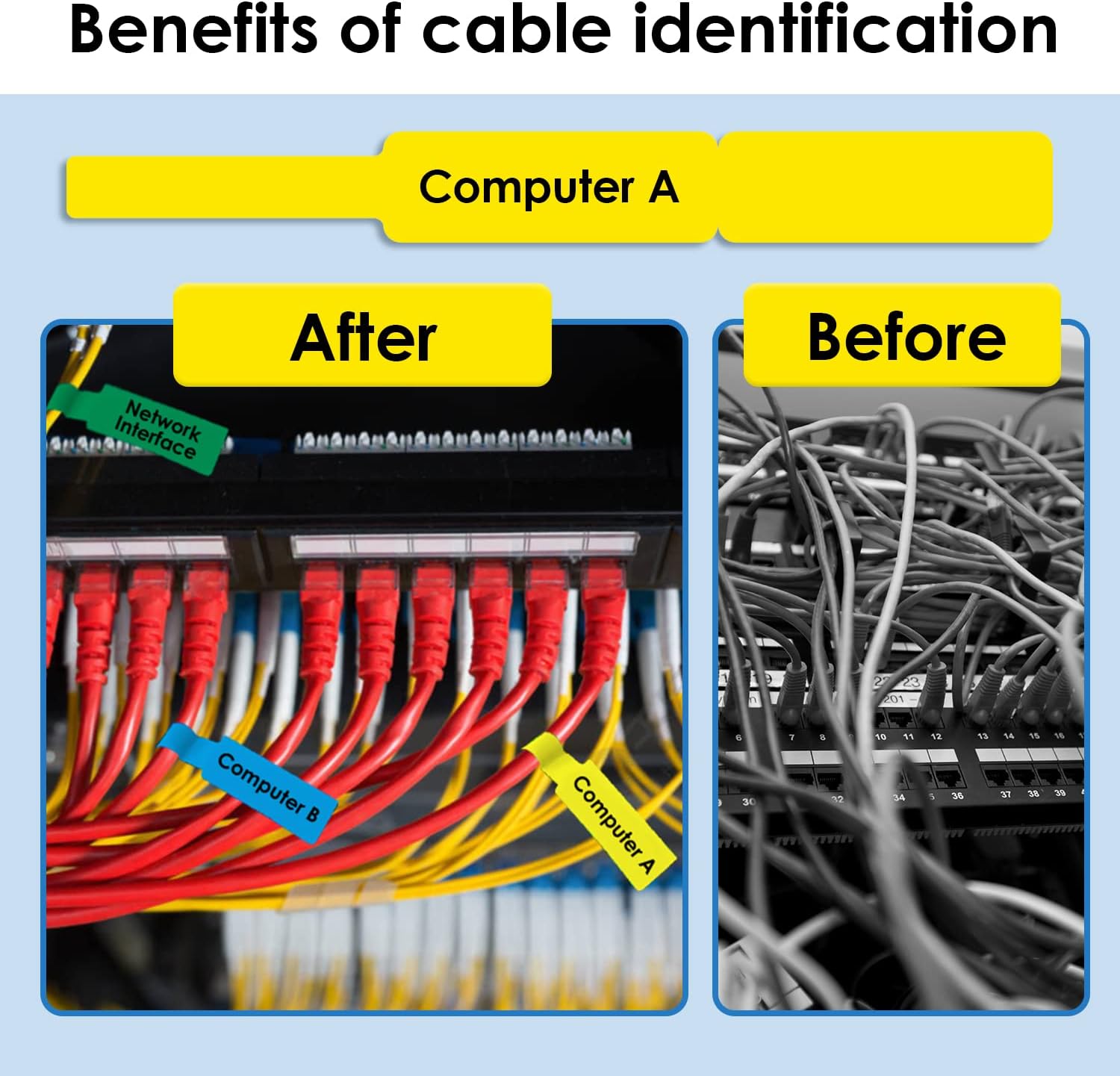
Before and after comparison of cable organization. The 'Before' image shows a tangled mess of cables. The 'After' image shows neatly organized cables with blue and yellow labels identifying 'Computer B' and 'Computer A' respectively.
Obrázek 5: Přample of cable organization using Phomemo D30 labels.

4. Údržba

5. Řešení problémů

ProblémMožná příčinaŘešení
Labels not printing clearlyLow printer battery; dirty print head; incorrect print density setting in app.Charge printer; clean print head (refer to printer manual); adjust print density in "Print Master" app.
Labels not adhering wellSurface is dirty or oily; label roll is old or improperly stored; insufficient pressure during application.Clean surface before applying; ensure labels are stored correctly; apply firm pressure when attaching.
Printer not connecting to appBluetooth is off; printer is out of range; app or printer needs restart.Ensure Bluetooth is enabled; move printer closer to device; restart both app and printer.
Labels are jammed in printerImproper loading of label roll; foreign object in printer.Open printer cover, carefully remove jammed labels, and re-load correctly. Check for obstructions.

6. Specifikace

AtributDetail
ZnačkaMemoqueen
Číslo modeluDXL12.574-35-65YL
Rozměry štítků12.5 mm × 74 mm (0.49" × 2.91")
Štítky na roli65 štítků
Množství3 role
BarvaYellow (Black print on Yellow paper)
Typ materiáluThermal Paper (Waterproof, Tear-resistant, Oil-proof, Flexible, Self-adhesive)
Hmotnost položky2.08 unce
Rozměry produktu1.97 x 1.97 x 1.97 inches (packaging/roll dimensions)

7. Záruka a podpora

For warranty information or technical support regarding your Memoqueen Phomemo D30 Cable Labels or compatible printer, please contact Memoqueen customer service. Refer to the product packaging or the official Memoqueen webstránky s aktuálními kontaktními údaji.

Výrobce: Memoqueen

Související dokumenty - DXL12.574-35-65YL

Předview Turbionaire Dot 35 Kuchyňský odsavač par Manuál
Uživatelská a instalační příručka pro nástěnný/ostrovní kuchyňský odsavač par Turbionaire Dot 35 Black. Obsahuje bezpečnostní pokyny, pokyny k obsluze, technické údaje a pokyny k řešení problémů.
Předview Foredom No. 35 Handpiece: Operation, Service, and Safety Instructions
Detailed operating and service instructions for the Foredom No. 35 Handpiece, including safety precautions, maintenance, and collet removal procedures.
Předview Seznam dílů a schéma zásuvky chladničky Zephyr Presrv PRRD24C1AS
Podrobný seznam dílů a rozložené díly view Schéma pro zásuvkovou chladničku Zephyr Presrv PRRD24C1AS s jednou zónou, včetně čísel dílů, popisů a množství.
Předview DESTA D (G) 25-35 Forklift Trucks: Specifications and Features
Komplexní přesview of DESTA D (G) 25-35 series diesel and LPG forklift trucks, including technical specifications, operating advantages, and optional features.
Předview Průvodce příslušenstvím Datalogic Memory 30-35
Komplexní průvodce příslušenstvím pro mobilní počítač Datalogic Memor 30-35 s podrobným popisem nabíjení, ochrany, možností montáže, RFID čteček, napájecích zdrojů a dalších prvků, včetně čísel dílů a popisů.
Předview Návod k instalaci smršťovacích kabelových spojek ENSTO HJ11.12045C
Podrobný návod k instalaci smršťovací sady ENSTO HJ11.12045C, určené pro 1žilové kabely XLPE s objememtage ratings up to 12 kV and conductor sizes from 185 to 400 mm². Ensure safe and correct installation by following these steps.