Zavedení
This manual provides instructions for the Angrox AN-MR21GA Magic Remote Control, designed as a replacement for compatible LG Smart TVs. This remote features pointer functionality, voice control, and dedicated shortcut buttons for enhanced navigation and user experience.
The remote is compatible with LG 2021, 2022, 2023, and 2024 OLED, QNED Mini-LED, NanoCell, and UHD TV series. It offers an ergonomic design with soft plastic buttons for comfortable use.
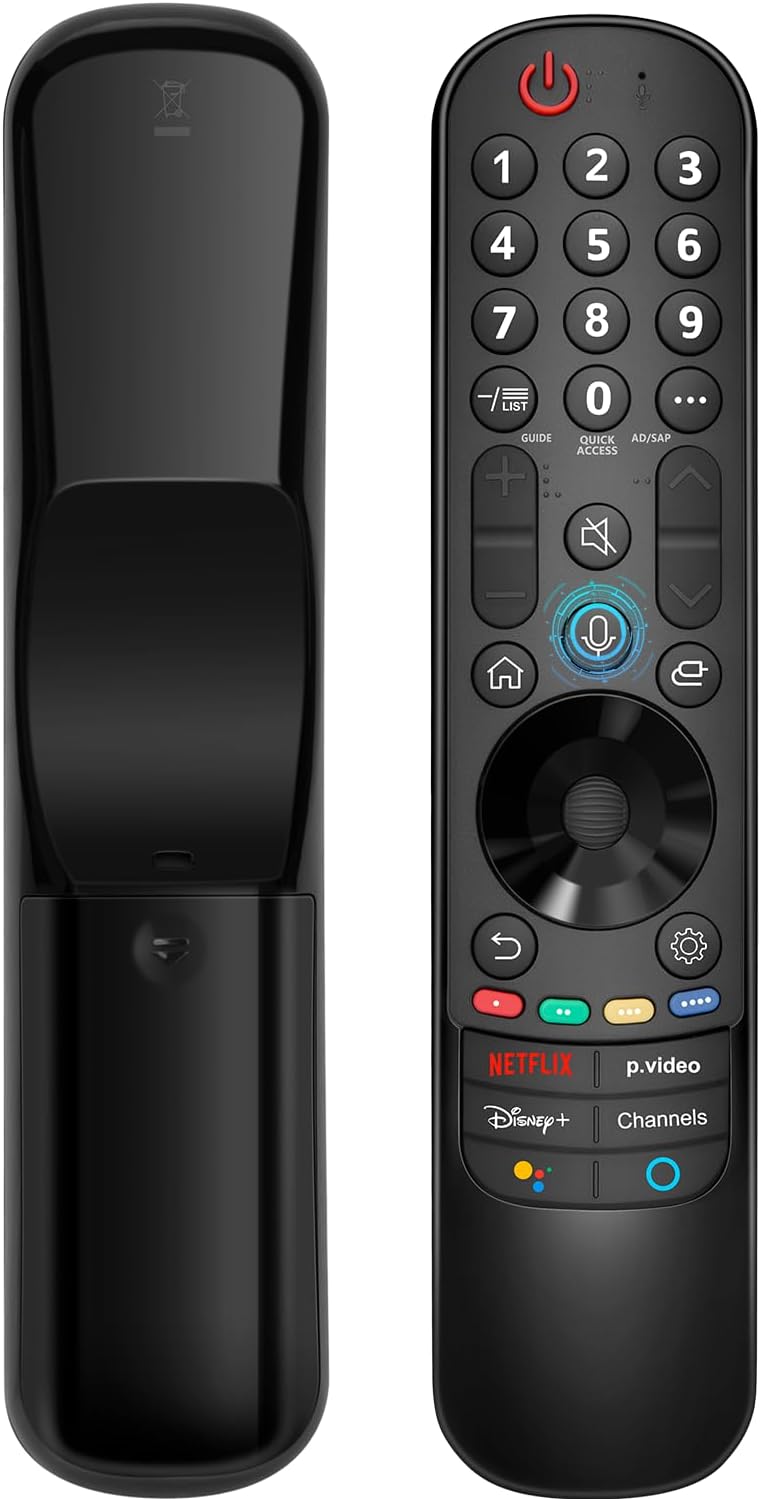
Kompatibilita
The Angrox AN-MR21GA Magic Remote Control is compatible with the following LG Smart TV series from 2021, 2022, 2023, and 2024:
- OLED TV Series: G1, G2, G3, G4, C1, C2, C3, C4, A1, A2, A3, A4 series.
- QNED Mini-LED TV Series: QNED99, QNED90 series.
- NanoCell TV Series: NANO99, NANO90, NANO85, NANO80, NANO75 series.
- UHD TV Series: UP80, UP75 series.
Specific compatible model numbers include, but are not limited to: 43NANO75UPA, 43UP7100ZUF, 43UP7560AUD, 43UP7700PUB, 43UP8000PUA, 50NANO75UPA, 50NANO77ZPA, 50NANO80UPA, 50NANO85APA, 50UP7100ZUF, 50UP7560AUD, 50UP7700PUB, 50UP8000PUA, 55NANO75UPA, 55NANO77ZPA, 55NANO80UPA, 55NANO85APA, 55NANO90UPA, 55UP7100ZUF, 55UP7560AUD, 55UP7700PUB, 55UP8000PUA, 60UP7700PUB, 60UP8000PUA, 65NANO75UPA, 65NANO77ZPA, 65NANO80UPA, 65NANO85APA, 65NANO90UPA, 65UP7100ZUF, 65UP7560AUD, 65UP7700PUA, 65UP7700PUB, 65UP8000PUA, 70UP7170ZUC, 70UP7570AUD, 70UP7770PUB, 70UP8070PUA, 75NANO75UPA, 75NANO80UPA, 75NANO85APA, 75NANO90UPA, 75QNED90UPA, 75QNED99UPA, 75UP7170ZUC, 75UP7570AUE, 75UP7770PUB, 75UP8070PUA, 82UP8770PUA, 86NANO75UPA, 86NANO85APA, 86NANO90UPA, 86NANO99UPA, 86QNED90UPA, 86QNED99UPA, 86UP8770PUA, BEJMR21GA, OLED48A1AUA, OLED48A1PUA, OLED48C1AUB, OLED48C1PUB, OLED55A1AUA, OLED55A1PUA, OLED55B1PUA, OLED55C1AUB, OLED55C1PUA, OLED55C1PUB, OLED55G1PUA, OLED65A1AUA, OLED65A1PUA, OLED65B1PUA, OLED65C1AUA, OLED65C1AUB, OLED65C1PUB, OLED65G1PUA, OLED77A1AUA, OLED77A1PUA, OLED77B1PUA, OLED77C1AUA, OLED77C1AUB, OLED77C1PUB, OLED77G1PUA, OLED83C1AUA, OLED83C1PUA, RCLLGEMR21GA, R-C-LLGEMR21GA, 43UP7670PUC, 43UP8000PUR, 50NANO75PUA, 50NANO80P, 50UP7670PUC, 50UP8000PUR, 55NANO80P, 55NANO90P, 55UP7670PUC, 55UP8000PUR, 60UP7670PUB, 60UP8000PUR.

Nastavení a párování
The Angrox AN-MR21GA remote control is designed for easy setup without complex programming.
1. Instalace baterie
Insert two (2) AA batteries into the remote control. Ensure correct polarity (+/-) as indicated inside the battery compartment. Batteries are not included with the remote.
2. Párování s televizorem
There are two methods for pairing the remote with your LG Smart TV:
- Method 1 (Automatic Pairing):
- Zapněte si chytrou televizi LG.
- Insert 2*AA batteries into the remote.
- After approximately 20 seconds, point the remote control towards the TV.
- Stiskněte tlačítko Kolo (OK) tlačítko.
- The remote control should register automatically, and a "Pairing Complete" message will appear on the TV screen.
- Method 2 (Manual Pairing):
- Zapněte si chytrou televizi LG.
- Insert 2*AA batteries into the remote.
- Stiskněte a podržte Domov (
 ) a Zadní () současně po dobu 5 sekund.
 - Poté stiskněte tlačítko Kolo (OK) tlačítko.
- A "Pairing Complete" message should appear on the TV screen.

Návod k obsluze
Basic Navigation and Pointer Function
The remote features a pointer function that allows you to navigate the TV screen by moving the remote. The Wheel (OK) button acts as a click function, and scrolling is also supported.
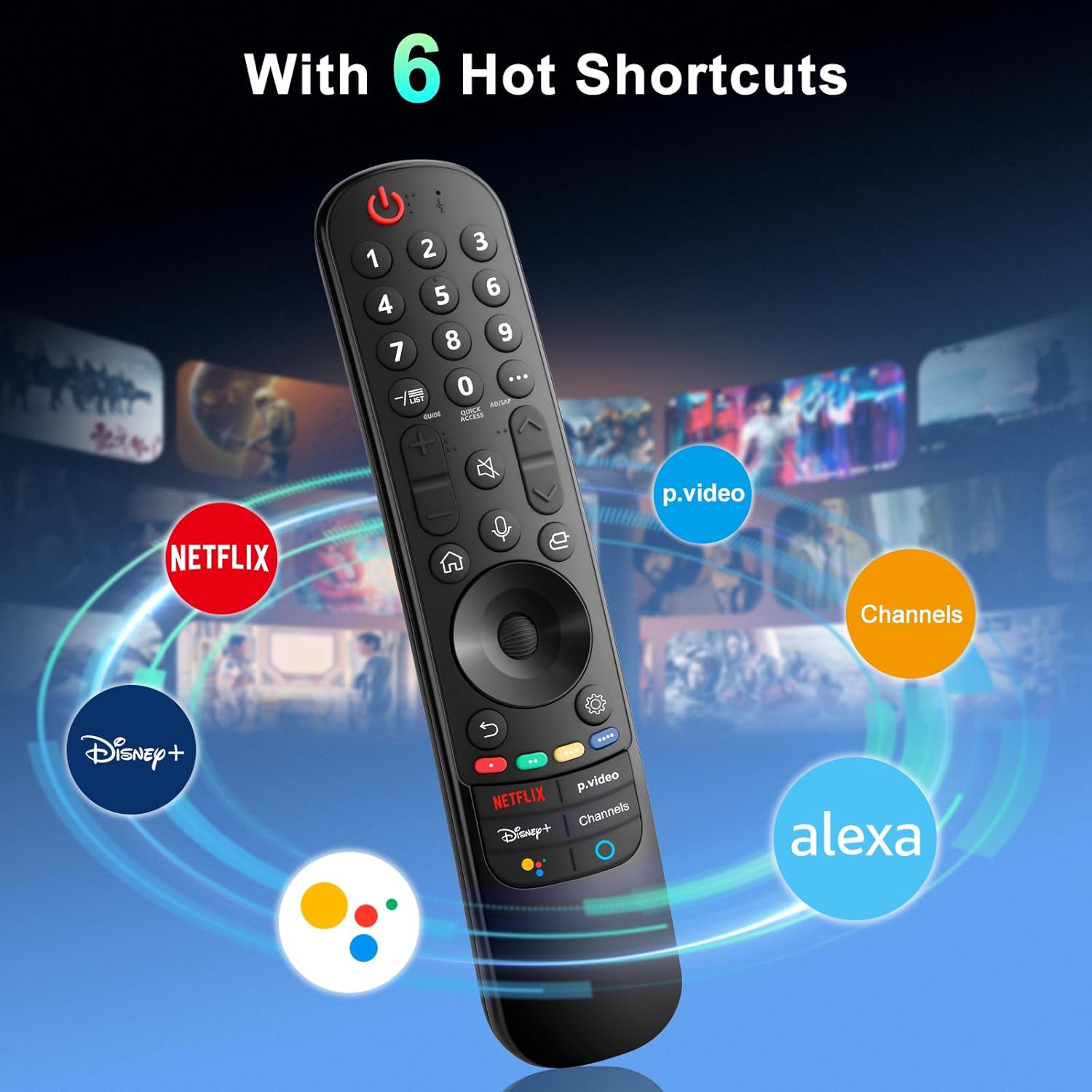
Hlasové ovládání
The remote includes a voice function for issuing commands to your TV. Press and hold the voice button (microphone icon) while speaking your command. Examples include "Go back home," "Open P.Video," or "Play some music."

Tlačítka zkratek
The remote provides dedicated shortcut buttons for quick access to popular streaming services and functions:
- NETFLIX: Spustí aplikaci Netflix.
- P.Video: Launches the Prime Video application.
- Disney+: Launches the Disney+ application.
- kanály: Accesses TV channels.
- Asistent Google: Aktivuje Google Assistant pro hlasové příkazy a vyhledávání.
- Alexa: Activates Amazon Alexa for voice commands and searches.

Podrobné funkce tlačítek
For buttons marked with a circle symbol (©), a long press (more than one second) may activate additional functions:
- 9©: Launch Quick Help.
- - / LIST©: Checking saved channels.
- GUIDE©: Launch Guide.
- 0©: Zobrazí se obrazovka úprav RYCHLÝ PŘÍSTUP.
- ...©: Display additional buttons on the remote control.
- AD/SAP©: Configures SAP.
- Volume Up/Down©: Upravte úroveň hlasitosti.
- Channel Up/Down©: Můžete změnit kanál.
- Mute©: Select to turn off the sound from the TV.
- Accessibility©: Enter the Accessibility menu.
- Search©: Check out recommended contents. (Recommendation service may not be available depending on the countries you are in.)
- Voice Button (Microphone)©: Push and hold the button while speaking to use the voice recognition function.
- Home Button©: Zobrazí nabídku Home.
- Input Button©: Vybere vstupní zdroj.
- Settings Button©: Entering into the Home Dashboard.
- Back Button©: Přejděte na předchozí krok.
- Exit Button©: Zavře nabídku.
- Quick Settings Button©: Vstup do nabídky Rychlá nastavení.
- All Settings Button©: Enters the All Settings menu.
- Launch Record Button©: Launch Record. (Some models may not be supported.)
Odstraňování problémů
- Dálkové ovládání nereaguje:
- Ensure batteries are correctly inserted and have sufficient charge. Replace with new AA batteries if necessary.
- Re-attempt the pairing process (see "Setup and Pairing" section).
- Ensure there are no obstructions between the remote and the TV's infrared receiver. This remote primarily operates via line-of-sight.
- Pointer Function Not Working:
- Ujistěte se, že je dálkový ovladač správně spárovaný.
- Try re-pairing the remote using Method 2 (holding Home and Back buttons).
- Hlasové ovládání nefunguje:
- Ensure the remote is properly paired and the TV supports voice control.
- Confirm that the voice button is being pressed and held while speaking.
- Zkontrolujte nastavení televizoru a ujistěte se, že je zapnuté rozpoznávání hlasu.
- Buttons Feel Flimsy or Stick:
- Může to znamenat výrobní vadu. Požádejte o pomoc zákaznickou podporu.
Specifikace
| Značka | Angrox |
| Číslo modelu | AN-MR21GA |
| Rozměry produktu | 7.48 x 1.18 x 1.18 palce (18.54 x 4.06 x 1.77 cm) |
| Hmotnost položky | 3.2 unce |
| Jsou vyžadovány baterie | 2 AA baterie (nejsou součástí balení) |
| Speciální funkce | Ergonomic design, No Programming Required, Universal compatibility (for specified LG models), Voice Search, Pointer Function |
| Maximální počet podporovaných zařízení | 1 |
| Kompatibilní zařízení | LG Smart Televisions (2021-2024 UHD, OLED, QNED, NanoCell series) |
Údržba
- Čištění: K čištění dálkového ovladače používejte měkký, suchý hadřík. Nepoužívejte tekuté čisticí prostředky ani abrazivní materiály.
- Výměna baterie: Vyměňte baterie, když se výkon dálkového ovladače sníží. Pokud dálkový ovladač nebudete delší dobu používat, vyjměte baterie, abyste zabránili vytečení elektrolytu.
- Skladování: Dálkový ovladač skladujte na chladném a suchém místě mimo dosah přímého slunečního záření a extrémních teplot.
- Zacházení: Zabraňte pádu dálkového ovladače nebo jeho vystavování silným nárazům, mohlo by dojít k poškození vnitřních součástí.
Záruka a podpora
For warranty information or technical support, please contact the manufacturer, Angrox, directly through their official channels or the retailer where the product was purchased. Please retain your proof of purchase for warranty claims.
Manufacturer: Angror
Pro další pomoc můžete navštívit Angrox Store on Amazon.


