Zavedení
This manual provides detailed instructions for the setup, operation, maintenance, and troubleshooting of your NiPoGi AK1 PRO Mini PC. The AK1 PRO is a compact desktop computer powered by an 11th Generation Intel Celeron N5105 processor, designed for efficient daily tasks, multimedia playback, and business applications. It features 12GB DDR4 RAM, a 256GB M.2 SSD, 4K UHD video output, dual display support, Dual Band WiFi, and Bluetooth 4.2.
Co je v krabici
Please check the contents of your package upon arrival. The standard package includes:
- 1 x NiPoGi AK1 PRO Mini PC (12GB RAM, 256GB ROM)
- 1 x napájecí adaptér EU
- 1 x HDMI kabel
- 1 x VESA Bracket with Screws
- 1 x Uživatelská příručka
Konec produktuview
The NiPoGi AK1 PRO Mini PC is designed with various ports for connectivity and expansion. Familiarize yourself with the layout below.
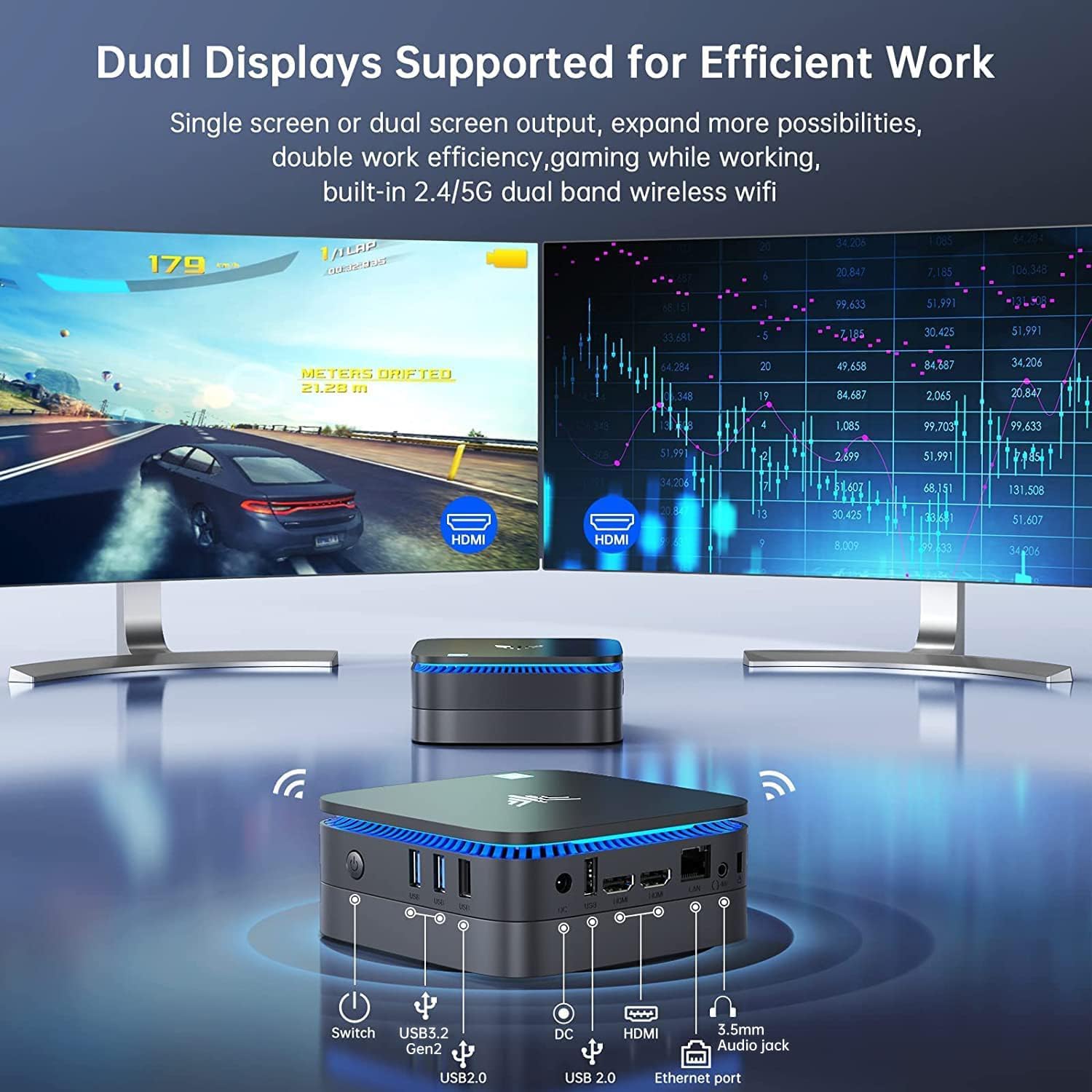
Obraz: Přední a zadní view of the NiPoGi AK1 PRO Mini PC, highlighting its various ports and compact design. The front features the power button and USB ports, while the rear includes HDMI, Ethernet, and additional USB ports.
Rozložení portu:
- Přední: Power Button, 2 x USB 3.0 ports, 2 x USB 2.0 ports
- Zadní: DC Power Input, 2 x HDMI ports, 1 x RJ45 Gigabit Ethernet port, 1 x 3.5mm Audio Jack
Klíčové vlastnosti:
- Procesor: 11th Gen Intel Celeron N5105 Quad-Core (up to 2.9 GHz)
- Grafika: Intel UHD Graphics, supporting 4K UHD (4096x2160@60Hz)
- Paměť: 12GB DDR4 RAM
- Skladování: 256GB M.2 SSD (expandable with 2.5-inch SSD/HDD up to 2TB)
- Konektivita: Dual Band 2.4GHz+5GHz WiFi, Gigabit Ethernet, Bluetooth 4.2
- Výstup displeje: Dual HDMI for dual screen setup
- Operační systém: Předinstalovaný OS
Průvodce nastavením
Follow these steps to set up your NiPoGi AK1 PRO Mini PC for the first time.
- Připojení k displeji: Use the provided HDMI cable to connect the Mini PC to your monitor or TV. The AK1 PRO supports dual displays, so you can connect two monitors via the two HDMI ports.
- Připojení periferií: Zapojte USB klávesnici a myš do dostupných USB portů.
- Připojení k napájení: Connect the EU power adapter to the DC input port on the Mini PC, then plug the adapter into a power outlet.
- Zapnutí: Press the power button located on the front of the Mini PC. The device will boot up, and the blue light will illuminate.
- Počáteční nastavení operačního systému: Follow the on-screen instructions to complete the operating system setup, including language, region, and network configuration.
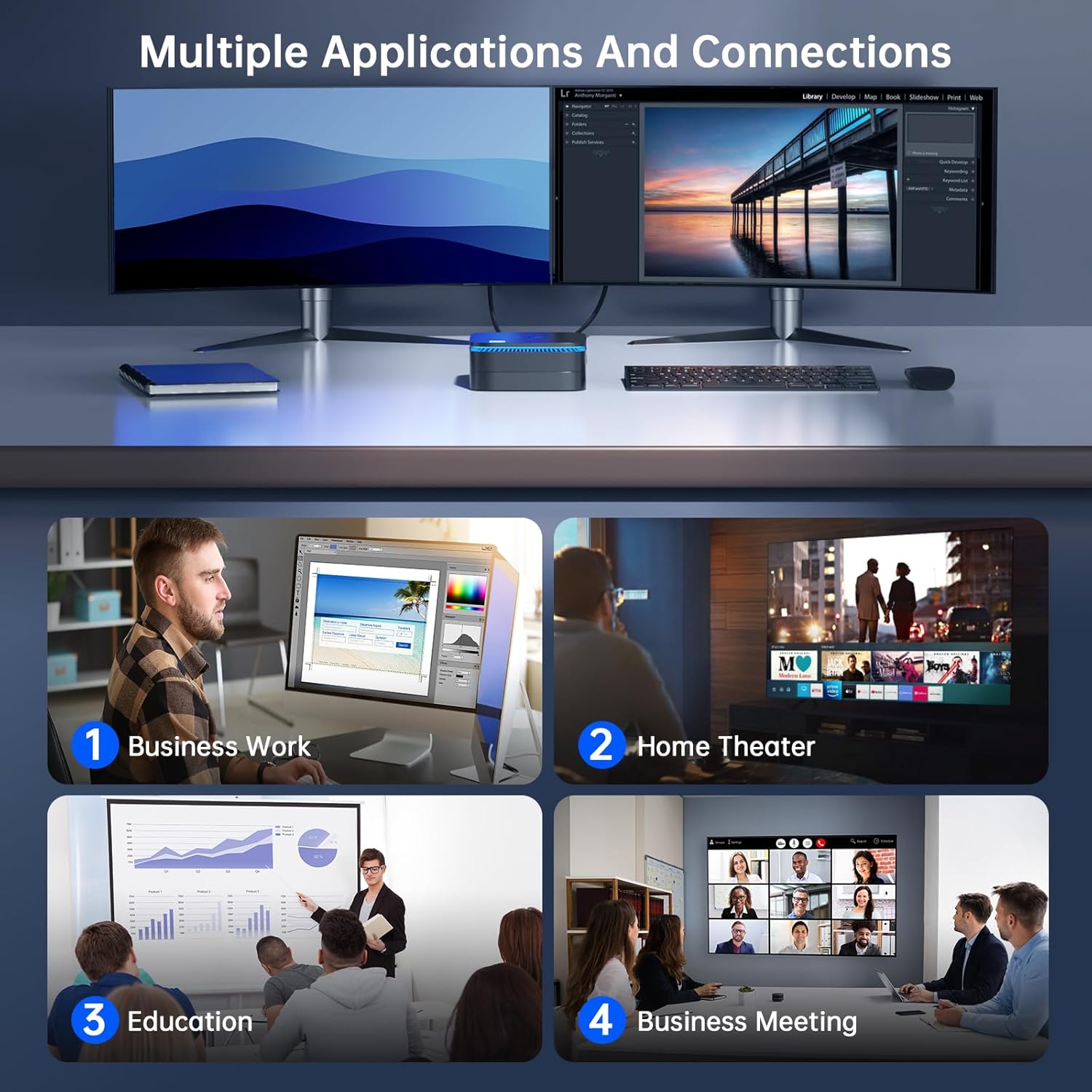
Obraz: The NiPoGi AK1 PRO Mini PC demonstrating multiple applications and connections, including business work, home theater, education, and business meetings, showcasing jeho všestrannost.
Návod k obsluze
Základní provoz:
- Zapnutí/vypnutí: Press the front power button to turn the PC on. To turn off, use the operating system's shutdown function or press and hold the power button for a few seconds for a forced shutdown (not recommended for regular use).
- Restartovat: Použijte funkci restartu operačního systému.
- Režim spánku: The PC can enter sleep mode to save power. Wake it up by moving the mouse or pressing a key on the keyboard.
Přehrávání videa v rozlišení 4K UHD:
The integrated Intel UHD Graphics supports 4K UHD resolution (4096x2160@60Hz), providing a clear visual experience for movies, streaming, and presentations.

Obraz: A person enjoying 4K HD video playback on a large display, powered by the NiPoGi AK1 PRO Mini PC, highlighting its multimedia capabilities and wireless Bluetooth support.
Konfigurace duálního displeje:
Connect two monitors to the two HDMI ports for an extended desktop experience. This can enhance productivity for work or provide a more immersive entertainment setup. Configure display settings within your operating system.
Rozšíření úložiště
The NiPoGi AK1 PRO Mini PC comes with a 256GB M.2 SSD. For additional storage, you can install a 2.5-inch SSD or HDD (not included) in the removable base, supporting up to 2TB.
Kroky instalace:
- Ensure the Mini PC is powered off and disconnected from the power adapter.
- Opatrně otevřete spodní kryt Mini PC.
- Insert your 2.5-inch SSD/HDD into the designated slot in the removable base.
- Secure the drive with screws if necessary (check the base for mounting points).
- Znovu nasaďte spodní kryt.
- After powering on, you may need to initialize and format the new drive through your operating system's disk management tools.

Obraz: A visual tutorial demonstrating how to install a 2.5-inch SSD or HDD into the NiPoGi AK1 PRO Mini PC by opening the bottom cover and inserting the drive into the expansion bay.
Montáž držáku VESA
The included VESA bracket allows you to mount the Mini PC to the back of a compatible monitor or TV, saving desk space and creating an all-in-one computing solution.
Kroky instalace:
- Attach the VESA bracket to the back of your monitor using the provided screws. Ensure your monitor has standard VESA mounting holes.
- Slide the NiPoGi AK1 PRO Mini PC onto the VESA bracket until it clicks securely into place.
- Connect all necessary cables (power, HDMI, peripherals) to the Mini PC.

Obraz: The NiPoGi AK1 PRO Mini PC shown mounted on the rear of a computer monitor using a VESA bracket, illustrating how it can transform into an all-in-one computer and save desk space.
Údržba
Správná údržba zajistí dlouhou životnost a optimální výkon vašeho Mini PC.
- Čištění: Regularly clean the exterior of the Mini PC with a soft, dry cloth. Use compressed air to clear dust from ventilation openings to prevent overheating.
- Aktualizace softwaru: Pro zajištění bezpečnosti a výkonu udržujte operační systém a ovladače aktualizované.
- Podmínky prostředí: Používejte Mini PC v dobře větraném prostoru, mimo dosah přímého slunečního záření, nadměrného tepla a vlhkosti.
- Řízení spotřeby: Use the provided power adapter. Avoid frequent abrupt power cuts.
Odstraňování problémů
If you encounter issues with your Mini PC, refer to the following common troubleshooting steps.
- Bez napájení:
- Ujistěte se, že je napájecí adaptér bezpečně připojen k Mini PC i k funkční zásuvce.
- Ověřte funkčnost elektrické zásuvky zapojením jiného zařízení.
- Bez displeje:
- Zkontrolujte, zda je kabel HDMI pevně připojen k Mini PC i monitoru.
- Ujistěte se, že je monitor zapnutý a nastavený na správný vstupní zdroj (HDMI 1, HDMI 2 atd.).
- Zkuste jiný kabel HDMI nebo monitor, pokud je k dispozici.
- Bez připojení k internetu (Wi-Fi/Ethernet):
- For Wi-Fi, ensure the Wi-Fi adapter is enabled in the operating system and you are connected to the correct network with the correct password.
- For Ethernet, ensure the Ethernet cable is securely connected to both the Mini PC and your router/modem. Check router status.
- Restart your router/modem and the Mini PC.
- Pomalý výkon:
- Zavřete nepotřebné aplikace běžící na pozadí.
- Ensure there is sufficient free space on your primary drive.
- Zkontrolujte a nainstalujte všechny čekající aktualizace operačního systému.
- Monitor CPU and RAM usage through Task Manager (Windows) to identify resource-intensive processes.
Specifikace
Detailed technical specifications for the NiPoGi AK1 PRO Mini PC.
| Funkce | Detail |
|---|---|
| Značka | NiPoGi |
| Modelová řada | AK1PRO N5105/12GB RAM+256GB ROM |
| Procesor | Intel Celeron N5105 (11th Gen, Quad-Core, up to 2.9 GHz) |
| Grafický koprocesor | Grafika Intel UHD |
| BERAN | 12 GB DDR4 |
| Skladování | 256GB M.2 SSD (Expandable with 2.5" SSD/HDD up to 2TB) |
| Operační systém | OS |
| Konektivita | Dual Band Wi-Fi (802.11a/b/g/n/ac), Bluetooth 4.2, Gigabit Ethernet |
| USB porty | 2 3.0 x USB, 2 x USB 2.0 |
| HDMI porty | 2 (supports dual display, 4K UHD resolution) |
| Zvuk | 1 x 3.5 mm zvukový konektor |
| Rozměry | 12.8 x 12.8 x 5.15 cm (přibližně 5.04 x 5.04 x 2.05 palce) |
| Hmotnost | 274 gramů |
| Barva | Černý |
Záruka a podpora
NiPoGi provides comprehensive support and warranty services for your Mini PC.
Kontaktujte podporu:
- Amazon Orders: Log in to Amazon, go to "Your Account", then "Your Orders", and select "Ask Product Question" for assistance.
- E-mailová podpora: support@inipogi.com
- Telefonická podpora: +44 808 175 2348 (Monday-Friday, 9am-5pm EST)
NiPoGi offers maintenance points for exchange or repair of your mini PC during the warranty period. Please retain your proof of purchase for warranty claims.

Obraz: Information regarding NiPoGi's "All-Around Protection" plan, including contact methods for support via Amazon, email, and phone, and details about maintenance services.


