Zavedení
This manual provides detailed instructions for the Powerwave Switch Wireless Controller. Learn how to set up, operate, maintain, and troubleshoot your controller to enhance your gaming experience on Nintendo Switch, PC, Android, and iOS devices.

Přední view of the Powerwave Switch Wireless Controller, showcasing its Star White design with blue grips and red shoulder buttons. The controller features standard button layouts including A, B, X, Y buttons, a D-pad, and dual analog sticks.
Vlastnosti produktu
- Bezdrátové připojení Bluetooth: Enjoy seamless gaming without cables.
- 3-Speed Dual-Motor Vibration: Experience immersive feedback with adjustable vibration intensity.
- Ovládání pohybu: Enhance gameplay with precise motion sensing capabilities.
- Kompatibilita s více platformami: Works wirelessly with Nintendo Switch, PC, Android, and iOS 13 and above.
- 4 programovatelných makro tlačítek: Customize complex inputs and activate them with a single button press.
- Turbo režim: Enable rapid-fire commands for quick actions in games.
- 8-Colour Rotating LED Lighting Effect: Adds a vibrant visual element to your gaming setup.

Visual representation of the controller's key features, including Wireless Bluetooth, 3-Speed Dual-Motor, PC/Android/iOS13 compatibility, 8-Colour Rotating LED, and Programmable Macro Buttons.
Průvodce nastavením
1. Počáteční nabíjení
Before first use, fully charge the controller using the provided USB-C cable. Connect the cable to the controller's USB-C port and the other end to a USB power source (e.g., Nintendo Switch dock, PC, or USB wall adapter). The LED indicators will show charging status.
2. Párování s konzolí Nintendo Switch
- V nabídce HOME na konzoli Nintendo Switch vyberte Ovladače, pak Změnit Grip/Pořadí.
- On the Powerwave controller, press and hold the tlačítko HOME (house icon) for 3-5 seconds until the LED indicators start flashing rapidly.
- Once paired, the corresponding player LED(s) on the controller will light up solid.
3. Pairing with PC, Android, or iOS (Bluetooth)
- Ensure Bluetooth is enabled on your device (PC, Android phone/tablet, iOS device).
- On the Powerwave controller, press and hold the tlačítko HOME po dobu 3–5 sekund, dokud LED indikátory nezačnou rychle blikat.
- On your device, search for new Bluetooth devices. Select "Powerwave Controller" (or similar) from the list to pair.
- Once connected, the LED indicators on the controller will stop flashing and remain solid.
Návod k obsluze
Základní ovládací prvky
The Powerwave Switch Wireless Controller features standard button layouts for intuitive gameplay. Refer to your game's specific control scheme for optimal use.
Programmable Macro Buttons (M1, M2, M3, M4)
The controller includes four programmable macro buttons on the back (M1, M2, M3, M4) for executing complex command sequences with a single press.
- Vstup do programovacího režimu: Stiskněte a podržte Makro tlačítko (usually a small button near the M buttons) until the indicator light flashes.
- Recording Macro: Press the desired M button (M1-M4) you wish to program. Then, input the sequence of buttons you want to record (e.g., A, B, X, Y, L, R, ZL, ZR, D-pad directions, analog stick movements).
- Ukončení režimu programování: Stiskněte tlačítko Makro tlačítko again to save the macro and exit programming mode. The indicator light will stop flashing.
- Using Macro: Simply press the programmed M button during gameplay to execute the recorded sequence.
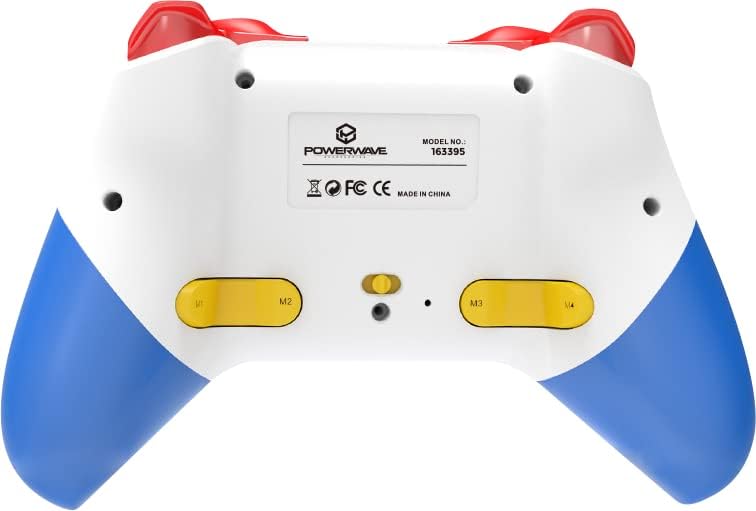
Zadní view of the Powerwave Switch Wireless Controller, highlighting the M1, M2, M3, and M4 programmable macro buttons, along with the model number and regulatory markings.
Turbo režim
Turbo mode allows a button to be pressed repeatedly as long as it is held down, providing a rapid-fire function.
- Aktivace Turbo: Stiskněte a podržte Tlačítko Turbo (usually marked 'T') and then press the desired action button (e.g., A, B, X, Y, L, R, ZL, ZR). The button will now be in Turbo mode.
- Nastavení rychlosti Turbo: Zatímco držíte Tlačítko Turbo, move the Right Analog Stick Up or Down to cycle through different turbo speeds (slow, medium, fast).
- Deaktivace Turba: To remove Turbo from a specific button, press and hold the Tlačítko Turbo and then press the same action button again. To clear all Turbo settings, press and hold the Tlačítko Turbo po dobu 5 sekund.
Nastavení vibrací
The controller features 3-speed dual-motor vibration. To adjust vibration intensity, press and hold the Vibrační tlačítko (if available, or a combination like Turbo + D-pad Up/Down) to cycle through intensities (Off, Low, Medium, High).
LED světelné efekty
The 8-colour rotating LED lighting effect can be toggled or adjusted. Refer to the specific button combination for your controller model, often involving a dedicated LED button or a combination with the Turbo button.
Údržba
- Čištění: K otření ovladače použijte měkký, suchý hadřík. V případě odolné nečistoty lehceampOpláchněte hadřík vodou. Nepoužívejte agresivní chemikálie ani abrazivní čisticí prostředky.
- Skladování: Regulátor skladujte na chladném a suchém místě mimo dosah přímého slunečního záření a extrémních teplot.
- Péče o baterie: Chcete-li prodloužit životnost baterie, vyvarujte se častého úplného vybíjení ovladače. Pravidelně jej nabíjejte, i když jej delší dobu nepoužíváte.
- Vyhněte se kapkám: Protect the controller from physical shocks and drops, which can damage internal components.
Odstraňování problémů
| Problém | Možné řešení |
|---|---|
| Ovladač se nezapne. | Ensure the controller is fully charged. Connect it to a power source and allow it to charge for at least 30 minutes before attempting to turn it on again. |
| Controller fails to pair with device. |
|
| Input lag or disconnection during gameplay. |
|
| Tlačítka nebo analogové páčky nereagují. |
|
Specifikace
- Číslo modelu: 163395
- Rozměry produktu: 15 x 6 x 10 cm
- Hmotnost: 212 gramů
- Konektivita: Bezdrátové Bluetooth
- Kompatibilita: Nintendo Switch, Nintendo Switch Lite, Nintendo Switch OLED, PC, Android, iOS 13+
- Vlastnosti: 3-Speed Dual-Motor Vibration, Motion Controls, 4 Programmable Macro Buttons, Turbo Mode, 8-Colour Rotating LED Lighting Effect
- Unsupported Functions (Nintendo Switch): HD Rumble, NFC, IR Camera
Záruka a podpora
For warranty information and technical support, please refer to the official Powerwave webnebo se obraťte na jejich zákaznický servis. Uschovejte si doklad o koupi pro případné reklamace.
Powerwave Official Webmísto: www.powerwave.com.au


