Zavedení
Welcome to the user manual for your new ICE-WATCH ICE Digit Dino digital wristwatch. This manual provides detailed instructions to help you set up, operate, and maintain your watch, ensuring optimal performance and longevity. Your watch features a digital display, calendar function (Day-Date), stopwatch, and light function, all designed for ease of use and durability.

Obrázek 1: Přední view of the ICE Digit Dino watch, showcasing its blue strap, green bezel, and digital display.
Nastavení
1. Initial Battery Information
Your ICE Digit Dino watch comes with one unknown type battery included and pre-installed. The watch is ready for use upon receipt. If the display is dim or not functioning, the battery may need replacement. Refer to the Maintenance section for battery replacement guidelines.
2. Nastavení času a data
The ICE Digit Dino watch typically features four buttons: MODE, RESET, ST/STP, and LIGHT. The exact procedure may vary slightly, but the general steps are as follows:
- Stiskněte tlačítko MODE opakovaně stiskněte tlačítko , dokud se neaktivuje režim nastavení času (obvykle to signalizují blikající číslice).
- Použijte RESETOVAT vyberte číslici, kterou chcete upravit (např. hodiny, minuty, rok, měsíc, den).
- Použijte ST / STP button to increase the selected digit. Hold it down for faster adjustment.
- Jakmile jsou všechna nastavení správná, stiskněte tlačítko MODE opětovným tlačítkem opustíte režim nastavení.
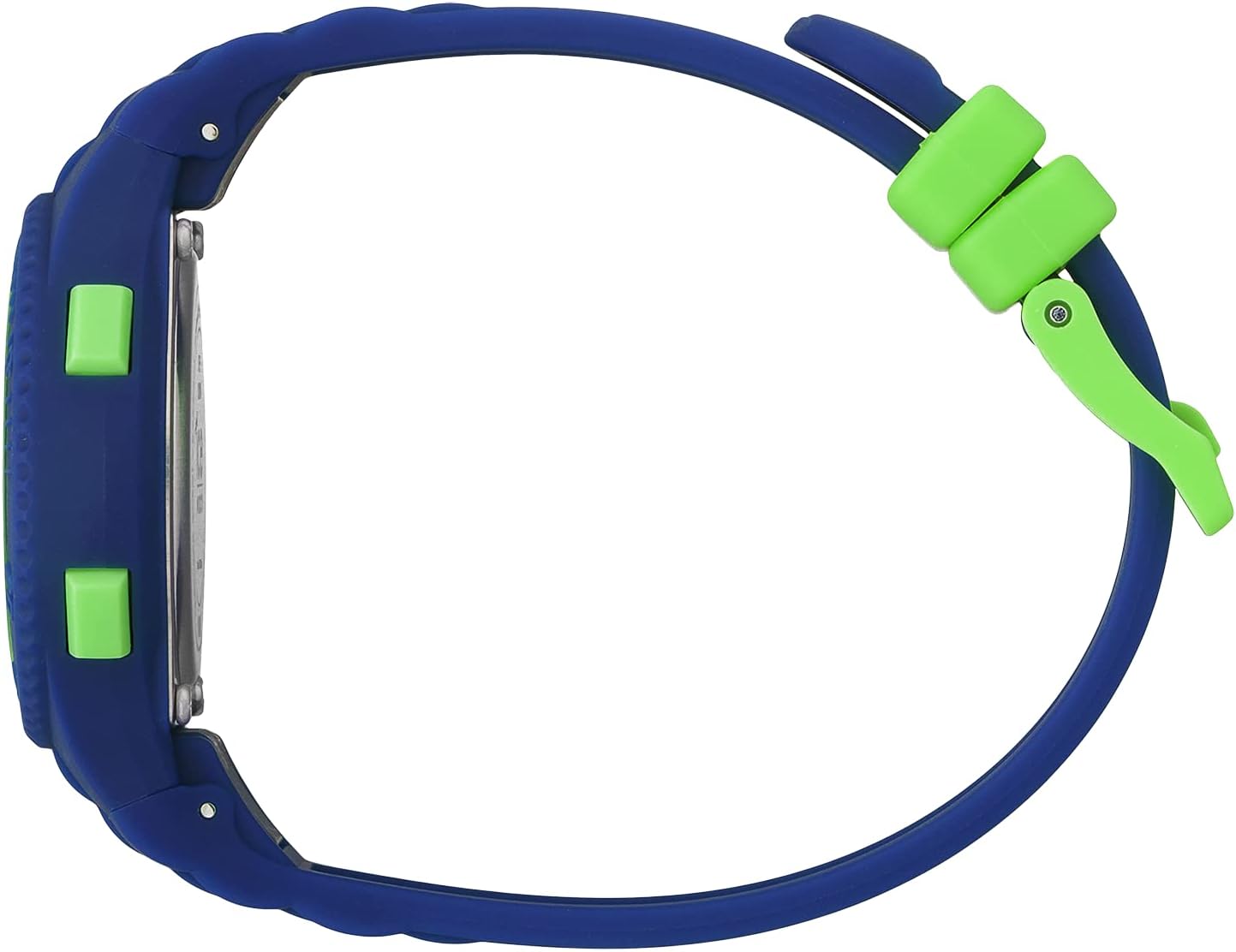
Obrázek 2: Strana view illustrating the watch's control buttons for various functions.
3. Nastavení popruhu
The watch features a silicone strap with a buckle closure. To adjust the strap, simply thread the end of the strap through the buckle and secure it in the desired hole for a comfortable fit. Ensure the watch is snug but not too tight on the wrist.

Obrázek 3: The watch with its silicone strap and buckle, ready for adjustment.
Návod k obsluze
1. Funkce tlačítekview
- REŽIM: Cycles through different display modes (Time, Date, Stopwatch, Alarm). Also used to confirm settings.
- RESETOVÁNÍ: Used to reset the stopwatch, or to select digits during time/date setting.
- ST/STP (Start/Stop): Used to start and stop the stopwatch, or to adjust values during time/date setting.
- SVĚTLO: Aktivuje podsvícení pro lepší viditelnost za zhoršených světelných podmínek.
2. Calendar Function (Day-Date)
The watch automatically displays the current day and date. To view the date, you may need to press the MODE button once from the main time display. The date will typically show the month and day, and the day of the week will be indicated (e.g., MO for Monday).
3. Funkce stopek
- Stiskněte tlačítko MODE button until the stopwatch display appears (usually showing "00:00:00").
- Stiskněte tlačítko ST / STP tlačítko pro spuštění stopek.
- Stiskněte tlačítko ST / STP znovu stiskněte tlačítko pro zastavení stopek.
- Stiskněte tlačítko RESETOVAT tlačítko pro vynulování stopek.
4. Light Function
To illuminate the display, press the SVĚTLO button. The backlight will typically stay on for a few seconds, providing temporary visibility in dark environments.
5. Voděodolnost
This watch is water resistant up to 10 bars (100 meters). This means it is suitable for swimming and snorkeling, but not for high-impact water sports or diving. Avoid pressing buttons while the watch is submerged to prevent water ingress.
Údržba
1. Čištění hodinek
Hodinky jemně otřete měkkým hadříkem.amp cloth. For silicone straps, mild soap and water can be used. Ensure the watch is completely dry before wearing it again. Avoid using harsh chemicals or abrasive materials, as these can damage the watch's finish or seals.
2. Bezpečnostní opatření týkající se voděodolnosti
- Do not operate buttons while the watch is underwater.
- Avoid exposing the watch to extreme temperature changes (e.g., hot showers followed by cold water), as this can affect the water-resistant seals.
- Have the water resistance seals checked periodically by a qualified watch technician, especially after battery changes.
3. Výměna baterie
When the display becomes dim or the watch stops functioning, the battery may need to be replaced. Battery replacement should ideally be performed by a professional watch technician to ensure the water resistance is maintained. Attempting to replace the battery yourself may void the warranty and compromise the watch's water resistance.
Odstraňování problémů
| Problém | Možná příčina | Řešení |
|---|---|---|
| Displej je prázdný nebo tmavý. | Slabá nebo vybitá baterie. | Replace the battery (refer to Maintenance section). |
| Čas je nesprávný. | Čas nebyl správně nastaven nebo bylo tlačítko stisknuto omylem. | Reset the time and date (refer to Setup section). |
| Tlačítka nereagují. | Hodinky mohou být v uzamčeném režimu nebo se může jednat o interní problém. | Try a soft reset by removing and reinserting the battery (if comfortable), or contact support. |
| Kondenzace uvnitř hodinek. | Water resistance compromised due to impact or seal degradation. | Stop using the watch immediately and take it to a professional watch technician for inspection and repair. |
Specifikace
- Značka: LEDOVÁ POZORNOST
- Název modelu: ICE Digit Dino
- Číslo modelu: 021006
- ASIN: B0B63C1MB4
- Průměr pouzdra: 32 mm
- Tloušťka pouzdra: 10 mm
- Barva pouzdra: Modrý
- Barva ciferníku: Zelený
- Materiál popruhu: Silikon
- Délka popruhu: 19 cm
- Šířka popruhu: 13 mm
- Voděodolnost: 10 bars (100 meters)
- Hmotnost: 21 g
- Baterie: 1 neznámá baterie (součástí balení)
- Funkce: Digital time display, Calendar (Day-Date), Stopwatch, Light
- Země původu: Čína

Obrázek 4: Zadní view of the watch, displaying the model reference number and water resistance rating.
Záruka a podpora
1. Informace o záruce
Your ICE-WATCH ICE Digit Dino wristwatch comes with a 2-letá záruka from the date of purchase. This warranty covers manufacturing defects under normal use. It does not cover damage resulting from improper use, accidents, unauthorized repairs, or normal wear and tear (e.g., strap damage, battery depletion).
2. Zákaznická podpora
For warranty claims, technical assistance, or any questions regarding your watch, please contact your retailer or the official ICE-WATCH customer service. Please have your proof of purchase and the watch model number (021006) available when contacting support.
You can find more information and contact details on the official ICE-WATCH webmísto: www.ice-watch.com


